Date Format Converter: One Date, Every Format, Zero Guesswork
Convert dates between ISO 8601, DD/MM/YYYY, MM-DD-YY, Unix timestamps, and custom tokens with a free browser-based tool. Learn why 03/04/2025 means two different days and how to write dates nobody can misread.
Free Interactive Tool
Date Format Converter
Convert dates between ISO 8601, DD/MM/YYYY, MM-DD-YY, Unix timestamps, and custom token formats with validation.
Table of Contents
An invoice lands in your inbox stamped 03/04/2025. Is that March 4th or April 3rd? If the sender is American, the month comes first: March 4th. If they are in Bangkok, Berlin, or London, the day comes first: April 3rd. Both readers are certain, and at least one is wrong — exactly the moment the Date Format Converter was built for. Paste any date and every major format appears side by side, resolved to one unambiguous answer.
Date formats never matter until the day they cost real money: a payment run posted a month late, an import that rewrote half a year of records, a booking made for the wrong day. Spreadsheets and databases are worse than people — they will happily "fix" an ambiguous date in the wrong direction without asking. This guide shows how the tool works and why dates keep tripping us up.
Why Use the Date Format Converter?
- Settle ambiguity in seconds. Paste 03/04/2025 and both readings collapse into one canonical date, emitted in every format you need.
- Speaks five dialects at once. ISO 8601, DD/MM/YYYY, MM-DD-YY, Unix timestamps, and custom token formats such as YYYY-MM-DD are all understood and produced.
- Catches impossible dates. 31/02/2025 does not exist, and the tool flags it instead of quietly rolling over to March.
- Instant two-way conversion. Type a Unix timestamp and get a readable date; type a date and get the timestamp. Results update as you type.
- Free and private. No account, no install, and everything runs 100% client-side, so contract dates never leave your machine.
Key Features
| Feature | What It Does | Why It Matters |
|---|---|---|
| Multi-format parsing | Reads ISO 8601, DD/MM/YYYY, MM-DD-YY, Unix timestamps, and custom tokens | Paste whatever you have and get a valid date |
| All-formats output | Shows every representation of the same instant at once | No re-entering the date once per format |
| Impossible-date validation | Rejects 31/02 or a 29 February outside leap years | Errors surface before they reach your data |
| Custom token formats | Converts to and from YYYY-MM-DD style patterns | Matches spreadsheet and code conventions |
| 100% client-side | Every calculation happens in your browser | Sensitive dates stay on your machine |
- Conversion is live: a half-finished entry like 03/0 already points somewhere useful.
- Both directions work without switching modes, and nothing touches the network once the page loads.
How to Use the Date Format Converter
- Open the tool. Visit the Date Format Converter — no install, no account.
- Paste your date in any format. 03/04/2025, 2025-04-03, 04-03-25, or a raw Unix timestamp such as 1743638400 all work as input.
- Check the parsed interpretation. The tool validates what it detected — impossible dates are rejected with an explanation rather than guessed.
- Read every equivalent at once. ISO 8601, regional formats, and the Unix timestamp for the same instant appear together and update as you edit.
- Copy the format you need. The ISO string for a database, the regional form for a document, or a token pattern for a spreadsheet column.
Why Date Formats Keep Biting Us
Three regional conventions grew up in parallel. The United States writes the month first — 04/03/2025 means April 3rd — because Americans say "April third" out loud. Most of Europe, Asia, and Latin America write the day first, so the same digits mean March 4th. Rising above both is ISO 8601, the standard that writes 2025-04-03: year, month, day, always. It is unambiguous by design and sorts correctly as plain text, keeping logs and filenames in order.
Unix timestamps removed the calendar entirely. A Unix timestamp counts seconds since 1970-01-01 00:00:00 UTC. It carries no locale, sorts as an integer, and runs APIs, databases, and server logs. The trade-off is that humans cannot read it: 1743638400 is midnight UTC at the start of 3 April 2025, but nobody knows that on sight. Some systems also emit milliseconds instead of seconds, so a value can be off by a thousand while looking plausible.
The two-digit year is the Y2K trap that never left. Shortening 2025 to 25 creates a riddle: does 04-03-25 fall in 2025 or 1925? Spreadsheets answer with a pivot year — Excel maps two-digit years from 00 to 29 into the 2000s and 30 to 99 into the 1900s, so a birthdate written 03/04/31 silently becomes 1931. Stack impossible dates like 31/02 — which some software silently "corrects" to March 3rd — and short forms become a quiet data-corruption machine.
Custom token formats are everywhere once you look. Excel custom formats (DD/MM/YYYY), strftime patterns (%Y-%m-%d), Java's yyyy-MM-dd, and JavaScript tokens like YYYY-MM-DD all mean the same thing — a template where letters become date parts — but each ecosystem spells the alphabet differently.
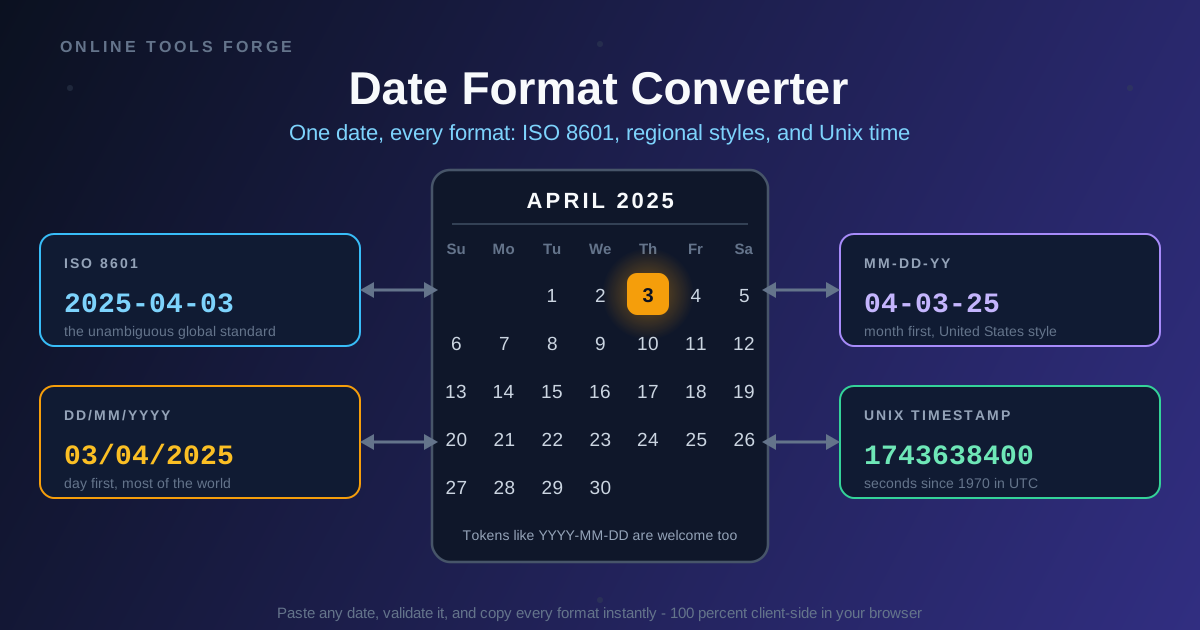
One instant, five costumes. Take Thursday, 3 April 2025, at midnight UTC:
| Format | Written form | How to read it |
|---|---|---|
| ISO 8601 | 2025-04-03 | April 3rd, 2025 — same meaning on every continent |
| DD/MM/YYYY | 03/04/2025 | day-month-year, most of the world |
| MM-DD-YY | 04-03-25 | month-day-year, United States shorthand |
| Unix timestamp | 1743638400 | seconds since 1970-01-01 UTC |
| ddd, DD MMM YYYY | Thu, 03 Apr 2025 | weekday plus abbreviated month |
Five strings, one moment in time. A converter's whole job is to keep that identity intact while changing the costume.
Practical Use Cases
Importing Spreadsheets Into Databases
CSV exports are where date chaos breeds: one column in DD/MM/YYYY, another in MM-DD-YY, a third mangled by auto-detection. Normalize every value to ISO 8601 before it reaches an INSERT statement, and spot-check suspicious values with the converter.
Reading Foreign Documents
Contracts, invoices, and flight bookings from another region arrive wearing local conventions. Before acting on a due date of 07/08/2025, resolve it once — August 7th in day-first regions, July 8th in the US — rather than trusting a guess with money attached.
API Integrations
One service emits epoch seconds, another expects ISO 8601 with an offset, a legacy third sends 04-03-25. When an integration misbehaves, paste the raw value into the converter to confirm which instant it represents. For deeper epoch work, the Unix Timestamp Converter covers timestamps in detail.
Logging and Reporting
Logs from different teams mix 2025-04-03, 03/04/2025, and raw timestamps on one page, which wrecks sorting and filtering. Standardize on ISO 8601 in log lines, and when reports group by week, the Week Number Calculator turns any date into its ISO week number.
Best Practices
- Store ISO 8601 internally; format only for display. Regional formats are a rendering decision made per audience.
- Avoid two-digit years. 25 is a puzzle; 2025 is an answer. The saved characters are not worth the pivot-year risk.
- Always state the timezone. 2025-04-03 alone is a date; 2025-04-03T00:00:00+07:00 is a fact. Zones left out invite silent off-by-hours bugs.
- Validate before you convert. Treat 31/02 and 29/02/2023 as errors, not as dates that need fixing.
- Label the format next to the data. A column named date_signed_iso removes the guesswork for the next reader.
- Round-trip a sample first. Convert a few values there and back; if the identity does not survive, stop there.
Try It Now
Open the free Date Format Converter, paste the most ambiguous date in your inbox, and watch every format appear side by side — ISO 8601 for storage, regional forms for humans, the Unix timestamp for machines. Everything runs client-side in your browser: private, free, and instant.
Related Tools You Might Like:
- Military Time Converter — read and convert 24-hour times without mental math.
- Unix Timestamp Converter — translate epoch numbers into readable dates and back.
- Week Number Calculator — map any date to its ISO week number for reporting.
Written by the Online Tools Forge Team — building fast, private, browser-based tools that keep every date, time, and format honest.
Frequently Asked Questions
Q: Is 03/04/2025 March 4th or April 3rd?
A: Both readings are correct somewhere. In the United States the month comes first, so it is March 4th. In most of Europe, Asia, and Latin America the day comes first, so it is April 3rd. Write it as ISO 8601 — 2025-04-03 — and it means April 3rd everywhere.
Q: What is the Unix timestamp for 3 April 2025?
A: Midnight UTC at the start of that day is 1743638400, counting seconds since 1970-01-01 00:00:00 UTC. The converter shows the timestamp for any date you enter and turns raw timestamps back into readable dates.
Q: Why does 03/04/31 become 1931 in my spreadsheet?
A: Two-digit years hit a pivot window: spreadsheet software commonly maps 00 to 29 into the 2000s and 30 to 99 into the 1900s, so 31 lands in 1931. Enter four-digit years and the guess disappears.
Q: Can the converter handle impossible dates like 31/02/2025?
A: No — and that is deliberate. February never has 31 days, so the input is rejected with a validation message instead of silently rolling over to March. Nothing you paste ever leaves your browser, either.