DHCP Option Reference: Master RFC 2132 Options and Hex Payloads for VoIP Deployments
The DHCP Option Reference tool lets you browse RFC 2132 options and build custom option 43, 60, 66, and 51 hex payloads for VoIP phones and routers.
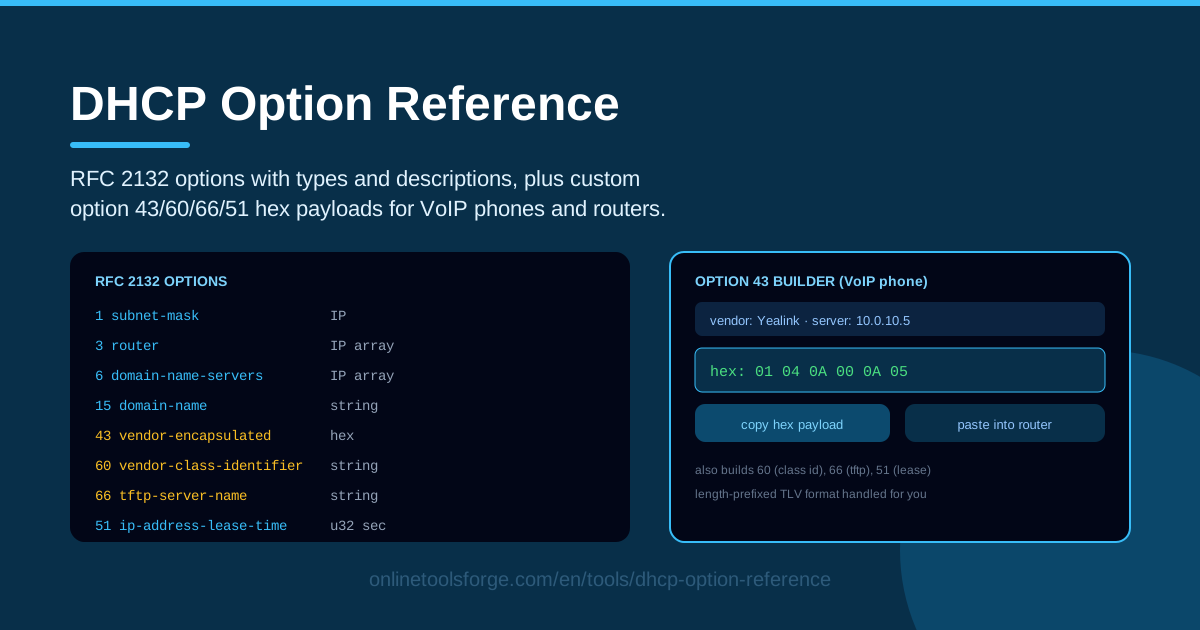
Table of Contents
When a VoIP phone boots on your network, getting an IP address is the easy part. The hard part is telling the phone where its provisioning server lives — and that instruction usually arrives as a hex payload inside DHCP option 43. One wrong length byte, and the handset sits in a reboot loop while users wonder why their desk extension is dead.
The DHCP Option Reference tool on Online Tools Forge takes the guesswork out of that moment. You can browse every RFC 2132 option with its type and description, then build custom hex payloads for option 43 (vendor-encapsulated), option 60 (vendor class), option 66 (TFTP server), and option 51 (lease time), with the length-prefixed TLV formatting handled automatically.
This guide covers why those options matter, how the builder works, and where a correct hex string makes or breaks a deployment — from VoIP fleets to PXE boots to access point onboarding.
Why Use DHCP Option Reference?
- The option 43 hex pain is real. Cisco, Polycom, Yealink, and Ubiquiti each expect provisioning data in a slightly different hex format. Counting bytes by hand in a text editor produces silent failures that are miserable to debug.
- The full RFC 2132 list in one place. Every standard option with its number, data type, and plain-English description, so you can confirm what option 66 or option 150 actually carries before you configure it.
- TLV formatting handled automatically. Option 43 is a length-prefixed code-length-value structure; get one length byte wrong and the phone cannot parse anything. The builder computes every prefix for you.
- Copy-paste output for any router. The generated payload is formatted for direct pasting into scope options on Windows DHCP Server, dnsmasq, ISC dhcpd, or cloud-managed controllers.
- Everything runs in your browser. No install, no account, no upload — handy when you are standing in a wiring closet with a laptop and a patch cable.
- Safer rollouts. Building and checking a payload before touching a production scope lowers the risk of one bad option taking down an entire voice VLAN.
Key Features
| Feature | What it does |
|---|---|
| RFC 2132 option browser | Browse every standard DHCP option with its number, type, and description |
| Option 43 builder | Compose vendor-encapsulated payloads with correct TLV length prefixes |
| Option 60 builder | Encode the vendor class identifier string used for vendor matching |
| Option 66 builder | Generate the TFTP server name option for phones and thin clients |
| Option 51 builder | Convert lease times into the 32-bit format DHCP servers expect |
| Copy-paste output | Produce ready-to-paste hex for router scope options |
| Browser-side processing | All encoding happens locally; nothing leaves your machine |
Two details worth calling out:
- The TLV engine is the heart of the tool. Add sub-options to an option 43 payload and it inserts the correct code and length bytes for each value, so devices parse the result cleanly on the first try.
- Because the output is plain hex, the same payload works across dnsmasq, Windows Server DHCP, UniFi, and Meraki scope settings without reformatting.
How to Use DHCP Option Reference
- Browse the option list. Open the tool and review the RFC 2132 table to confirm the option number and data type you need — option 43 carries raw vendor hex, while option 66 carries a TFTP server name string.
- Pick the vendor scenario. Check what your devices actually require: a Polycom phone often needs option 60 plus option 66, while many Cisco and Yealink models expect an option 43 TLV payload pointing at the provisioning server.
- Enter your server and VLAN data. Type the provisioning or TFTP server address, any VLAN ID, and your lease time values into the builder fields.
- Generate the hex. The tool assembles each payload, adds the length prefixes automatically, and displays the final hex string for every option.
- Paste into the router. Copy each payload into the matching scope option on your DHCP server or controller, then renew a lease on a test device to confirm the options arrive.
The Options That Deploy Phones
DHCP delivers these settings during the ordinary lease dance: the client broadcasts DHCPDISCOVER, the server answers with a DHCPOFFER carrying an address plus options, the client formally requests the lease, and the final DHCPACK contains the complete option set. Everything you configure in the scope — vendor options included — rides along inside that acknowledgment.
Option 43 is the tricky one because RFC 2132 defines it only as a container: the standard says nothing about what goes inside. Each vendor fills the container with its own sub-options using the TLV format — a one-byte code, a one-byte length, then the value bytes. A payload pointing a phone at 192.168.1.10 might read 01 04 C0 A8 01 0A: sub-option code 1, length 4, and the IP packed as hex. Vendors diverge from there — some define their own codes, some want ASCII strings instead of packed bytes, and some use different length conventions — which is exactly why one logical setting becomes different hex per vendor.
Option 60, the vendor class identifier, runs in the opposite direction. The client announces what it is, and the server can match policies against that string — handing PXE clients a boot server while ordinary workstations get nothing. It pairs naturally with option 43: the class identifies the device, and the encapsulated options serve it.
Option 66, the TFTP server name, is the classic boot option: a simple string telling a phone or thin client where to fetch firmware and configuration. Many environments still depend on it even as newer devices move to option 150 or HTTPS URLs. Option 51, the lease time, encodes a 32-bit duration in seconds; voice networks often prefer longer leases to reduce renewal chatter, while guest networks use short ones to recycle addresses quickly.
Practical Use Cases
Provisioning a VoIP Fleet
Rolling out hundreds of desk phones is where option 43 earns its keep. Build the vendor payload once, paste it into the voice scope alongside options 60 and 66, and test one handset before the cutover. When the fleet reboots overnight, every phone finds the provisioning server without a single manual touch.
PXE and Network Boot Setups
PXE clients announce themselves with option 60 set to PXEClient and historically rely on option 66 plus a boot filename to find their image server. Building those values correctly eliminates the classic "no boot filename received" failure during OS deployment.
AP Onboarding and VLANs
Many access points learn their controller address or management VLAN from option 43. Ubiquiti gear, for example, discovers a UniFi controller through an option 43 payload of sub-option code 1 followed by the four-byte controller IP — exactly the kind of string the builder produces.
Teaching DHCP Internals
Instructors can project the RFC 2132 table, have students assemble a TLV payload in the tool, then capture a real lease in Wireshark and compare the bytes on the wire with what was built. Abstract option numbers become concrete hex.
Best Practices
- Match the vendor's exact format. The tool guarantees correct structure, but sub-option codes and encodings are vendor-defined, so check the vendor's provisioning guide first.
- Test one phone first. Apply the payload to a test scope or a single reservation before the entire VLAN inherits it.
- Document options per VLAN. Record which options, values, and hex payloads belong to each scope so the next engineer is not reverse-engineering your work.
- Keep a scope-options inventory. Audit DHCP scopes periodically; stale option 43 payloads pointing at decommissioned servers cause mysterious boot failures months later.
- Choose lease times deliberately. Use option 51 to balance flexibility against renewal load — long leases for stable voice networks, short ones for guest and IoT segments.
- Verify on the wire. A quick Wireshark capture or the phone's own status page confirms your option arrived intact.
Ready to stop counting hex bytes by hand? Open the DHCP Option Reference, browse the RFC 2132 options, and generate a copy-paste-ready payload for your next phone, AP, or PXE rollout — free, instant, and entirely in your browser.
Related Tools You Might Like:
- Subnet Calculator — plan the addressing for the voice VLAN your phones will live in.
- IP Range Calculator — define exactly which addresses a DHCP scope is allowed to hand out.
- IP Lookup — trace where a device's address is coming from when leases misbehave.
Happy networking!
Frequently Asked Questions
Q: What is DHCP option 43 used for? A: It carries vendor-encapsulated options — vendor-specific data such as provisioning server addresses, controller IPs, or VLAN IDs, formatted as code-length-value (TLV) hex that the vendor's devices know how to parse.
Q: Why does my option 43 hex string differ between phone vendors? A: RFC 2132 defines option 43 as a container but leaves its contents opaque. Each vendor defines its own sub-option codes and encodings, so a Cisco payload is structured differently from a Yealink or Ubiquiti one.
Q: What is the difference between option 60 and option 43? A: Option 60 is the vendor class identifier the client sends to describe itself, letting the server match policies. Option 43 is the vendor-specific data the server sends back to the device.
Q: Is my network data uploaded anywhere? A: No. The tool builds every payload locally in your browser — nothing is sent to a server, stored, or logged.