Dim Weight Calculator: Avoid Surprise Shipping Bills
Calculate dimensional (volumetric) shipping weight from package size with IATA 6000 and courier 5000/139 divisors. Compare carriers and see exactly which weight you will be billed for.
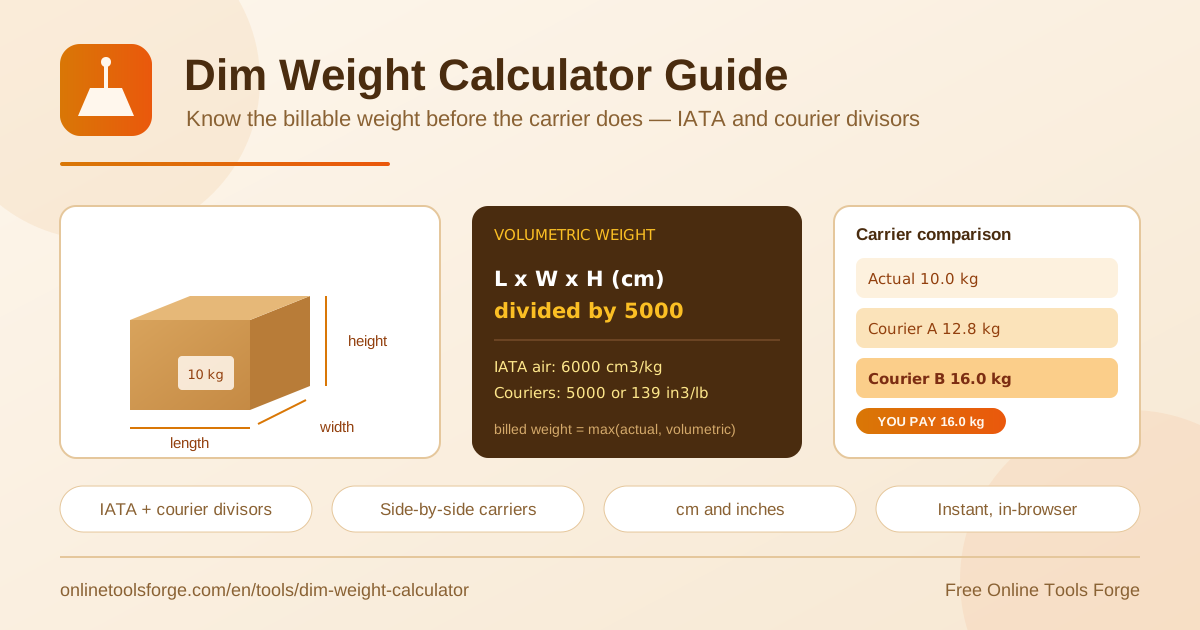
Table of Contents
Shipping invoices rarely match the number on your scale, and dimensional weight is the reason. Carriers do not bill for what a package weighs — they bill for the space it occupies in a truck or aircraft. A lightweight foam pillow can cost more to ship than a box of screws simply because it fills more cargo room. Quote rates without checking volumetric weight and you are flying blind.
The free Dim Weight Calculator removes the guesswork. Enter your package's length, width, and height, pick the divisor that matches your carrier — IATA volumetric 6000, courier standard 5000, or 139 in³/lb — and the tool instantly shows actual weight versus volumetric weight plus the chargeable weight you will be billed for. A side-by-side carrier comparison is built in.
Everything runs 100% in your browser: no signup, no uploads, and results update as you type. Whether you ship occasionally or run fulfillment daily, it takes seconds to know your real billable weight.
Why Use the Dim Weight Calculator?
- See the true billable weight. The calculator shows actual weight, volumetric weight, and the chargeable weight — the greater of the two — so the invoice holds no surprises.
- Use the divisors carriers actually apply. Switch between IATA volumetric 6000 cm³/kg, the courier standard 5000 cm³/kg, and the imperial 139 in³/lb factor used by major parcel networks.
- Work in metric or imperial. Measure in centimeters or inches and get consistent results without manual conversion.
- Compare carriers side by side. Because divisors differ, the same box can be billed very differently — the comparison view makes the gap visible instantly.
- Instant, private, and free. All math happens in your browser with no account, no upload, and no cost.
- Plan before you pack. Test different carton sizes before buying them and stop paying to ship air.
Key Features
| Feature | What it does |
|---|---|
| Package dimension input | Enter length, width, and height in centimeters or inches for any parcel. |
| Multiple divisors | Choose IATA volumetric 6000, courier standard 5000, or 139 in³/lb. |
| Actual vs volumetric view | Shows both weights so you can see which one applies. |
| Chargeable weight result | Displays the billed weight — the greater of actual and volumetric. |
| Carrier comparison | Puts carrier outcomes side by side for the same package. |
| In-browser processing | Computes instantly with no server round-trip and no signup. |
Two details are worth noting. First, results recalculate the moment you change a dimension or divisor, so scenario testing is effortless. Second, the carrier comparison turns abstract divisor differences into concrete billed-weight numbers — exactly what you need when choosing a service or negotiating rates.
How to Calculate Volumetric Weight
- Measure the packed carton. Measure length, width, and height at the widest points, including padding or bulge — carriers assess the outer box, not the product.
- Enter the dimensions. Open the Dim Weight Calculator and type the three measurements in centimeters or inches.
- Select the divisor. Use 6000 for IATA air freight, 5000 for most parcel couriers such as FedEx, DHL, and UPS, or 139 for inches and pounds.
- Enter the actual weight. Weigh the packed parcel on a scale and type in the result.
- Read the chargeable weight. The tool compares actual and volumetric weight and shows the larger figure — the weight your invoice is based on.
How Dimensional Weight Pricing Works
Dimensional weight (dim weight) is a pricing technique that converts a package's volume into an equivalent weight. Cargo space is finite, so a large, light parcel consumes more capacity than a small, dense one. To charge for space as well as mass, the carrier computes volumetric weight from the dimensions and bills whichever is greater: the actual scale weight or the volumetric weight. That larger number is the chargeable weight.
The formula multiplies the three dimensions and divides by a dimensional factor.
Volumetric weight (kg) = (L × W × H in cm) ÷ divisor
Divisors: IATA air freight = 6000 | parcel courier = 5000 | imperial = 139 in³/lb
Chargeable weight = the greater of actual weight and volumetric weight
Worked example: a carton of 50 × 40 × 30 cm holds 60,000 cm³. With the courier divisor 5000 its volumetric weight is 12 kg; with the IATA divisor 6000 it is 10 kg. If the parcel actually weighs 8 kg, the courier bills 12 kg while air freight bills 10 kg. The same box produces two different bills — and quoting with the wrong divisor quietly inflates your costs.
Practical Use Cases
E-commerce and Fulfillment
An online store ships sweatshirts in 40 × 30 × 20 cm boxes weighing 1.5 kg packed. Volumetric weight at divisor 5000 is 4.8 kg, so every order is billed at 4.8 kg, not 1.5 kg. Running those numbers before launch lets the store price shipping accurately instead of absorbing the difference across hundreds of monthly orders.
Air Freight Quoting
A forwarder preparing a quote for machine parts uses the IATA 6000 divisor to compute volumetric weight for the air leg. Because air rates are charged per kilogram of chargeable weight, knowing in advance whether a shipment is dense or volumetric determines the entire quote — and the tool shows it in seconds.
Choosing the Right Box Size
Before buying cartons in bulk, a seller tests several sizes in the calculator. Trimming a box from 45 cm to 40 cm in height cuts volumetric weight by more than a kilogram per parcel, which compounds into real savings at volume. Smaller boxes also mean less void fill and lower material costs.
Comparing Courier Rates
The same 60,000 cm³ box bills at 12 kg under a 5000 divisor and 10 kg under 6000. When two couriers quote similar per-kilogram rates, the one with the friendlier divisor often wins once dimensional weight is applied. Comparing side by side reveals which carrier genuinely costs less for bulky parcels.
Best Practices
- Measure the packed carton, not the product. Carriers assess outer dimensions, so include padding and any box bulge.
- Weigh after packing. The final weight includes the box, fill, and tape — and it can push a parcel into a higher bracket.
- Confirm each carrier's divisor. 5000 and 139 are common but not universal; service level and route can change the factor.
- Round up as carriers do. Most networks round chargeable weight up to the next half or whole kilogram or pound.
- Retest when packaging changes. A new carton supplier or different void fill can shift your chargeable weight.
- Audit invoices against your calculations. Recheck billed weight with the calculator to catch carrier measurement errors and claim adjustments.
Start Calculating Before You Ship
Surprise shipping bills usually trace back to one overlooked number: volumetric weight. Open the free Dim Weight Calculator, enter your box dimensions, and see in seconds exactly which weight you will be billed for — actual, volumetric, or chargeable — under IATA and courier divisors alike. It runs entirely in your browser, costs nothing, and needs no signup, so there is no reason to quote another shipment blind.
Related Tools You Might Like:
- Weight Converter — switch between kg, lb, oz, and more for accurate parcel weights.
- Unit Converter — convert lengths between centimeters and inches when measuring cartons.
- Unit Price Calculator — compare true per-unit costs when buying packaging in bulk.
Happy shipping!
Frequently Asked Questions
Q: What is dimensional weight and why do carriers use it?
A: Dimensional (volumetric) weight converts a package's volume into an equivalent weight using a divisor. Carriers bill on the greater of actual and volumetric weight — the chargeable weight — because large, light parcels occupy more cargo space than small, dense ones.
Q: Which divisor should I use, 6000 or 5000?
A: Use 6000 for IATA-based air freight calculations and 5000 for most express parcel couriers such as FedEx, DHL, and UPS. If you measure in inches and pounds, the equivalent factor is 139 in³/lb. Always confirm the divisor that applies to your specific service.
Q: How do I calculate volumetric weight in centimeters?
A: Multiply length × width × height in centimeters to get cubic centimeters, then divide by the divisor. For example, 50 × 40 × 30 = 60,000 cm³, and 60,000 ÷ 5000 = 12 kg of volumetric weight.
Q: What is chargeable weight?
A: Chargeable weight is the figure your shipping invoice is based on: the greater of the parcel's actual scale weight and its volumetric weight. The calculator highlights it automatically so you know the billed weight before you ship.
Q: Is the Dim Weight Calculator free to use?
A: Yes. It is completely free, requires no signup, and runs 100% in your browser — your package dimensions never leave your device.