Timecode Calculator: Frame-Accurate SMPTE Math in Your Browser
Add and subtract SMPTE timecodes at 24, 25, 30, or 60 fps and convert frames to timecode instantly. Frame-accurate math for video editors, free in your browser.
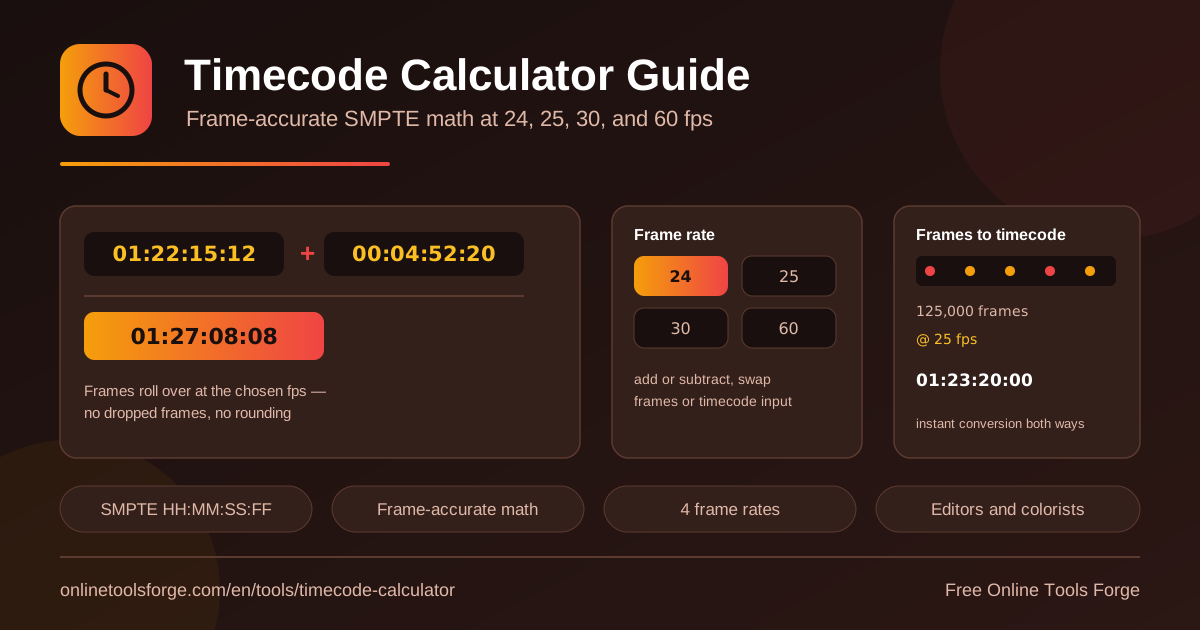
Table of Contents
Every video project runs on timecode: the shared clock that marks where each shot starts and stops, down to the individual frame. The catch is that timecode math is not ordinary clock math. The frames field wraps at your project frame rate, so adding 00:04:52:20 to 01:22:15:12 does not behave like a stopwatch, and one missed carry can shift a whole sequence by several frames.
The timecode calculator solves that. It parses standard SMPTE timecode in HH:MM:SS:FF format, adds and subtracts values at 24, 25, 30, or 60 fps, and converts total frame counts into readable timecode. Everything runs instantly in your browser, with frame rollover handled exactly at the rate you choose.
Whether you are summing clip durations for a rough cut, checking a trim against a delivery slot, or turning render logs full of frame counts into hours and minutes, the tool keeps every result frame-accurate, free, and without a signup.
Why Use the Timecode Calculator?
- Frame-accurate results, not estimates. Duration tools stop at seconds; this calculator carries and borrows frames exactly like your editing software, so results match your NLE to the frame.
- Every standard frame rate covered. Pick 24 fps for film, 25 for PAL, 30 for NTSC, or 60 for modern digital work, and every calculation adapts instantly.
- Add and subtract in one place. Stack clip durations for total runtime, or subtract an in point from an out point for an exact clip length.
- Bidirectional frames conversion. Turn raw frame counts from render logs into HH:MM:SS:FF, or convert any timecode into its total frames.
- Runs 100 percent in your browser. Nothing is uploaded, no account is needed, and the tool is completely free.
- No rounding surprises. Rollover is computed exactly at the selected fps, never approximated, so 24 fps rolls at frame 23 and 60 fps at frame 59.
Key Features
| Feature | What it does |
|---|---|
| HH:MM:SS:FF parsing | Accepts standard SMPTE timecode and interprets each field correctly |
| Frame rate selector | Works at 24, 25, 30, or 60 fps, matching film, PAL, NTSC, and modern digital formats |
| Add operation | Sums two timecodes with exact frame carry into seconds, minutes, and hours |
| Subtract operation | Finds the difference between two timecodes, borrowing frames correctly |
| Frames to timecode | Converts a total frame count into a formatted HH:MM:SS:FF value |
| Timecode to frames | Converts any timecode into its equivalent total number of frames |
| Instant results | Calculates locally in the browser the moment you type |
The frames converter works both ways: the panel that turns 4,306 frames into 00:02:59:10 at 24 fps also confirms that 00:02:59:10 equals 4,306 frames. And because the frame rate is a selector rather than a hidden assumption, switching from 30 to 24 fps immediately reframes every result instead of silently mixing rates.
How to Add and Subtract Timecodes
- Open the timecode calculator. It loads fast and works entirely in your browser.
- Select your frame rate. Pick 24, 25, 30, or 60 fps to match your timeline; this controls how the frames field rolls over.
- Enter two timecodes in HH:MM:SS:FF format. For example, 01:22:15:12 and 00:04:52:20. Padded two digit fields keep input unambiguous.
- Choose add or subtract. Addition gives total durations; subtraction gives the span between two points, such as an in point and an out point.
- Read the result. It appears instantly, and the frames converter shows the total frame count behind any value.
How SMPTE Timecode Works
SMPTE timecode labels every frame with a four part clock: hours, minutes, seconds, frames. The value 01:22:15:12 reads as one hour, twenty two minutes, fifteen seconds, twelve frames. The first three fields roll over like a normal clock at sixty. The frames field is different: it counts frames within the current second and wraps at the project frame rate, running 00 through 23 at 24 fps, through 24 at 25 fps, through 29 at 30 fps, and through 59 at 60 fps.
That is why timecode addition is not stopwatch addition. The clean method is to convert each timecode to total frames, add or subtract, then convert back. Total frames equals hours times 3,600 times fps, plus minutes times 60 times fps, plus seconds times fps, plus frames; reversing it divides by fps, then by 60 twice, with each remainder becoming the next field.
Here is a worked addition at 24 fps, showing the frames field carrying into seconds:
01:22:15:12 + 00:04:52:20
frames: 12 + 20 = 32 -> 32 - 24 = 8, carry 1s
seconds: 15 + 52 + 1 = 68 -> 68 - 60 = 8, carry 1m
result: 01:27:08:08
The frames field never shows 32 even though twelve plus twenty equals thirty two; at 24 fps it wraps at 24 and pushes one extra second forward. The rate matters too, because the same span holds different frame counts: one minute is 1,440 frames at 24 fps, 1,500 at 25, 1,800 at 30, and 3,600 at 60. Those rates trace back to theatrical film (24), PAL broadcast (25), NTSC television (30), and modern digital video (60).
Practical Use Cases
Summing Clip Durations for a Rough Cut
Producers want a runtime estimate before the edit locks. Add selected clips a pair at a time: a 00:02:41:07 title card, a 00:03:18:19 interview, and a 00:00:47:22 bumper resolve to an exact combined total, because the frames field participates in every sum.
Trim and Gap Calculations
Subtraction answers how long a take really is. If a clip starts at 00:14:26:03 and ends at 00:16:02:18 at 25 fps, subtracting in from out yields the usable length to the frame. The same move shows how much to cut to hit a broadcast slot, or how big a gap remains before a fixed start timecode.
Turning Render Frame Counts into Runtime
Render queues quote raw frame counts. A compositor may report a shot as 9,847 frames; at 24 fps the frames-to-timecode converter gives 00:06:50:07, which is far more useful when scheduling a review or slotting the shot into an assembly.
Sync Planning for Multicam Shoots
Multicam projects live and die by sync. If camera A starts at 01:00:00:00 and camera B at 00:58:41:12, subtracting the start times gives the offset that aligns the angles; adding a clip duration to a start timecode predicts exactly when that angle ends.
Best Practices
- Match the calculator rate to your timeline rate. Most errors come from computing at 30 fps and pasting into a 25 fps sequence.
- Use padded two digit fields. Enter 01:22:05:04, not 1:22:5:4, so inputs match what your NLE displays.
- Check deliverables in frames. If a spec allows 90 seconds plus or minus two frames, compare frame counts exactly.
- Convert frame counts before reviews. A log entry of 26,318 frames means little; 00:18:16:14 at 24 fps communicates instantly.
- Watch mixed rate projects. A 24 fps master with 60 fps inserts gives one span two frame counts; compute each element at its own rate.
- Make it a habit. A seconds-long spot check catches a wrong carry before it costs a re-export.
Start Calculating Timecodes Today
Frame math should never slow an edit down. Open the timecode calculator, select your frame rate, and get frame-accurate additions, subtractions, and conversions as fast as you can type the numbers. It is free, runs entirely in your browser, and never asks for an account.
Related Tools You Might Like:
Round out your editing workflow with these companions:
- Time Duration Calculator — add and subtract general durations when no single frame rate applies.
- Aspect Ratio Calculator — resolve width, height, and ratio questions for any deliverable.
- Video Trimmer — cut clips to the exact spans you just measured.
Happy editing!
Frequently Asked Questions
Q: What is SMPTE timecode?
A: SMPTE timecode is the industry standard way of labeling every frame in a video, written as HH:MM:SS:FF, where the last field counts frames within the current second and wraps at the project frame rate, such as 24, 25, 30, or 60 fps.
Q: Why do frame values stop one below the frame rate?
A: The frames field counts from 00 up to one less than the frame rate: at 30 fps the last frame of a second is 29, then seconds roll forward. The calculator applies the same rule at whichever rate you select.
Q: How do I convert frames to timecode?
A: Divide the total frame count by the frame rate for seconds, then by 60 for minutes and hours; each remainder becomes a field. The tool's frames-to-timecode converter does this instantly at 24, 25, 30, or 60 fps.
Q: Does the calculator support drop-frame timecode?
A: The tool performs non-drop math at 24, 25, 30, and 60 fps, where every second holds an equal number of frames. For 29.97 drop-frame projects, convert values to non-drop timecode or frame counts first, then calculate.