Stop Landing in Spam: A Practical Guide to the Email Deliverability Spam Checker
The Email Deliverability Spam Checker scores your email subject and body against the rules real spam filters use — trigger words, caps and punctuation abuse, link density, and missing unsubscribe links — before you hit send.
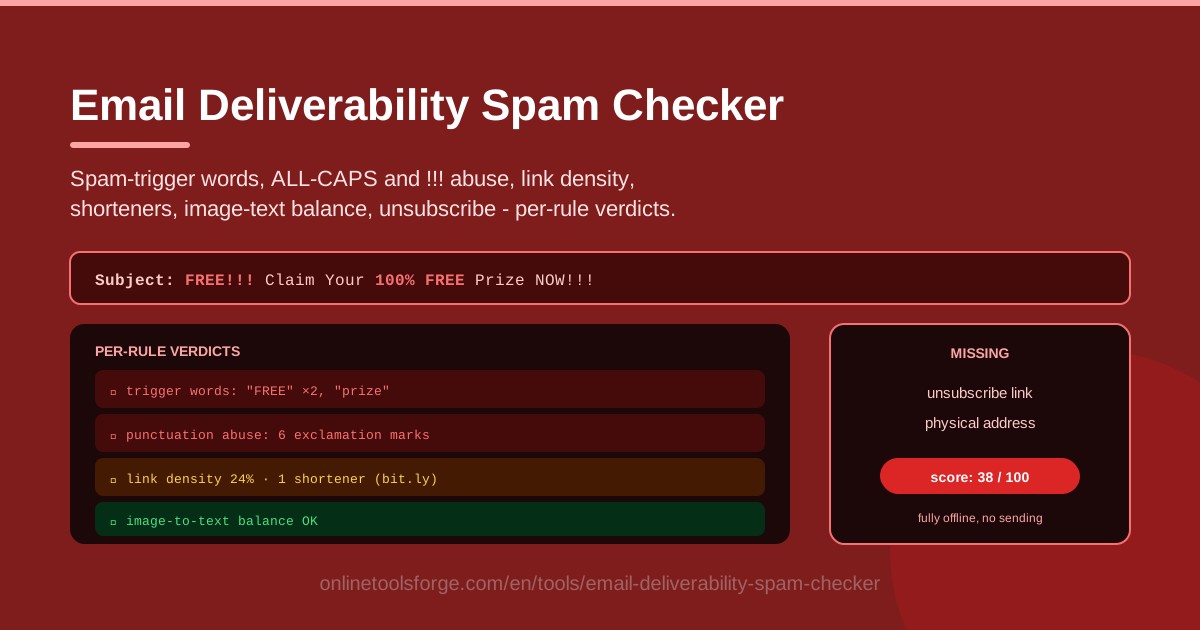
Table of Contents
Few things sting quite like watching a carefully written campaign collapse to a handful of opens because it quietly landed in the spam folder. The frustrating part is that most spam placement comes from a short list of predictable, fixable content signals: the words you chose, the way you shout with capital letters and exclamation marks, how many links you cram into the body, and whether an unsubscribe link exists at all.
The Email Deliverability Spam Checker puts those signals under a microscope before you press send. Paste in your subject line and body, and the tool scores your message against rules that mirror what real spam filters evaluate: spam-trigger words, ALL-CAPS abuse, exclamation mark abuse, link density, URL shorteners, image-to-text balance, and a missing unsubscribe link. Every rule gets its own verdict, and the results roll up into a total score you can act on.
Because everything runs fully offline in your browser, nothing you paste ever leaves your machine. That matters when you are reviewing unreleased campaign drafts, confidential client copy, or internal announcements that have not shipped yet.
Why Use Email Deliverability Spam Checker?
- Catch problems before subscribers do. A thirty-second content review can save a campaign that took days to write, long before a single bad signal reaches a filter.
- Get a diagnosis, not a vague warning. Per-rule verdicts tell you exactly which rule fired — "too many exclamation marks" is far more useful than a mysterious "this looks spammy."
- Turn instinct into a number. A total score makes deliverability measurable, so you can compare drafts and track improvement across campaigns.
- Learn the patterns as you go. Re-running revised versions teaches you which writing habits reliably push messages toward the junk folder.
- Protect your sender reputation. Repeated spam-folder placement teaches mailbox providers to distrust your domain, quietly damaging inbox placement for every future send.
- Keep drafts private. The tool is fully offline with no account and no uploads, so unreleased campaigns never touch a third-party server.
Key Features
| Feature | What it does |
|---|---|
| Spam-trigger word scan | Flags classic spam vocabulary like "free," "act now," "risk-free," and "guaranteed winner" hiding in your subject and body |
| ALL-CAPS detection | Measures how much of your message is shouted in capital letters, a favorite red flag for filters |
| Exclamation mark abuse | Counts aggressive punctuation stretches that make legitimate mail read like junk mail |
| Link density check | Spots messages stuffed with far more links than a normal human would naturally write |
| URL shortener detection | Flags shortened links, which spammers use to hide destinations and filters treat with suspicion |
| Image-to-text balance | Warns when a message leans too heavily on images, a pattern common in image-only spam |
| Missing unsubscribe check | Verifies a visible unsubscribe link is present, one of the top compliance signals filters look for |
| Total score | Rolls every per-rule verdict into one number you can track from draft to draft |
A few details worth knowing:
- Verdicts are issued per rule, so you see exactly which check tripped, how strongly, and roughly where in the message the problem lives.
- The checker reviews the subject and body together, since filters weigh the subject line heavily and judge the two in combination.
- Analysis is instant and local — no sign-up, no queue, and no content leaving your browser.
How to Use Email Deliverability Spam Checker
- Paste your subject line. Drop the exact subject you plan to send into the subject field, word for word. Filters punish subjects hardest, so test the real thing rather than a paraphrase.
- Paste your email body. Add the full body text, including your calls to action, footer, and any legalese you plan to include near the unsubscribe area.
- Read the per-rule verdicts. Go rule by rule through the results: trigger words, caps, punctuation, links, shorteners, image balance, and unsubscribe. Note which rules failed and by how much.
- Fix the flagged issues. Rewrite flagged phrases in plain language, trim capital letters and exclamation marks, reduce or consolidate links, replace shorteners with direct URLs, and add a clear unsubscribe link if one is missing.
- Re-check and compare. Run the revised draft again and watch the total score drop. Repeat until the remaining verdicts are clean or are deliberate choices you are comfortable defending.
What Spam Filters Actually Look For
Spam-trigger words. Filters maintain large dictionaries of phrases that correlate with unwanted mail: hype-heavy promises, urgency theatrics, get-rich language, and pharmaceutical or financial boilerplate. No single word is fatal, but stacking several in a short message multiplies the risk. The checker shows you which terms in your copy are on that radar so you can rephrase them naturally.
Punctuation and caps abuse. A subject line in ALL-CAPS, or three exclamation marks in a row, is one of the oldest spam tells there is. Legitimate senders occasionally emphasize a point; spammers shout in every paragraph. Filters score the ratio — how much of your text is capitalized, and how densely punctuation clusters — and the checker scores the same ratio before a filter gets the chance.
Link density and URL shorteners. A short personal note with fifteen links looks like a phishing lure, not a newsletter. Filters count links against message length and examine destinations. Shortened URLs are especially costly because they hide where the click actually leads — exactly what scammers want — so swapping them for direct links is one of the fastest score improvements available.
Image-to-text balance. Image-heavy emails with a few lines of text were a classic spam tactic: the payload lived in pictures, invisible to text filters. Modern filters read the balance. If your message is mostly images with little text, spam scoring rises, and subscribers with images blocked see nothing at all. Aim for real, readable text that carries the message on its own.
Unsubscribe compliance. Laws like CAN-SPAM and GDPR require a clear way to opt out, and filters treat a missing unsubscribe link as a hallmark of unsolicited mail. The tool flags its absence so you never discover the gap the hard way — through a spam complaint.
Content is only one layer. Filters combine content scoring with sender reputation (complaint rates, engagement history) and domain authentication. That last piece is SPF, DKIM, and DMARC: DNS records that prove your mail genuinely comes from your domain and was not tampered with. Content checks catch the signals this tool measures; authentication and reputation are handled at the DNS and mailbox level, which is where the related record builders below come in.
Practical Use Cases
Pre-Send Newsletter Check
Before your weekly newsletter goes out, paste the final subject and body into the checker. Most issues surface immediately: a subject that reads "🔥 LAST CHANCE!!! 50% OFF EVERYTHING" trips trigger words, caps, and punctuation at once. Tone it down to "Last weekend for 50% off — a few favorites left" and the verdicts change in seconds.
Cold Outreach Template Review
Sales teams reuse outreach templates for months, and templates drift toward salesy language nobody notices anymore. Run your template through the checker occasionally — heavy link footers, shortener-wrapped calendar links, and ALL-CAPS company names are the usual offenders — and keep a clean master version the whole team copies from.
E-Commerce Campaign Review
Promotional emails live closest to the spam line: discount urgency, multiple product links, and image-heavy layouts. Check each campaign before scheduling, especially seasonal blasts where competition for the inbox is fiercest, and make sure the unsubscribe footer survived the latest template update.
Fundraising and Nonprofit Appeals
Appeals often stack emotional urgency ("URGENT: lives depend on your gift TODAY") that looks identical to scam patterns filters are trained to catch. Testing drafts protects donation emails from the junk folder — often the single highest-value message a nonprofit sends all month.
Best Practices
- Write like a person. Plain, specific sentences beat hype. If a sentence would embarrass you spoken aloud, rewrite it.
- Authenticate your domain. Publish SPF, DKIM, and DMARC records so mailbox providers can verify your mail. Great content cannot rescue an unauthenticated domain.
- Keep your lists clean. Remove hard bounces and inactive addresses regularly; engagement signals feed directly into reputation.
- Honor unsubscribes fast. Process opt-outs immediately and never email an address again. Complaints hurt far more than a shrinking list.
- Test every campaign, not just the first. Copy changes with every send, and so does the score.
- Watch trends, not single sends. If scores creep upward over weeks, your templates are drifting — tighten them before filters notice.
Ready to see how your next email scores? Paste your draft into the Email Deliverability Spam Checker, fix what the per-rule verdicts flag, and send with far better odds of landing in the inbox.
Related Tools You Might Like:
- SPF Record Builder — generate a valid SPF record so mailbox providers know your sending servers are legitimate.
- DMARC Record Builder — create a DMARC policy that tells receivers what to do when authentication fails.
- DKIM Record Generator — produce the keys that cryptographically sign your outgoing mail.
Happy sending!
Frequently Asked Questions
Q: Does a passing score guarantee my email lands in the inbox? A: No. Content scoring is one of several layers filters use, alongside sender reputation and domain authentication (SPF, DKIM, DMARC). A clean score removes the content problems you can control, which is exactly where every pre-send check should start.
Q: Is my email content uploaded anywhere? A: No. The tool runs fully offline in your browser, and nothing you paste is transmitted or stored on a server, so confidential drafts and client copy stay on your machine.
Q: Will using a word like "free" automatically get me blocked? A: Not automatically. Single words are weak signals on their own; filters weigh combinations, frequency, and context. The checker tells you when trigger words stack up enough to matter, so you can rephrase strategically instead of avoiding useful words entirely.
Q: Does the tool send test emails or check my domain settings? A: No. It analyzes the subject and body text you paste and returns per-rule verdicts with a total score. Domain-level authentication is a separate concern — the SPF, DMARC, and DKIM builders in the related tools above cover that side.