Email Normalizer: One Inbox Should Not Look Like Five Addresses
Normalize email lists in your browser: lowercase addresses, strip Gmail dots and plus-aliases, trim whitespace, and dedupe lines with per-rule toggles and before and after counts. 100% client-side.
Free Interactive Tool
Email Normalizer
Normalize email lists in your browser: lowercase, strip Gmail dots and plus-aliases, trim whitespace, and dedupe lines. 100% client-side.
Table of Contents
One person, five addresses, one inbox. A customer subscribes to your newsletter as [email protected], enters your contest as [email protected], and types [email protected] into a checkout form. Gmail delivers all of those spellings to the same mailbox, but to your spreadsheet, CRM, and email platform they are three different rows. Multiply that across a real list, and duplicate emails quietly waste sends, inflate counts, and can drop the same announcement into one inbox five times over.
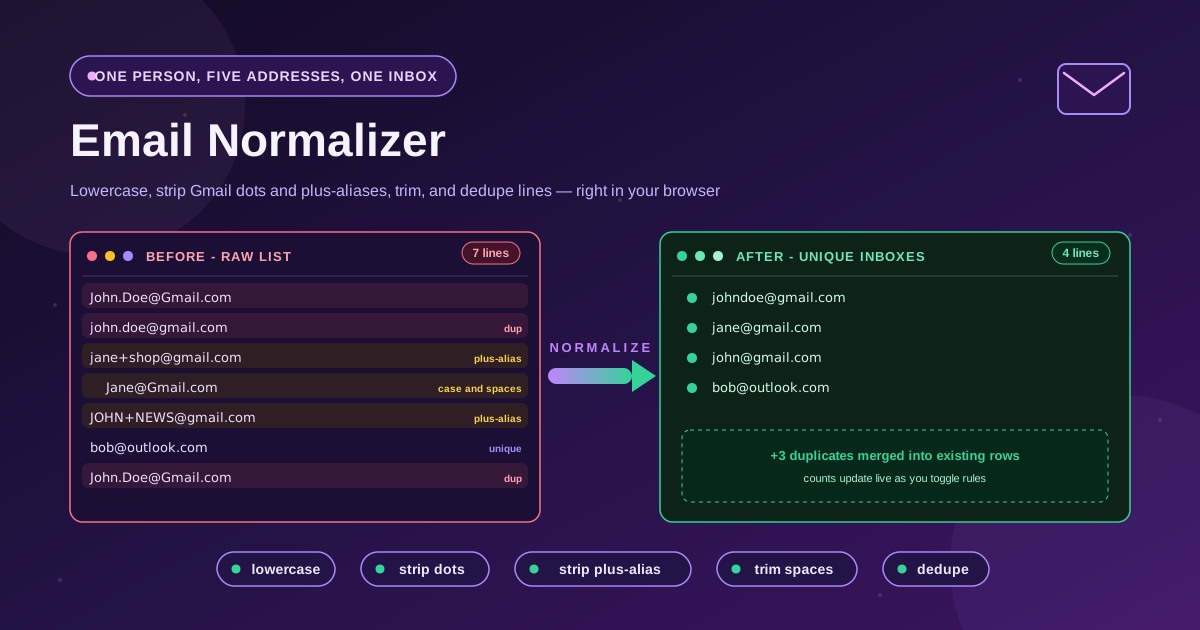
Email Normalizer collapses those variants in a single paste. The tool runs entirely in your browser and applies five rules: lowercase every address, strip Gmail dots, strip plus-aliases, trim stray whitespace, and dedupe identical lines. Each rule has its own toggle, before and after counters track input lines versus unique inboxes, and nothing is uploaded — the whole pass happens client-side.
Why Use Email Normalizer?
- Stop paying for duplicates: Most email platforms bill by subscriber count or send volume. Three spellings of one subscriber are three rows stored and two extra sends per campaign.
- Match records across systems: Your shop, your CRM, and your support desk may each hold a different spelling of the same customer. Normalized addresses are the join key.
- Keep one inbox from getting five copies: Contest entries and waitlists are where duplicates breed. Dedupe before the draw, so nobody receives the same email twice.
- Tune the pass to the provider: Toggles and presets apply Gmail-style canonicalization only where it is correct — dots are never stripped from providers that treat them as significant.
- Stay private end to end: The tool is 100% client-side. Paste an exported customer list without uploading it to any third party.
Key Features
| Feature | What it does | Why it matters |
|---|---|---|
| Lowercase | Converts every address to lower case | Removes case-only duplicates like JOHN@ vs john@ |
| Strip Gmail dots | Removes dots from the local part for Gmail rules | Merges j.o.h.n@ into johndoe@ correctly |
| Strip plus-aliases | Drops the tag after the plus sign | Collapses user+shop@ and user@ into one inbox |
| Trim whitespace | Removes stray spaces around and inside lines | Fixes paste artifacts from PDFs and spreadsheets |
| Dedupe lines | Removes repeated lines, keeping one entry each | Guarantees one row per unique inbox |
| Per-rule toggles | Turn any rule on or off independently | Safe for non-Gmail lists and mixed providers |
| Before and after counts | Shows input lines versus unique output lines | Verifies the pass did what you expected |
- Presets included: A Gmail preset strips dots and plus-aliases, an Outlook preset strips plus-aliases but keeps dots, and a Basic preset only lowercases and dedupes.
- Instant results: the list updates as you type or toggle — no submit button.
How to Use
- Open the tool: Visit Email Normalizer in your browser. Nothing to install, no account to create.
- Paste your list: Drop in one address per line from a spreadsheet column, an export file, or a form dump. Processing happens locally.
- Pick a preset and adjust the toggles: Gmail-heavy list, keep the Gmail preset. Mixed or non-Gmail list, switch off the dot-stripping rule so distinct mailboxes stay distinct.
- Check the counts: Compare the before and after numbers. A large drop usually means real duplicates; a surprising one deserves a second look at which rules are active.
- Copy the clean list: Paste the deduped output back into your newsletter tool, CRM, or invoice system, and repeat whenever a new batch arrives.
What Counts as the Same Inbox
Gmail ignores dots in the local part. For gmail.com addresses, Google treats [email protected], [email protected], and [email protected] as one mailbox. The dots are cosmetic. That is why stripping them is correct for Gmail and wrong almost everywhere else.
Plus-aliases route to the same inbox. Anything after a plus sign in the local part is a label, so [email protected] and [email protected] both land in [email protected]. People use this to trace which site leaked their address, so one subscriber can arrive under many aliases.
Domains are case-insensitive. Domains ignore case by standard, and in practice servers treat the whole address that way. [email protected] and [email protected] are the same destination, which is why the lowercase rule is the safest one to always leave on.
Non-Gmail providers honor dots — the canonicalization caveat. At outlook.com, at Yahoo, and on company mail servers, [email protected] and [email protected] are usually two genuinely different mailboxes. Stripping dots there does not merge duplicates; it merges two different people — far worse. So the dot rule is a toggle: for a non-Gmail list, disable it, and keep the plus-alias rule only where aliases truly land in one inbox.
A concrete before and after, with Gmail rules active:
Before (7 lines)            After (4 lines)
[email protected]          [email protected]
[email protected]          [email protected]
[email protected]         [email protected]
  [email protected]            [email protected]
[email protected]
[email protected]
[email protected]
Seven lines in, four unique inboxes out — the exact duplicates and every case, dot, and alias variant merge, while the outlook.com address stays untouched.
Practical Use Cases
Newsletter dedupe before import
Before importing a new batch of subscribers, run the column through the normalizer. You import one row per person, and deliverability statistics stop being diluted by malformed pasted addresses.
Contest and giveaway entry dedupe
Entrants submit the same inbox under several disguises — dots added, tags appended, caps lock on. Normalize the entries before the draw so one person gets one chance, and winners get one congratulations email instead of five.
CRM cleanup
Years of imports leave a CRM full of near-duplicates that defeat segmentation. A normalized export reveals the true duplicate clusters and becomes a reusable join key when you consolidate two systems.
Invoice recipient matching
Billing lists accumulate addresses from many hands. Normalizing both the invoice list and the master contact list lets exact matches work again, so statements reach the right inbox once.
Best Practices
- Keep the originals until verified: Normalize a copy, compare the counts, spot-check the merged rows, and only then replace the source.
- Use plus-aliases deliberately for tracking: If you sign up for services as [email protected], the plus rule helps you audit which list leaks or resells which alias.
- Consent still applies to normalized addresses: Two spellings of one inbox often came from two sign-ups; after dedupe, keep the most recent consent record.
- Match the preset to the provider: Gmail rules for Gmail lists, the Outlook preset for Outlook-heavy lists, Basic for everything unknown. When in doubt, the rule that merges less is the safe one.
- Re-run after every new batch: Fresh lists arrive messy. Five seconds per batch keeps the master clean.
One Inbox, One Row, Every Time
A list you can trust is a list where one person is one row. Open Email Normalizer, paste your addresses, pick the preset that matches your provider, and copy out a deduped, lowercased, whitespace-free list — in your browser, with your data never leaving your machine.
Related Tools You Might Like:
- Text Case Converter — convert any pasted text between upper case, lower case, title case, and more before it goes into your templates.
- PII Redactor — strip emails and other personal identifiers from logs and tickets before you share them.
- Find and Replace — apply bulk multi-pattern replacements to the cleaned list when domains or formats need remapping.
Happy normalizing, and may every inbox appear exactly once!
Frequently Asked Questions
Q: Does Email Normalizer upload my list to a server?
A: No. Lowercasing, dot and plus-alias stripping, trimming, and dedupe all happen in your browser. The list never leaves your device.
Q: Will stripping dots merge two different people?
A: Only on providers where dots are significant, such as Outlook and most company mail servers. That is why dot-stripping is a toggle: leave it on for Gmail lists, switch it off for everything else, and let the presets get it right.
Q: Which line survives the dedupe?
A: The first occurrence is kept and later repeats are dropped, so the position of an address in your list is preserved for everything that remains.
Q: Does the tool validate that addresses are real?
A: No. Normalization standardizes formatting and removes duplicates; it does not check whether a mailbox exists or whether the domain accepts mail. Use it as the cleanup step before validation or verification. For a mixed Gmail and non-Gmail list, keep the plus-alias and lowercase rules on, disable the dot rule, and let dedupe handle case-only and exact repeats — a few dots-only duplicates surviving is the right trade-off.