Complete Guide to the Golden Ratio Calculator
Learn how to use the Golden Ratio Calculator to split any length into major and minor parts, compute phi complements, and explore Fibonacci approximations of 1.618.
Free Interactive Tool
Golden Ratio Calculator
Compute golden-ratio complements, split a length, and compare Fibonacci approximations of phi.
Table of Contents
Phi shows up everywhere in design work: in logo grids, layout systems, and typography scales. Yet in most projects it is applied by eyeball rather than by math, so the ratio meant to bring harmony quietly drifts to 1.7 or 1.5, wherever the mouse happened to land. The Golden Ratio Calculator replaces that guesswork with exact numbers, splitting any length into its golden major and minor parts in the time it takes to type them.
The tool is deliberately focused. Enter a total length and it returns the two parts whose ratio equals phi, the constant 1.6180339887. Run it in reverse as a complement calculator: give it one part and it derives the other part and the total. It also lists Fibonacci approximations of phi, whole-number cousins like 13:8 and 21:13 that suit grid work far better than decimals.
This guide covers why the tool earns a place in your workflow, how each feature works, and the math behind phi, then applies it to layout widths, type scales, and image crops.
Why Use Golden Ratio Calculator?
- Exact splits without mental math — Dividing by 1.618 is trivial until the length is 1,440 px, 37 em, or a logo canvas in millimeters. The calculator returns full-precision values instantly.
- Complement calculations in both directions — Design problems rarely start from the total. If the sidebar must be 300 px, complement mode derives the content width and container that make the pair exactly golden.
- Fibonacci approximations built in — Ratios like 8:5, 13:8, and 21:13 converge on phi and are far easier to use in grid systems, where whole columns beat decimals.
- One consistent ratio across the project — Eyeballing produces a different "golden" split on every artboard. Computing the numbers once keeps your hero, article column, and spacing scale in tune.
- Private and instant — Every calculation runs entirely in your browser. No dimensions are uploaded, no account is required, and no server slows your iterations.
- Free and unlimited — No paywall, usage cap, or watermark. Open the tab, get your numbers, get back to designing.
Key Features
| Feature | What it does |
|---|---|
| Length splitting | Divides any total into a major part of about 61.8 percent and a minor part of about 38.2 percent. |
| Complement calculation | Given either part, computes the matching part and the total length. |
| Fibonacci approximations | Lists whole-number ratios such as 13:8 and 21:13 that converge on phi. |
| Full precision results | Keeps the decimals so you can round once, on your own terms. |
| Client-side processing | All math happens in your browser; nothing is transmitted or stored. |
- The split works from any starting point: the major part is 0.618 of the total, the minor part is 0.382, and complement mode connects whichever two of the three values you know.
- Full-precision output lets you apply one deliberate rounding rule at the end instead of compounding rounding errors through several steps.
How to Use
- Open the tool. Navigate to the Golden Ratio Calculator. Nothing to install, nothing to configure.
- Enter your total length. Type the dimension to split, such as 1200 for a desktop layout width or 1000 for a poster height in millimeters.
- Read the major and minor parts. The tool shows both instantly: the major at roughly 61.8 percent of the total, the minor at roughly 38.2 percent.
- Use complement mode when you start from a part. If a constraint fixes one part, such as a 320 px sidebar, switch direction and derive the other part and the exact total.
- Check the Fibonacci options, then transfer. Compare whole-number pairs like 13:8, copy the final values into your design tool, CSS, or crop settings, and round once, deliberately.
φ in Practice
The golden ratio describes a specific way of dividing a length. A segment split into parts a and b is golden when a over b equals a plus b over a — the whole is to the longer part as the longer part is to the shorter. Solving that constraint gives phi, an irrational number beginning 1.6180339887. The practical recipe: divide the total by 1.618 to get the major part; whatever remains is the minor part.
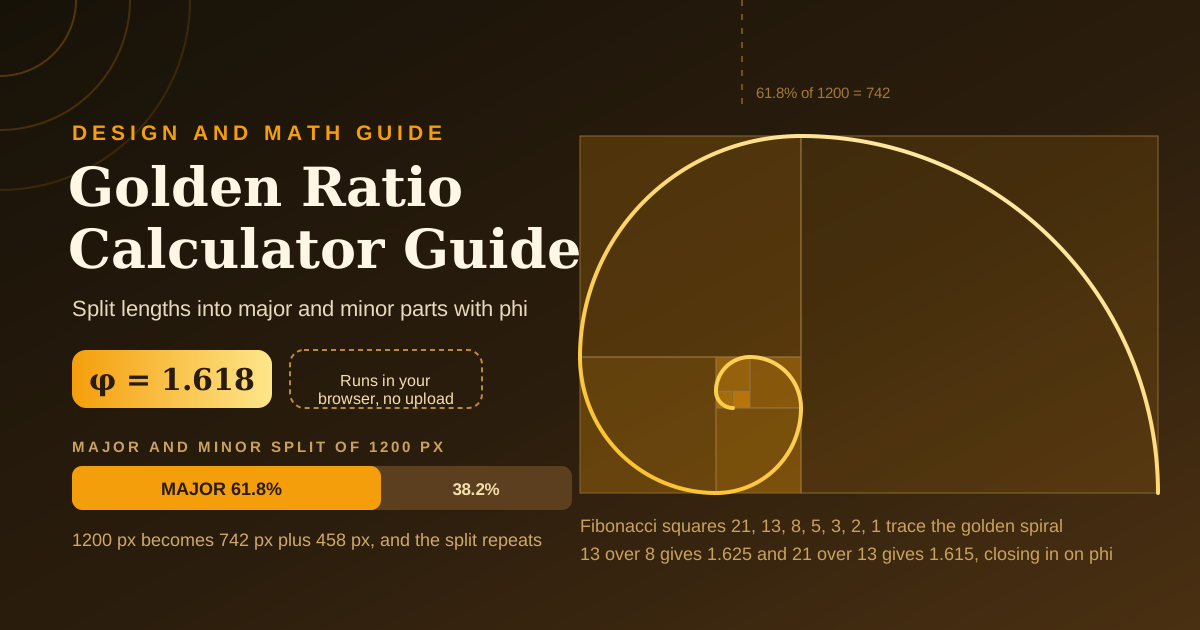
The Fibonacci sequence is the whole-number shadow of that recipe. Each term is the sum of the previous two, and the ratio of consecutive terms marches toward phi: 8 over 5 is 1.6, 13 over 8 is 1.625, 21 over 13 is about 1.615, and 34 over 21 is about 1.619. By 55 and 34 the match holds to three decimals. Hence the designer's shortcut: 13 columns beside 8 look proportionally golden while staying countable and easy to explain.
A worked example: for a 1200 px desktop layout, 1200 divided by 1.618 gives 741.7, so use a 742 px major column and a 458 px minor column — 742 over 458 is 1.620, golden to within a rounding pixel. The numbers cascade: the major column itself splits into golden parts of about 459 px and 283 px, a self-similar hierarchy echoing the nested golden rectangle.
Type scales work the same way. From a 16 px body size, multiply by phi each step: roughly 25.9, 41.9, 67.8, and 109.7 px. Rounded to 16, 26, 42, 68, and 110, this scale has more contrast between levels than the common 1.25 or 1.333 options. For images, a frame 1.618 times as wide as it is tall is a golden rectangle; the classic spiral overlay is simply nested golden rectangles with a quarter-circle arc in each square, as in this article's featured image.
One honest caveat: strict golden-ratio layouts are a design choice, not a rule. Claims that phi is uniquely pleasing have weak experimental support, and many excellent interfaces run on 2:3 splits, 8-point grids, or plain judgment. Treat phi as a principled tiebreaker — if a 60:40 split reads better for your content, ship the 60:40 split.
Practical Use Cases
Layout grid planning
When a client asks why the content column is 742 px, hand over a system: 1200 divided by 1.618 gives 742 and 458, gutters come out of the minor column, and the ratio repeats at the 768 px breakpoint as 475 and 293. Complement mode reverse-engineers the container when the brief fixes only the sidebar.
Type scale generation
Golden-ratio type scales are the boldest of the common modular scales, popular where dramatic hierarchy is the point. Compute the steps from your body size, round once, and record the values as design tokens, pairing the scale with generous line height.
Logo construction
Many classic marks are drawn on golden-rectangle construction grids. Divide the icon canvas, then sketch circles and arcs whose diameters follow the major and minor parts. Construction grids want whole units, so an 8 by 13 or 13 by 21 grid often beats a literal 1.618.
Photography crops
A golden-rectangle crop is a stronger, wider alternative to the rule of thirds for landscapes and product shots. Set the ratio to 1.618:1, or place the subject on the 61.8 percent line rather than the thirds line. Once the frame is chosen, the Aspect Ratio Calculator reduces it to a clean export ratio.
Best Practices
- Round once, deliberately. Keep full precision through the math, then snap to whole pixels or your spacing scale at the end.
- Pair with an 8-point grid. Rounding a 742 px column to 744 px is an invisible drift that improves alignment everywhere.
- Use phi as a starting point, not a religion. Golden proportions are a hypothesis to test against real content and real screens.
- Keep the ratio consistent within a system. One ratio across hero, cards, and spacing reads as intentional; several near-misses read as sloppy.
- Prefer Fibonacci approximations for countable things. Columns communicate better as 8:13 than as 0.618, and the visual difference is negligible.
- Document your numbers. Record totals and parts as design tokens so teammates extend the system instead of reinventing it.
Start Splitting with Phi
Open the Golden Ratio Calculator, drop in your first length, and watch the major and minor parts appear instantly. Exact phi-based numbers take a minute and make every later decision easier to defend.
Related Tools You Might Like:
Design with numbers you can explain.
Frequently Asked Questions
Q: Is the golden ratio really more beautiful than other proportions?
A: The evidence is mixed. Controlled studies have not shown a consistent human preference for phi-based proportions, so treat the ratio as a principled starting point and tiebreaker, not a guarantee. Content, contrast, and spacing usually matter more.
Q: Why use Fibonacci approximations instead of exact phi?
A: Grids and construction drawings work best in whole units, and Fibonacci pairs like 8:13 or 21:34 approximate phi while staying countable. The visual difference from the exact ratio is negligible at everyday scales.
Q: Does the calculator send my numbers anywhere?
A: No. Every calculation runs entirely in your browser, and nothing is uploaded or stored, so you can safely use it with confidential client dimensions.