HTML to Pug Converter: Turn Verbose Markup into Clean, Indented Templates
Convert HTML markup into clean Pug (Jade) template syntax instantly with indentation control, class/id shorthand, comment handling, and 100% in-browser processing. Free online HTML to Pug converter.
Free Interactive Tool
HTML to Pug Converter
Convert HTML markup into clean Pug (Jade) template syntax with indentation, attributes, and nested tags preserved — free online tool, 100% in your browser.
Table of Contents
Pug's selling point is everything it removes: no closing tags, no angle-bracket noise, just indentation and intent. The catch is on the way in. If your team ships Express apps or any Jade-descended stack, you know the routine: turning a designer's static HTML export into Pug templates by hand is an afternoon of deleting closing tags, re-indenting every level, and rewriting attributes as shorthand — mechanical work where one mis-indented line silently changes the template's structure. The HTML to Pug Converter does it for you: paste markup, get idiomatic, correctly indented Pug in the same tab.
The conversion is not cosmetic. Pug — the template engine formerly known as Jade — is whitespace-significant: the indentation is the tree. Hand-converting means acting as a human parser, and one slip breaks a layout at render time. And since everything runs in your browser, nothing is uploaded — safe for internal pages and client work under NDA.
Why Use the HTML to Pug Converter?
- 100% in-browser processing. No server round trip: markup never leaves your machine.
- Shorthand conversion done correctly. div class="container" becomes .container and div id="nav" becomes #nav; multiple classes chain as .card.featured, and toggles keep literal attributes if you prefer.
- Indentation control that matches your project. Choose 2 spaces, 4 spaces, or tabs — a unit that already matches your .editorconfig.
- Realistic markup, not toy snippets. Void elements like img and input emit a single line, and boolean attributes such as required come out bare.
- Comment handling on your terms. Keep HTML comments as Pug // comments in their original positions, or strip them for production.
- Free and frictionless. No account, no quota, no install.
Key Features
| Feature | What it does |
|---|---|
| Class/id shorthand | Turns class and id into .class and #id, with toggles to keep literals |
| Indentation control | 2 spaces, 4 spaces, or tabs to match your project's style |
| Comment modes | Keep HTML comments as // lines, or strip them |
| Void element handling | img, input, br emit one line each — no invented closing tags |
| Inline text detection | Text-only elements collapse onto their tag; stray text becomes | pipe lines |
| doctype and fragment awareness | Emits doctype html when present; converts fragments without wrapper elements |
The output re-renders live as you edit or change options, and the result can be copied or downloaded as index.pug.
How to Use
- Collect the markup. A designer's export, a prototype fragment, or a legacy page heading into an Express app.
- Paste it into the input panel on the HTML to Pug Converter page. Full documents produce doctype html plus the html/head/body skeleton; fragments convert as fragments.
- Set the options. Indentation unit, shorthand versus literal attributes, and whether comments survive.
- Review the output. Nesting depth mirrors the source, class and id appear as shorthand, and remaining attributes sit in parentheses.
- Copy or download, then compile. Drop the file into views/, render through Express or the Pug CLI, and fix whatever the compiler flags.
What Gets Simplified
The div Collapse: Shorthand for Classes and IDs
In Pug, the div name is implied whenever a line starts with a class or id, so div class="container" shortens to .container and div id="nav" to #nav. Both on one element merge — #app.wrapper — and classes chain with dots. The keep-literal toggles leave div(class="wrapper", id="app") untouched.
Attributes Survive as Parentheses
Everything that is not a class or id keeps Pug attribute syntax: a(href="/home", target="_blank"). Values stay quoted, and boolean attributes such as required compile back to bare HTML.
Indentation: 2 Spaces vs 4 Spaces vs Tabs
Pug's compiler measures indentation to build the tree, so mixed units are a syntax error, not a style nit. The converter normalizes every line to your choice — the 2-space default, roomier 4 spaces, or tabs — while depth mirrors the source nesting.
Inline Text and Pipes
An element whose only child is text collapses onto one line: p Welcome to my site. Mixed content expands the children to their own indented lines, and stray text inside a container becomes a | piped line — text rendered as-is, no tag invented.
Comment Modes
<!-- site header --> becomes // site header at the same depth, preserving position while a migration is in flight. Uncheck the option and comments are dropped for production.
Before and After: a Realistic Header
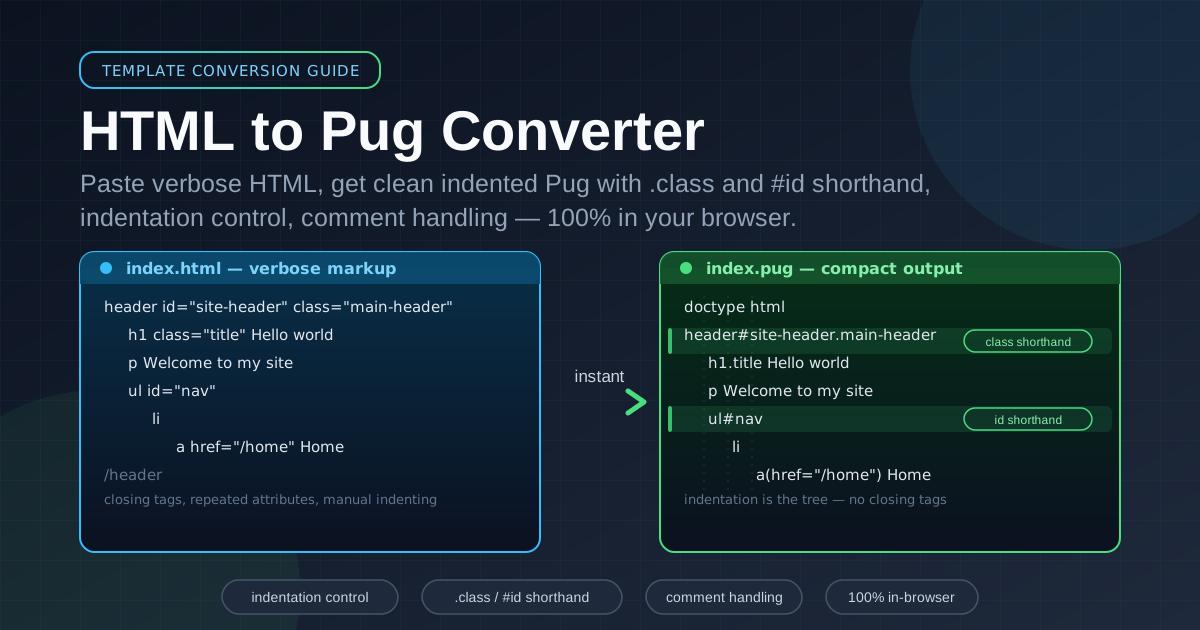
Here is the markup a design export actually contains:
<header id="site-header" class="main-header">
  <h1 class="title">Hello world</h1>
  <p>Welcome to my site</p>
  <ul id="nav">
    <li><a href="/home">Home</a></li>
    <li><a href="/about" target="_blank">About</a></li>
  </ul>
</header>
And the converter's output with 2-space indentation:
header#site-header.main-header
  h1.title Hello world
  p Welcome to my site
  ul#nav
    li
      a(href="/home") Home
    li
      a(href="/about", target="_blank") About
Tag-and-attribute noise becomes a structure you can read at a glance.
Where Manual Touch-Up Is Still Needed
Three spots deserve a human pass. Inline script and style blocks convert into Pug's dot-block form, but real JavaScript belongs in a bundle. Legacy conditional comments for old Internet Explorer have no clean Pug equivalent — hand-write them or delete them. And fragments that should loop or branch get that logic added afterward: the converter hands you the skeleton, you add each, if, and variables.
Practical Use Cases
Migrating Static Sites to Express and Pug
A marketing site outgrows plain hosting and moves to Express. Convert each page into a views/ template, then carve the shared shell into a layout with header and footer partials.
Converting Design Exports
Prototyping tools produce polished but rigid HTML. Converting the export on arrival means the prototype lives in the app's template language, and later tweaks become diffs in version control.
Refactoring Legacy Jade Projects
New pages still arrive as HTML — from agencies or marketing — even when the codebase dates to the Jade era. Converting them into the project's Pug style keeps views/ coherent.
Building Reusable Template Libraries
Convert canonical button, card, and modal markup once into components/card.pug-style partials, then parameterize them with variables and mixins. The library pays the one-time conversion back forever.
Best Practices
- Review the indentation before compiling. Indentation is structure in Pug; a ten-second scan of nesting depth catches nearly every artifact.
- Keep semantic tags, not div soup. header, main, and nav survive conversion intact — resist flattening them back into divs.
- Watch inline script and style blocks. They arrive as dot-blocks; decide whether that code belongs in the template or a bundled asset.
- Do a round-trip check. Run the output back through the Pug to HTML Converter and diff against the original — the fastest proof nothing was lost.
- Match the project's indent unit first. Set it in the tool rather than re-formatting afterwards.
- Convert in small chunks. One component at a time keeps code review meaningful and regressions easy to spot.
Ready to retire the delete-key ritual? Open the HTML to Pug Converter, paste a page, and watch verbose markup collapse into tidy templates in seconds.
Related Tools You Might Like:
- Pug to HTML Converter — compile Pug templates back into standard HTML for previews
- HTML to Markdown Converter — turn HTML pages into clean Markdown for docs and CMS imports
- Markdown to HTML Converter — render Markdown back into structured HTML markup
Happy templating — may every template compile on the first try, with every line indented exactly where it belongs. — Online Tools Forge Team
Frequently Asked Questions
Q: Is my HTML uploaded to a server?
A: No. The conversion runs entirely in your browser using the client-side DOM parser, so your markup never leaves your machine.
Q: What happens to class and id attributes?
A: By default they become Pug shorthand: every class chains as .class and the id becomes #id, so div class="card featured" id="promo" turns into #promo.card.featured. Checkboxes keep the literal attributes instead.
Q: How are void elements like img and input handled?
A: As single lines with their attributes in parentheses — input(type="text", name="q", required) — with boolean attributes emitted bare and no phantom closing tags.
Q: Can I use tabs instead of spaces for indentation?
A: Yes — pick 2 spaces, 4 spaces, or Tab, and keep one unit per file, because Pug treats mixed indentation as a syntax error.