JSON Flattener: Turn Nested JSON Into Flat Keys and Back Again
Flatten nested JSON into dotted, underscored, or bracket-notation keys and unflatten flat maps back into objects with the free online JSON Flattener. 100 percent client-side.
Free Interactive Tool
JSON Flattener
Flatten nested JSON into dotted, underscored, or bracket-notation keys, and unflatten flat maps back into objects — entirely in your browser.
Table of Contents
Real-world JSON is deeply nested. An order contains a customer, the customer contains an address, and the address contains a city, a postcode, and a list of phone numbers. Nesting is excellent for APIs, but it becomes a real obstacle the moment your destination system expects one flat value per field: a spreadsheet column, a search index field, or a configuration key. That is exactly the gap the JSON Flattener fills.
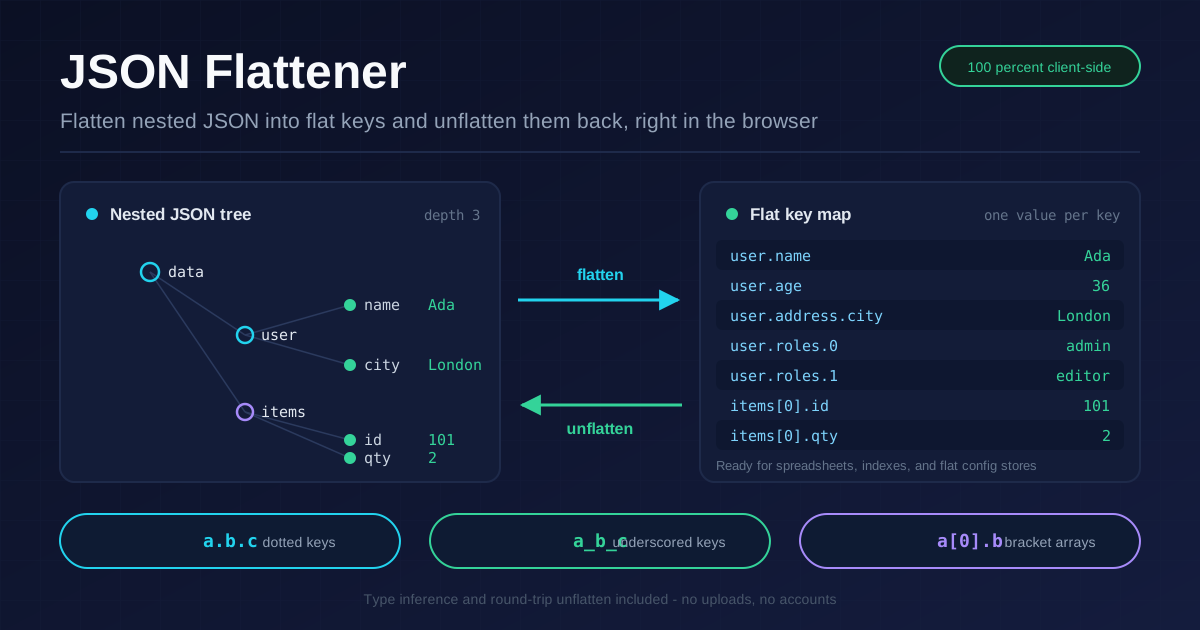
Flat keys feed spreadsheets, search indexes, and config systems that cannot read nesting. Instead of handing a BI tool a value buried three levels deep, you hand it a single key-value pair it can put straight into a column. The flattener walks your entire document, joins every path into one readable key, and outputs a flat map — then it can walk back the other way and rebuild the original structure.
The tool works in both directions, supports three key notations, handles arrays, infers types on the way back, and runs entirely in your browser — nothing is uploaded.
Why Use JSON Flattener?
- Spreadsheets demand flat rows: Excel and Google Sheets map one flat key to one column. Flattening turns nested documents into clean, importable rows.
- Search indexes want flat documents: Most document stores index scalar fields at the top level. Flattened keys map directly onto index fields without custom mapping scripts.
- Two-way conversion: Flatten nested JSON, then unflatten the result and get your original structure back — ideal for round-trip checks and pipelines.
- Three notations, your choice: Use dotted keys for readability, underscored keys for databases and identifiers, or bracket notation to make array positions explicit.
- Type inference on rebuild: when unflattening, strings like "36", "true", and "null" become numbers, booleans, and null automatically.
- Private and instant: Everything runs client-side. Paste, click, copy — no accounts, no uploads, no waiting.
Key Features
| Feature | What it does |
|---|---|
| Dotted notation | Joins paths with dots: user.address.city |
| Underscored notation | Joins paths with underscores: user_address_city |
| Bracket notation | Appends array indices in brackets: items[0].id |
| Unflatten | Rebuilds a nested object or array from any flat map |
| Array support | Walks arrays of objects and scalars at any depth |
| Custom separators | Supply your own separator when dots or underscores clash |
| Type inference | Restores numbers, booleans, and null during unflatten |
| Client-side only | All processing happens in your browser |
A few practical notes on top of the table:
- Paste a nested API response or hand-written config and get a flat map in one click.
- The output copies cleanly, and the browser-based tool works offline once loaded.
How to Use
- Open the JSON Flattener in your browser.
- Paste nested JSON into the input panel (or paste a flat map if you want to unflatten instead).
- Choose a notation — dotted, underscored, or bracket — and adjust the separator if your keys contain dots or underscores.
- Click Flatten to produce a flat key map, or Unflatten to rebuild a nested structure.
- Copy the result, then run it back through the opposite direction as a round-trip test.
Flat Keys, Three Notations
Start with this nested sample:
{
  "user": {
    "name": "Ada",
    "address": { "city": "London" }
  },
  "roles": ["admin", "editor"]
}
Dotted notation is the most readable choice and the default for good reason. Each nesting level becomes one more dot-separated segment, so the structure of the key mirrors the structure of the document:
user.name = Ada
user.address.city = London
roles.0 = admin
roles.1 = editor
Underscored notation replaces dots with underscores (user_address_city). It is the safest option for databases, column names, and search index fields, because many stores restrict or misinterpret dots in identifiers — underscores usually work without escaping.
Bracket notation keeps dots for objects but marks array positions explicitly (items[0].id). It reads like a path expression in code, which makes it easy to tell "the first element's id" apart from "an object with a key literally named 0" — a real ambiguity in pure dotted keys.
The unflatten direction closes the loop. Given the flat map above, the tool rebuilds the original nested object, re-creating both objects and arrays. Two details matter here:
- Type inference: flat maps store everything as text. On unflatten, "36" becomes the number 36, "true" becomes a boolean, and "null" becomes null, so the round trip preserves types as well as structure.
- Separator collisions: if an original key already contains your separator, two different documents can flatten to the same key. {"a.b": 1} and {"a": {"b": 1}} both become a.b with dotted notation. The same risk applies to underscores. Pick a separator that never appears in your keys, or unflatten will merge branches that were separate.
Practical Use Cases
Spreadsheet Exports
Analysts rarely want your nesting — they want columns. Flatten a batch of records and every nested field lands in its own predictable column, turning reporting on nested API data into a two-minute task.
Search Indexing and Bulk Imports
Indexing pipelines and bulk import formats generally accept flat documents with unique field names. Flatten each record so settings.theme and settings.notifications.email become first-class fields you can query, facet, and boost without nested mapping logic.
Config Flattening
Environment variable stores and many deployment platforms only accept flat keys. Flatten database.host and database.port into DATABASE_HOST-style pairs with an underscored separator, manage them as a simple list, then unflatten them when the application needs nested config.
Diffing Deep Structures
Comparing two versions of a large nested document is painful line by line. Flatten both and the diff collapses to key-by-key comparison: renamed paths, changed values, and added or removed branches all become obvious — and flattened keys are far easier to log and attach to a review ticket.
Best Practices
- Watch for key collisions: test whether any real key in your data contains your chosen separator before trusting a flatten-unflatten round trip.
- Choose separators that never appear in keys: double underscores (__) or an unlikely character make collisions practically impossible in real datasets.
- Round-trip test every pipeline: flatten, unflatten, and compare against the original once per schema to confirm your notation and separator are safe.
- Prefer dotted keys for humans, underscored for machines: readability matters in reviews; identifier-safe characters matter in storage.
- Keep array notation consistent: bracket notation is self-documenting, but if a downstream system expects pure dotted keys, convert once at the boundary.
- Remember types are inferred: if a value is genuinely the string "36", add a quoting convention or keep that field out of the round trip.
Flatten Your First Payload Today
Grab any nested API response from your recent work, open the JSON Flattener, and flatten it in one click. Toggle between notations, unflatten it back, and see how much simpler flat keys make downstream work — free, private, and entirely browser-based.
Related Tools You Might Like:
- JSON Formatter — format, validate, and minify JSON before or after flattening.
- CSV to JSON Converter — turn tabular data into JSON structures ready to nest.
- JSON to CSV Converter — export flattened records straight into spreadsheet-friendly CSV.
Written by the Online Tools Forge Team — building fast, free, privacy-first developer tools that run entirely in your browser.
Frequently Asked Questions
Q: What is the difference between flattening and formatting JSON?
A: Formatting only changes whitespace while preserving nesting. Flattening restructures the document, turning every nested path into a single flat key-value pair. Use a formatter to read JSON and a flattener to feed flat systems.
Q: Does flattening support arrays inside objects?
A: Yes. Arrays are walked like any other branch: each element gets an index in its key, so items[0].id or items.0.id refers to the first element. Nested arrays of objects work at any depth.
Q: What happens if a key already contains a dot or underscore?
A: Two different structures can produce the same flat key, and unflattening will merge them. Choose a separator that never appears in your keys, such as a double underscore, and run a round-trip test to confirm the structure survives.
Q: Is my data sent to a server?
A: No. The tool runs entirely client-side in your browser, so sensitive payloads and internal configurations never leave your machine.