MessagePack Converter: Turn JSON Into Compact Binary and Back
Convert JSON to MessagePack binary and decode MessagePack hex dumps back to JSON in your browser, with a live hex preview, UTF-8 safety, and file download for Redis, IoT, and API payloads.
Free Interactive Tool
MessagePack Converter
Convert JSON to MessagePack binary and back, with hex preview and file download. Runs fully in your browser.
Table of Contents
A surprising amount of the data moving through modern systems never appears as text. Payloads sitting in Redis queues, telemetry from IoT devices on constrained links, and responses from binary APIs are often serialized with MessagePack, a compact binary format that looks like unreadable noise in a terminal. When one of those payloads misbehaves, you have to decode the bytes before you can see what is inside.
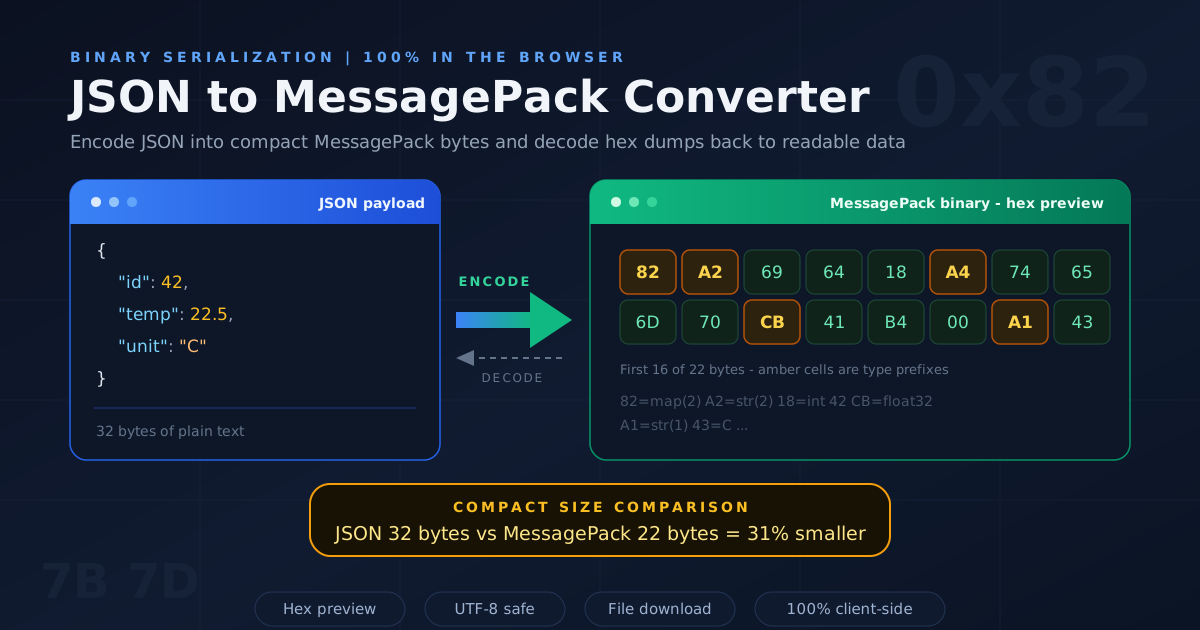
That is the gap the MessagePack Converter fills. Paste JSON to see its exact MessagePack encoding, or paste a MessagePack hex dump to get readable JSON back. A built-in hex preview shows every output byte, TextEncoder and TextDecoder handle UTF-8 correctly, and the encoded result can be downloaded as a file.
The tool runs entirely client-side, so it is safe for payloads containing customer data or tokens — nothing ever leaves your browser.
Why Use the MessagePack Converter?
- See the real bytes, not a summary — Partial library output hides what is on the wire. The converter shows the complete encoded payload as hex, byte by byte.
- Two directions in one place — Encode and decode in the same tab, making round-trip checks a ten-second task.
- Instant hex literacy — The preview maps every JSON value to its encoded bytes, so you can watch a small integer collapse into a single byte.
- Correct UTF-8 handling — TextEncoder and TextDecoder keep multibyte strings intact, so Thai text, emoji, and CJK characters survive intact.
- Nothing leaves the browser — All conversion happens client-side: no uploads, no accounts, no server round trip.
- Download the result — Save the encoded bytes to a file for a Redis fixture, firmware test bench, or API integration test.
Key Features
| Feature | What It Does |
|---|---|
| Two-way conversion | Encodes JSON to MessagePack and decodes MessagePack back to JSON |
| Hex preview | Shows the full binary output as hexadecimal, byte by byte |
| UTF-8 text handling | TextEncoder and TextDecoder keep multibyte strings intact |
| File download | Saves the encoded payload as a binary file for tests or devices |
| 100% client-side | All conversion happens in your browser; no uploads, no accounts |
- Zero setup — No SDK to install and no server to reach; conversions render as fast as you can paste.
- A teaching tool built in — The hex preview updates with every edit, doubling as an interactive lesson in binary serialization.
How to Use the MessagePack Converter
- Open the MessagePack Converter and paste your JSON into the input panel.
- Run the encode step and inspect the hex preview: each character pair is one byte, and every value starts with its type prefix.
- If you need the raw binary, use the download button to save the encoded payload as a file.
- To decode, paste a hex dump into the decode panel and run the decode step to get clean JSON.
- Verify the round trip by comparing the decoded output with your original — pretty-print it in the JSON Formatter if the structure is deeply nested.
Why MessagePack Beats Base64-JSON
A common workaround for squeezing structured data through a byte-oriented pipe is to Base64-encode a JSON string. That costs 33 percent extra size and forces a double parse on the receiving end. MessagePack solves the problem natively, and understanding why makes the hex preview far more useful.
The Type-Prefix Trick
Every MessagePack value begins with a single byte that declares its type and, for small values, carries the value itself. Integers from 0 to 127 are one byte, full stop. Strings up to 31 bytes store their length inside that prefix byte, and maps with up to 15 entries store their entry count the same way. JSON, by contrast, pays two quotes per key plus colons and commas — pure structure overhead MessagePack does not have.
JSON vs MessagePack: A Real Payload
Take a realistic sensor reading: {"deviceId":"sensor-42","ts":1726123456,"temp":22.5,"hum":48,"status":"ok"}. As compact JSON that is 75 bytes; as MessagePack it is about 53 bytes — roughly 30 percent smaller with zero compression. Savings grow with short keys and numeric values: 48 becomes a single 0x30 byte and the temperature a five-byte float32. Gzip can shrink JSON further, but it costs CPU on both ends and cannot be partially parsed; MessagePack is compact by construction and stays stream-decodable.
Where MessagePack Shows Up
- Redis serialization — Clients often store cached objects and queue jobs as MessagePack blobs to cut memory and network use versus JSON strings.
- IoT telemetry — Devices on LPWAN and NB-IoT links pay for every byte of radio time, so trimming quotes and colons extends battery life.
- msgpack-rpc — Compact request and response framing used by Neovim's RPC API and Fluentd's log forwarding.
Reading a Hex Dump
The first byte of every value is its type prefix: 0x82 is a fixmap with two entries, 0xA2 a two-byte string, 0x18 the integer 24, 0xCB a float32, and 0xC4 an eight-bit-length binary blob. Once you can walk a dump like that, inspecting a raw value from redis-cli --no-raw becomes readable instead of guesswork.
Practical Use Cases
Debugging Redis Values
A queue consumer starts failing with "unexpected field", but the producer swears nothing changed. Fetch the suspect value with redis-cli --no-raw, paste the escaped bytes into the converter, and decode. In thirty seconds you can see the producer now writes status as the string "pending" instead of a boolean — drift invisible in application logs.
Decoding IoT Device Telemetry
Firmware teams often define the uplink format as MessagePack and debug it from captured frames. Paste a frame's hex into the decoder to confirm field names, value scales, and timestamp formats. If a sensor reads double the expected temperature, a quick decode usually reveals a scale factor applied twice, not a hardware fault.
API Contract Checks
Binary APIs drift quietly. Encode your documented fixture and compare the hex output against a captured request, or decode a captured payload and diff it against your schema. This catches integer-versus-float drift, omitted optional fields, and wrong string encodings before consumers notice.
Understanding Binary Protocols
The best way to internalize a wire format is to poke at it. Encode a two-field object, read its five or six bytes, and predict the next one before you look. Once that feels fluent, formats such as CBOR and Protocol Buffers stop being intimidating — they share the same length-prefix and type-tag ideas.
Best Practices for Working with MessagePack
- Agree on the schema at both ends — MessagePack carries types but not field documentation, so keep a shared schema or interface definition both sides honor.
- Keep field names short for IoT — Every key is sent on every message; renaming temperatureC to tc saves megabytes across a fleet.
- Validate decodes round-trip — After any encoder or schema change, encode a fixture, decode it back, and diff against the original.
- Watch integer and float types — 22.5 encodes as a float32 while 22 stays an integer, so pin down numeric types in your schema.
- Label raw bytes versus hex — The hex preview is text, but the downloaded file is true binary; mixing them up causes double-encoding bugs.
- Version your payloads — Add a small v field so you can evolve the schema without breaking devices still running old code.
Ready to Decode Your First Payload?
Grab a hex dump from Redis, a device frame, or a captured API request and run it through the MessagePack Converter. Watching opaque bytes resolve into familiar JSON builds real confidence with binary data fast.
Related Tools You Might Like:
- JSON Formatter — pretty-print and validate the JSON you decode, especially deeply nested payloads.
- Base64 Tool — encode and decode Base64 and Base64URL, the text-safe wrapper often mixed into binary pipelines.
- ASCII Binary Converter — translate text to binary and back to see how individual characters become bytes.
Happy encoding!
Frequently Asked Questions
Q: Is MessagePack always smaller than JSON?
A: Usually 20 to 50 percent smaller for typical API and telemetry payloads, because it drops quotes, colons, and commas and packs small values into single bytes.
Q: Is it safe to store MessagePack values in Redis?
A: Yes. MessagePack output is just bytes, and Redis stores bytes. Use binary-capable commands such as GET and SET, and keep every reader of that key on the same deserializer.
Q: Does the converter upload my data anywhere?
A: No. Encoding and decoding run entirely in your browser with JavaScript, so the tool works offline once loaded and nothing is transmitted to any server.
Q: How is MessagePack different from Base64-encoded JSON?
A: Base64 wraps binary inside text, inflating it by about a third, and the JSON inside still needs a separate parse. MessagePack is the binary format itself: smaller, typed, decodable in one step.