How to Parse and Validate Passport MRZ Codes with ICAO 9303 Check Digits
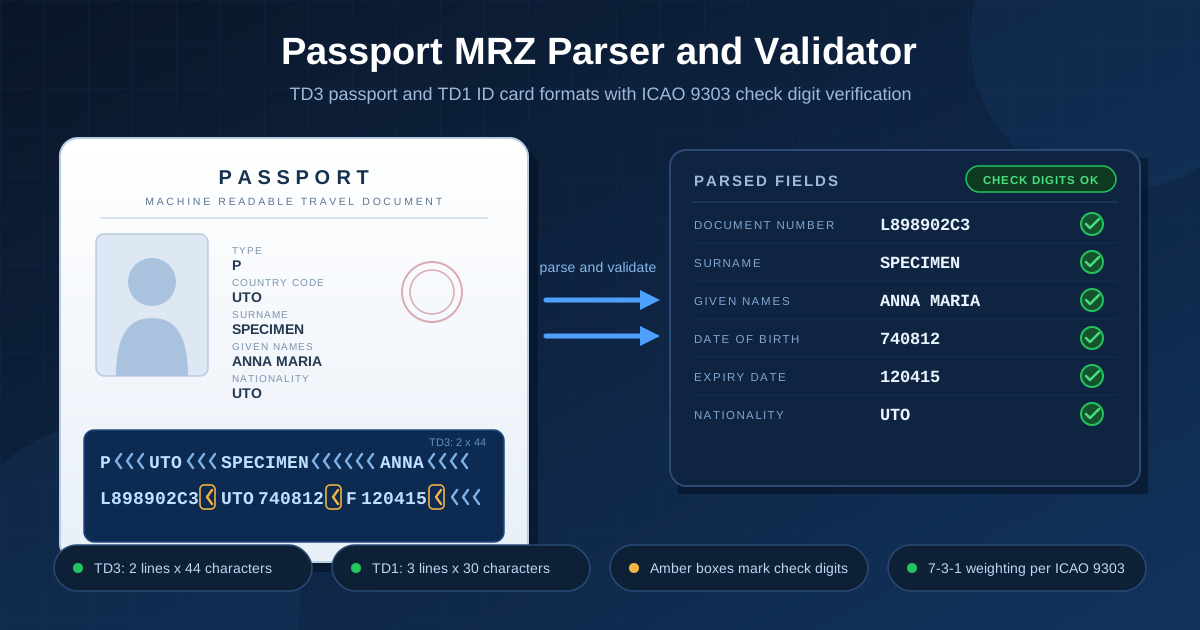
Decode TD3 passport and TD1 ID card machine readable zones into document number, names, dates, and nationality with the free MRZ Parser, including ICAO 9303 check digit verification that runs entirely in your browser.
Free Interactive Tool
Passport MRZ Parser
Parse and validate passport and ID card MRZ codes (TD3 and TD1) into names, document number, dates, and nationality with ICAO 9303 check digit verification, entirely in your browser.
Table of Contents
The two lines of glyphs at the bottom of every modern passport are not decoration. They are the machine readable zone (MRZ), a compact, standardized record of the holder's identity — and that record carries its own checksums. ICAO Doc 9303 defines how document numbers, names, dates, and nationality are laid out, and how each critical field is protected by a check digit any computer can recompute.
Reading that zone by hand is tedious and error-prone. The free MRZ Parser does the work for you: it accepts the TD3 format used by passport booklets (2 lines of 44 characters) and the TD1 format used by ID cards (3 lines of 30 characters), extracts every field, and verifies each check digit using the exact ICAO 9303 weighting rules. Everything runs 100% client-side, so nothing you paste ever leaves your browser.
This guide covers how to use the tool, how check digits work with a fully worked example, and where an MRZ parser fits into real workflows.
Why Use the MRZ Parser?
- Instant field extraction. Paste two or three lines and immediately get the document number, names, dates, sex, and nationality.
- Real ICAO 9303 verification. Every check digit is recomputed from scratch and compared against the MRZ, so a mistyped line is caught instead of silently accepted.
- Both major formats. TD3 (2 x 44) and TD1 (3 x 30) are detected automatically, with clear errors for wrong lengths or invalid characters.
- Built-in valid specimens. TD3 passport and TD1 ID card samples with correct checksums let you explore before touching any real document.
- 100% client-side privacy. Parsing happens in JavaScript in your browser — no upload, no server, no logs.
- Human-readable output. Raw YYMMDD values become readable dates, and names split into surname and given names at the double-filler boundary.
Key Features
| Feature | What it does |
|---|---|
| TD3 passport parsing | Parses 2 x 44 passport lines: type, issuer, name field, document number, nationality, dates, sex |
| TD1 ID card parsing | Parses 3 x 30 card lines: document code, issuer, document number, dates, nationality, name line |
| Check digit verification | Recomputes each check digit via 7-3-1 weighting, expected vs. actual per field |
| Composite check digit (TD3) | Verifies the final checksum over the number and date fields on line 2 |
| Specimen samples | One-click load of valid TD3 and TD1 specimens |
| Client-side only | No network calls; everything runs in the browser |
Input is auto-cleaned — spaces and dashes stripped, text uppercased — fixing the most common paste mistakes. And every failure mode (wrong line count, wrong length, illegal characters) produces a specific message instead of a confusing result.
How to Use
- Open the MRZ Parser in your browser.
- Click TD3 passport sample or TD1 ID card sample to load a built-in specimen, or paste the MRZ lines from a document you own.
- Confirm the detected format — "TD3 passport booklet (2 x 44)" or "TD1 ID card (3 x 30)".
- Review the extracted fields: document number, names, dates of birth and expiry, sex, nationality, and optional data.
- Check the verification panel: each field shows a green badge when its check digit matches, a warning when it does not.
ICAO 9303 and the Check Digit System
TD3 is the passport booklet format: two lines of 44 characters. Line 1 holds the document type code, the three-letter issuing state, and the name field written as SURNAME<<GIVEN<NAMES, padded with filler characters to exactly 44 positions. Line 2 holds the 9-character document number plus check digit, the nationality code, the date of birth (YYMMDD) plus check digit, a one-letter sex code, the expiry date plus check digit, an optional-data field plus check digit, and a final composite check digit.
TD1 is the ID card format: three lines of 30 characters. Line 1 packs the document code, issuing state, and document number with its check digit; line 2 carries the birth date, sex, expiry date, nationality, and optional data with their check digits; line 3 is the name field. Note that in this implementation TD1 has no composite check digit, per ICAO 9303 Part 5.
Each character becomes a number: digits keep their value, letters map A=10 through Z=35, and the filler character counts as 0. Values are multiplied by the repeating weight sequence 7, 3, 1, 7, 3, 1, ... and summed; the check digit is the last digit of the sum (modulo 10).
Here is a fully worked example using the specimen passport's document number, L898902C3:
| Character | L | 8 | 9 | 8 | 9 | 0 | 2 | C | 3 |
|---|---|---|---|---|---|---|---|---|---|
| Value | 21 | 8 | 9 | 8 | 9 | 0 | 2 | 12 | 3 |
| Weight | 7 | 3 | 1 | 7 | 3 | 1 | 7 | 3 | 1 |
| Product | 147 | 24 | 9 | 56 | 27 | 0 | 14 | 36 | 3 |
The products add up to 316, and 316 modulo 10 is 6 — exactly the check digit following the document number on line 2 of the specimen. The same procedure validates the birth date (740812 yields 2) and the expiry date (120415 yields 9).
What does a failed check digit mean? Almost always an OCR or transcription error, not fraud. One misread character from a worn, printed document is enough to break the checksum. When the tool flags a field, re-check your input for look-alike characters before suspecting the document.
Privacy warning: everything an MRZ contains — full name, document number, date of birth, nationality — is sensitive personal data. Treat parsed output as confidential, and never paste lines from a real document into any tool you do not control. Prefer the built-in specimens for demos and screenshots.
Practical Use Cases
Border and operations software testing
Teams building check-in, border management, or hotel registration systems need realistic MRZ fixtures. The specimens provide valid inputs with correct checksums; deliberately breaking one character creates a known-bad case for verifying your software rejects tampered lines.
OCR pipeline validation
If you scan passports with OCR, the MRZ check digits are a free quality gate: a correct read passes all five TD3 checksums, while a misread shows immediately. Parsing known-good and corrupted lines helps calibrate your acceptance criteria.
Form auto-fill prototyping
Products that pre-fill registration or KYC forms need the same field mapping shown here: splitting names at the double-filler boundary, converting YYMMDD dates, and normalizing nationality codes. Prototype that mapping before writing integration code.
Document education
Developers, QA engineers, and students learn the MRZ layout fastest by example: loading the specimens shows how each character position maps to a field, making ICAO 9303 concrete instead of abstract.
Best Practices
- Use specimen data for demos. The built-in samples are valid and safe to show in screenshots, talks, and test suites.
- Verify all check digits, not just one. A document number can pass while the expiry date fails; only a full green panel means the line is consistent.
- Handle filler characters correctly. Fillers are legal padding, not typos: they count as 0 in check digit math, and the double-filler boundary separates surname from given names.
- Match the format first. Confirm 2 x 44 (TD3) or 3 x 30 (TD1); field positions differ between the layouts.
- Re-type rather than guess on failure. When a check digit fails, suspect look-alike characters (8/B, 0/O, 1/I) in your input first.
- Minimize data exposure. Parse only what you need, avoid storing raw MRZ text, and never paste real document lines into tools you do not control.
Try the MRZ Parser Now
Whether you are building scanning software, validating an OCR pipeline, or just curious what those two passport lines encode, the MRZ Parser gives instant field extraction with genuine ICAO 9303 check digit verification — free, no signup, entirely in your browser.
Related Tools You Might Like:
- GTIN Validator — validate GTIN-8, GTIN-12, GTIN-13, and GTIN-14 product codes with checksum verification
- Thai ID Validator — check Thai national ID card numbers and their check digit
- IMEI Checker — verify IMEI numbers with the Luhn algorithm and TAC inspection
Happy parsing!
Frequently Asked Questions
Q: What is the MRZ on a passport?
A: The machine readable zone is the two-line (TD3, 44 characters per line) block of OCR-B text at the bottom of a passport data page. It encodes the document type, issuing state, name, document number, nationality, dates, and sex in a fixed ICAO 9303 layout, with check digits protecting the critical fields.
Q: What is the difference between TD3 and TD1?
A: TD3 is the passport booklet format: 2 lines of 44 characters. TD1 is the common ID card format: 3 lines of 30 characters, with the name field on the third line. The parser detects the format automatically from the number and length of the lines you paste.
Q: Why does a check digit fail even though the document looks fine?
A: A failed check digit almost always means a transcription or OCR error in the input — one wrong character in a protected field breaks the checksum. Re-check look-alike characters such as 8 versus B, 0 versus O, and 1 versus I before suspecting the document.
Q: Is my data sent to a server?
A: No. The MRZ Parser runs 100% client-side in your browser; your input is never uploaded, stored, or logged.