Paper Size Converter: Convert A4, Letter and ANSI Sizes to mm, Inches and Pixels
Convert ISO A/B/C, US Letter, Legal and ANSI paper sizes to millimetres, inches, points and pixels with selectable DPI. Free, instant and fully client-side.
Free Interactive Tool
Paper Size Converter
Convert ISO A/B/C, US Letter/Legal, and ANSI sheet sizes to millimetres, inches, points, and pixels. Runs in your browser.
Table of Contents
Paper sizes look simple until two standards collide — an A4 brochure lands on a US print queue, a client asks for a poster in pixels, or a dieline needs checking before the cutter. Suddenly you are juggling millimetres, inches, points and DPI in your head. The Paper Size Converter takes that mental arithmetic off your plate.
The tool covers the three families you meet most: the ISO A, B and C series used almost everywhere outside North America, the US Letter and Legal formats, and the ANSI series behind American engineering drawings. Pick a size and an output unit, and you get exact millimetre, inch, point and pixel values — with pixel results that respect your chosen DPI.
Because everything runs client-side, there is nothing to install and nothing to upload — open the page, get your numbers, close the tab. This guide covers what the tool does, the maths behind it, and where it earns its keep in everyday design and print work.
Why Use the Paper Size Converter?
- Every standard in one place. ISO A4, B5 and C5 sit alongside US Letter, Legal, Tabloid and the ANSI A-E engineering sizes — no second lookup table needed.
- DPI-aware pixel output. A4 is 794 px wide at 96 DPI but 2,480 px at 300 DPI — pick 72, 96, 150, 300 or 600 DPI so the pixels match the job.
- Four output units at once. Millimetres, inches, points and pixels are computed together — exactly what print specs and stylesheets ask for side by side.
- Instant and accurate. Values come from official ISO 216 and ANSI definitions, not rounded approximations — 210 × 297 mm stays 210 × 297 mm.
- Private by design. The conversion runs entirely in your browser; no size or file you enter is ever sent to a server.
- Free with no sign-up. No account, no limits, no watermarks — one bookmark, one click away.
Key Features
| Feature | What you get |
|---|---|
| Paper series | ISO A, B and C series, US Letter and Legal, ANSI A-E |
| Output units | Millimetres, inches, points, pixels |
| DPI presets | 72, 96, 150, 300 and 600 DPI for pixel conversion |
| Conversion basis | Exact millimetre values from ISO 216 and ANSI definitions |
| Privacy | 100% client-side — nothing leaves your browser |
Three details worth calling out:
- Pixel output follows pixels = mm × DPI ÷ 25.4, so the same sheet gets different — and correct — pixel counts for screen and print.
- Points are included because typography and PDF page geometry are specified in points, not millimetres: A4 is exactly 595 × 842 pt.
- Results update as you switch sizes, so comparing A4 against Letter takes seconds instead of a search session.
How to Use the Paper Size Converter
- Open the tool. Visit the Paper Size Converter — it loads instantly, even on a phone.
- Choose a paper size. Pick from the ISO A/B/C series, the US Letter/Legal group or the ANSI series; A4 is the everyday default.
- Pick your output unit. Choose millimetres, inches, points or pixels depending on whether you are briefing a printer, writing CSS or preparing a bitmap.
- Select a DPI for pixel results. Use 72 or 96 for screens, 300 for commercial print, 600 for fine art or archival scanning.
- Read and copy the result. All unit values show together — copy the one you need straight into a spec sheet or stylesheet.
A4 vs Letter and the Pixel Question
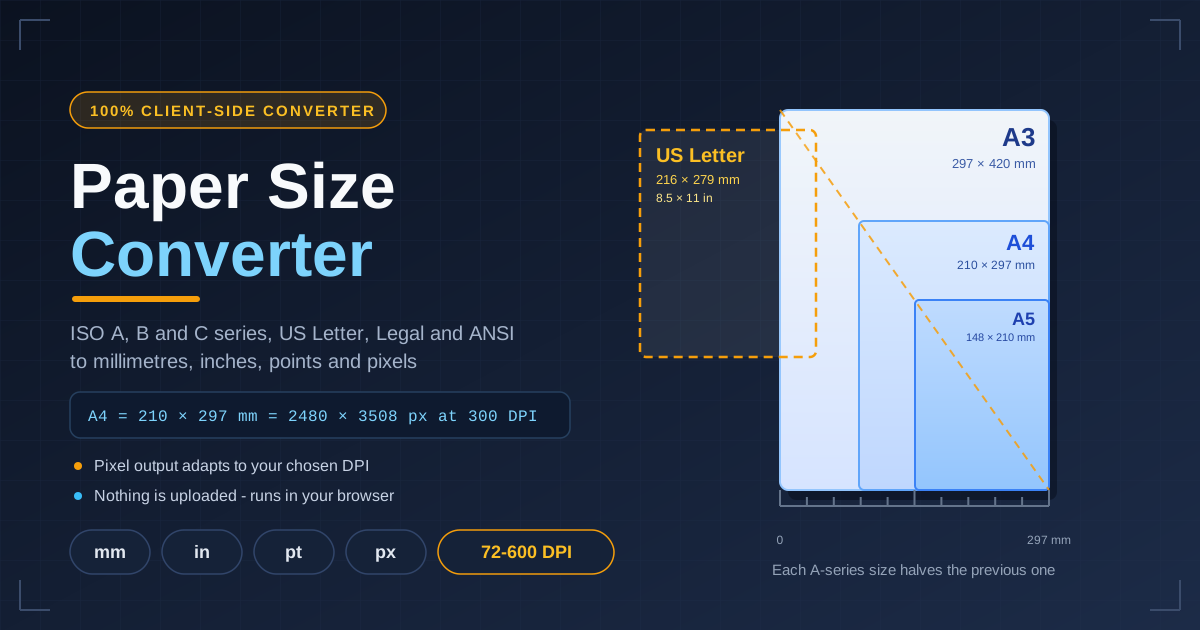
The ISO A series has one elegant trick: its aspect ratio is the square root of 2 (about 1.414). Because √2 halves cleanly, folding a sheet in half along its long side produces the next size down with the same proportions — A3 folds to A4, A4 folds to A5, all the way back to A0 at exactly one square metre (841 × 1,189 mm). That is why two A4 sheets fit side by side on one A3, why copiers resize without cropping, and why the featured image shows every size sharing a single diagonal.
US Letter follows different logic: 216 × 279 mm (8.5 × 11 in) — 6 mm wider than A4 but 18 mm shorter. That mismatch is the classic source of clipped international PDFs: A4 laid out and printed on Letter loses roughly 18 mm at the bottom, while Letter content on A4 picks up uneven side margins. Check both sizes before a file crosses a border — one conversion settles it.
Points matter for typography: one point is 1/72 of an inch, so A4 is 595 × 842 pt — and PDF page boxes are defined in points, which is why print templates quote them.
Pixels are the only unit that depends on a setting: the formula is pixels = mm × DPI ÷ 25.4 (25.4 mm per inch), and DPI answers how many pixels one inch should occupy:
- 72 or 96 DPI — baselines for on-screen viewing and web layouts.
- 150 DPI — large-format posters and banners viewed from a distance.
- 300 DPI — the commercial print standard for brochures, books and photos.
- 600 DPI — fine art reproduction and archival scanning.
Worked example: A4 (210 × 297 mm) at 300 DPI gives 210 × 300 ÷ 25.4 ≈ 2,480 and 297 × 300 ÷ 25.4 ≈ 3,508, so a print-ready A4 bitmap is 2,480 × 3,508 px. The same sheet at 96 DPI is only 794 × 1,123 px — exactly why a screen-sized image in a print layout looks soft and pixelated.
Practical Use Cases
Print-Ready CSS and Design Specs
When a print spec arrives in inches but your stylesheet works in pixels, convert once and hard-code the right numbers. Page-like layouts — invoices, résumés, email templates — start from knowing A4 is 210 × 297 mm, about 794 × 1,123 px at 96 DPI.
PDF Templates
Report covers, contracts and letterheads target one page size. If a template will cross regions, convert A4 and Letter up front and design inside the smaller common area or plan proper bleed, so nothing is clipped when the other size is chosen.
Packaging and Die-Line Checks
Dielines and box templates arrive in millimetres from suppliers but often need inch-based approval from US stakeholders. Convert the flat dimensions both ways and sanity-check the dieline against the ANSI or ISO sheet it prints on.
Cross-Region Document Exchange
Distributed teams shuttle documents between A4 and Letter worlds daily. A quick conversion tells you whether a scan, form or print run will fit, and hands you exact numbers for the print shop — no forum threads required.
Best Practices
- Design with bleed. Add 3-5 mm beyond the trim size on every edge — the bleed is your safety margin.
- Set DPI before converting to pixels. A pixel result is meaningless without it — match DPI to the output device first.
- Prefer millimetres for print and pixels for screens. Millimetres and points survive scaling on paper; pixels only describe a bitmap at a known DPI.
- Check both target sizes for international work. The 18 mm height difference between A4 and Letter is what bites.
- Use points for typography. Font sizes, leading and PDF margins are points-based; converting to points keeps the maths exact.
- Re-verify before the print run. Convert the final page size or dieline once more after edits; last-minute resizes are the most common source of clipped prints.
Ready to Convert a Paper Size?
Skip the spreadsheet and the search results. Open the free Paper Size Converter, choose your sheet and DPI, and copy the exact millimetre, inch, point or pixel values you need — in seconds, with nothing leaving your browser.
Related Tools You Might Like:
- Unit Converter — convert length, mass, temperature and dozens of other units.
- Height Converter — switch between centimetres, feet and inches instantly.
- Aspect Ratio Calculator — keep proportions perfect when resizing images and screens.
Happy converting!
Frequently Asked Questions
Q: How many pixels is A4 at 300 DPI? A: A4 is 210 × 297 mm. Applying pixels = mm × DPI ÷ 25.4 gives 2,480 × 3,508 px — the standard resolution for a print-ready A4 bitmap.
Q: What is the difference between A4 and US Letter? A: A4 is 210 × 297 mm; US Letter is 216 × 279 mm. Letter is 6 mm wider but 18 mm shorter, so A4 content printed on Letter without scaling loses about 18 mm at the bottom.
Q: Which DPI should I choose for pixel conversions? A: Use 72 or 96 DPI for screens, 150 DPI for large posters, 300 DPI for commercial printing, and 600 DPI for fine art or archival scans.
Q: Why does the tool include points? A: Points (1/72 of an inch) are the unit of typography and PDF page geometry; A4 is exactly 595 × 842 pt.
Q: Is my data uploaded anywhere? A: No. Every conversion runs entirely in your browser — the tool never sends your sizes or inputs to a server.