Regex Railroad Diagram Generator: Read Regular Expressions at a Glance
Turn cryptic regular expressions into interactive railroad diagrams. See nested groups, character classes, alternations, and quantifiers as tracks and branches — instantly, in your browser.
Free Interactive Tool
Regex Railroad Diagram Generator
Visualize any regular expression as a railroad (syntax) diagram. Understand groups, classes, alternation, and quantifiers at a glance — no signup, fully offline in your browser.
Table of Contents
Most regular expressions are write-only. You compose one in a burst of confidence, it works, and six months later nobody — including you — can say for certain what it matches. Regex packs loops, branches, and nesting into one line of punctuation, exactly the kind of structure human brains parse poorly as text. Paste that pattern into the Regex Railroad Diagram Generator and everything changes: it stops being noise and becomes a picture you can read.
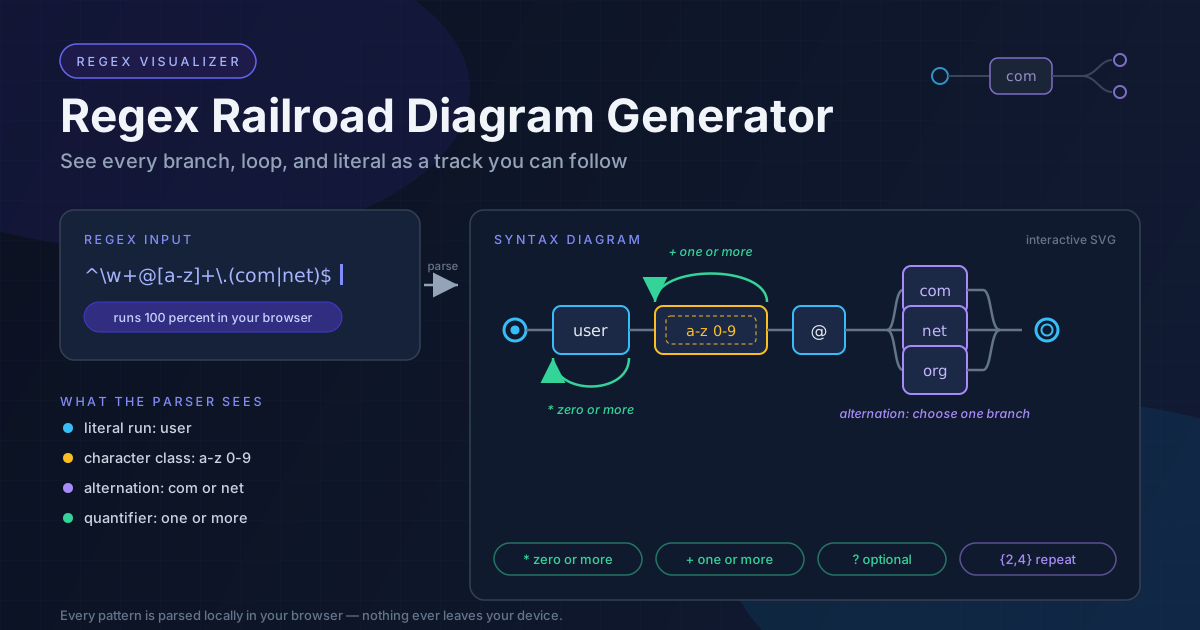
The tool parses your pattern and renders it as an interactive railroad (syntax) diagram — the visualization style used in language specifications for decades. Literal runs become straight tracks, character classes fenced stations, alternations parallel branches, and quantifiers loop-back arcs showing exactly what can repeat. The finished diagram downloads as an SVG for a wiki, pull request, or slide deck.
Everything runs 100% client-side: parsing happens on your machine, nothing is uploaded, and there is no account or install. Paste a pattern and the diagram appears instantly — from a two-second sanity check to untangling a hundred-character legacy expression.
Why Use Regex Railroad Diagram Generator?
- Instant comprehension — A dense validation one-liner becomes a left-to-right map of tracks and junctions you can read in seconds.
- Fewer regex bugs — Misplaced quantifiers and wrong alternation scope are classic failure modes; drawn as loops and branches, they jump out before you ship.
- Safer refactoring — Diagram an inherited pattern before touching it — the picture is your baseline for confirming edits.
- Documentation that stays true — Export the SVG and attach it to the code; a diagram explains intent better than prose.
- Teaching-friendly — Watching each symbol reshape the tracks turns abstract syntax into concrete geometry for learners.
- Private and instant — Every parse happens locally in your browser; nothing ever leaves your device.
Key Features
| Feature | What It Does | Why It Matters |
|---|---|---|
| Live parsing | Parses your regex as you type and rebuilds the diagram on every change | Experiment without a save-and-refresh cycle |
| Railroad diagram | Renders literal runs, classes, groups, alternations, and quantifiers as tracks, stations, branches, and loops | You read structure, not syntax |
| Nested group visualization | Draws nested groups as enclosed sections of the track | Deeply layered patterns stay readable |
| Quantifier annotations | Loop-back arcs show what repeats, distinguishing greedy from lazy | Spot runaway repetition risks at a glance |
| SVG download | Exports the current diagram as a clean SVG file | Drop it into docs, pull requests, or presentations |
| 100% client-side | All parsing and rendering happen in your browser | Nothing is uploaded; works offline once loaded |
- Quantifier annotations — A + inside versus outside a group moves the loop-back arc; the diagram makes it impossible to miss.
- Consistent reading — Tracks, stations, and junctions map one-to-one to regex constructs.
How to Use
- Open the tool — Navigate to the Regex Railroad Diagram Generator in any modern browser.
- Paste your regex — Enter the pattern and the diagram renders immediately — no analyze button to hunt for.
- Inspect the structure — Trace the track from start node to end node, following every branch and loop-back arc.
- Edit and re-check — Tighten a quantifier or reorder an alternation, and watch the diagram reshape to confirm your intent.
- Download the SVG — Save the finished diagram beside the regex — in the source header, team wiki, or review thread.
Reading Regex as Tracks and Junctions
After a few sessions, the railroad notation becomes a mental model you can apply anywhere. Here is the vocabulary.
Literals are straight tracks. Ordinary characters such as user form a single flat segment the match must walk in exact order — the longer the run, the more anchored the pattern.
Character classes are fenced stations with many exits. A class like [a-z0-9] draws as a fenced box with one entry and one exit, but any character from the set carries the match through. It becomes obvious when a class is doing heavy lifting — and easy to spot a character you meant to exclude.
Groups are nested loops. Parenthesized sections appear as enclosed sub-tracks. A capturing ( ... ) and a non-capturing (?: ... ) share the same geometry — the difference is bookkeeping, not matching behavior. Deep nesting shows as boxes within boxes, and tangles become visual clutter.
Alternation is a branch junction. com|net|org splits the track into parallel paths that merge downstream. Junctions are where regexes most often go wrong, because the left side of | binds only what it can reach — the diagram shows immediately whether a branch covers one token or half the pattern.
Quantifiers are loop-back arcs. * and + draw an arc from an element's exit back to its entry: the match may loop as many times as the input allows. ? adds a bypass lane for skipping, {2,4} bounds the arc. This is where greedy versus lazy becomes visible: a greedy + takes the loop as often as possible before backtracking, while a lazy +? exits at the first opportunity. Stack two quantifiers together and the picture shows interlocking loops — the classic recipe for backtracking pain, and a cue to run a ReDoS safety check.
Take a gnarly email-shaped validator:
^[a-zA-Z0-9._%+-]+@[a-zA-Z0-9.-]+\.[a-zA-Z]{2,}$
Read as a diagram, piece by piece: ^ is the single entry gate and $ the single exit. [a-zA-Z0-9._%+-]+ is a fenced station wrapped in a loop — one or more laps through the allowed local-part characters. @ is a short literal track passed exactly once. Another fenced loop, [a-zA-Z0-9.-]+, is the domain body. The \. after it is a deliberate single-track dot — the domain needs a literal period before the top-level domain. Finally, [a-zA-Z]{2,} is a fenced station whose arc demands at least two laps — no one-letter TLD slips through. In thirty seconds the picture communicates rules the raw string hides in punctuation.
Practical Use Cases
Documenting Validation Rules
When a form validator rejects input, the first question is always "what does this pattern require?" Diagram the regex and attach the SVG to the rule's documentation. Non-engineers can read tracks and branches without learning regex syntax.
Speeding Up Code Review
A pull request that touches a regex is hard to review from a diff alone — a one-character change can restructure the whole match. Reviewers who diagram before and after versions compare the pictures side by side and confirm the change is as narrow as the commit message claims.
Teaching and Learning Regex
Tutorials move symbol by symbol, leaving learners to assemble fragments. A railroad diagram shows the whole structure at once — students watch a loop arc appear when a quantifier is added, and the mental model clicks. Keep it open on the projector in workshops and onboarding.
Untangling Inherited Patterns
Every codebase has a regex nobody wants to touch. Paste it into the tool first. The diagram reveals dead branches, redundant nested groups, and quantifiers that can never exit early — raw material for a safe cleanup. Pair the visual pass with targeted experiments in a find and replace workflow to confirm the rewrite still matches the same corpus.
Best Practices
- Diagram before you edit — For any regex you did not write, render it first. Edits without a map are guesses.
- Prefer non-capturing groups — Use (?: ... ) when you only need grouping; identical geometry, cleaner emphasis on structure.
- Name your groups — Named captures document intent inside the pattern and line up with the labeled sections of the diagram.
- Test with real inputs — A diagram proves structure, not behavior; validate against genuine edge-case strings before shipping.
- Anchor deliberately — Make sure ^ and $ appear exactly where you intend the match to begin and end.
- Keep the SVG with the code — Store exported diagrams beside their patterns so documentation cannot silently drift.
Ready to stop squinting at punctuation? Open the Regex Railroad Diagram Generator, paste the pattern that has been nagging you, and read it as tracks and branches — diagram first, edit second.
Related Tools You Might Like:
- ReDoS Checker — Detect catastrophic backtracking risks before they hit production.
- Find and Replace Text — Apply regex-powered substitutions with live match highlighting.
- CSS Selector Tester — Validate selector logic against real markup in the browser.
Every regex tells you what it does — eventually. A railroad diagram tells you immediately. Paste your pattern in, read the tracks, and ship patterns you can explain.
Frequently Asked Questions
Q: Is my regex sent to a server?
A: No. The generator is 100% client-side — parsing and rendering happen entirely in your browser, so sensitive patterns never leave your device.
Q: What exactly is a railroad diagram?
A: A railroad (or syntax) diagram is a flowchart-style notation for grammars: your regex becomes tracks from a start node to an end node, where literals are straight segments, classes are gated stations, alternations are junctions, and quantifiers are loop-back arcs.
Q: Does the tool test my regex against sample text?
A: It visualizes structure rather than executing matches — understand the pattern here, then verify behavior with real inputs in your test suite.
Q: Can I use the exported SVG in documentation?
A: Yes. It is a standard SVG that scales cleanly into wikis, markdown, pull requests, and slide decks without conversion.