Migrating from Tailwind v3 to v4: Convert Your Config to CSS-First @theme Blocks
The Tailwind v3 to v4 Config Migrator converts your tailwind.config.js theme object into a v4 CSS-first @theme block in your browser, with flattened CSS variables, OKLCH hints, and warnings for removed v3-only options.
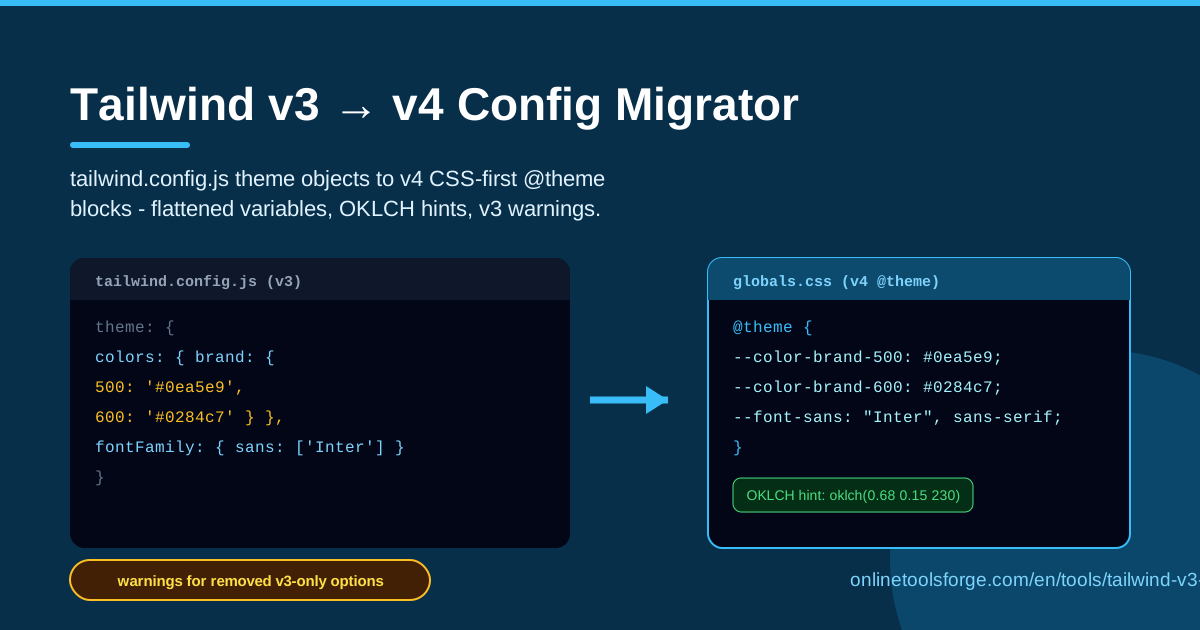
Table of Contents
Tailwind CSS v4 brought the biggest architectural shift in the framework's history: configuration moved out of a JavaScript file and into CSS itself. The familiar tailwind.config.js theme object is now a CSS-first @theme block built on native custom properties. That is great news for performance and portability, but it means every existing project has a migration waiting. The free Tailwind v3 to v4 Config Migrator takes the tedium out of that work — paste your theme object and it generates a ready-to-use @theme block, complete with flattened color and font variables, automatic OKLCH hints, and warnings for v3-only options that no longer exist.
Most of this migration is mechanical, which makes it perfect for automation. Nested color scales like colors.brand.500 become --color-brand-500, and font stacks under fontFamily become --font-sans and friends. Doing that by hand across a large theme is slow and easy to get wrong; the migrator handles the flattening, naming, and syntax for you in seconds.
Everything runs entirely in your browser — your config never leaves your machine, there is no signup, and you can re-run the tool as often as you need.
Why Use Tailwind v3 to v4 Config Migrator?
- Save hours of manual renaming. A theme with several color scales and font families can contain hundreds of entries. The tool converts all of them into properly namespaced CSS variables at once.
- Get v4 naming right the first time. v4 expects --color-* and --font-* style namespaces. One typo in a variable name silently produces missing utilities, so generating the names automatically removes a whole class of bugs.
- Make sense of the OKLCH shift. Tailwind v4's default palette uses the OKLCH color space. The tool adds OKLCH hints for converted colors so you can modernize your palette deliberately instead of guessing.
- Catch v3-only options before they break your build. Options like safelist or corePlugins have no direct v4 equivalent. The tool warns you about them so nothing slips through unnoticed.
- Zero setup, zero risk. No npm install, no CLI flags, no account. Open the page, paste, copy the output.
- Learn as you convert. Because the output follows Tailwind's own conventions, the tool doubles as a living reference for how v4 themes should be written.
Key Features
| Feature | What it does |
|---|---|
| Theme object input | Paste the theme object from your tailwind.config.js directly into the editor. |
| @theme block generator | Produces a complete v4 CSS-first @theme block you can drop into your stylesheet. |
| Flattened variables | Converts nested keys into --color-brand-500 style names across color, font, and other namespaces. |
| OKLCH hints | Suggests OKLCH approximations for converted colors alongside the original values. |
| Removed-option warnings | Flags v3-only configuration options that have no v4 equivalent. |
| Fully browser-based | All conversion happens locally in your browser — nothing is uploaded. |
A few details worth knowing:
- The flattening follows Tailwind's official conventions, so a nested colors.primary.500 and a top-level scale entry both end up as the same --color-primary-500 variable.
- OKLCH hints are advisory — your original hex or RGB values stay valid in v4, so you can adopt the new color space gradually.
- Warnings are actionable, pointing you at exactly what needs a manual decision before cutover.
How to Use Tailwind v3 to v4 Config Migrator
- Copy your theme object. Open tailwind.config.js and copy the contents of the theme (and theme.extend, if you use it) object. You do not need the rest of the file — plugins and content globs are out of scope.
- Paste it into the tool. Drop the object into the input panel on the migrator page and let it generate the @theme block.
- Review the OKLCH hints. For each converted color you will see a suggested OKLCH value. Decide whether to keep the original value or adopt the hint — either works in v4.
- Fix the warnings. Read any warnings about v3-only options and resolve them using the recommended replacements before you cut over.
- Paste into your global CSS. Copy the finished @theme block into your main stylesheet (typically globals.css or app.css, right after the @import "tailwindcss"; line) and delete the corresponding parts of the old config.
What Changes in v4 CSS-First Configuration
From JavaScript to CSS. In v3, design tokens lived in tailwind.config.js and Tailwind compiled them into utilities. In v4, a single @import "tailwindcss"; replaces the three @tailwind directives, and the @theme block is where tokens are defined. The config file becomes optional — anything expressible in @theme needs no JavaScript at all.
Flattened variable naming. v3 allowed deep nesting (colors.brand.500) and an extend layer. v4 flattens everything into namespaced CSS custom properties: colors use --color-*, font families use --font-*, font sizes use --text-*, and so on. There is no extend — you simply write more variables. Because these are real CSS variables, you can read or override them anywhere in your own styles, not just inside Tailwind classes.
Why OKLCH matters. v4's default palette is authored in OKLCH, a perceptually uniform color space. Equal numeric steps produce visually equal lightness steps, gradients interpolate more smoothly, and wide-gamut displays can show more saturated color. The tool's OKLCH hints give you a starting point if you want a custom palette to share those benefits — while plain hex and RGB remain perfectly valid.
Options that disappeared. Several v3 config keys have no v4 equivalent: safelist is replaced by @source inline(...); corePlugins is gone because v4 has no plugin toggles of that kind; the separator option was removed entirely; and darkMode: 'class' becomes a @custom-variant dark declaration in CSS. The migrator warns you about these rather than silently dropping them.
Practical Use Cases
Upgrading an Existing App
If you maintain a production app on Tailwind v3, start by running its theme object through the migrator. You get a complete @theme block plus a checklist of removed options, so the cutover becomes a reviewable diff instead of an afternoon of guesswork.
Auditing a Large Theme Object
Teams accumulate years of color tweaks: near-duplicate grays, one-off blues, a font stack nobody remembers adding. Converting the whole object surfaces every token in one flat list, making it easy to spot duplicates and dead entries before they become CSS variables.
Learning v4 Conventions
If you are new to v4, generating output from a config you already understand is one of the fastest ways to internalize the naming. Watching colors.surface.raised become --color-surface-raised teaches the pattern better than any table of examples.
Keeping Design Tokens in Sync
Some teams keep tokens in a design system repo and mirror them into Tailwind. Re-running the migrator whenever the source of truth changes keeps the v4 @theme block aligned with your design tokens for minimal effort.
Best Practices
- Migrate incrementally. Convert one namespace at a time — colors first, then fonts — instead of rewriting everything in a single commit.
- Keep the v3 config until cutover. Leave tailwind.config.js in place while old classes still resolve, and delete it only after the @theme block is verified.
- Run the official codemods alongside. Tailwind's own upgrade tooling handles class renames and template changes; this migrator covers the theme side. They complement each other.
- Test visually against screenshots. Compare key pages before and after — color-space differences are subtle and easiest to catch side by side.
- Adopt OKLCH selectively. Keep critical brand colors on their original values until you have checked them on real screens; switch secondary tokens first.
- Treat the output as source code. Commit the generated @theme block and review it like any other change, not as throwaway output.
Ready to start? Open the Tailwind v3 to v4 Config Migrator, paste your theme object, and walk away with a clean @theme block in under a minute.
Related Tools You Might Like:
- Color Converter — convert colors between HEX, RGB, HSL, and OKLCH.
- CSS Formatter — tidy up your generated CSS before committing it.
- Box Shadow Generator — design shadows visually and export CSS.
Happy migrating!
Frequently Asked Questions
Q: Does the migrator upload my tailwind.config.js anywhere? A: No. The conversion runs entirely in your browser, so your configuration never leaves your machine.
Q: Can it migrate the whole config file, including plugins and content paths? A: The tool is focused on the theme object, which is where CSS-first migration actually applies. Plugins, content globs, and other file-level options are handled separately by Tailwind's own upgrade tooling.
Q: What exactly are the OKLCH hints? A: For each converted color, the tool also suggests an OKLCH approximation. It is a suggestion, not a replacement — the original value stays valid in v4, and you decide whether to adopt OKLCH.
Q: Do I need to delete my v3 config immediately? A: No. Keep the legacy config during a gradual migration and remove it only once your @theme block is complete and verified in the running app.