Agents MD Generator: Create AGENTS.md Files for Claude Code, Cursor, Codex and GitHub Copilot
Generate AGENTS.md instruction files for AI coding agents like Claude Code, Cursor, Codex, and GitHub Copilot. Pick sections, fill in commands and conventions, preview live, and download a ready-to-commit file. Free, private, and works offline.
Free Interactive Tool
AGENTS.md Generator
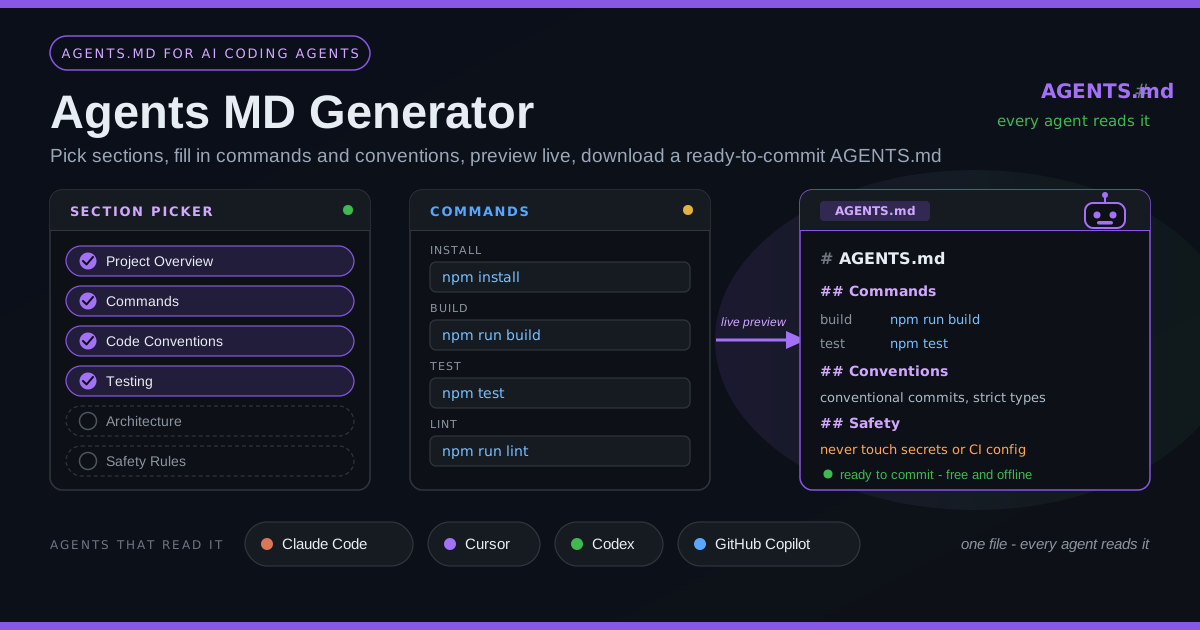
Build AGENTS.md instruction files for AI coding agents like Claude Code, Cursor, Codex, and GitHub Copilot. Pick sections, fill in commands and conventions, and download a ready-to-commit file.
Table of Contents
AI coding agents are now the newest member of almost every development team. Claude Code, Cursor, Codex, and GitHub Copilot read code, propose changes, run commands, and open pull requests — yet dropped into an unfamiliar repository, each faces the question any new contributor would: how do I build, test, and behave here? Agents MD Generator answers that in minutes with a ready-to-commit instruction file. AGENTS.md is the emerging standard that tells every AI coding agent how your project builds, tests, and behaves.
The idea is refreshingly simple: one Markdown file at your repository root describing the project to any agent that visits. Supporting agents read it automatically, so there are fewer wrong assumptions, fewer invented commands, and fewer pull requests that miss your house style. The generator turns writing one into a guided workflow: pick your sections, fill in real commands and conventions, watch the live preview, download the result — 100% client-side, private, free, and offline.
Why Use Agents MD Generator?
- One file, every agent reads it. AGENTS.md is tool-agnostic: the same file guides Claude Code, Cursor, Codex, and GitHub Copilot, so you keep one source of truth instead of scattered prompt snippets.
- Agents stop guessing your commands. Without guidance they try make, then npm, then whatever they remember. Exact build, test, and lint commands stated up front remove the biggest source of wasted agent cycles.
- Structured sections keep it complete. Toggle only what you need: overview, commands, conventions, testing, architecture, workflow, safety rules.
- Live preview removes the guesswork. The file you commit is exactly what you reviewed, not an approximation.
- Total privacy. Free, no account, and 100% client-side — project details never touch a server.
- Ready to commit. The download is a clean, well-formed AGENTS.md for your repository root.
Key Features
| Feature | What it does |
|---|---|
| Section picker | Toggle the sections you want and skip the rest. |
| Commands inputs | Exact install, build, test, and lint commands, so agents verify work correctly. |
| Conventions fields | Naming rules, style preferences, and error-handling expectations in one format. |
| Live preview | Watch the file assemble in real time as you edit. |
| One-click download | A ready-to-commit AGENTS.md in standard Markdown. |
| 100% client-side | Nothing is uploaded, logged, or stored. |
- The defaults are sensible: empty fields fall back to widely used values like npm install and npm test.
- The safety rules section records never-touch zones — secrets, CI config, destructive commands.
How to Use
- Open the tool at Agents MD Generator. The editor and live preview load instantly.
- Pick your sections. A small library may need only overview, commands, and testing; a monorepo wants architecture and safety rules too.
- Fill in project details. Name, one-line description, primary language, and your exact install, build, test, and lint commands.
- Describe conventions and workflow. Add naming rules, style guidelines, testing expectations, and never-touch rules.
- Review and download. Adjust anything awkward in the preview, then download, place it at your repository root, and commit.
What Belongs in AGENTS.md
A good AGENTS.md reads like an onboarding checklist for a careful new engineer. The most effective files cover five areas.
Project overview. Two or three lines on what the project is, its stack, and hard constraints. This anchors every other instruction.
Setup and build commands. The exact install and build sequence. Precision matters most here: npm ci versus npm install, or a required Node version, is exactly what agents get wrong alone.
Test and verification commands. How the agent proves its work — where tests live, whether a database is needed, which variables are required. Write one rule plainly: never mark work complete until build and tests pass locally.
Conventions. Naming patterns, import order, error-handling style, commit format. Agents follow these when stated plainly.
Do-not-touch rules. Boundaries that keep everyone safe: never edit generated files, never run destructive commands, never commit secrets.
Without this file, agents misbehave predictably: they guess build commands from stale memory, run the wrong test runner or none, invent file paths, and reimplement utilities that already exist nearby. Almost every frustrating agent experience traces back to missing context that AGENTS.md provides in one line.
Keep it short and current. A 300-line AGENTS.md is a prompt nobody reads — including the model. Aim for one screen of high-signal content and update it the day your tooling changes; a stale instruction is worse than none, because agents trust it.
On layering: AGENTS.md, CLAUDE.md, and .cursor/rules complement rather than compete. AGENTS.md is the open, tool-agnostic baseline any agent reads. CLAUDE.md adds Claude-specific personalization; .cursor/rules configures Cursor in depth. Put shared facts in AGENTS.md and reserve vendor files for tool-specific behavior — switching agents then costs nothing.
Here is a small annotated excerpt of what the generator produces:
# AGENTS.md

## Commands

- Install dependencies: `npm ci`
- Build: `npm run build`
- Run tests: `npm test`

Never mark work complete until the build
and test commands above pass locally.

## Safety Rules

- Never commit secrets or .env files.
The commands list is the highest-value block — it turns your real workflow into something an agent executes verbatim. The closing sentence sets an expectation for the whole session, and the safety rules draw lines the agent must not cross.
Practical Use Cases
Open-Source Repositories: Contributors Agents Read It Too
Public repositories now receive agent-authored pull requests as often as human ones. A root AGENTS.md quietly raises their quality: every contributor's agent learns the real commands and conventions before writing code — the cheapest documentation a maintainer can add.
Monorepos
Monorepos are where agents struggle most — one app uses pnpm, another Poetry. A root file sets the global picture while per-directory AGENTS.md files override commands per package. Agents read the nearest applicable file, giving you a shared baseline plus local precision.
Personal Projects
Even a solo repository benefits. Switch between machines and tools — Cursor at your desk, Claude Code on your laptop — and never re-explain your setup. Returning after months away, the file reminds you how the project builds.
Enterprise Standardization
For teams, AGENTS.md becomes policy. A reviewed template across repositories ensures every session follows the same verification steps and respects the same boundaries — one auditable place where rules like "never run migrations automatically" live.
Best Practices
- Commit it at the repository root. It only works where agents look, and versioning delivers it to every contributor through a normal pull.
- Keep commands exact and tested. Run every command you write before committing; a broken command wastes more time than no file.
- Update when tooling changes. Treat the AGENTS.md update as part of the same change, the way you update a README.
- Keep it under one screen. High-signal beats exhaustive; link to deeper docs instead of pasting them in.
- State safety rules explicitly. Name the directories, files, and commands the agent must never touch.
- Review changes like code. Agents follow the file literally, so careless instructions propagate into every future session.
Try It Now
A well-written AGENTS.md may be the highest-leverage file you add to a repository this year. Open the Agents MD Generator, pick your sections, fill in real commands, and download a ready-to-commit file in about five minutes — free, private, offline.
Related Tools You Might Like:
- Cursor Rules Generator — generate .cursor/rules files for Cursor-specific configuration.
- GitHub Actions Workflow Generator — scaffold CI workflows running the same commands your agents run.
- Markdown Preview — render your AGENTS.md as agents and readers will see it.
Happy building, human and agent alike.
Frequently Asked Questions
Q: What is AGENTS.md and which tools actually read it?
A: It is an open convention for a Markdown file at your repository root that gives AI coding agents project-specific instructions. Claude Code, Cursor, Codex, and GitHub Copilot's coding agent read it automatically when present; tools that ignore it are unaffected.
Q: Does the generator upload my project information anywhere?
A: No. It runs 100% client-side in your browser. Everything stays on your device, the file is generated locally, and it works offline once the page has loaded.
Q: Can I use AGENTS.md and CLAUDE.md together?
A: Yes, and it is a common pattern. Put shared, tool-agnostic facts in AGENTS.md, and use CLAUDE.md for Claude-specific behavior or preferences. Vendor files extend the baseline rather than duplicate it.
Q: How long should my AGENTS.md be?
A: Short enough to read in one screen. Focus on exact commands, a brief overview, essential conventions, and safety rules; link to deeper documentation rather than duplicating it.