Bicycle Gear Calculator: Gear Inches, Development and Gain Ratios Explained
Use the free Bicycle Gear Calculator to compute gear inches, development meters, gain ratios and speed at cadence from your chainring, cassette and wheel size — instantly in your browser.
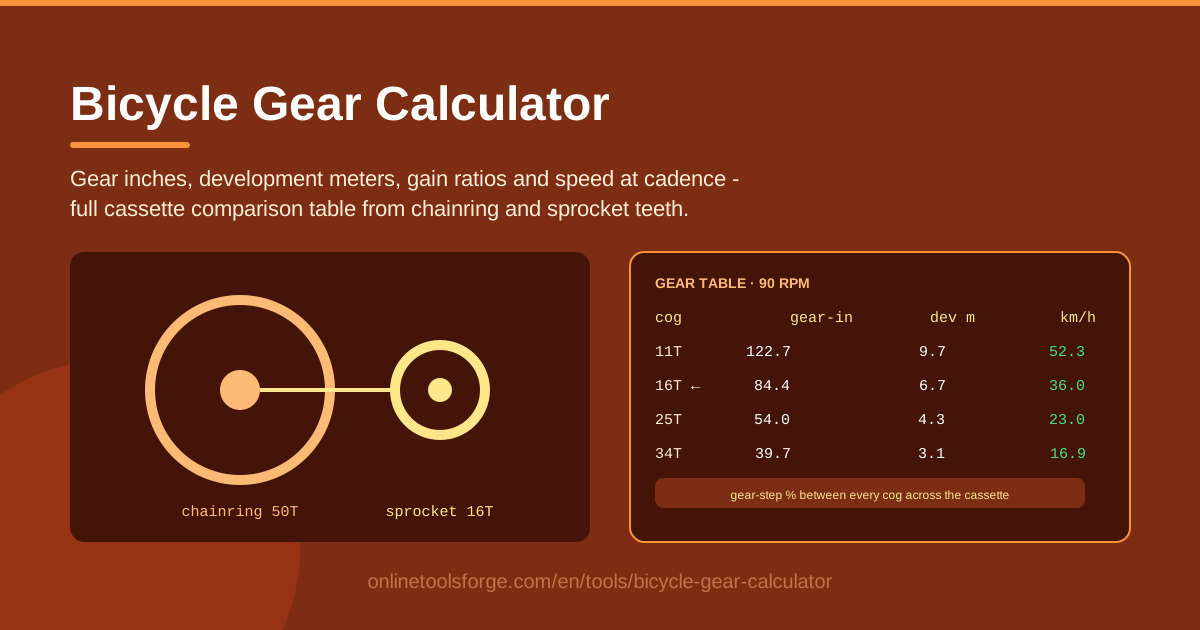
Table of Contents
Gear ratios shape how a bike feels long before frame material or aerodynamics get a vote. Whether you are grinding up a mountain pass, spinning on the flats, or deciding which cassette to buy next, the numbers behind your drivetrain tell you exactly what to expect. The free Bicycle Gear Calculator on Online Tools Forge turns those numbers into instant answers: enter chainring teeth, sprocket teeth, wheel size and crank length, and it computes gear inches, development meters, gain ratios and your real speed at any cadence.
Most riders pick gears by feel, or by copying what their riding friends use. That works until it doesn't — until you stall on a climb you should have cleared, or spin out on a descent because your top gear is too small. A gearing chart removes the guesswork. The calculator also builds a gear-step comparison table across a full cassette, showing how every shift changes your speed and whether two of your gears are so close together they are effectively the same gear.
Because all the math runs client-side in your browser, results update the moment you change an input, there is nothing to install, and no data ever leaves your device.
Why Use Bicycle Gear Calculator?
- Translate tooth counts into meaning. "50x11" tells a mechanic everything and most riders nothing; gear inches and development meters convert raw ratios into distances you can picture.
- Plan a cassette before you spend money. Compare an 11-28 against an 11-34 on screen instead of discovering the difference on a 10% gradient.
- Match gears to your cadence. The speed-at-cadence output shows how fast each gear carries you at the rpm you genuinely ride.
- Spot gapped or redundant gears. The gear-step table exposes jumps too wide to spin smoothly, or so narrow they are not worth a shift.
- Compare bikes on equal terms. Gear inches let a 650b gravel bike and a 700c road bike be judged by the same yardstick.
- Fast, private and free. Pure client-side math: instant updates, no sign-up, and no data leaves your device.
Key Features
| Feature | What it does |
|---|---|
| Chainring and sprocket input | Enter any tooth counts, from a road 53x11 to a mountain 30x52. |
| Wheel size selection | Choose your exact wheel and tyre size so results match your bike. |
| Crank length setting | Add crank length to unlock true gain ratios, not just ratios. |
| Gear inches | See the classic "equivalent high-wheel diameter" for every gear. |
| Development meters | Read the distance the bike rolls per full crank revolution. |
| Gain ratio | Compare gearing across any wheel size and crank length fairly. |
| Speed at cadence | Type your rpm and get a real speed for every gear. |
| Gear-step table | View the whole cassette with the percentage jump between gears. |
Three details worth knowing:
- Everything recalculates live — change the chainring once and the entire table, including step percentages, updates instantly.
- The step-percentage column is where cassette decisions are made, because it shows whether a shift costs you 8% of your speed or 18%.
- Running entirely client-side, the tool keeps working on a weak connection and respects your privacy by design.
How to Use Bicycle Gear Calculator
- Enter your chainring teeth. Use 50 for a standard road double, 34 for a compact, or 38-42 for a 1x gravel or mountain setup.
- Add the sprocket and wheel size. Enter the cassette teeth you want to analyse — or step through the full cassette, such as 11 to 34 — and pick your wheel and tyre size.
- Set your cadence. Type the rpm you naturally hold, typically 80-95 for road riding; the tool converts it into speed for every gear.
- Read the table. Gear inches, development meters, gain ratio and speed appear side by side for the gearing you entered.
- Compare the steps. Scan the percentage column: jumps above roughly 15% feel like real drops on climbs, while jumps under 8% may be gears you never need.
Gear Inches, Development and Gain Ratios
These three figures describe the same gear from different angles, and each earns its place.
Gear inches: a unit older than the safety bicycle. It dates to the high-wheelers of the 1870s, where pedals attached directly to a giant front wheel, so a bigger wheel simply went further per stroke and riders spoke of a "60-inch machine." When chain drives arrived, engineers described a modern gear by the high-wheel it would replace: multiply the chainring-to-sprocket ratio by the wheel diameter in inches. A 50x11 on a 700x25c tyre works out to roughly 120 gear inches — as if riding a penny-farthing with a five-foot wheel. British and American riders still quote this figure first.
Development: the metric view. European riders mostly quote development, the distance the bike rolls in meters per full crank revolution. It is the same ratio multiplied by tyre circumference instead of diameter: a 50x11 on a 700c wheel develops about 9.6 meters per stroke. Speed falls straight out of it — development times cadence times 60, divided by 1,000, gives km/h. At 90 rpm, 9.6 meters of development is about 52 km/h.
Gain ratio: the great equaliser. Popularised by Sheldon Brown, the gain ratio divides the wheel radius by the crank length, then multiplies by the gear ratio. With 170 mm cranks and a 336 mm wheel radius the factor is about 2.0, so a 50x11 lands near 9.0. Because crank length enters the formula, a rider on 165 mm cranks does genuinely different work than one on 175 mm cranks in "the same gear," and gain ratio is the only figure that captures it. It is also the fairest way to compare a folding bike against a 29er.
What cadence does to real speed. Gear inches never change; your speed does. Every gear converts your cadence into velocity, so the same 34x28 that holds 18 km/h at 80 rpm approaches 21 km/h at 95 rpm. The calculator's speed column makes that trade visible and explains why one cassette feels perfect to a spinner and undergeared to a masher.
Gear-step percentages: why jumps matter on hills. Each shift should feel like a small, predictable change in effort, normally quoted as a percentage. A 12-to-13 sprocket jump is about 8% — comfortable mid-climb. Wide cassettes trade range for size: the 28-to-32 jump on an 11-34 exceeds 14%, enough to break your rhythm on a steep gradient. Checking steps is how you decide whether a big cassette is rideable for you or just reassuring on paper.
1x versus 2x thinking. A 1x drivetrain trades close steps for simplicity: a 42t ring with a 10-52 cassette spans a similar overall range to a road double, but mid-cassette steps often exceed 10-12%. A 2x setup gives smaller, denser steps at the cost of a front derailleur. There is no universal winner — model both against the terrain you actually ride and let the step table decide.
Practical Use Cases
Choosing a Cassette for Climbing
Take a local climb averaging 7% for six kilometres on a 50/34 with an 11-28. Your lowest gear, 34x28, is about 32 gear inches and holds roughly 11.5 km/h at a sustainable 75 rpm. If that pace suits you, the 11-28 stays. If you creep below 10 km/h and stall, the calculator shows exactly what a 32 or 34 sprocket buys you — 34x34 drops the floor to about 26.5 gear inches — and what its wider steps cost on the way back down.
Gravel Gearing Decisions
Gravel riders juggle two demands: low gears for steep, loose climbs and top gears that survive the road sections between trails. Model a 40x10-44 mullet against a 42x10-36 and the tool shows each setup's low end in gear inches, plus the top-end speed you give up at 90 rpm. Often a two-tooth ring change shifts the whole window by five percent — cheaper than a new cassette, and sometimes the entire fix.
Setting Up a Single-Speed
With one gear there is nowhere to hide, so let numbers decide. You want a ratio that keeps flat-road cadence in the 80-90 rpm zone while still letting you crawl over the odd rise. Gear inches between roughly 65 and 72 suit many urban single-speeds; hillier cities often call for 55-60. Enter candidates and check the speed-at-cadence column against the streets you actually ride.
Comparing Bikes Before You Buy
Spec sheets advertise tooth counts, which makes cross-bike comparison nearly useless: a 48x32 gravel bike and a 50/34 road bike look similar until both are converted to gear inches on their own wheel sizes. Run each drivetrain through the calculator and you will often find the "gravel bike" geared a few percent higher across the board — an insight worth more than any review.
Best Practices
- Use your real wheel diameter. A 700x23c and a 700x40c differ by almost two gear inches at the same ratio, so pick the exact tyre size.
- Check the gears you actually ride. Find the three or four gears your regular loop uses and read those rows closely instead of the whole table.
- Keep steps under about 15%. Beyond that, most riders lose usable cadence mid-climb; wide jumps should be a deliberate trade-off, not an accident.
- Let cadence comfort set the numbers. Gear for the rpm you can hold, not the rpm a training plan says you should.
- Re-run after every change. New tyres, a cassette swap or a ring change all move your figures; thirty seconds keeps your mental model honest.
Ready to stop guessing about your gearing? Open the Bicycle Gear Calculator, enter your drivetrain, and see every gear inch, development meter and cadence speed in seconds — free, private and entirely in your browser.
Related Tools You Might Like:
- VO2 Max Calculator — estimate your aerobic capacity and train in the right zones.
- Speed Converter — flip between km/h, mph and other speed units instantly.
- Unit Converter — convert lengths, weights and more for any spec sheet.
Happy riding and smooth shifting!
Frequently Asked Questions
Q: What exactly is a gear inch? A: A gear inch is the diameter of a high-wheel bicycle's front wheel that would travel the same distance per pedal revolution as your gear. It equals the chainring-to-sprocket ratio times the wheel diameter in inches, and it remains the most common way to compare gearing between different bikes.
Q: Do I need to enter crank length? A: Not for gear inches or development, which depend only on the gear ratio and wheel size. Crank length is required for gain ratios, so skip it if you only need those two figures — though entering it takes seconds and makes cross-bike comparisons more honest.
Q: What gear inches should I aim for when climbing? A: Most recreational road riders are comfortable between roughly 22 and 28 gear inches on long climbs, while fit riders manage fine at 30 or above on shorter gradients. Gravel and loaded touring setups often drop below 20. The right number depends on your sustainable cadence and the gradient — exactly what the speed-at-cadence column is for.
Q: Why does my real speed differ from the calculator? A: The tool assumes you hold the cadence you entered, with no wind, using the nominal wheel size you selected. Real riding adds headwinds, rolling resistance and a surging cadence, so treat the figures as clean reference points rather than a prediction of any single ride.