Browser Feature Detector: See What Your Browser Really Supports
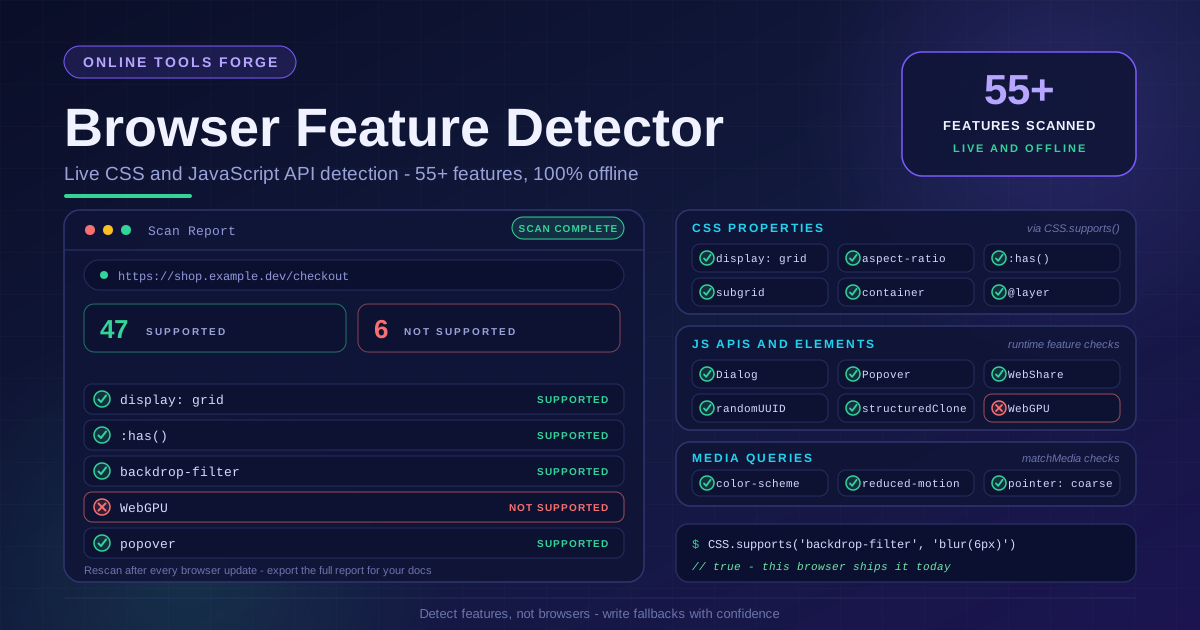
Live-detect which CSS and JavaScript APIs your current browser supports via CSS.supports and feature checks — 55+ features scanned offline, 100% client-side.
Free Interactive Tool
Browser Feature Support Detector
Live-detect which CSS, JavaScript, and HTML features your current browser supports via CSS.supports and feature checks — 55+ features scanned instantly, fully offline.
Table of Contents
Support tables describe browsers in general; your users browse with one browser in particular. The Browser Feature Detector closes that gap: it live-scans your current browser for 55+ CSS properties, JavaScript APIs, and media queries, then reports what works and what does not — grouped, counted, and ready to export. Everything runs offline, with no upload and no account.
caniuse tells you what the tables say — this tool tells you what the browser in your hand actually does, live and offline. The distinction matters because vendors ship behind flags and staged rollouts, and enterprises pin old versions — the gap between "supported in Chrome 140" and "supported in this person's Chrome right now" is where compatibility bugs breed.
Why Use Browser Feature Detector?
- Ground truth instead of documentation. The scan asks the browser itself, so answers reflect flags, rollouts, and enterprise policies — everything a table cannot see.
- Runs completely offline. Once loaded, detection needs no connection — ideal for kiosks and conference Wi-Fi.
- Grouped, scannable results. Findings are organized into CSS properties, JavaScript APIs, and media queries, so you can jump straight to the layer you ship.
- Instant counters. Supported and unsupported totals describe the browser's overall shape in seconds.
- Exportable report. Copy the findings into a ticket, pull request, or compatibility notes.
- 100% client-side. No telemetry, no upload, no account — the browser is only asked about itself.
Key Features
| Feature | What It Does | Why It Matters |
|---|---|---|
| Automatic scan | Detects features on page load | Zero setup, results in one click |
| CSS.supports() checks | Tests property and value pairs directly | Real answers from the CSS engine |
| JavaScript API checks | Probes APIs with typeof checks | Confirms runtime callability |
| Media query checks | Evaluates matchMedia conditions | Shows environmental adaptation |
| Supported counters | Totals supported and unsupported items | Judge browser modernity |
| Export and rescan | Copy-ready report, one-click re-detect | Keep docs current after updates |
- Facts over folklore. Every result comes from the browser's own engines — no cache, no stale database.
- Readable output. Each finding names the feature and status, readable by teammates who never opened the tool.
How to Use the Browser Feature Detector
- Open the tool. Navigate to the Browser Feature Detector in the browser you want to inspect — desktop Chrome, an Android WebView, a kiosk browser.
- Let the scan run. Detection starts automatically on page load, and the counters fill in within moments.
- Review the groups. Walk through CSS properties, JavaScript APIs, and media queries separately.
- Inspect the misses. Check whether a missing feature blocks what you planned or merely rules out an optimization.
- Export or rescan. Copy the report into documentation, then Rescan after browser updates or device switches.
Feature Detection Done Right
What CSS.supports() and runtime checks test
CSS.supports('display', 'grid') asks the CSS engine one question: would you accept this declaration? The tool uses it for every CSS entry, so answers reflect parser support — whether a rule can apply. JavaScript APIs are probed at runtime: does window.HTMLDialogElement exist, is 'popover' in HTMLElement.prototype? These are the checks production code should perform, demonstrated live.
Why user-agent strings lie
Parsing navigator.userAgent fails three ways. UA strings are frozen chaos — most browsers still claim to be Mozilla, AppleWebKit, and "like Gecko" at once. Worst of all, a UA string describes what the vendor shipped, not what the user enabled: a policy or an old GPU driver can make a nominally supported feature fail. Feature detection never asks who the browser claims to be — it verifies what the browser can do.
Reading the groups: CSS, JavaScript APIs, and media queries
The CSS group shows which declarations will be honored. The JavaScript APIs group shows which platform capabilities you can call — dialogs, popovers, structured cloning. The media queries group shows how the browser responds to its environment: dark mode, reduced motion, pointer precision. A browser can be strong in one group and weak in another; that profile tells you what to ship.
From detection to fallbacks with @supports
Write a baseline every browser renders, then layer the modern path inside @supports (display: grid) and @supports (backdrop-filter: blur(4px)). Passing browsers get the enhancement; the rest silently keep the baseline. In JavaScript, check for the API and fall back otherwise. Scan your target browser and you know which blocks activate — and which fallbacks still carry traffic.
Test on the devices your users own
A scan on your laptop proves one thing about one machine. Open the tool on the aging Android phone in your drawer, the office iPad, and the corporate laptop on an ESR build. Each scan takes seconds, and the differences you find are what your users experience.
Practical Use Cases
Deciding whether to ship a modern feature
Run the detector on the browsers your customers use. If every target passes, ship the modern path behind a @supports guard and close the debate; if some fail, the scan shows which fallbacks still need to work.
Debugging "works on my machine" reports
A ticket says a dialog renders as a plain div on one customer's machine. Have the reporter open the detector — a missing API turns a vague mystery into a one-line diagnosis.
Writing fallback CSS with confidence
Before deleting an old vendor prefix or float-based fallback, verify the modern replacement works in browsers still visiting your site. A supported scan justifies the @supports gate; a missing scan explains why old paths still carry traffic.
Documenting a support matrix
Run the detector on each supported browser, export the report, and attach it to the compatibility page — evidence instead of folklore, refreshed after any browser update.
Best Practices
- Detect features, not browsers. Never branch on user-agent strings; branch on what the runtime proves it can do.
- Gate production code with @supports. Scan results tell you which blocks to write, so enhancements activate only where they work.
- Keep a baseline, enhance above it. Ship a path that works without any detected feature, then layer improvements.
- Re-check after OS or browser updates. Support moves; a Rescan each cycle keeps assumptions current.
- Scan on real hardware your users own. Laptop results never fully predict phone, tablet, or kiosk.
- Export and version findings. A dated report turns "it should work" into "here is what we verified."
Try the Browser Feature Detector Today
If you have ever shipped against a support percentage and hoped for the best, flip the workflow: open the Browser Feature Detector, scan the browsers you care about, and let the counters decide. Free, instant, and fully offline — guesswork becomes evidence in about five seconds.
Related Tools You Might Like:
- CSS Selector Tester — test selectors against pasted HTML with live highlighting and match counts.
- CSS Unit Converter — convert between px, rem, em, pt, and more without leaving the browser.
- Regex Data Generator — generate realistic test data from any regex pattern instantly.
Detect first, then ship — and may every fallback you write be the one nobody ever needs.
Frequently Asked Questions
Q: Does the tool upload anything about my browser or device?
A: No. The entire scan runs client-side in your tab using CSS.supports, runtime checks, and matchMedia. Nothing is transmitted or stored, which is why the tool works fully offline.
Q: Why does a scan disagree with support tables?
A: Support tables describe releases in general; the scan describes the instance in front of it. Flags, enterprise policies, and old drivers can leave a nominally supported feature missing. When they disagree, trust the scan — it is what your code will experience.
Q: What exactly does CSS.supports() verify?
A: It asks the CSS engine whether it accepts a property and value pair, such as display and grid. True means the declaration parses and is honored; false means it is discarded. The tool pairs these checks with object-level JavaScript checks.
Q: How often should I rescan?
A: Rescan whenever the browser or OS updates, whenever you switch devices, and before releases that depend on a specific feature. The scan takes seconds — far cheaper than debugging a bug found by a user.