Browser Fingerprint Checker: See Exactly How Trackable Your Browser Really Is
Run the free Browser Fingerprint Checker to reveal your canvas, WebGL, and audio fingerprints, installed fonts, screen details, timezone, and tracking entropy score — computed entirely in your own browser.
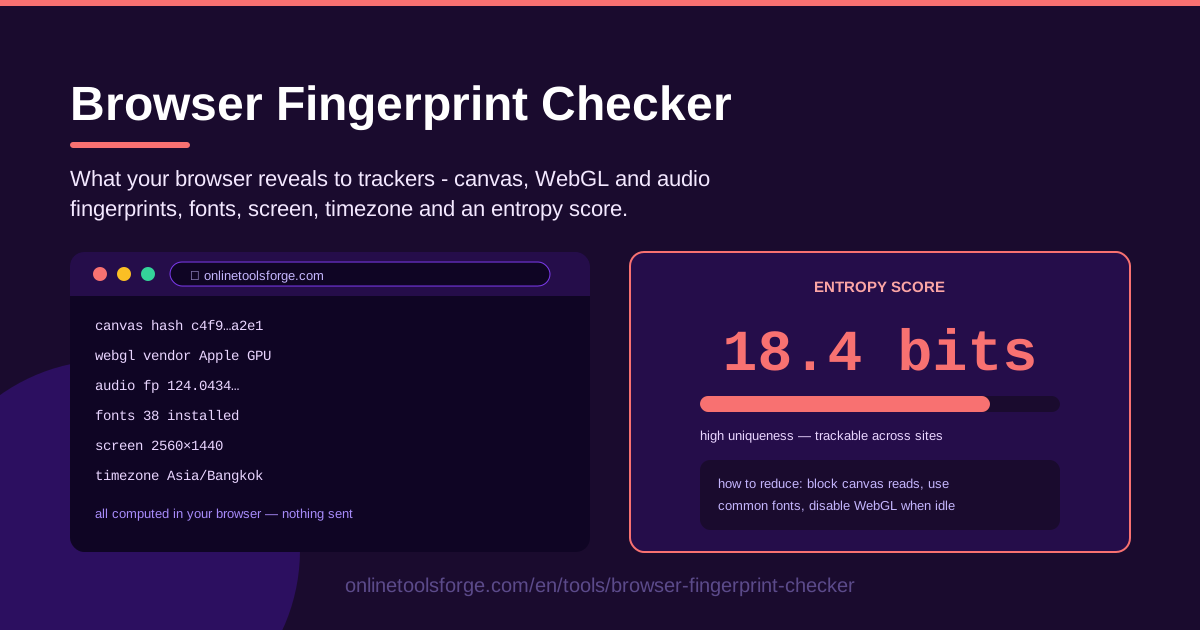
Table of Contents
Every time you visit a website, your browser quietly volunteers more than most people realize: details about your graphics hardware, installed fonts, screen size, timezone, and how it renders text and sound. None of this requires cookies, logins, or permission prompts. The Browser Fingerprint Checker lays it all out in one glance, computed entirely on your own machine.
This matters because fingerprinting has replaced the cookie as the tracking technology of choice. Cookies can be deleted and browsers increasingly block them, but a fingerprint is rebuilt from scratch on every visit. If your attributes form a rare pattern, trackers recognize you across sites without storing anything on your device.
The tool answers "how unique am I?" directly. It scans the same signals trackers use, then distills them into an entropy score in bits with a plain-language interpretation of what that means for your anonymity. Everything runs locally; nothing is sent anywhere.
Why Use Browser Fingerprint Checker?
Plenty of sites demo fingerprinting; few are built around your privacy. Here is why this one is worth bookmarking:
- Local-only auditing. The scan runs entirely inside your browser; your canvas hash, font list, and entropy score never leave your device, so checking yourself creates no new data point.
- Entropy in plain language. A bit score with a uniqueness interpretation is actionable — you instantly know whether you are one browser among millions or a statistical outlier.
- Covers the signals that matter. Canvas, WebGL, and audio fingerprints are the hardest to fake casually; the tool surfaces all three alongside screen, timezone, and font data.
- Built for comparisons. Open it in Chrome, Firefox, Safari, Brave, or Tor and see which browser resists fingerprinting and which one broadcasts a unique signature.
- Verifies your defenses. Running an anti-fingerprinting extension? The tool tells you in seconds whether it truly randomizes or blocks what it claims.
- Free, instant, educational. No sign-up, no data collection — just an honest look at what your browser says about you.
Key Features
Each result maps to a real tracking signal:
| Feature | What it does |
|---|---|
| Canvas fingerprint hash | Hashes pixels from hidden graphics into a stable ID shaped by your GPU, drivers, and fonts. |
| WebGL vendor and renderer | Exposes your GPU's vendor and renderer strings, narrowing down your hardware. |
| Audio fingerprint | Hashes rounding differences from a tone pushed through your audio stack. |
| Installed fonts count | Counts fonts exposed to pages; unusual libraries are a strong signal. |
| Screen resolution | Reports display size and depth, which correlates with your device class. |
| Timezone | Shows the timezone your browser leaks, a quick geolocation hint. |
| Entropy score | Combines everything into a bits score with a uniqueness interpretation. |
Two results deserve special attention:
- The canvas hash is often the most identifying value on the page — two identical laptops can differ after one driver update.
- The entropy score is the headline: it turns a wall of technical attributes into one number you can reason about.
How to Use Browser Fingerprint Checker
The whole audit takes under a minute:
- Open the tool. Visit the page — nothing to install, nothing to configure. The scan starts immediately and computes everything locally.
- Review each revealed attribute. Walk the results: canvas fingerprint hash, WebGL vendor and renderer, audio fingerprint, installed fonts count, screen resolution, and timezone. Note anything more specific than expected, like an unusual GPU string.
- Read the entropy score. Your combined attributes become bits plus a uniqueness interpretation. Higher entropy means fewer people share your configuration — bad news for anonymity.
- Compare across browsers. Open the page in your other browsers and private windows. Values identical across sessions are exactly the ones tracking you.
- Apply reduction tips. Standardize your window size, trim exotic fonts, or switch to a fingerprint-resistant browser, then re-run to confirm your score drops.
How Fingerprinting Works Without Cookies
Fingerprinting works because browsers were built to be helpful, not private. Rendering and media APIs must produce output, and the microscopic differences are deterministic for your machine.
Canvas pixel hashing. Draw hidden text and shapes on a canvas, and the exact pixels depend on your GPU, drivers, anti-aliasing, and fonts. Two identical machines usually produce subtly different images, and that hash is stable across visits — a tracking ID no cookie jar requires.
WebGL renderer strings. The WebGL API exposes vendor and renderer strings for your graphics hardware, often naming a precise GPU model. Combined with how that GPU renders a 3D scene, it can pin down a specific hardware family.
Audio oscillator signatures. Your browser can generate a tone, process it through the audio stack, and measure the output. Floating-point rounding differences vary by OS and audio hardware, producing a compact, stable signature.
Font enumeration. Pages probe installed typefaces by measuring text rendered in each. Someone with 300 fonts, including obscure design faces, is far rarer than someone on system defaults.
Screen and timezone as entropy. Resolution, color depth, and timezone each contribute more bits. A 3440x1440 ultrawide in a small timezone is a far smaller crowd than 1920x1080 in a common one.
What bits mean for uniqueness. Each bit of entropy doubles the possible configurations. At 18 bits, your fingerprint matches roughly 1 in 260,000 browsers — in a city of a million internet users, you are effectively alone. At 30 bits, one in a billion. Uniqueness comes from the combination, not any single value.
Why local computation matters for the test itself. A fingerprint test that uploads your attributes has just done to you what trackers do. Because this tool computes everything in your browser, you get an accurate audit without donating a fresh fingerprint to anyone — including us.
Practical Use Cases
Verify a Privacy Browser or Extension Actually Works
Install a fingerprint-spoofing extension, open the tool, and check whether your canvas hash or WebGL strings genuinely changed — or were merely blanked in a way that is itself rare. Many extensions leak their presence through inconsistencies; this catches that fastest.
Compare Incognito Mode Against Normal Browsing
Private windows delete cookies, but fingerprints are rebuilt from hardware. Run the tool in a normal window, then incognito: if the canvas hash and entropy score match, incognito alone does not stop fingerprint tracking.
Test Anti-Fingerprint Tooling Before You Trust It
Before relying on a hardened profile or virtual machine for sensitive work, run the checker inside it. You want a commonly shared fingerprint or stable randomization — not a strange hybrid that stands out more than your original setup.
Security Awareness Training That Sticks
Nothing teaches fingerprinting faster than watching your own values appear on screen. Have a team open the tool, compare entropy scores, and discuss why deleting cookies was never enough.
Best Practices
- Blend in rather than stand out. Aggressively spoofed settings make you rarer and more trackable; aim to look like the most common configuration possible.
- Keep extensions minimal. Every extension can alter API behavior in detectable ways; fewer means a more ordinary fingerprint.
- Re-test after browser updates. Major updates can shift rendering behavior or reset settings, moving your fingerprint overnight.
- Remember your IP address matters too. A perfect fingerprint with a static home IP still identifies you; pair hygiene with a VPN or Tor.
- Treat the score as a trend. Watching entropy fall over time beats chasing one magic number.
- Share the tool, not your results. Scores help most when colleagues compare configurations, not when one hash gets pinned to an identity.
Ready to see what your browser is telling the world? Run the free Browser Fingerprint Checker now. It takes seconds, reveals your canvas, WebGL, and audio fingerprints alongside your tracking entropy score, and never sends a single byte anywhere.
Related Tools You Might Like:
- User Agent Parser — decode what your user-agent string reveals to every site you visit.
- Screen Resolution Checker — inspect the display details your browser reports.
- Timezone Converter — see how the timezone your browser leaks narrows down your location.
Stay safe out there!
Frequently Asked Questions
Q: What is a browser fingerprint? A: It is the set of attributes your browser reveals to websites — canvas rendering hash, WebGL vendor and renderer, audio stack behavior, installed fonts, screen resolution, and timezone. Together they act like a serial number identifying your device across sites without cookies or logins.
Q: Is my data sent anywhere when I use the Browser Fingerprint Checker? A: No. All fingerprint values and the entropy score are computed locally in your browser with client-side JavaScript. Nothing is transmitted, stored, or logged.
Q: What does the entropy score in bits actually mean? A: Each bit doubles the possible configurations. At 18 bits, roughly 1 in 260,000 browsers shares your fingerprint; at 30 bits, one in a billion. The tool interprets your score so you know whether you blend in or stand out.
Q: Can I make my fingerprint completely untrackable? A: Not completely, and chasing perfection can backfire — unusual settings make you more identifiable. Reduce entropy and look like a common configuration instead: mainstream privacy browser, minimal extensions, near-default settings, re-test after updates.