Bulk URL Opener: Open Long Lists of Links in New Tabs at Once
Free bulk URL opener guide. Paste a list of links, remove duplicates, and open everything in new tabs with batch pacing that stays friendly to popup blockers — 100% client-side.
Free Interactive Tool
Bulk URL Opener
Open multiple links in new tabs at once with dedupe and batch controls
Table of Contents
Every team has them: checklists of 20 URLs in a spreadsheet or shared doc — client dashboards to review, competitor pages to inspect, listings to verify. The links themselves are never the problem. Opening them one by one is the slow part: copy, switch tab, paste, wait, repeat — twenty times. The Bulk URL Opener collapses that ritual into one click — paste the list, press one button, and every link opens in its own tab.
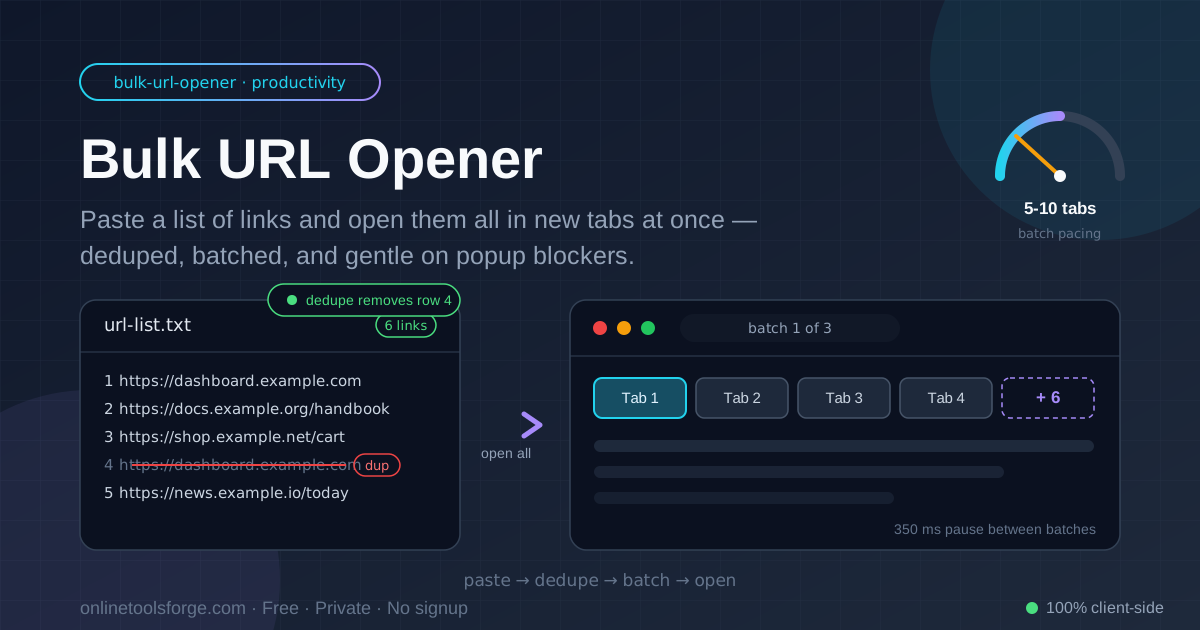
The tool is deliberately simple, and the details earn their keep. It parses URLs out of any pasted text, adds https:// to bare domains, removes exact duplicates before opening anything, and releases links in small, paced batches instead of one reckless burst — the difference between a smooth bulk-open and a popup blocker silently swallowing half your tabs. Everything runs 100% client-side, so your list never leaves your machine.
Why Use Bulk URL Opener?
- One click instead of twenty. Any list you open weekly — a morning dashboard set, a review queue, a batch of client sites — is a list worth automating. Paste it once and every link opens for you.
- Dedupe is built in. Lists collected from docs and spreadsheets almost always repeat links. Exact duplicates are stripped before opening, so you never waste a tab on the same page twice.
- Batch pacing beats popup blockers. Instead of firing 40 window.open calls in one burst and tripping the blocker, the tool opens links in configurable batches with short pauses between them.
- Normalization for messy input. Bare domains like example.com get https:// added automatically, and whitespace is trimmed so a sloppy copy-paste still parses cleanly.
- Private and client-side. Your list is processed entirely in your browser — nothing is uploaded or logged — safe for internal dashboards and client work.
- Free with no signup. Open the page, paste, go.
Key Features
| Feature | What it does |
|---|---|
| Paste-any-format input | Accepts one URL per line, or URLs scattered through text |
| Automatic dedupe | Removes exact duplicate links before anything opens (on by default) |
| Bare-domain repair | Adds https:// to entries like example.com/page |
| Batch-size control | Choose how many tabs open per batch |
| Paced opening | Opens each batch with a short pause, staying friendly to blockers |
| 100% client-side | All parsing and opening happens locally in your browser |
Two of these deserve a second look. Dedupe is on by default because repeated links are the norm in real-world lists. And batch size matters more than it sounds: a batch of 5–10 tabs per wave opens reliably, while an unpaced flood of 50 is exactly the pattern browsers are designed to interrupt.
How to Use
- Open the Bulk URL Opener in your browser.
- Paste your list into the text area — one URL per line is cleanest, but URLs buried in prose are extracted too.
- Keep Remove duplicates checked (on by default) so repeated links open only once.
- Set a batch size — 5 to 10 tabs per batch works well on most machines.
- Click Open all. The first time, your browser may ask permission to open multiple tabs — allow popups for this site once, and every later batch flows without prompting.
That is the entire workflow. If a few tabs ever fail to appear, it is the popup blocker — allow the site once and re-run.
Batches Beat Popup Blockers
Why browsers block mass tab opening
Popup blockers exist because unscrupulous pages once spawned dozens of windows per visit. Modern browsers therefore watch window.open behavior: a script that opens many tabs in one synchronous burst looks exactly like adware, so the browser silently refuses some or all of the calls. The refusal is quiet, too — you click Open, twenty tabs appear, and the rest vanish without an error.
How paced batches stay friendly
The Bulk URL Opener works with the browser instead of against it. It opens one small batch, waits a few hundred milliseconds, opens the next, and so on until the list is done. Each small batch looks like ordinary behavior, and the pause lets the browser settle between waves. The tool also reports how many links it has opened, so a blocked batch is easy to spot.
Dedupe and normalization
Dedupe runs on the parsed list before anything opens, so example.com pasted twice opens once — with https:// added automatically. Near-duplicates still matter, though: http versus https, and a trailing slash on one link only, count as different strings. Normalize to one scheme and slash style before pasting, and dedupe catches every repeat.
Workflow patterns that fit batching
Batching pairs naturally with how people work. A morning routine might be a saved list of ten dashboards opened as one batch, skimmed, and closed before the next task. A review queue works the same way: open five listings, work through them, close the tabs, open the next five. The batch size becomes your working unit.
Practical Use Cases
Daily dashboard routines
Most roles accumulate a set of pages checked every morning: analytics, project boards, support inboxes, status pages. Keep the list in a doc, paste it into the Bulk URL Opener, and your entire dashboard set is open before the first sip — seconds instead of five minutes of copy-paste.
Listing and audit checks
Marketplace sellers and SEO auditors often review 30–60 listing pages at once. Paste the export, let dedupe collapse the repeats, and open the set in batches of ten — the tab bar stays manageable, and each batch is a natural checkpoint for notes.
QA sweeps
Before a release, testers walk a known set of routes — landing pages, checkout steps, account settings. Bulk-open the route list and every page loads in seconds, while paced batches keep the machine responsive. Each batch becomes one pass of the sweep.
Link-in-bio management
Creators managing a link-in-bio page rotate links weekly: new drops, sponsor pages, seasonal campaigns. Before publishing, open the whole candidate list at once to verify every destination loads and redirects correctly — catching a dead link before your followers do.
Best Practices
- Keep your lists in a doc. A persistent checklist turns the tool into a one-paste routine instead of a rebuild-from-memory chore.
- Use batches of 5–10. Small waves open reliably, keep the browser responsive, and match a natural working rhythm.
- Let dedupe run before opening. Leave Remove duplicates on — the cheapest way to avoid wasted tabs and double work.
- Normalize before pasting. Pick one scheme (https://) and one trailing-slash style so near-duplicates collapse cleanly.
- Allow popups for the site once. One permission grant removes the only obstacle between you and a fully opened list.
- Close a batch before the next. Bounded waves keep memory usage low and your attention where the tabs are.
Make Every List a One-Click Job
The slow part of any link-heavy workflow was never the reading — it was the opening. Paste your next checklist into the Bulk URL Opener, keep dedupe on, and let the tabs come to you. Twenty links, one click, zero repeated pages.
Related Tools You Might Like:
- Markdown Preview — keep your URL checklists in Markdown and preview them as you edit
- JSON Formatter — tidy up API responses and config files that contain link arrays
- Text Case Converter — clean up pasted list text before it goes into your workflow
Happy opening!
Frequently Asked Questions
Q: Why do some tabs fail to open? A: Almost always the browser's popup blocker, which silently refuses tabs it thinks were mass-opened. Allow popups for the tool's site once — the browser will remember — and because links open in small paced batches, refusals are rare even without the exception.
Q: How many URLs can the tool handle at once? A: No hard limit — parsing stays instant even for hundreds of links. Practically, open in batches of 5–10 so your machine and your attention both stay comfortable.
Q: Is my URL list uploaded anywhere? A: No. The tool runs 100% client-side. Your list is parsed and opened entirely in your browser, so it is safe for internal dashboards and client links.
Q: What happens to duplicates and bare domains like example.com? A: Exact duplicates are removed before opening when the dedupe toggle is on (the default), and bare domains get https:// added automatically. For near-duplicates such as http versus https versions of the same page, normalize the list first so dedupe can catch them.
Q: Can I control how fast the tabs open? A: Yes. The batch-size control sets how many tabs open per wave, with a short pause between batches. Fewer tabs per batch means gentler pacing.