Case Style Converter: One Identifier, Eight Naming Conventions, Zero Guesswork
Learn how to convert identifiers between camelCase, PascalCase, snake_case, kebab-case, CONSTANT_CASE, dot.case, Title Case and Train-Case with smart acronym and digit handling.
Free Interactive Tool
Case Style Converter
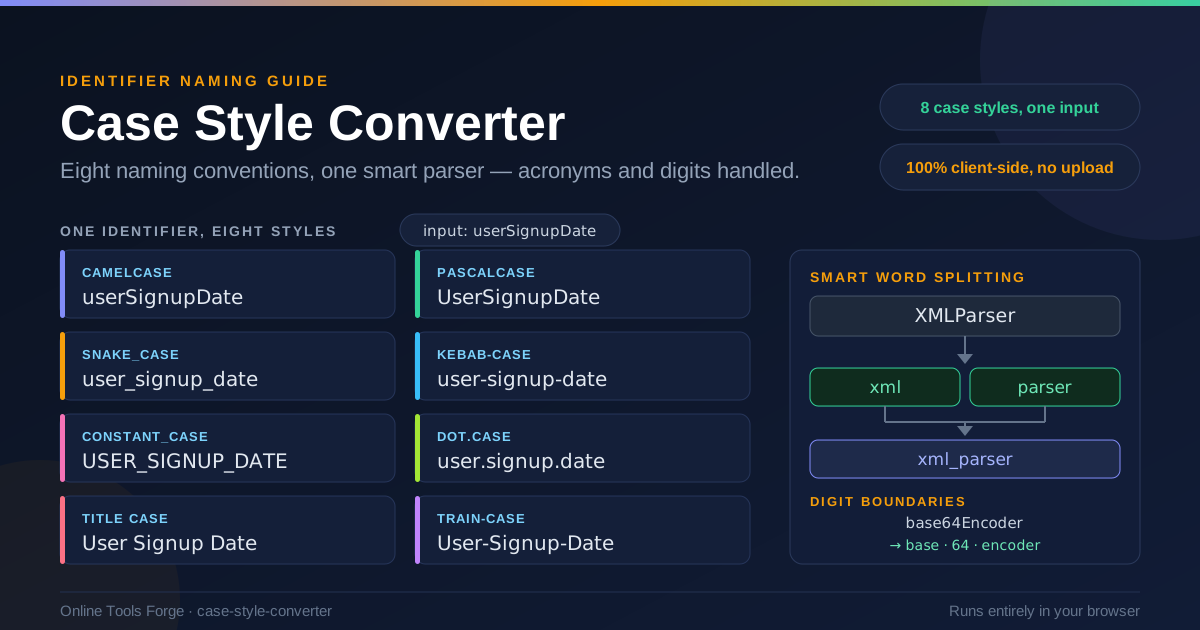
Convert identifiers between camelCase, PascalCase, snake_case, kebab-case, CONSTANT_CASE, dot.case, Title Case, and Train-Case with smart word-splitting for acronyms and digits.
Table of Contents
Every layer of the stack names the same concept differently. The JavaScript variable is lastLoginTimestamp in camelCase, the database column is last_login_timestamp in snake_case, the CSS class is .last-login-timestamp in kebab-case, and the environment variable is LOGIN_TIMEOUT_MS in CONSTANT_CASE. Same concept — only the casing convention changed.
Retyping these by hand is where bugs are born. Drop one underscore, or forget that XMLParser should become xmlParser and not xMLParser, and you have a field mismatch that only surfaces at runtime. Case Style Converter takes any identifier, splits it into words intelligently — including acronyms and digit boundaries — and renders all eight common conventions at once, entirely in your browser. This guide covers why each convention exists, how the splitting works, and where a reliable converter pays off.
Why Use Case Style Converter?
Naming conventions are not decoration; they are contracts between layers. A dedicated converter buys you:
- Consistency across the stack. When one entity appears as camelCase in the frontend, snake_case in the database, and kebab-case in URLs, the converter keeps the words identical — userSignupDate never drifts into userSignUpDate.
- Correct acronym handling. Humans disagree about where XMLHTTPRequest splits; deterministic rules make XMLParser become xml · parser every time.
- Digit-aware splitting. Identifiers like base64Encoder or sha256Hash split correctly on digit boundaries; naive scripts mangle them.
- Speed during refactors. Renaming an API field touches route, model, serializer, and docs — one paste gives all eight forms.
- Zero friction. It runs 100% client-side — no sign-up, no upload, nothing leaving your machine.
Key Features
| Feature | What It Does |
|---|---|
| Eight output styles | camelCase, PascalCase, snake_case, kebab-case, CONSTANT_CASE, dot.case, Title Case, Train-Case from one input |
| Smart word splitting | Detects boundaries inside run-together identifiers: userSignupDate becomes user, signup, date |
| Acronym handling | XMLParser splits into xml and parser, then rebuilds in any target case |
| Digit boundaries | Digit runs become their own segments: base64Encoder becomes base, 64, encoder |
| 100% client-side | All eight conversions appear side by side, computed in your browser |
- The splitter works in both directions — USER_SIGNUP_DATE becomes userSignupDate, and vice versa.
- Every output derives from one parsed word list, so all eight styles are guaranteed to agree — exactly what you want when one field must line up across layers.
How to Use
- Open the tool. Go to Case Style Converter — it loads instantly and works offline once cached.
- Paste your identifier. Any starting convention works: invoiceTotalDue, invoice_total_due, Invoice-Total-Due, or INVOICE.TOTAL.DUE.
- Review the parsed words. The tool shows how it split your input, including acronyms and digits. If IDNumber parsed as id · number, the outputs are right.
- Copy the style you need. Grab snake_case for the migration and camelCase for the client in the same visit.
- Repeat for the field set. For an API rename, paste each field in turn and keep a scratch old-to-new list for your changelog.
That is the entire interface: nothing to install, no account, no server round-trip.
Where Each Case Lives
The real skill in naming is knowing which convention each layer expects:
- camelCase — JavaScript and TypeScript variables and functions (userSignupDate), JSON payloads from modern APIs, Java methods. The lingua franca of application code.
- PascalCase — classes and components (UserSignupForm), React components, exported TypeScript types, .NET methods. Blueprints rather than values.
- snake_case — Python variables and functions (user_signup_date), SQL columns and tables, Ruby, most migrations. PostgreSQL folds unquoted identifiers to lowercase, quietly reinforcing the habit.
- kebab-case — CSS classes, URLs and slugs (/user-signup-date), file names, HTML attributes, npm packages. Dashes are URL-safe and read cleanly in paths.
- CONSTANT_CASE — environment variables (MAX_RETRIES), codebase-wide constants, and shell scripts where all-caps means "set this before you run me."
- dot.case — configuration keys and log fields (user.signup.date), common in INI files, structured logging, and namespaced config trees.
Acronym Splitting Rules
Acronyms are where manual conversion fails most. The rule here is simple: a run of uppercase letters followed by a capitalized or lowercase word splits off as its own unit. XMLParser becomes xml and parser — giving xmlParser, XML_PARSER, or xml-parser — and HTTPResponseCode becomes http · response · code, never hTTPResponseCode. In reverse, parseXMLDocument splits into parse, xml, and document.
Digit Boundaries
A digit run becomes its own segment: base64Encoder splits into base, 64, and encoder, yielding base64_encoder or BASE64_ENCODER cleanly. Identifiers like utf8String, sha256Hash, and x509Certificate are everywhere, and wrong boundaries produce names that fail code review instantly.
A Realistic Field Rename
Suppose maxRetryCount is deemed ambiguous and the team renames the concept to "maximum retry attempts per endpoint." Every convention in the codebase needs a form of it:
| Style | Output |
|---|---|
| camelCase | maximumRetryAttempts |
| PascalCase | MaximumRetryAttempts |
| snake_case | maximum_retry_attempts |
| kebab-case | maximum-retry-attempts |
| CONSTANT_CASE | MAXIMUM_RETRY_ATTEMPTS |
| dot.case | maximum.retry.attempts |
| Title Case | Maximum Retry Attempts |
| Train-Case | Maximum-Retry-Attempts |
Client code gets row one, the Postgres migration row three, the gateway route row four, the Kubernetes config row five, the logger row six, the docs the last two. Same words, eight destinations.
Practical Use Cases
API-to-Frontend Field Mapping
The classic scenario: your backend serializes snake_case, your frontend speaks camelCase, and every deserializer is a chance for a typo. Paste each payload field through the converter once to build your client-side mapping — or confirm that a third-party API's created_at should become createdAt.
Database Column Naming
Column names outlive the application code that uses them. Checking candidate names in all eight styles up front tells you whether a name reads well as a column, a config key, and in documentation.
File Naming
Components, stylesheet partials, and spec files each carry their own expectations — user-signup-form.tsx versus UserSignupForm.tsx versus user_signup_form.spec.ts. Converting a concept once and reusing the outputs keeps imports, routes, and test files aligned.
Config Key Cleanup
Long-lived projects accumulate keys in three or four conventions — maxRetryCount, max_retry_count, MAXRETRYCOUNT — depending on the era and the author. Cleanup is trivial when every legacy key can be parsed into words and re-emitted in the convention your loader expects.
Best Practices
- Pick conventions per layer and document them. Write the map down — camelCase for the client, snake_case for the database, kebab-case for files — and treat the converter output as canonical when layers meet.
- Automate where you can. Linters catch violations inside code files but cannot see migrations, docs, or route tables. Use the converter for everything a linter does not reach.
- Keep acronyms consistent. Decide once whether ID and HTTP are words (idNumber) or preserved (IDNumber), then apply the rule everywhere.
- Convert from the most explicit source. If you have the snake_case column, start there — its word boundaries are unambiguous, so the parse is correct.
- Prefer readability over cleverness. When two conventions are both acceptable, pick the one that reads better aloud — you will say these names in meetings for years.
Ready to Standardize Your Naming?
Open Case Style Converter, paste the identifier, and copy the exact form each layer needs. Free, instant, and 100% client-side — bookmark it next to your linter config and let the convention map in your README finally match your codebase.
Related Tools You Might Like:
- Text Case Converter — transform blocks of text between uppercase, lowercase, title case, and sentence case
- Git Branch Name Generator — turn tickets into clean, kebab-case branch names
- JSON Formatter — format, validate, and inspect the API payloads you are renaming
Written by the Online Tools Forge Team — building fast, free, privacy-first developer tools that run entirely in your browser.
Frequently Asked Questions
Q: Which input formats does the Case Style Converter accept?
A: Any of the eight conventions it outputs — camelCase, PascalCase, snake_case, kebab-case, CONSTANT_CASE, dot.case, Title Case, Train-Case — plus mixed forms that already combine separators and capital letters.
Q: How does the tool decide where to split an identifier like XMLParser?
A: It applies deterministic rules: acronym runs split off as a unit before a capitalized word, and digit runs become their own segments. XMLParser becomes xml and parser; base64Encoder becomes base, 64, encoder.
Q: Is my identifier or code sent to a server?
A: No. All parsing and conversion runs in your browser with JavaScript — nothing is uploaded, logged, or stored, so the tool is safe for identifiers from private or unreleased codebases.