JavaScript Source Map Explorer: See Which Files Bloat Your Bundle
Paste a source map and get a ranked breakdown of which files contribute the most bytes to your JavaScript bundle — validated and analyzed 100% client-side with JavaScript Source Map Explorer.
Free Interactive Tool
JavaScript Source Map Explorer
Drop in a .map file and instantly see which source files contribute the most bytes to your JavaScript bundle — segments, names, and sourcesContent stats, all computed locally in your browser.
Table of Contents
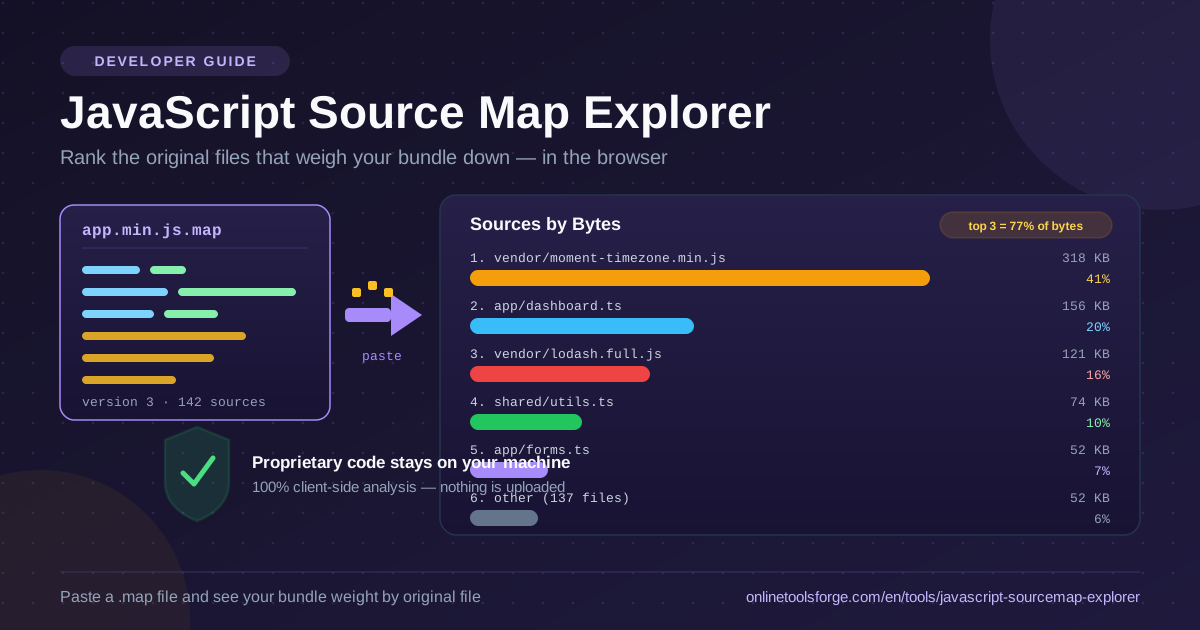
When a bundle grows release after release, the question is never whether it got fat — it is which file got fat. Minification compresses a codebase into one wall of characters, and file names vanish along the way. A source map keeps the connection alive: a sidecar file, emitted next to app.min.js as app.min.js.map, recording how the minified output maps back to the original sources. The JavaScript Source Map Explorer reads that sidecar and turns it into a ranked list of the files contributing the most bytes to your bundle.
The workflow is deliberately small: paste your .map file's contents and you immediately see the per-file ranking — which vendor library dominates and how the remaining weight is distributed. No account, no CLI, no upload step.
That last point matters: production bundles are proprietary assets encoding your product's architecture, internal endpoints, and business logic. The explorer runs entirely in your browser, so the bundle and its map never leave your machine.
Why Use JavaScript Source Map Explorer?
- Proprietary code never leaves the machine. All parsing, decoding, and ranking happens client-side — inspect an internal dashboard's source map without sending a byte anywhere.
- No installation. No bundler plugin, Node script, or desktop app. A browser and the .map file are enough.
- A direct answer to the "which file" question. Instead of decoding a treemap, you get a ranked list of files ordered by bytes contributed, each with its share of the total.
- Post-minification attribution. The ranking reflects what actually shipped in the minified bundle — not your development source tree, where sizes differ wildly.
- Safe, explicit validation. The tool validates that the pasted JSON looks like a source map before analyzing — the wrong file gets a clear error, not a misleading chart.
- Works with any bundler. webpack, Vite, esbuild, Rollup, and tsup all emit the same version 3 format.
Key Features
| Feature | What It Gives You |
|---|---|
| Per-file byte ranking | Every source file ordered by bytes contributed, largest first |
| Contribution share | Each file's percentage of total mapped bytes for instant context |
| Source map validation | Confirms the pasted JSON contains mappings before any analysis |
| Sources overview | File count and whether original code is embedded in the map |
| 100% client-side | Decoding and ranking run in the browser with zero uploads |
A few details worth knowing:
- Fallback ranking. When a map ships without embedded code — common for vendor maps — the explorer ranks files by mapping-segment counts instead, so you keep usable signal.
- Built for real-world maps. The decoder walks the compact mappings string line by line, so maps with hundreds of thousands of segments stay manageable.
How to Use
- Build with source maps and locate the .map file. Build for production with source maps enabled, then find the output file named like the bundle with .map appended — app.min.js.map beside app.min.js in dist.
- Copy the .map contents. Open it in any text editor, select everything, and copy — source maps are plain JSON, nothing else needed.
- Paste into the explorer. Visit JavaScript Source Map Explorer and paste the JSON. Validation runs immediately — invalid JSON, or JSON without the required mappings, gets a precise error instead of a broken report.
- Read the ranking. Files appear ordered by bytes contributed, each with its share of the total — the top rows are your optimization targets.
- Act, rebuild, and re-run. Lazy-load a heavy module, dedupe duplicated utilities, or swap a bloated dependency, then rebuild and paste the new map to confirm the ranking moved.
What Source Maps Know About Your Bundle
What mappings and sources actually encode. A version 3 source map has a few top-level fields: version, a sources array of original file paths, an optional sourcesContent array with embedded code, names, and mappings — a compact base64 VLQ string. For every position in the minified output, that string records which original file, line, and column the code came from — the shipping manifest of your bundle.
Byte contribution, attributed after minification. Because every generated segment points back to an original file, weight can be attributed to files as they shipped. The explorer measures the UTF-8 byte size of each file embedded in sourcesContent and ranks them by share of the total — what users download, not what the repository looks like. When a map carries no embedded sources, segment counts step in as the ranking signal.
The findings you should expect. A date library dwarfing your application code is the classic — its locale data alone outweighs the app that uses a fraction of it. Duplicated utilities come second: the same helpers bundled twice under different chunk names. Others: a component library pulled in whole and polyfills for browsers you dropped years ago.
What to do with the ranking. The top of the list is your roadmap: lazy-load modules not needed on first paint, dedupe shared utilities into one module, tree-shake by importing only named exports, and swap heavy dependencies for lighter ones. Then re-run — an unmeasured change is just a hope.
Practical Use Cases
Bundle-Growth Investigations
The page got heavier and nobody knows why. Paste the maps from the last known-good release and the current one; the ranking points at the offending file within minutes — often a single upgrade that dragged in a transitive giant.
Dependency Swap Decisions
Choosing between two libraries? Build once with each candidate, paste both maps, and compare their byte share directly. The same technique validates that a completed migration delivered the savings promised in the RFC.
Build Comparisons Over Time
Archive the top-ten ranking after each release, even as plain text — within a few sprints you have a bundle-weight trend line with named culprits.
Performance Reviews That Hold Up
"The bundle feels big" does not survive a planning meeting. A ranked table of files with byte shares shifts the discussion from opinions to a prioritized fix list.
Best Practices
- Analyze production builds, not dev. Development bundles are unminified and structured differently; their rankings say little about what users download.
- Compare before and after on the same commit. When measuring an optimization, the only variable should be the optimization itself.
- Act on the top three contributors first. Fixing the three largest entries usually beats twenty micro-optimizations.
- Keep the .map file out of production hosting. Analyze it locally, then deploy without it — a publicly downloadable map hands over your source code.
- Trust bytes over file counts. Two hundred tiny files can weigh less than one vendor module. Optimize by size numbers, not list length.
- Re-run after every change. Fix, rebuild, paste again, and confirm the bytes actually dropped.
Next time someone asks why the bundle is heavy, skip the estimation game: grab the .map from your build output, paste it into the JavaScript Source Map Explorer, and answer in bytes — with names, ranks, and shares everyone can act on.
Related Tools You Might Like:
- JSON Formatter — pretty-print and inspect the raw .map JSON when you want to see the version, sources, and mappings fields directly
- HAR File Analyzer — connect bundle weight to what actually delays page load in a real network capture
- JSON Schema Visualizer — map the shape of the API payloads your bundle produces and consumes
Happy shipping — may your vendor chunk never outweigh your app again!
Frequently Asked Questions
Q: Is my source map or bundle uploaded anywhere?
A: No. Decoding, byte counting, and ranking all happen in your browser — nothing is transmitted, stored, or logged, and the analysis works fully offline.
Q: My map has no embedded source code — why does the ranking look different?
A: Without embedded sources the explorer cannot measure exact byte sizes, so it falls back to ranking by mapping-segment counts. That still reflects how much generated output each file produces, but is less precise than true byte attribution.
Q: Does the tool need my actual JavaScript bundle file too?
A: No. All the weight information comes from the source map itself, so pasting only the .map contents is enough — the minified bundle file is never required.