CPC Calculator: Price Every Click and Plan Every Budget
Calculate Cost Per Click (CPC) from ad spend and clicks, or solve the budget required for a click target and the click volume a fixed budget will buy — free, instant, and 100% client-side.
Free Interactive Tool
CPC Calculator
Calculate Cost Per Click (CPC) from ad spend and clicks, or solve required budget and click volume for PPC campaign planning.
Table of Contents
Every paid-click platform quotes its prices in a different currency of attention. Search networks sell clicks, display networks sell impressions, and affiliate dashboards report conversions. The one number that connects them all is Cost Per Click. CPC tells you what the market charges to put one visitor on your landing page, and small differences compound fast: 0.60 per click instead of 0.75 stretches the same budget 25 percent further.
Our free CPC Calculator works the formula in both directions. Enter spend and clicks for an instant CPC, or switch the solve-for mode to answer planning questions: how much budget buys 4,000 clicks, or how many clicks will a 1,200 budget deliver? Click volume arrives prefilled at 400, so the arithmetic is visible immediately. Everything runs 100% in your browser and nothing leaves your device.
This guide walks through the tool, then places CPC alongside CPM and CPA inside the funnel.
Why Use the CPC Calculator?
- It turns two raw numbers into the one that matters. Spend and clicks sit in every dashboard; CPC is the normalized price that makes campaigns and networks comparable.
- It plans forward, not just backward. Reports tell you what you paid; the solve-for modes tell you what you are about to pay: the budget a target requires, or the clicks a budget buys.
- It makes budget requests defensible. "Give me more money" is an opinion. "4,000 clicks at a 0.62 average CPC requires 2,480" is arithmetic a finance team can verify.
- It guards keyword-level bids. Compare what a keyword currently costs against the ceiling your margins allow before raising a bid.
- It is fast and private. Results update as you type, and all math runs client-side — nothing is uploaded, stored, or sent anywhere.
- It is free with zero friction. No account, no spreadsheet template, no watermarked exports.
Key Features
| Feature | What It Does |
|---|---|
| Three solve-for modes | Compute CPC from total cost and clicks, or solve for the required budget or the click volume |
| Bidirectional planning | Work from "budget needed for X clicks" or "clicks delivered by Y budget" |
| Sensible defaults | Click-volume mode starts at 400 clicks so the math is visible immediately |
| Instant results | Values recalculate as you type — no submit button, no reload |
| 100% client-side | Every calculation runs locally; no data ever leaves your device |
Two details deserve emphasis:
- The direction is the point. A CPC readout describes the past; solving for the budget a target requires describes the campaign ahead.
- The defaults teach the formula. Click volume arrives prefilled at 400, so the arithmetic is visible before you touch any input.
How to Use
- Pick what you want to solve for. Choose CPC to measure a running campaign, budget to fund a click target, or clicks to forecast traffic from a fixed budget.
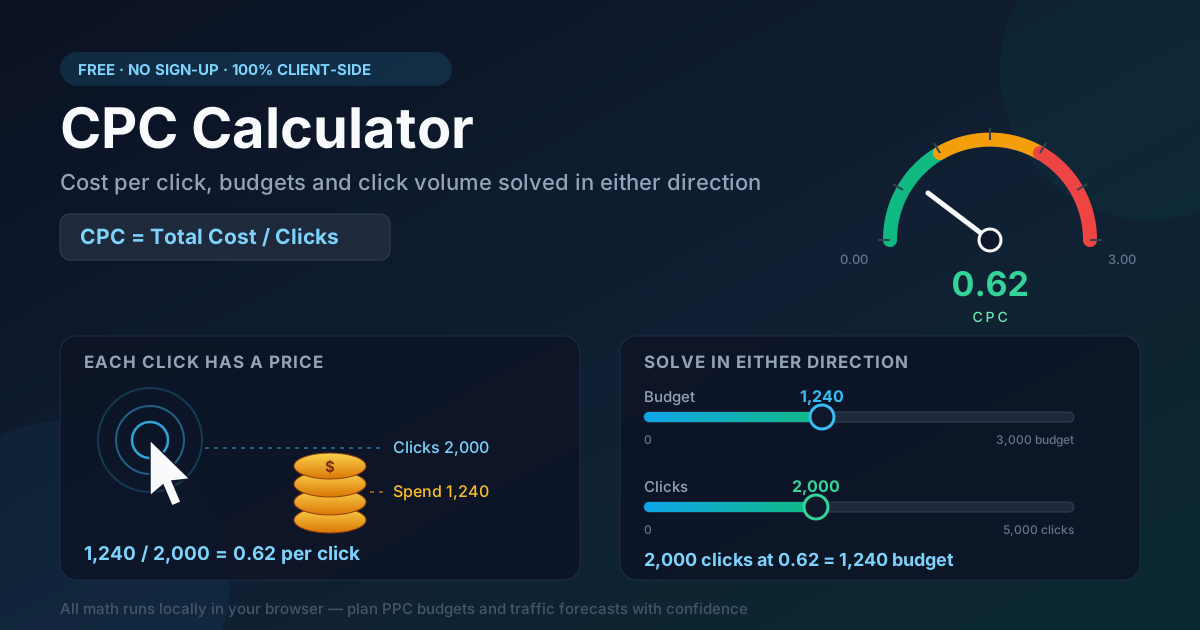
- Enter the two known figures. For a quick audit, type your period spend — say 1,240 — and the clicks it bought, say 2,000.
- Read the result. The tool returns 0.62: each visitor cost 62 cents, and every future estimate builds on that unit price.
- Flip the direction to plan. Keep 0.62 CPC and switch to the budget mode with a 4,000-click goal: the required budget is 2,480. Or lock 1,500 at a 0.50 CPC in the clicks mode to see 3,000 expected clicks.
- Pressure-test the plan. Raise the assumed CPC by 20 percent and re-solve; the difference is the contingency to hold before committing budget.
CPC in the Wider Funnel
CPC never travels alone. It sits between two neighboring metrics, each pricing a different stage of the funnel:
- CPM — cost per thousand impressions — prices visibility: what 1,000 ad views cost, clicked or not.
- CPC — cost per click — prices traffic: what you pay for each person who actually arrives.
- CPA — cost per acquisition — prices outcomes: what you pay for each signup, lead, or sale.
CTR is the bridge between the pricing models: 1,000 impressions at click-through rate CTR produce 1000 × CTR clicks, so a campaign's CPM translates into CPC like this:
CPC = CPM / (1000 × CTR)
A 12.00 CPM with a 1.5% CTR therefore costs 0.80 per click — and improving creative, which lifts CTR, is often the cheapest way to cut CPC.
The critical caveat: CPC alone is not a performance metric. A 0.20 CPC converting at 0.5% yields a CPA of 40.00, while a 1.50 CPC converting at 5% yields 30.00 — the pricier click wins. Judge CPC alongside conversion rate and let CPA or ROAS make the final call.
A worked example — budgeting from a click target. Suppose a landing page needs 4,000 visits next month at an estimated 0.62 CPC; the calculator returns a 2,480 working budget. A second estimate via CPM — 12.00 CPM at a 1.5% CTR implies 0.80 per click, or 3,200 total. The 720 gap is your uncertainty band: fund toward the pessimistic figure and keep the rest as headroom.
Practical Use Cases
Budget Forecasting
Translate traffic goals into money before committing: the budget mode converts a target like 10,000 monthly visits into a figure you can approve, and the clicks mode shows what it buys at current prices.
Cross-Network Price Comparison
Search, social, and display quote clicks differently; CPC puts them on one axis. A 0.45 search click and a 0.12 display click stop being apples and oranges once you ask what each does after the landing page.
Keyword-Level Bid Ceilings
Every keyword has a price above which it stops being profitable. Divide the CPA your product supports by the keyword's conversion rate to get a maximum CPC, then compare it with the live average.
Client Reporting
Turn a month of spend and clicks into a CPC trend per campaign. Pair it with the plan — forecast 0.58, delivered 0.62 — and budget conversations shift from blame to arithmetic.
Best Practices
- Benchmark against your own history. Industry averages blend industries, geographies, and intent; your last 90 days is the only fair baseline.
- Define "spend" consistently. Media cost alone compares platforms; media plus fees reflects true unit economics.
- Average over enough clicks. A CPC drawn from 12 clicks is noise; wait for a few hundred before concluding.
- Watch CPC together with CTR. A rising CPC at a flat CPM usually means falling CTR — creative fatigue, not auction inflation.
- Re-check after every bid-strategy change. Smart bidding reshapes CPC distributions within days; old averages mislead.
- Convert before you compare. Normalize currencies and use net prices when benchmarking across markets.
Put Your Clicks on a Budget
You know what you spent and how many clicks arrived; what matters is the price of the next click. Open the free CPC Calculator, enter two figures, and walk into your next budget meeting with the math done.
Related Tools You Might Like:
- ROAS Calculator — judge whether those clicks became profitable revenue.
- CTR Calculator — measure how efficiently impressions become clicks.
- CLV Calculator — weigh acquisition cost against lifetime customer value.
Price every click, fund every plan — the Online Tools Forge Team.
Frequently Asked Questions
Q: What is a good CPC?
A: There is no universal figure — it depends on industry, network, geography, and intent. The useful number is your ceiling: target CPA multiplied by conversion rate. If a lead is worth 50 and your page converts at 4%, stay under a 2.00 CPC.
Q: How do I calculate CPC?
A: Divide total ad cost by the clicks delivered: CPC = total cost / clicks. A campaign that spent 1,240 and received 2,000 clicks has a CPC of 0.62.
Q: Why did my CPC rise when nothing changed?
A: CPC is an auction price, and auctions move: new competitors, seasonal demand, lower relevance scores, audience saturation, and bid-strategy shifts can all raise it. Recheck CTR and quality signals before blaming the auction alone.
Q: Does the calculator store my numbers anywhere?
A: No. The tool is 100% client-side — all math runs in your browser, nothing is uploaded or shared, and it works offline once loaded.