CSS Font Stack Generator: Build Bulletproof font-family Stacks in Seconds
Build robust CSS font-family stacks with per-platform system-font fallbacks, preview the result live, and copy it as CSS or a Tailwind config — free, fast, and 100% client-side.
Free Interactive Tool
CSS Font Stack Generator
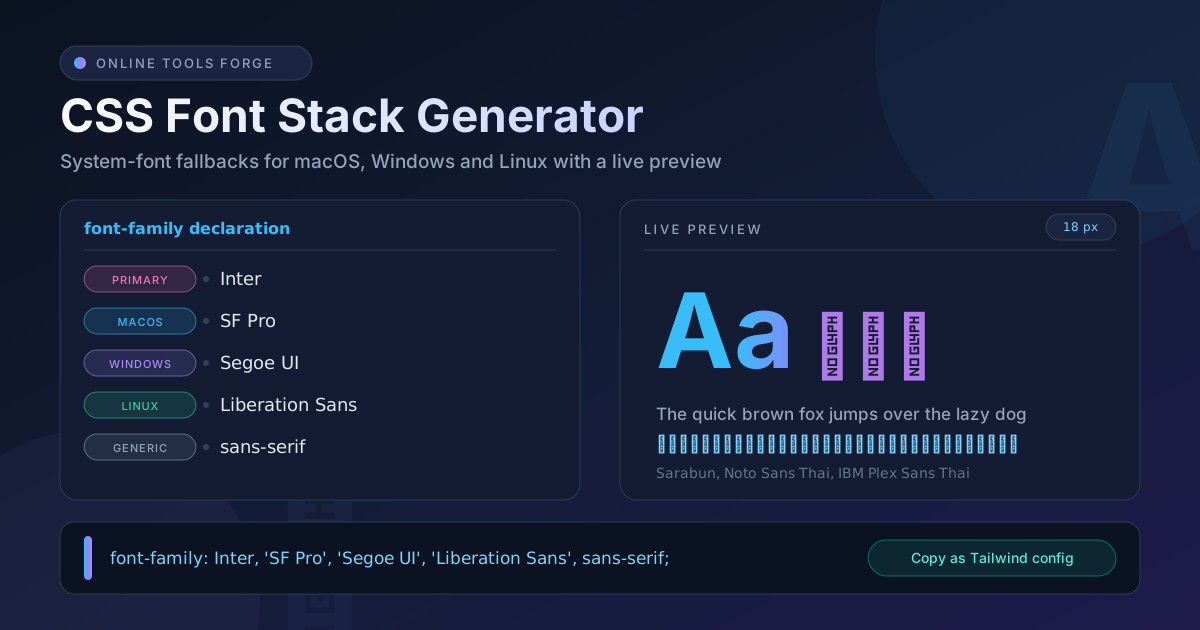
Build robust CSS font-family stacks with system-font fallbacks for every platform, preview them live, and copy ready-to-use CSS or a Tailwind config.
Table of Contents
Every website renders all of its text through a single CSS property, and most teams treat that property carelessly. Naming one font in your stylesheet is a silent bet that every visitor owns that typeface — a bet that loses the moment someone opens your page on a different operating system. The free CSS Font Stack Generator removes the guesswork by assembling a complete, platform-aware font-family declaration that you can preview and copy in one click.
A font stack is an ordered list of "try this, else this" instructions for the browser. You lead with the typeface you want, follow with near-identical alternatives, add the default system fonts of each platform, and finish with a generic family such as sans-serif. Most sites get this wrong by naming only one font, which hands rendering decisions to the operating system — often producing Times New Roman where a modern interface was intended.
This guide explains why layered fallbacks matter, walks through the generator step by step, and covers the practical details — quoting rules, platform defaults, and Thai script support — that separate a professional stack from a fragile one.
Why Use CSS Font Stack Generator?
- Platform-correct fallbacks without the research. The tool knows which system fonts exist on macOS, Windows, and Linux, so your stack lands on a good-looking font everywhere instead of a random serif.
- Live rendered preview. Type your own sample text, adjust the size, and see the stack render before it ever touches your stylesheet.
- Dual output formats. Copy a ready-to-paste CSS font-family declaration or the same stack as a Tailwind fontFamily config value.
- Six curated presets. System UI, Modern Sans, Classic Serif, Monospace, a Thai-friendly stack, and Helvetica and Arial cover the decisions most projects face.
- Correct quoting automatically. Multi-word names like Segoe UI are quoted for you; single-word names stay clean.
- 100% client-side. Nothing is uploaded and no account is required.
Key Features
| Feature | What It Does |
|---|---|
| Primary font picker | Choose the typeface that leads your stack |
| Per-platform fallbacks | Inserts the right system fonts for macOS, Windows, and Linux |
| Live rendered preview | Shows real text at your chosen font size as you edit |
| Copy as CSS | Produces a complete font-family declaration with one click |
| Copy as Tailwind config | Outputs the stack as a Tailwind fontFamily.sans value |
| Preset stacks | Six sensible starting points, including a Thai-friendly option |
A few details make the output genuinely production-ready: every stack ends with a generic family, the preview accepts your own content — including Thai characters — and the fully client-side tool works offline with zero setup.
How to Use
- Open the tool and pick a preset. Start from System UI for interfaces, Classic Serif for editorial content, Monospace for code, or Thai-friendly for Thai-language sites.
- Set your primary font. Replace the preset lead with your chosen webfont — for example Inter or Sarabun — so the stack prefers it wherever it is installed or loaded.
- Refine with the live preview. Enter representative text, tune the font size, and compare how the stack reads before committing.
- Copy as CSS. Click the CSS copy button and paste the font-family: ...; declaration straight into your stylesheet.
- Or grab the Tailwind config. Use the Tailwind copy button to get the stack formatted for theme.extend.fontFamily, ready for your tailwind.config file.
Why the Fallbacks Matter
When the browser renders text, it walks the stack from left to right, checking each name against the fonts installed on the visitor's machine plus any webfonts the page loaded. The first exact name match wins; a missing name is skipped. Only when every named font fails does the browser fall back to the generic keyword at the end — sans-serif, serif, or monospace — which the operating system resolves to a default for that class. A stack without that generic ending has no safety net.
Each platform ships different system fonts, which is exactly why stacks need layers: SF Pro and Helvetica Neue on macOS and iOS, Segoe UI on Windows, Roboto on Android, and Liberation Sans or DejaVu Sans on most Linux distributions. Naming the strongest candidate per platform gives every visitor a native-feeling interface instead of an arbitrary default.
Quoting is the small detail that breaks many hand-written stacks. Names with spaces must be quoted — 'Segoe UI', 'Times New Roman' — while single-word names like Georgia can go bare. The generator applies these rules, so the copied output is valid CSS every time.
Thai script deserves a special note. Modern systems render Thai well out of the box — macOS, Windows, and Android all ship system fonts with Thai coverage. The risk appears when a subsetted Latin-only webfont leads the stack: Thai glyphs silently fall through to the next font, creating a mixed-alphabet page. Name Thai-capable families explicitly, as the Thai-friendly preset does with IBM Plex Sans Thai, Sarabun, and Noto Sans Thai, and always preview Thai text before shipping.
Practical Use Cases
Production Websites
Generate one sans-serif stack for body text and one monospace stack for code blocks, then paste both into your design tokens. Per-platform fallbacks guarantee that a Windows user, a MacBook owner, and an Android visitor all see a clean, native-feeling typeface — no per-OS media queries required.
HTML Email Campaigns
Email clients are the harshest font environment on the internet: most ignore webfonts entirely and rely on locally installed fonts. Generate a conservative stack once, reuse it in every campaign, and your emails keep their intended look across Outlook, Apple Mail, and Gmail.
Documentation Themes
Docs sites mix prose, inline code, and fenced code blocks — three stacks working together. Build them all with the generator, and the generic endings keep code samples legible even on minimal Linux servers where few fonts are installed.
Tailwind Font Configurations
The tool's Tailwind output drops straight into theme.extend.fontFamily, giving you a font-sans (or font-serif, font-mono) utility backed by a battle-tested stack — typography centralized in config instead of scattered across components.
Best Practices
- Always end with a generic family. sans-serif, serif, or monospace is the last line of defense; never omit it.
- Test on real platforms. Check the stack on Windows, macOS, and at least one Linux or Android device — emulated screenshots hide real differences.
- Keep webfonts subsetted. Serve only the characters and weights you use; a Latin-only subset will not cover Thai or other scripts.
- Quote every multi-word name. Unquoted 'Times New Roman'-style names are invalid CSS and break the whole declaration.
- Keep stacks short and ordered. Three to seven entries is plenty; every additional name adds maintenance cost without adding coverage.
- Revisit after OS updates. Platforms occasionally rename or retire system fonts, so re-check critical stacks yearly.
Ready to Build a Bulletproof Font Stack?
Open the CSS Font Stack Generator, pick a preset, watch the live preview update, and copy a production-grade stack as CSS or Tailwind config in under a minute — free, with no sign-up.
Related Tools You Might Like:
- CSS Unit Converter — convert px, rem, em, pt, and more instantly
- CSS Mesh Gradient Generator — create modern mesh gradient backgrounds
- Text Case Converter — switch text between camelCase, snake_case, kebab-case, and more
Happy stacking!
Frequently Asked Questions
Q: What is a CSS font stack?
A: A font stack is the comma-separated list of font names in a font-family declaration. The browser tries each name in order and uses the first one installed on the visitor's device, ending with a generic family such as sans-serif as the final fallback.
Q: Do I still need fallbacks if I load a webfont?
A: Yes. Webfonts can fail to load — slow networks, blocked requests, CDN outages — and may not cover every script your visitors type. Fallbacks keep the page readable regardless.
Q: Why must font names with spaces be quoted?
A: CSS treats an unquoted name with spaces as several separate identifiers, which makes the declaration invalid. Wrapping names like 'Segoe UI' in quotes removes the ambiguity. Single-word names such as Georgia may go unquoted.
Q: Which generic family should I end with?
A: Match your lead font: sans-serif for interface and body text, serif for editorial designs, and monospace for code. The generator adds the appropriate generic automatically.
Q: Does the tool work with Thai and other non-Latin scripts?
A: Yes. The Thai-friendly preset leads with IBM Plex Sans Thai, Sarabun, and Noto Sans Thai before platform system fonts, and the live preview lets you paste Thai text to confirm the rendering before you copy the stack.