Cursor Rules Generator: Build .cursor/rules MDC Files the Easy Way
Build .cursor/rules MDC files with description, globs, and alwaysApply frontmatter plus curated rule presets — copy or download ready-to-use rules that steer Cursor AI editing.
Free Interactive Tool
Cursor Rules Generator
Build .cursor/rules MDC files with description, globs, and alwaysApply frontmatter to steer AI-assisted editing in Cursor.
Table of Contents
AI coding assistants are only as consistent as the instructions you give them. Without written conventions, an editor guesses your file structure, invents its own patterns, and quietly rewrites code you had already settled. The Cursor Rules Generator fixes that at the source: it builds .cursor/rules MDC files with proper frontmatter — description, globs, and alwaysApply — plus curated presets that show you what a good rule actually says.
The core idea is worth repeating: AI editors follow rules you write once — a good rules file is the difference between an assistant and a nuisance. Capture your conventions in a small, well-scoped file, and every future request starts from shared ground instead of a blank slate.
This guide explains the MDC format, shows what belongs in a rules file (and what does not), and walks through turning the generator's output into a rules library your whole team can reuse.
Why Use Cursor Rules Generator?
- Frontmatter done right. The generator assembles description, globs, and alwaysApply with correct syntax, so you never hand-edit a malformed MDC header or wonder why Cursor ignores a rule.
- Curated presets as starting points. Start from presets for TypeScript, React, Tailwind, Vitest, conventional commits, and docs style — then trim them to your project.
- Globs-driven scoping. Attach each rule to exactly the files it concerns, so the TypeScript rule loads for **/*.ts work and the docs rule stays out of your diffs.
- Live validation. Warnings appear as you type: a missing description, a missing rule name, or an alwaysApply: true rule that would silently override your globs.
- Copy or download instantly. Grab the finished .mdc content to the clipboard or download the file, ready to drop into .cursor/rules/ with no cleanup.
- Private by design. Everything runs client-side in your browser — your conventions and project details never leave your machine.
Key Features
| Feature | What It Does |
|---|---|
| Frontmatter builder | Emits valid MDC frontmatter with description, globs, and alwaysApply |
| Rule presets | Six curated starting points covering typing, styling, testing, commits, and docs |
| Multi-rule workspace | Build several rules in one session with duplicate-filename detection |
| Live warnings | Flags missing descriptions, missing names, and alwaysApply conflicts |
| Copy and download | One-click clipboard copy or .mdc file download |
| Client-side only | All generation happens in your browser; nothing is uploaded |
Three details deserve a closer look:
- Duplicate detection warns when two rules would produce the same filename — important because files in .cursor/rules/ silently overwrite each other.
- The alwaysApply guard reminds you that a rule set to alwaysApply: true is injected into every request and its globs are ignored, pushing you toward deliberate choices.
- Preset bodies stay editable. Presets load conventions into the form; you keep full control of the final text.
How to Use
- Open the generator at Cursor Rules Generator. Nothing to install and no account required.
- Pick a preset or start blank. Choosing, say, the TypeScript preset fills in a sensible description, globs, and a body of conventions you can edit line by line.
- Name the rule and tune the fields. The name becomes the filename (typescript-conventions.mdc, for example). Write a one-sentence description, list your globs, and decide whether the rule should always apply.
- Write the body. Keep it short: imperatives the model can act on, commands it should run, and the few patterns you never want to see again.
- Copy or download. Review the live warnings, then copy the MDC content or download the file into your project's .cursor/rules/ directory — and commit it so the whole team benefits.
Frontmatter Steers the Editor
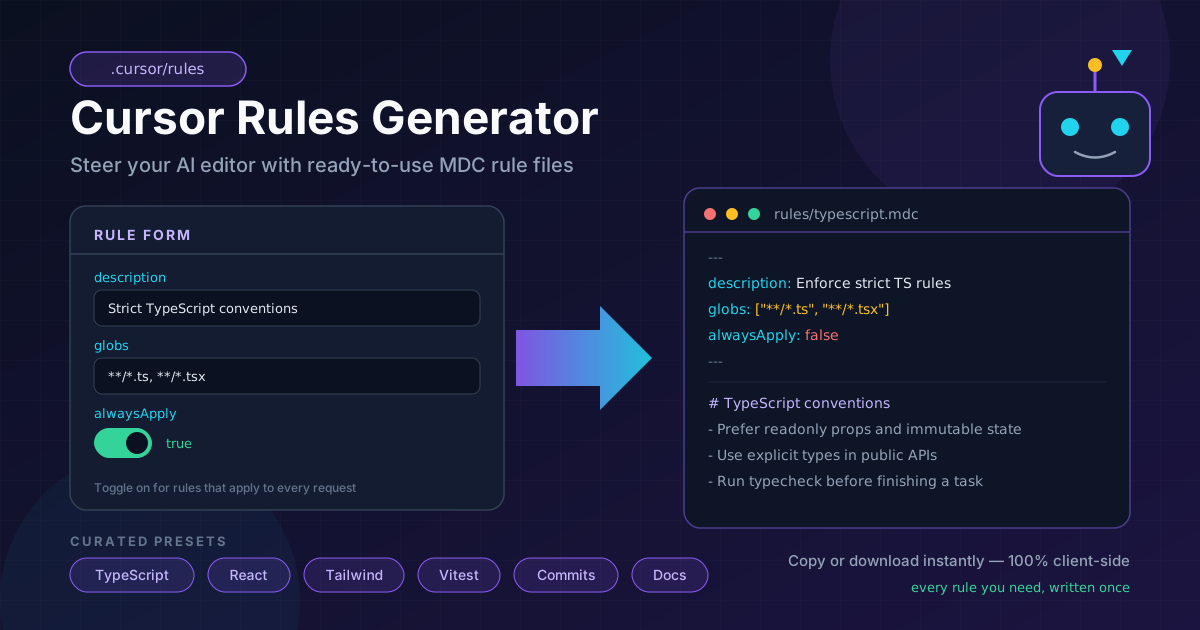
A .cursor/rules file uses the MDC format: YAML frontmatter that tells Cursor when to load the rule, followed by markdown that tells the model what to do. The three frontmatter fields are the entire control system:
- description is what Cursor reads when deciding whether a rule is relevant to the current request. A vague description means the rule never fires; a precise one ("Conventional commit message format for this repository") fires exactly when it should.
- globs scopes the rule to file patterns. A rule with globs: ["**/*.test.ts", "**/*.test.tsx"] is attached only when you are working in test files — keeping context small and relevance high.
- alwaysApply turns a rule into always-on context injected into every request. Use it sparingly: it is the most expensive kind of rule, and once it is true, your globs are ignored entirely.
Here is an annotated example of the generator's output:
---
# Cursor reads this to decide if the rule is relevant
description: Enforce strict TypeScript conventions
# File patterns this rule attaches to
globs: ["**/*.ts", "**/*.tsx"]
# true would inject this rule into every request
alwaysApply: false
---

# TypeScript conventions

- Prefer readonly parameters for object arguments.
- Never use any in exported signatures; narrow from unknown instead.
- Run npm run typecheck before declaring a change complete.
What belongs in a rules file? Conventions (naming, structure, patterns), commands (typecheck, lint, test invocations), and style (formatting decisions, tone for docs and comments). What does not? Secrets and credentials — rules are committed files — and "everything." A 4,000-word dump of your engineering handbook gets skimmed by the model and resented by your context window. One concern per rule, scoped tightly, beats an omnibus rule every time.
The curated presets follow exactly this philosophy. Each one is a minimal, opinionated seed — TypeScript strictness, React component patterns, Tailwind class ordering, Vitest standards, conventional commit format, markdown docs style — meant to be pruned and extended, not accepted blindly.
Practical Use Cases
Encode Project Conventions
Every team accumulates unwritten rules: where helpers live, how API errors are shaped, which state management pattern is current. Write them once as a rule scoped with globs like **/*.ts, **/*.tsx, and new code stops drifting from the existing codebase.
Framework-Specific Rules
Give each framework its own file: a React rule scoped to **/*.tsx, a Tailwind rule scoped to **/*.tsx, **/*.css, a Vitest rule scoped to test files. Cursor then loads only what matters for the file in front of it, so responses stay relevant.
Team Onboarding That Sticks
A new hire reads the README once; Cursor reads the rules on every request. Commit a .cursor/rules/ directory with your core conventions and the editor becomes an onboarding tool that enforces standards instead of documenting exceptions.
Personal Style Without Team Noise
Not everything belongs in the shared repo. A personal rule — "prefer arrow functions and early returns," "always add JSDoc to exported functions" — can live locally, giving you an editor tuned to your habits without touching team files.
Best Practices
- Keep rules short and actionable. Aim for a handful of imperatives per rule; long prose gets skimmed by the model and future maintainers alike.
- Scope with globs before reaching for alwaysApply. A well-scoped rule stays relevant; an always-on rule is a permanent tax on every request.
- Review rules quarterly, like dependencies. Conventions drift, and a rule that contradicts your current setup is worse than no rule at all.
- One concern per rule. Split "TypeScript conventions" and "commit message format" into separate files so each can evolve and scope independently.
- State the command, not the intention. "Run npm run lint:fix before finishing" beats "keep the code clean" — the model can act on the first and only admire the second.
- Never put secrets in rules. Rules files are committed and shared; keys, tokens, and internal endpoints belong in your secret manager.
Steer Your Cursor Today
The rules file is the highest-leverage configuration in an AI-assisted workflow: written once, applied to every future request. Head to the Cursor Rules Generator, start from a preset, scope it with globs, and commit the result. Your next session starts from conventions instead of guesses.
Related Tools You Might Like:
- AGENTS.md Generator — write AGENTS.md instructions that travel across AI coding tools, not just Cursor.
- ESLint Config Generator — pair your AI rules with a real linter that enforces them mechanically.
- Markdown Preview — preview and polish the markdown bodies of your rules files as you write them.
Happy rules writing — may your AI editor finally follow the conventions you actually use!
Frequently Asked Questions
Q: Where do I put the generated rules file?
A: Save the downloaded .mdc file into your project's .cursor/rules/ directory (create it if it does not exist) and commit it, so everyone on the team gets the same behavior.
Q: What is the difference between globs and alwaysApply?
A: Globs attach a rule only when files matching the patterns are involved in a request. alwaysApply: true injects the rule into every request and ignores globs — the generator warns you when the two settings conflict.
Q: Can I edit the MDC file after downloading it?
A: Yes. MDC files are plain text — frontmatter followed by markdown. Any editor can modify them, and you can regenerate later with updated fields.
Q: Does the generator upload my rules or code anywhere?
A: No. The tool runs entirely client-side in your browser. Nothing you type is transmitted, stored, or logged.
Q: How many rules should a project have?
A: Start with two or three — one always-on rule for core conventions and one or two glob-scoped rules for framework or test files. Add more only when you notice the same correction repeating.