Cyclomatic Complexity Calculator: Score, Grade and Refactor Your JavaScript Functions
The Cyclomatic Complexity Calculator analyzes pasted JavaScript and TypeScript functions in your browser, returning per-function complexity scores, A-D risk grades, and concrete refactoring hints.
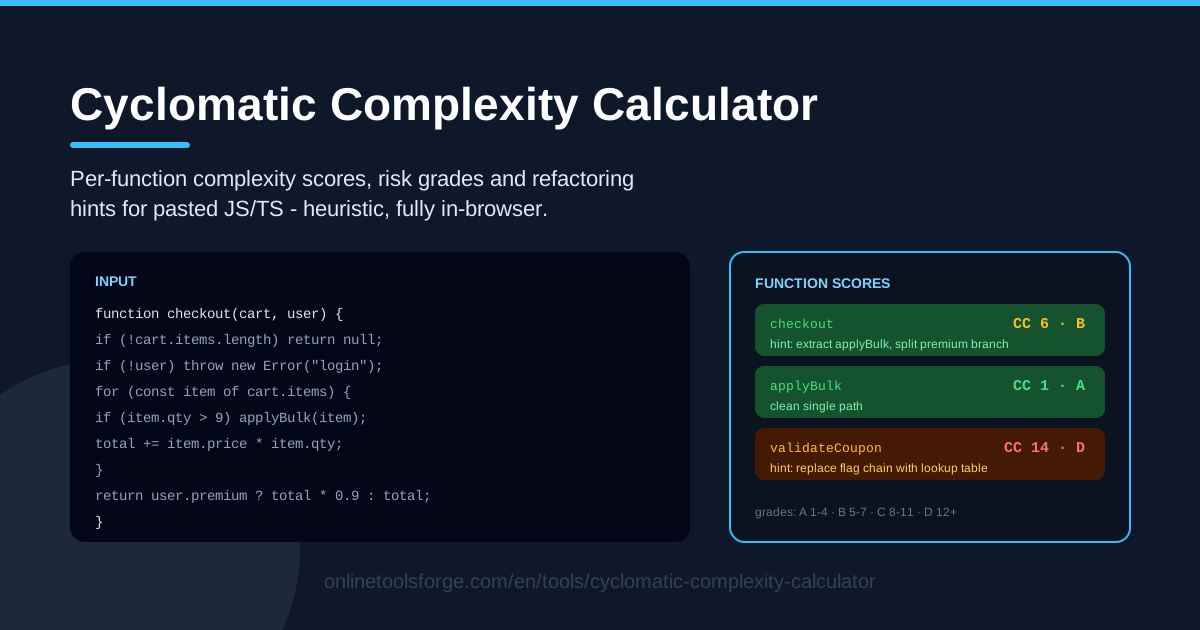
Table of Contents
Every team has that one function: two hundred lines, a forest of nested ifs, three loops, and a switch nobody dares to touch. You can feel that it is risky, but "this feels complicated" is hard to defend in a code review. The Cyclomatic Complexity Calculator turns that feeling into a number you can act on, by measuring cyclomatic complexity — the count of independent paths through your code.
Paste JavaScript or TypeScript functions and the tool returns per-function scores, A-D style risk grades, and refactoring hints for the worst offenders. The heuristic analysis is fully in-browser: nothing to install, no account to create, and no code leaves your machine.
This guide covers how to use the tool, what the score actually counts, and how to turn the numbers into a working refactoring plan.
Why Use Cyclomatic Complexity Calculator?
- Objective evidence for code review. Instead of debating taste, paste the function and point at its score and grade. Numbers settle arguments faster than opinions.
- Find risk before production does. Research dating back to the 1970s links high complexity with higher defect rates — more independent paths means more ways to break.
- Size your test suite. A score of N needs roughly N test cases to cover every branch. If that feels untestable, it is a refactoring signal.
- Actionable hints, not just numbers. Complex functions come with concrete refactoring suggestions, so you walk away with a to-do list instead of a vague warning.
- Fully private and instant. Heuristic analysis runs in your browser, so you can paste proprietary code without uploads or sign-ups.
- JavaScript and TypeScript both. Audit frontend components, Node services, and utility modules with a single tool.
Key Features
| Feature | What it does |
|---|---|
| Paste JavaScript or TypeScript | Drop in one function or a whole module; both languages are analyzed in place. |
| Per-function scores | Every detected function gets its own complexity number, so hotspots stand out immediately. |
| Risk grades (A-D style) | Scores map to letter grades that communicate severity at a glance. |
| Refactoring hints | Complex functions include concrete suggestions for splitting and simplifying them. |
| In-browser heuristic analysis | No uploads and no backend; results appear as soon as you paste. |
Two details worth calling out:
- The per-function view matters more than any average: a module can look healthy overall while hiding a single function scoring 25.
- The A-D grades create a shared vocabulary — an A is trivially testable, while a D is where bugs and merge conflicts tend to cluster.
How to Use Cyclomatic Complexity Calculator
- Paste your functions. Open the calculator and drop in JavaScript or TypeScript — one function or many; each is detected and analyzed separately.
- Review the scores and grades. Every function shows its cyclomatic complexity score and a risk grade. Start with the worst: D before C, then work down the list.
- Read the refactoring hints. For C and D functions, the hints point at what drives the score, such as deep nesting or long chains of conditions.
- Refactor the worst one. Apply a single hint to the highest scorer — usually extracting a cohesive block into its own well-named function, or flattening nested conditionals into guard clauses.
- Re-check. Paste the refactored code back in, confirm the score dropped and the grade improved, then repeat until nothing exceeds your team's threshold.
What the Score Actually Counts
Cyclomatic complexity, introduced by Thomas McCabe in 1976, counts the linearly independent paths through a function. The intuition behind the classic formula is simple: start at 1 for the single straight-through path, then add 1 for every decision point that can split that path.
Decision points that typically add 1 to the score:
- if statements and else if chains
- for and while loops
- each case label in a switch
- each && and || short-circuit operator
- ternary conditionals (condition ? a : b)
A function with three ifs, two loops, and one && therefore starts at 1 and lands at 7. Each of those decisions is a path your tests must eventually walk, and each is a place where a future edit can introduce a bug that appears on only one of the paths.
Grades turn the raw number into predictions. As a rough rule of thumb: 1-5 is grade A territory — simple and easy to test; 6-10 is moderate, about one function's worth of logic; 11-20 falls in grade C, where you need systematic branch coverage and bug rates start climbing; above 20 is grade D, where defect research consistently finds elevated fault density and covering every path with tests becomes a project of its own.
Why heuristics instead of a full AST parser? A compiler-grade parser walks an exact control-flow graph, but it is heavyweight and sensitive to every corner of the language. The tool uses pattern-based heuristic analysis tuned to common JavaScript and TypeScript constructs, which tracks full parsers closely on typical business code and buys instant, private, in-browser analysis. Treat a score as a dependable risk signal rather than an exact spec — the gap between 14 and 15 matters far less than the gap between 6 and 14.
The hints map to the classic moves that genuinely reduce complexity:
- Extract function. Pull a cohesive block into its own well-named function. Total decisions barely change, but each function's score drops and each becomes independently testable.
- Lookup tables. A ten-case switch can become an object or Map of key to handler, collapsing ten counted decisions into a single property access.
- Guard clauses. Invert nested if/else pyramids into early returns; the nesting that hurts comprehension disappears even though each guard still counts.
Practical Use Cases
Pre-Refactor Triage
Before touching a gnarly module, paste it in. Within seconds you have a ranked list of functions by risk grade, which shows where refactoring effort pays off most and gives you a baseline to prove progress: the two D-grade functions are now B, and the module's worst score fell from 26 to 9.
Pull Request Review Evidence
"Please split this function" lands better with a number attached. When a review comment would otherwise read as taste, paste the new function, cite its score and grade, and attach the hint. Reviewers accept complexity budgets more readily when they are measurable, and authors can push back with data when branching is genuinely unavoidable.
Legacy File Triage
Inheriting an old codebase? Paste the largest files one at a time and let the grades build a heat map of danger zones. D-grade functions in legacy files are prime candidates for characterization tests first — their path counts tell you how big the safety net must be before you dare edit a line.
Teaching Branching Discipline
For teams and students, the tool makes an abstract idea concrete. Paste a "clever" one-liner dense with ternaries next to a boring multi-line version and compare the scores. Seeing a single expression carry a complexity of 8 teaches why readable code is not the same as simple code — and why a low score is a design goal worth defending.
Best Practices
- Treat scores as smells, not laws. A high score is a prompt to look, not an automatic verdict; some domains are legitimately branchy.
- Refactor with tests around you. Pin existing behavior with tests before splitting anything. The score tells you the risk; the tests are the harness.
- Prefer small, well-named functions. Extraction only helps when the new function has a clear purpose — splitAndValidateAndFormat is the same complexity in a costume.
- Watch for complexity moving, not shrinking. If extraction leaves a parent orchestrating five children in a tight sequence, comprehension may not improve. Aim for the score to genuinely drop, not relocate.
- Set a team threshold. Many teams hold new code to a ceiling of 10 and use the tool in review to enforce it while slowly retiring legacy outliers.
- Re-check after meaningful edits. Complexity creeps in one condition at a time; a quick paste-and-check keeps the drift visible.
Ready to see where your code hides its risk? Paste a function into the Cyclomatic Complexity Calculator, read its grade, and follow the hints — most functions drop a full grade band in one focused refactor.
Related Tools You Might Like:
- Regex Performance Tester — benchmark regex patterns before they hit production.
- Dockerfile Linter — catch Dockerfile mistakes before builds fail.
- JSON Formatter — beautify, validate, and inspect JSON payloads.
Happy refactoring!
Frequently Asked Questions
Q: Does the Cyclomatic Complexity Calculator upload my code anywhere? A: No. The heuristic analysis runs entirely in your browser, so your code never leaves your machine.
Q: Does it support both JavaScript and TypeScript? A: Yes. Paste plain JavaScript or TypeScript, including annotated functions, and get per-function scores, grades, and hints for both.
Q: What score should I consider too high? A: Many teams treat 10 as a soft ceiling. The grades make it easy: A and B are comfortable, C deserves a look, and D is a strong refactoring candidate.
Q: Why do the numbers differ slightly from my linter's cyclomatic complexity? A: The tool uses fast heuristic analysis rather than a full AST parse, so edge-case counting can differ by a point or two. Treat the score as a dependable risk signal, not an exact spec.