Dew Point Calculator: The Honest Number Behind Humidity
Learn what dew point really means, why it beats the humidity percentage for judging muggy air, and how the free Dew Point Calculator computes it with the Magnus-Tetens formula, absolute humidity, vapor pressure, and a comfort scale — 100% client-side.
Free Interactive Tool
Dew Point Calculator
Compute dew point, relative humidity, absolute humidity, and vapor pressure from temperature and humidity using the Magnus-Tetens formula, or reverse from dew point to relative humidity, with a comfort scale.
Table of Contents
At 7 a.m. the forecast says 70% relative humidity and the morning feels crisp. By mid-afternoon the same app shows 70% again — yet stepping outside feels like a steam room. Same percentage, different air. Relative humidity is a ratio, not an amount: it measures moisture only against how much water the air could hold at its current temperature. Seventy percent at 15°C is barely damp; seventy percent at 30°C is tropical.
The honest number is the dew point: the temperature to which air must cool for condensation to start forming. It tracks the actual moisture in the air, so it stays meaningful all day. Our free Dew Point Calculator converts any temperature and humidity reading into dew point, absolute humidity, and vapor pressure instantly, then maps the result onto a comfort scale so you know at a glance whether the air is dry, pleasant, or oppressive.
The tool runs the well-established Magnus-Tetens formula entirely in your browser — no account, no upload, nothing leaves your device. This guide explains what dew point really is and how to put it to work.
Why Use Dew Point Calculator?
- The honest moisture number. Relative humidity shifts whenever temperature shifts; dew point reflects actual water vapor, so morning and afternoon readings finally compare fairly.
- Comfort in one glance. The built-in scale classifies every result from dry to comfortable, muggy, and oppressive — a verdict, not just a figure.
- Condensation predicted in advance. Any surface cooler than the dew point fogs or drips: a window, a cold pipe, a lens carried out of an air-conditioned room.
- Mold prevention for buildings. Sustained indoor dew points well above cold-surface temperatures are how damp patches and mold begin. One number makes the risk checkable.
- Instant and private. Every keystroke recalculates all outputs, and everything stays client-side — nothing uploaded, logged, or stored.
Key Features
| Feature | What it does |
|---|---|
| Dew point via Magnus-Tetens | Converts temperature and relative humidity into dew point with the standard Magnus-Tetens equation |
| Absolute humidity | Reports water vapor density in grams per cubic meter, immune to the relative-humidity paradox |
| Vapor pressure | Shows the partial pressure of water vapor, the quantity driving evaporation and condensation |
| Humidity comfort scale | Maps your dew point onto a color-coded band from dry to oppressive |
| Live recalculation | Updates all outputs as you type for effortless scenario comparison |
| 100% client-side | All math happens in your browser; no accounts, no tracking |
- Absolute humidity counts grams of water per cubic meter — it does not change just because the afternoon got warmer, unlike the misleading percentage.
- The comfort scale uses dew point bands that weather services and health researchers rely on, so its label matches how the air genuinely feels.
How to Use
- Open the Dew Point Calculator.
- Enter the air temperature — the shaded reading from any thermometer or forecast.
- Enter the relative humidity as a percentage, the number every forecast reports.
- Read the outputs. Dew point, absolute humidity, and vapor pressure appear at once, each answering a different question about the same air.
- Check the comfort scale to see whether conditions are dry, comfortable, muggy, or oppressive — then act on it.
Why Dew Point Beats Humidity Percent
What dew point physically means. Cool a pocket of air while keeping its water fixed and its vapor capacity shrinks, so relative humidity climbs. The dew point is the exact temperature where it reaches 100% and excess moisture must condense into liquid — cool the air to that temperature and condensation forms.
The Magnus-Tetens formula, in plain words. The calculator uses the Magnus-Tetens equation, a century-old empirical fit to water's saturation vapor pressure curve:
gamma     = ln(RH/100) + 17.62 x T / (243.12 + T)
dew point = 243.12 x gamma / (17.62 - gamma)
Here T is air temperature in °C and RH is relative humidity in percent. The first line measures how close the air sits to saturation; the second converts that into the temperature where saturation actually occurs.
Absolute versus relative humidity. Relative humidity answers "how full is the tank?" — but the tank changes size with temperature, so one percentage can feel like two worlds. Absolute humidity answers "how much water is actually here?" — roughly 6 g/m³ on the crisp 15°C morning versus about 25 g/m³ on the 30°C afternoon at the same 70%.
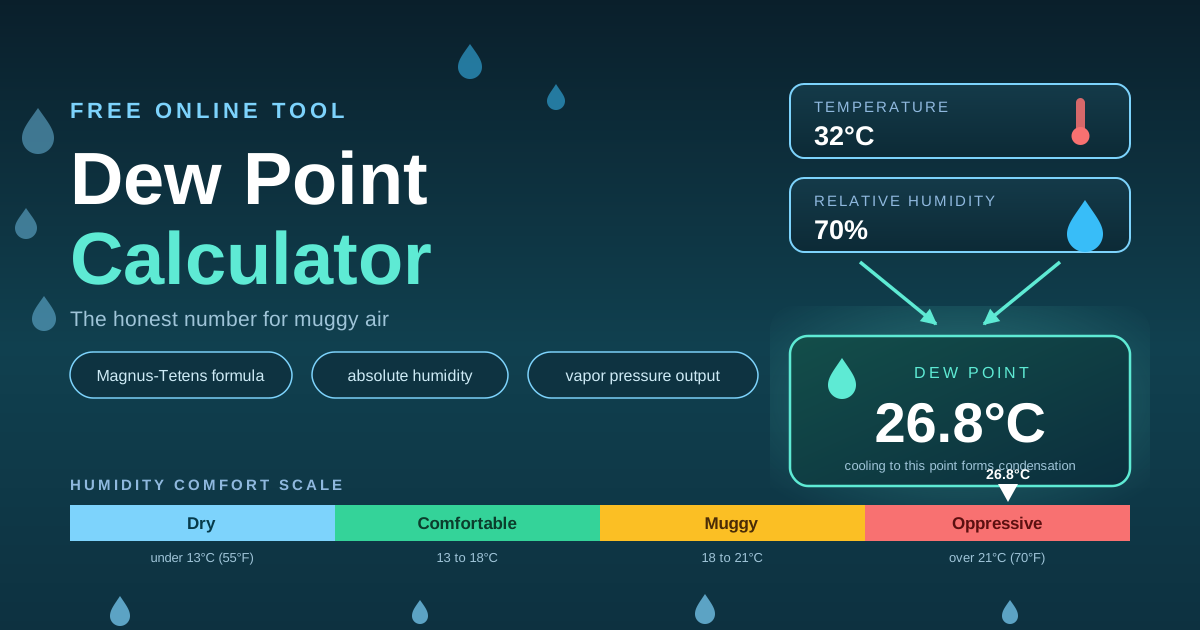
The comfort scale. When air holds abundant moisture, sweat cannot evaporate and your cooling system fails. The widely used bands: below 55°F (13°C) dry and crisp; 55–60°F (13–16°C) pleasant; 60–65°F (16–18°C) noticeable but manageable; 65–70°F (18–21°C) muggy, with exercise feeling harder; above 70°F (21°C) oppressive, when the body struggles to cool itself. Thailand puts this in perspective: Bangkok's afternoon dew points routinely reach 24–27°C, deep in the oppressive band, and the rainy season pushes them higher. A cool-season morning near 18–20°C feels genuinely fresh even though the temperature barely moved.
Condensation and mold in buildings. Condensation appears on any surface colder than the dew point — a cool window, a cold-water pipe, the inner face of an uninsulated wall in an air-conditioned room. Give mold spores that dampness for a few days and a colony follows; holding the indoor dew point near 12–15°C starves both before they start.
A worked Bangkok afternoon. The forecast reads 33°C with 70% humidity. The calculator returns a dew point of about 26.8°C, vapor pressure near 3.5 kPa, and absolute humidity around 25 g/m³ — deeply oppressive. The numbers also explain your air conditioner's job: cool that air to 24°C without removing moisture and it pushes past saturation, condensing water on every cold surface.
Practical Use Cases
Air Conditioning and Dehumidifier Decisions
If a room feels cold but clammy, check the indoor dew point. Muggy or oppressive even at 24°C means you need moisture removal — a dehumidifier or a drying mode, not more cooling. When the outdoor dew point is far lower, simple ventilation is free dehumidification.
Photography and Lens Fogging
A camera carried from an air-conditioned room into tropical air fogs within seconds, because the glass is colder than the dew point of the air hitting it. Check the outdoor dew point first and you know whether to let gear acclimatize in a sealed bag.
Running and Outdoor Comfort
Above roughly 18°C (65°F) dew point, sweat stops evaporating efficiently and heart rate drifts upward at any pace. Checking it before a run tells you whether to train hard, ease off, or move indoors.
Storing Sensitive Goods
Camera gear, instruments, electronics, and leather degrade faster in moist air — mold on paper and leather, corrosion on optics. Holding your storage space's dew point in a safe, stable band beats guessing from a swinging percentage.
Best Practices
- Judge comfort by dew point, not the percentage. The percentage misleads whenever temperature changes; dew point does not.
- Watch the indoor-outdoor gap for condensation. Any surface near or below the dew point — windows, pipes, walls — will collect moisture.
- Ventilate with outside air wisely. Open windows only help when the outdoor dew point is lower; in a tropical rainy season it usually is not, so keep closed and dehumidify.
- Recheck through the day. Dew point drifts with weather and the daily cycle; mornings do not describe afternoons.
- Plan with forecast values. Tomorrow's temperature and humidity are published everywhere — run them through the calculator the evening before.
Check the Dew Point Before You Trust the Percentage
The humidity percentage has been quietly misleading everyone who reads it at face value. The dew point replaces guesswork with one honest number describing actual moisture, predicting condensation, and mapping cleanly onto human comfort. Open the Dew Point Calculator, type in today's temperature and humidity, and see your weather the way meteorologists do — instantly and entirely in your browser.
Related Tools You Might Like:
- Heat Index Calculator — the hot-weather companion: how temperature and humidity combine into the feels-like heat index.
- Wind Chill Calculator — the cold-weather counterpart: what wind does to the temperature your body actually feels.
- Sleep Cycle Calculator — plan bedtime around 90-minute sleep cycles, because muggy nights and good rest do not mix.
Stay ahead of the muggy air — read the dew point, not just the temperature!
Frequently Asked Questions
Q: Why does 70% humidity feel fine in the morning but awful at noon?
A: Relative humidity is a ratio against temperature-dependent capacity, not a measure of moisture. As air warms, its capacity grows and the same 70% represents far more actual water — precisely what the dew point captures.
Q: Can the dew point ever be higher than the air temperature?
A: No. Dew point is always at or below air temperature, because it is defined as the cooling level where saturation occurs. When the two meet, relative humidity is 100% and fog or active condensation is likely.
Q: Does the calculator send my data anywhere?
A: No. It runs the Magnus-Tetens formula entirely client-side in your browser. Your inputs never leave your device, no account is needed, and nothing is stored or tracked.