Docker Run to Compose Converter: Turn Any docker run Command Into Compose YAML
Convert docker run commands into Docker Compose YAML in your browser — ports, volumes, environment variables, networks, and restart policies mapped automatically, with nothing leaving your machine.
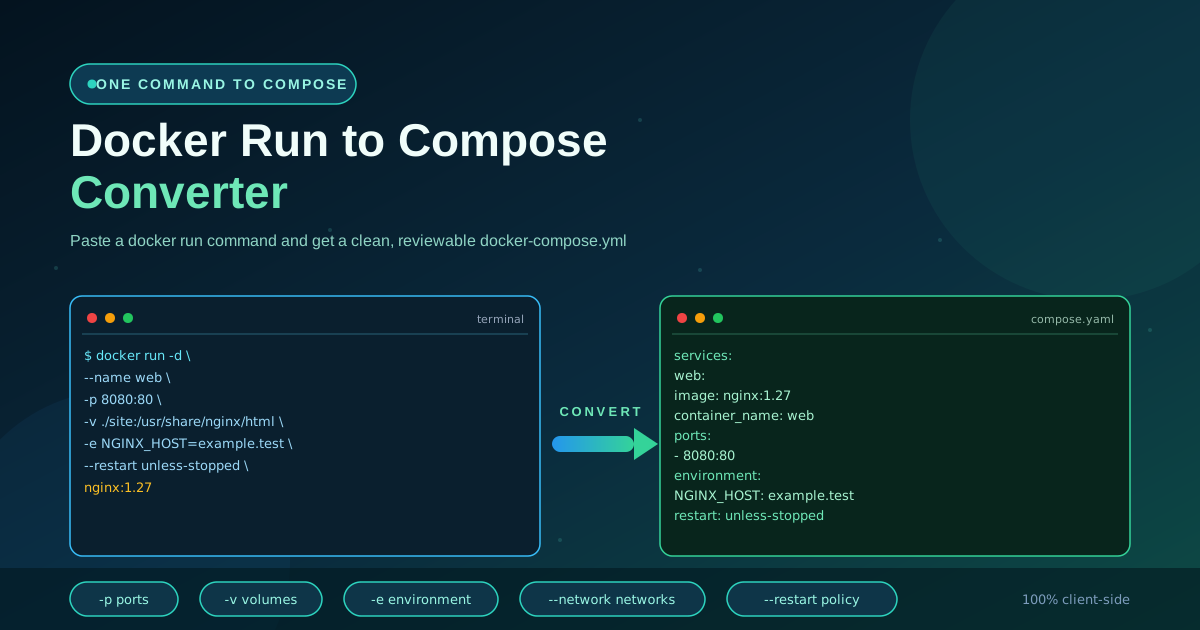
Free Interactive Tool
Docker Run to Compose Converter
Convert docker run commands into Docker Compose YAML with ports, volumes, environment variables, networks, and restart policies.
Table of Contents
Somewhere in a project README sits a line developers recognize: a docker run command with a wall of flags — published ports, mounted volumes, environment variables, a restart policy. The README says run it; your team runs everything through Compose so it can be reviewed and shared. The Docker Run to Compose Converter closes that gap: paste the command, and a service-ready docker-compose.yml block appears in your browser.
The tool parses the command the way a shell would — quotes and line continuations included — then maps every recognized flag to its Compose equivalent, while anything without a clean counterpart returns a plain-language warning. Everything runs client-side, so internal names and values never leave your machine. This guide covers why the conversion is worth doing, how each flag finds its home in YAML, and the gotchas to check before you commit.
Why Use Docker Run to Compose Converter?
- It removes the transcription tax. Hand-converting a twenty-flag command means remembering Compose key names, indentation, and list syntax. The converter does that in a second.
- READMEs speak docker run, teams speak Compose. Most quick starts are one-liners. Converting them lets you adopt a tool without breaking your one-file, one-stack convention.
- Faithful, readable output. Values land in the standard Compose keys a human would have written.
- Warnings instead of surprises. Flags without a clean counterpart, such as --publish-all or --rm, produce explicit notes rather than quiet data loss.
- Nothing leaves your machine. Parsing happens in your browser, keeping internal registries, host paths, and secrets local.
Key Features
| What you paste | What you get | Why it helps |
|---|---|---|
| Full docker run or docker create | One ready service block | Paste straight from docs or history |
| Multi-line commands with \ breaks | Single clean YAML | Copy-paste friendly for long commands |
| Ports, volumes, env, networks, restart | Mapped to correct keys | The tedious, error-prone part is done |
| Flags with no Compose equivalent | Plain-language warnings | You know what to finish by hand |
- Real shell tokenization. Quoted values, -it, and backslash continuations are parsed the way your shell reads them.
- Beyond the big six. Labels, user, working directory, hostname, healthcheck flags, DNS, and devices are mapped too.
How to Use
- Paste the command. Drop the full docker run line — or a multi-line command with backslashes — into the input. docker create and a leading sudo are handled too.
- Watch the YAML appear. Conversion is live: once the command parses, the service block renders.
- Read the generated service. Check image, service name, ports, volumes, environment, and restart policy against what you intended.
- Review the warnings. Anything the tool could not map faithfully is listed as a note. Fix those before shipping.
- Copy or download. Paste the YAML into an existing file, or download a docker-compose.yml, then run docker compose config to validate.
Every Flag Has a YAML Home
The mapping below is applied on every conversion; these six carry most real-world commands:
| docker run flag | Compose key | What happens |
|---|---|---|
| -p 8080:80 | ports | One list entry per published port |
| -v src:dst | volumes | Bind mounts and named volumes kept |
| -e KEY=value | environment | Values carried over; a valueless -e warns for review |
| --network name | networks | Added to the service; declare it top level too |
| --restart policy | restart | unless-stopped, always, and friends transfer as-is |
| --name web | container_name | Optional in Compose, but kept to match the command |
Anything after the image name is the container command, appended as the service command; an explicit --entrypoint becomes the entrypoint key. Interactive flags translate directly: -i becomes stdin_open: true and -t becomes tty: true.
Three gotchas to check before you commit:
- Bind mount relative paths. In docker run, a relative host path resolves against your shell directory; in Compose, against the compose file location. Adjust ./ paths accordingly.
- Environment file references. A bare -e VAR inherits from your shell at run time — a static Compose file cannot express that. Give it a value, use ${VAR} with an .env file, or move it under env_file.
- Quoted values. Shells strip quotes before the tool sees the text, so -e MSG="hello world" should arrive as one value with the space intact. Confirm nothing lost its spacing.
This command, typical of a monitoring quick start:
docker run -d \
  --name metrics \
  -p 9100:9100 \
  -v /proc:/host/proc:ro \
  -e NODE_ID=web-01 \
  --network monitoring \
  --restart unless-stopped \
  quay.io/prometheus/node-exporter:v1.8.1
becomes this service block:
services:
  metrics:
    image: quay.io/prometheus/node-exporter:v1.8.1
    container_name: metrics
    ports:
      - '9100:9100'
    volumes:
      - '/proc:/host/proc:ro'
    environment:
      - NODE_ID=web-01
    networks:
      - monitoring
    restart: unless-stopped
Add a top-level networks: entry, and the one-liner is now a versioned, reviewable service.
Practical Use Cases
Adopting Compose for local development
You have been starting a database by re-typing a long docker run from a note. Convert it once, save the service in your compose file, and docker compose up -d becomes the only command anyone needs.
Assembling stacks from README one-liners
A side project needs a web app, a queue, and a search engine — each documented as its own one-liner. Convert each, paste the services into one file, and the stack starts with one command. Warnings show what still needs attention, such as the shared network to join.
Standardizing team setups
When everyone wires their own containers, differences creep in: one developer mounts a config read-write, another omits the restart policy. One vetted command, converted and committed, gives the team identical configuration — and pull requests show when it changed.
Documenting infrastructure as you go
A compose file is executable documentation. Convert the commands behind your internal tools as you deploy them, and the file doubles as a record of what runs where, on which ports and volumes.
Best Practices
- Review every volume path. Relative bind mounts resolve differently under Compose, and host paths are machine-specific. Verify each entry before sharing.
- Move secrets to env files. Passwords, tokens, and connection strings belong in a git-ignored .env referenced with ${VAR} — not in a committed compose file.
- Pin image versions. Quick starts use :latest. Replace it with an explicit tag so docker compose up yields the same result next month.
- Validate with docker compose config. One command confirms the YAML parses and the definitions are sound before anyone runs them.
- Declare networks deliberately. A converted --network needs a top-level definition; decide whether services share a network or stay isolated.
- Commit the file and review changes in pull requests. Compose is a versioned source of truth — treat edits like any code change.
Convert Your One-Liners Today
If your team lives in Compose, a README one-liner should not break the pattern. Paste the next docker run command you meet into the Docker Run to Compose Converter, review the mapped service, and commit a compose file everyone can improve.
Related Tools You Might Like:
- Docker Compose to Kubernetes Converter — turn your Compose services into starter Kubernetes manifests
- YAML Formatter — format and validate merged compose files before you commit them
- Nginx Log Analyzer — analyze access logs from the containers you just composified
Happy converting — turn every one-liner into infrastructure your whole team can read.
Frequently Asked Questions
Q: Is my command uploaded to a server?
A: No. Parsing and YAML generation run entirely in your browser, so image names, host paths, and environment values never leave your machine.
Q: Does it handle multi-line docker run commands?
A: Yes. Backslash continuations are tokenized the way a shell reads them, so you can paste straight from docs or history.
Q: What happens to flags the tool does not recognize?
A: Never silently dropped: each unmapped flag produces a plain-language warning naming what needs manual attention.
Q: Why did my valueless -e flag produce a warning?
A: A bare -e VAR inherits from your shell at run time, which a static Compose file cannot express. Give it a value, use ${VAR} interpolation, or use env_file.