Figma Design Token Converter: Turn Token JSON Into CSS, SCSS, and Tailwind
Convert Figma Tokens or W3C Design Tokens JSON into CSS custom properties, SCSS variables, and Tailwind theme values — alias references resolved automatically, 100% client-side.
Free Interactive Tool
Figma Design Token Converter
Convert Figma Tokens or W3C Design Tokens JSON into CSS variables, SCSS variables, and Tailwind theme values.
Table of Contents
Design tokens are the bridge between Figma and your codebase. They capture every color, spacing value, and type size as structured data, so what your designer signs off in Figma is exactly what ships in production. But the bridge has a missing span: the Figma Tokens plugin exports JSON, while your stylesheet wants CSS custom properties, your Sass codebase wants SCSS variables, and your Tailwind project wants a theme object. Copying values across by hand is slow — and it drifts, because the moment someone retypes #6366F1 as #6366f2, your design system has quietly forked.
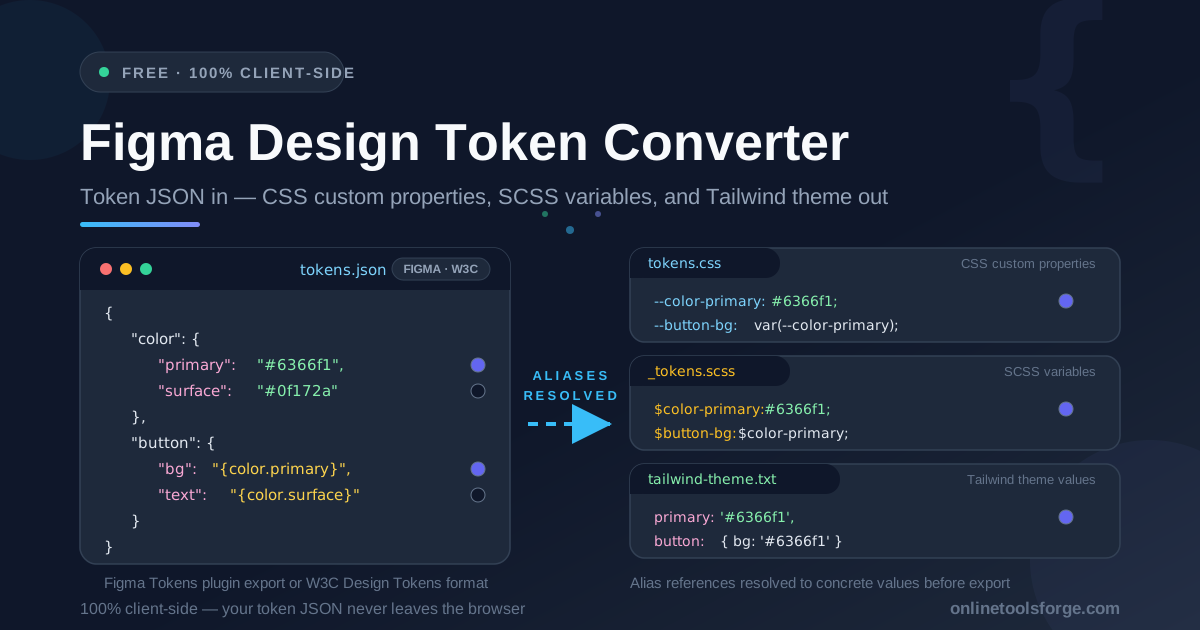
The Figma Design Token Converter closes that gap. Paste your token JSON — Figma Tokens plugin format or W3C Design Tokens format — and it instantly generates three ready-to-use outputs: tokens.css with CSS custom properties, _tokens.scss with SCSS variables, and tailwind-theme.txt with Tailwind theme values. Along the way it resolves alias references automatically, so a button background defined as "points at color primary" comes out with the concrete hex value baked in.
Everything runs 100% client-side: nothing is uploaded, no signup is required, and each output tab has one-click copy and download. This guide covers how the conversion works and how to fold it into a real design-system workflow.
Why Use Figma Design Token Converter?
-
One source of truth, three formats: Designers maintain tokens in Figma; developers need them in CSS, SCSS, or Tailwind. The converter turns a single JSON paste into all three flavors, so nobody maintains parallel copies of the same values.
-
Automatic alias resolution: Token files are full of token-to-token references, like a button background pointing at {color.primary}. The converter walks each reference chain and emits the resolved concrete value — exactly what hand-copying tends to get wrong.
-
Understands both major token formats: Whether your team exports from the Figma Tokens plugin or has adopted the W3C Design Tokens format, the tool parses it without reformatting or field renaming.
-
Tabbed outputs with copy and download: Each result — tokens.css, _tokens.scss, and tailwind-theme.txt — lives on its own tab with immediate copy-to-clipboard and download, so wiring output into a repo takes seconds.
-
Private and deterministic: Nothing leaves your machine — which matters for unreleased palettes — and the same JSON always produces identical output, making regeneration on each release a safe, repeatable step.
Key Features
| Feature | What it does |
|---|---|
| Dual format support | Accepts Figma Tokens plugin JSON and W3C Design Tokens format, detecting the shape of your input |
| Alias reference resolution | Walks token-to-token references and substitutes the final concrete value in every output |
| CSS custom properties output | Generates tokens.css with --token-name: value declarations ready for modern CSS |
| SCSS variables output | Generates _tokens.scss with $token-name: value declarations for Sass codebases |
| Tailwind theme output | Generates tailwind-theme.txt with a theme extension object for your Tailwind config |
| Tabbed download interface | Three tabs — tokens.css, _tokens.scss, tailwind-theme.txt — each with copy and download controls |
| 100% client-side | All parsing and generation happens in your browser; nothing uploaded, no account required |
-
Alias resolution is the real differentiator. Token files are graphs, not flat lists: button.bg may reference color.primary several hops deep. Resolving that by eye is error-prone busywork; the converter does it deterministically.
-
The three-tab output mirrors real codebases, which often use two formats at once — CSS custom properties for components, SCSS in a legacy layer, a Tailwind theme object for utilities — so generating all three from one paste keeps every layer in sync.
How to Use
- Export your token JSON from Figma. Use the Figma Tokens plugin's export action to download your tokens as JSON. If your team stores tokens in the W3C Design Tokens format, export that file instead — both work as-is.
- Open the Figma Design Token Converter and paste the JSON. The tool parses it immediately — no configuration, no field mapping, no signup.
- Pick your output tab. Switch between tokens.css, _tokens.scss, and tailwind-theme.txt depending on which flavor your project needs.
- Copy or download the result. Use one-click copy for a quick change, or download the file to commit directly into your repository.
- Wire it in and regenerate on every token release. Drop tokens.css into your global styles, _tokens.scss into your Sass entry, or merge the Tailwind values into your config — then repeat whenever new tokens ship.
Tokens, Aliases, and the Three Outputs
Design tokens express design decisions as data. A color is not just a hex string buried in a component; it is a named value like color.primary with a defined role, and spacing, radii, and type sizes work the same way. Because the decisions live in a structured file, they can travel — from Figma to code, from light theme to dark.
The two supported formats encode the same idea slightly differently: the Figma Tokens plugin format wraps each value in a value key, while the W3C format uses $value with optional $type metadata. Both let a token hold either a raw value or a reference to another token — an alias — written in curly-brace syntax:
{
  "color": {
    "primary": { "value": "#6366f1" }
  },
  "button": {
    "bg": { "value": "{color.primary}" }
  }
}
That "{color.primary}" is an alias: the button background does not own a color, it points at one. When the design team changes color.primary, every alias referencing it updates in Figma. The converter preserves that behavior in code by resolving references before generating output — here is the before and after for tokens.css:
:root {
  --color-primary: #6366f1;
  --button-bg: #6366f1;
}
Each output targets a different consumer. CSS custom properties are the modern default: natively supported everywhere and overridable per theme. SCSS variables serve Sass codebases where variables compile away at build time — simpler, but no runtime theming. The Tailwind theme file is an extension object for your tailwind.config that turns each token into utilities like bg-primary. The converter keeps all three pointing at the same truth.
Practical Use Cases
Design system handoff
Designers finalize a token set in Figma; developers need it in the codebase before the sprint ends. Export, convert, commit — what was reviewed is byte-for-byte what lands in the repository, with no "close enough" hex codes.
Dark-mode token sets
Dark themes are usually a second token file where every semantic token is aliased to new values. Convert both sets separately and you get two generated stylesheets with identical token names. Scope them under a data-theme attribute and your dark mode inherits the alias structure the designer built in Figma.
Multi-brand theming
Several brands on one codebase means each brand is essentially a token file: same names, different values, heavy aliasing so shared components stay untouched. Generate one CSS output per brand, load the right one per deployment, and a single component stylesheet serves every brand.
Keeping Tailwind config in sync
Tailwind projects drift when someone updates a color in Figma but forgets the config. Make the converter part of the release routine: regenerate tailwind-theme.txt whenever tokens change, merge it into the config, and utilities like bg-primary track Figma exactly.
Best Practices
- Name tokens semantically, not by value. color.primary survives a rebrand; color.indigo does not. Semantic names keep aliases meaningful and generated output stable.
- Let the tool resolve aliases before diffing. Comparing raw JSON with unresolved references hides real changes. Compare generated output instead — concrete values make every drift visible.
- Regenerate on every token release. Treat the generated files like build artifacts, produced by the converter whenever tokens change and never edited by hand. Hand edits are how forks begin.
- Commit all three outputs even if you use one today. The file you do not need this quarter costs nothing and saves a regeneration cycle when another team adopts that stack.
- Keep the exported JSON in the repository. Storing the token source alongside generated files makes the pipeline auditable, and lets CI verify the outputs are current.
Start Converting Your Tokens Today
If design tokens already live in Figma, the last mile to code should take seconds, not an afternoon of copy-paste. The Figma Design Token Converter turns your Figma Tokens or W3C Design Tokens JSON into CSS custom properties, SCSS variables, and Tailwind theme values with aliases resolved — free, instant, and entirely in your browser. Export, paste, and ship all three formats from one source of truth.
Related Tools You Might Like:
Happy converting!
Frequently Asked Questions
Q: Is the tool free, and does my token JSON get uploaded anywhere?
A: Completely free with no signup, and nothing is uploaded: parsing, alias resolution, and file generation all happen in your browser, so design-system values never leave your machine.
Q: Which token formats does the converter accept?
A: Both the Figma Tokens plugin JSON format and the W3C Design Tokens format. The tool detects the structure of your input automatically, so no manual field renaming is required.
Q: What does alias resolution actually do?
A: Tokens can reference other tokens, such as a button background pointing at {color.primary}. The converter follows each reference to its final concrete value and writes that resolved value into all three outputs.
Q: What is the difference between the three output files?
A: tokens.css contains CSS custom properties for modern stylesheets, _tokens.scss contains SCSS variables for Sass codebases, and tailwind-theme.txt contains a theme extension object to merge into your Tailwind config.
Q: Can I regenerate the outputs whenever my tokens change?
A: Yes, and you should: re-export the JSON from Figma after each token release, paste it in, and replace the generated files so your code always matches your designs.