GitHub Issue Template Generator: Build Markdown Templates and Issue Forms Visually
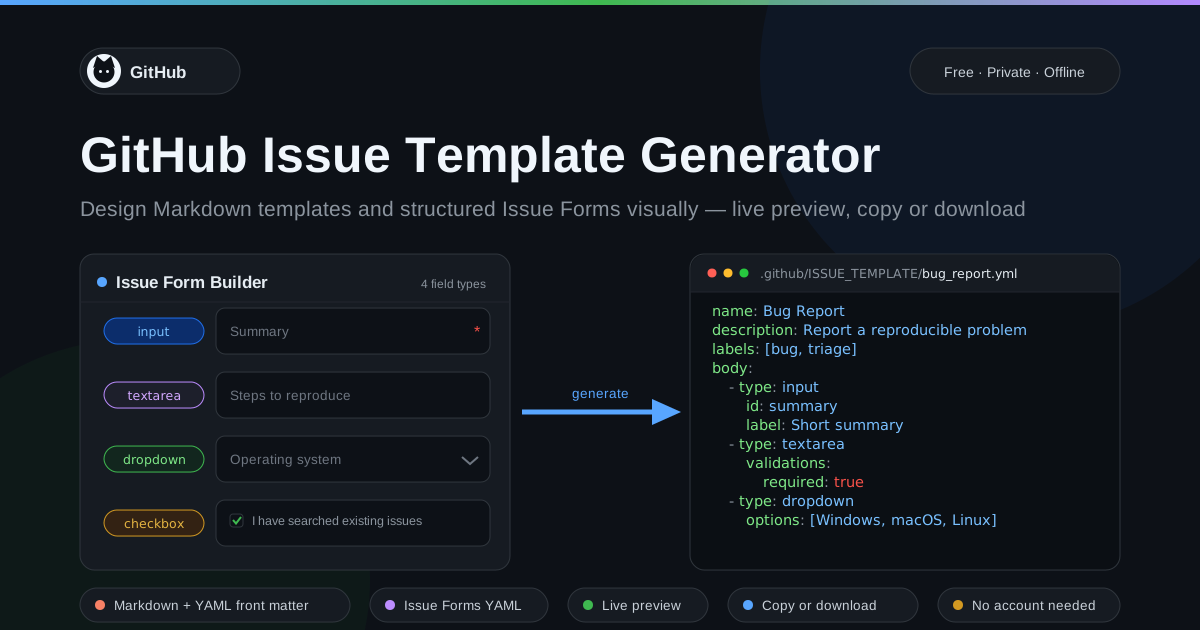
Build GitHub issue templates visually with this free generator. Create classic Markdown templates with YAML front matter or structured Issue Forms with input, textarea, dropdown, and checkbox fields. Live preview, copy or download, 100% client-side.
Free Interactive Tool
GitHub Issue Template Generator
Build bug-report and feature-request issue templates plus structured Issue Forms (YAML) with input, textarea, dropdown, and checkbox fields, with live preview and copy-paste output.
Table of Contents
Every maintainer knows the report they dread: a bug report that says only "it doesn't work." No version, no steps, no logs — just a title and a shrug. That message costs hours of clarification, and it is exactly what a well-designed issue template prevents. Instead of answering the same five questions in comments, a template asks once, up front, in a structured form.
GitHub Issue Template Generator is a free, browser-based builder for those templates. It supports both formats GitHub understands: classic Markdown templates with YAML front matter, and structured Issue Forms written as YAML with input, textarea, dropdown, and checkbox fields. You configure fields visually, watch the live preview update as you type, then copy or download the finished file — no account needed, 100% client-side.
Why Use GitHub Issue Template Generator?
- Stop chasing missing information. A template turns vague submissions into complete reports with versions, steps, and expected behavior, because the form asks for each piece explicitly.
- No YAML syntax errors. Hand-written Issue Forms YAML invites indentation mistakes that GitHub silently rejects. The generator emits valid output on the first commit.
- Two styles, one builder. Produce classic Markdown templates for compatibility or modern Issue Forms for enforced input, without learning two formats.
- Live preview as you build. See the rendered form and raw output side by side, catching awkward labels before contributors do.
- Required fields enforced by GitHub. Mark a field required and GitHub refuses incomplete submissions — nothing empty slips into your backlog.
- Private and instant. Everything runs client-side: no uploads, no tracking, no sign-up wall.
Key Features
| Feature | Description |
|---|---|
| Classic Markdown templates | YAML front matter defining name, about text, labels, and title prefix |
| Issue Forms YAML | Structured forms with input, textarea, dropdown, and checkbox fields |
| Required validation | Flag fields so GitHub blocks incomplete submissions before your queue |
| Live preview | Watch labels, placeholders, and options render as you edit |
| Copy or download | Grab the YAML or download a file ready to drop into your repository |
- The output stays aligned with what GitHub validates, so dropdowns and required flags behave as the Issue Forms specification describes.
- The live preview doubles as documentation — show teammates the form reporters will see before you merge.
- Because everything runs client-side, drafting templates for private repositories is completely safe.
How to Use
- Open the generator. Visit GitHub Issue Template Generator and choose a style: classic Markdown with YAML front matter, or structured Issue Forms YAML.
- Set the basics. Enter the template name, the description shown in the template chooser, labels to auto-apply, and optionally a title prefix.
- Add your fields. Pick a type per question — input for short answers, textarea for details, dropdown for fixed lists, checkboxes for confirmations — then set label, placeholder, and whether it is required.
- Review the live preview. Check the rendered form and generated YAML side by side, reordering fields until the flow reads naturally from a reporter's view.
- Copy or download, then commit. Save the file as .github/ISSUE_TEMPLATE/bug_report.yml (or .md for classic templates), commit it, and open a test issue to confirm.
Markdown Templates vs Issue Forms
GitHub supports two generations of issue templates, and the generator produces both.
Classic Markdown templates are plain Markdown files with a small YAML front matter block defining the name, the short "about" text shown in the template chooser, labels for new issues, and an optional title prefix. The body is ordinary Markdown reporters fill in by hand. Classic templates are simple and universally supported — but nothing is enforced, so a reporter can delete every heading and submit a blank issue.
Issue Forms are structured YAML files that GitHub renders as real form controls: an input for one-line answers, a textarea for details, a dropdown with a fixed option list, and checkboxes for confirmations. Each field can carry a label, description, placeholder, and validation rules — most importantly a required flag, which makes GitHub block submission until the field is filled. Dropdowns guarantee values like operating system come from your list, not free text.
Both file types live in the .github/ISSUE_TEMPLATE/ directory at the repository root. A companion config.yml in the same folder controls repository-wide behavior, most notably blank_issues_enabled: false, which removes the "open a blank issue" escape hatch.
Here is a small annotated Issue Forms example:
name: Bug Report # shown in the template chooser
description: Report a reproducible problem
labels: [bug, triage] # auto-applied to new issues
body:
  - type: input # one-line answer
    id: summary
    attributes:
      label: Summary
    validations:
      required: true # GitHub blocks empty submissions
  - type: textarea
    id: steps
    attributes:
      label: Steps to reproduce
  - type: dropdown
    id: os
    attributes:
      label: Operating system
      options: [Windows, macOS, Linux]
  - type: checkboxes
    id: checks
    attributes:
      label: Before submitting
      options:
        - label: I have searched existing issues
          required: true
As a rule of thumb: use classic Markdown when you need free-form flexibility, and Issue Forms whenever consistent, validated input matters more.
Practical Use Cases
Bug Reports With Environment Data
The classic case. An input for the affected version, a textarea for reproduction steps, a dropdown for operating system, and a required "searched existing issues" checkbox turns your noisiest channel into reports triageable from labels alone.
Feature Requests You Can Act On
Ask for the problem, not the solution: a textarea for the use case, a dropdown for how often the need arises, and an input for workarounds tried. This filters noise and feeds your roadmap real context.
Documentation Issues
Docs live in the repository now, so they deserve a template too. Fields for the page URL, the section, what the text says versus what it should say, and a "checked the latest version" checkbox keep doc fixes small.
Support and Triage Intake
Teams using issues as a support queue can build separate templates for questions, incidents, and access requests, with dropdowns for urgency and component. With labels, each submission is routed before anyone reads it.
Best Practices
- Keep required fields few. Mark only what a maintainer truly needs — usually summary and reproduction steps. Every extra required field increases abandonment.
- Use dropdowns for values you know. Versions, platforms, and components should be fixed option lists; free-text answers like "v2 maybe?" are worse than none.
- Test the form from a reporter's view. Open a real issue on a scratch branch, checking reading flow and mobile rendering, not just YAML validity.
- Write labels as questions. "What did you expect to happen?" collects better answers than "Expected behavior."
- Disable blank issues. Set blank_issues_enabled: false in config.yml so nothing bypasses the structure you built.
- Iterate on real submissions. When issues still need clarification after a month, sharpen a field.
Ready to Fix Your Issue Inbox?
Open GitHub Issue Template Generator, build a form that fits your project, and commit it alongside your repository configuration. It pairs naturally with the tools below.
Related Tools You Might Like:
- GitHub Actions Workflow Generator — scaffold CI and automation workflows with ready-to-commit YAML.
- Markdown Preview — render and proofread Markdown files, including template bodies, before committing.
- YAML Formatter — clean up and validate the YAML your templates and workflows depend on.
Standardize your intake, respect your contributors' time, and let every bug report arrive ready to triage.
Frequently Asked Questions
Q: Where do I put the generated file in my repository?
A: Under .github/ISSUE_TEMPLATE/ at the repository root — for example bug_report.yml for an Issue Form or feature_request.md for a classic template. Commit it to your default branch and GitHub picks it up on the "New issue" page immediately.
Q: What is the difference between classic templates and Issue Forms?
A: Classic templates are Markdown files with YAML front matter (name, about, labels, title prefix) and a free-form body reporters edit by hand. Issue Forms are structured YAML that GitHub renders as real controls — input, textarea, dropdown, checkboxes — with required-field validation blocking incomplete issues.
Q: Can I make a field mandatory?
A: Yes. Add a validations block with required: true to any Issue Forms field, and GitHub refuses to create the issue until it is filled. The generator toggles this per field with a checkbox.
Q: Does the generator upload my templates anywhere?
A: No. The tool runs entirely client-side in your browser. Your field definitions and generated YAML never leave your machine, no account is required, and drafting templates for private repositories is safe.