Glob Pattern Tester: Master *, **, and Negation Before They Match the Wrong Files
Test glob and minimatch patterns against real file paths with include and exclude rules, negation, brace expansion, and character classes — instant match highlighting, free and offline in your browser.
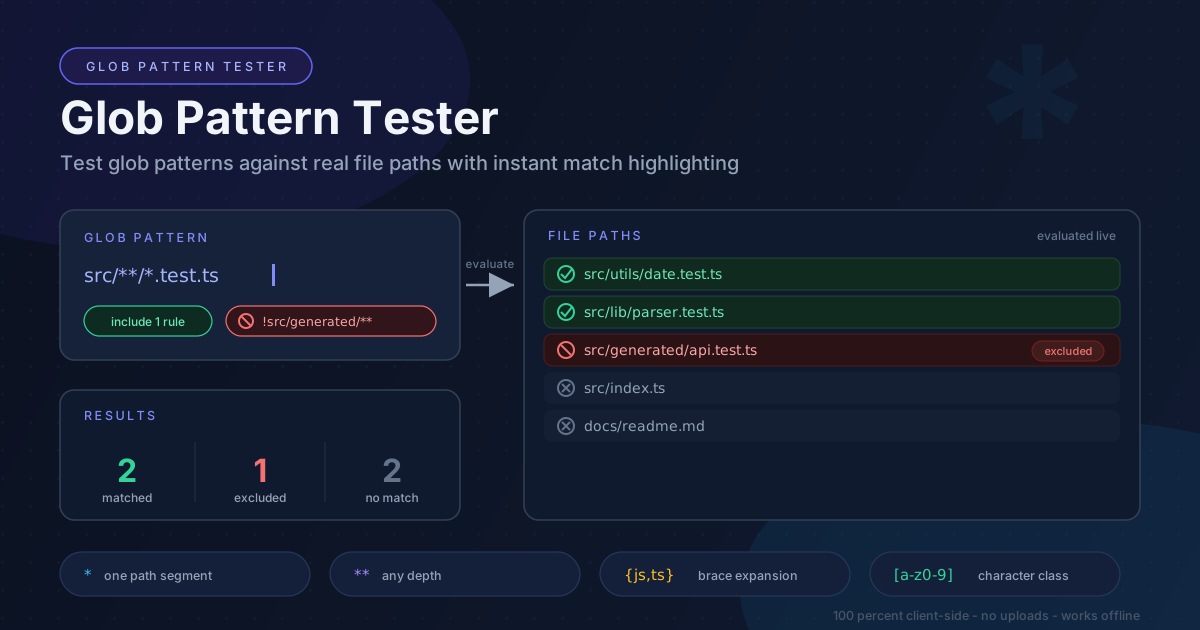
Free Interactive Tool
Glob Pattern Tester
Test glob and minimatch patterns against file paths with include/exclude rules and instant match highlighting.
Table of Contents
Glob patterns decide which files your .gitignore ignores, which paths your CI watches and uploads, which sources TypeScript compiles through tsconfig include, and what your lint configs scan — yet almost nobody learns the syntax formally. Worse, each tool interprets it differently: a ** crossing directories in one engine may behave conservatively in another, and negation that works in Git can fail in a backup script. The Glob Pattern Tester closes the gap: paste your patterns and a realistic file list, and see which files match before the rule ships to a config.
Globs fail silently, so the cost of guessing is real: a pattern one character off either hides files you meant to keep or sweeps in far more — a dependency folder riding along as a CI artifact, or a secret committed because the ignore rule never fired.
Glob Pattern Tester makes the feedback loop instant and safe. It supports include and exclude rules, negation with !, brace expansion with {a,b}, and character classes like [a-z], labeling every path as matched, excluded, or unmatched as you type. Everything runs 100 percent client-side and keeps working offline.
Why Use Glob Tester?
- Instant feedback instead of trial and error — Stop editing .gitignore and re-running git status. Results update as patterns change; guess-and-check becomes a five-second glance.
- See includes and excludes together — Both rule sets are evaluated as a pair, so an exclude that undoes an include is visible immediately.
- Catch tool-specific differences early — The same-looking pattern can behave differently across minimatch, Git, shells, and build tools — testing against a real file list exposes the differences before you commit.
- Safe for private repository layouts — Every evaluation happens locally, so internal directory structures never leave your machine.
- Learn the syntax by example — Swap * for **, add a !, widen [a-c] to [a-z], and watch which files change state.
Key Features
| Feature | What it does | Why it matters |
|---|---|---|
| Include patterns | Match paths against minimatch-style globs | The positive half of every rule set |
| Exclusion and negation | ! patterns remove earlier matches | Carve exceptions out of broad rules |
| Brace expansion | {js,ts} expands into alternatives | One line instead of a rule per extension |
| Character classes | [abc] and ranges match one character | Character-level precision without long lists |
| Instant highlighting | Every path labeled live | Consequences of edits are visible |
| 100 percent client-side | All evaluation in your browser | Private paths stay private; works offline |
- Comment-friendly input — Lines starting with # are ignored, so annotated rule sets paste into pull requests.
- Copy only the matches — One click copies the final matched list for a script or CI config.
How to Use
- Open the tool — Go to the Glob Pattern Tester in any modern browser. Nothing to install.
- Paste a realistic file list — Use the output of git ls-files, a directory listing, or a build log. Real paths beat invented ones: they carry the nesting that breaks naive patterns.
- Write your include patterns — Add one glob per line, such as src/**/*.test.ts — results update as you type.
- Add exclusions with ! — Prefix a pattern with !, like !src/generated/**, and watch affected rows flip to excluded.
- Refine and copy — Adjust until the matched set is right, then copy the paths or rule set into your config.
*, **, and the Braces
The syntax is tiny, but two characters can separate six files from six thousand.
The single star: one segment. * matches any characters except the separator, so src/*.js matches src/index.js but not src/lib/util.js — it never crosses a slash.
The double star: any depth. A ** segment matches zero or more directories, so src/**/*.js reaches src/lib/deep/format.js too. Keep it a whole segment — src** is a different animal some engines reject.
The question mark: one character. file?.ts matches file1.ts but not file10.ts, and never matches a separator.
Negation: order decides. A pattern starting with ! removes earlier matches. In gitignore-style engines, the last matching line wins, so this pair selects everything, then removes node_modules:
**
!node_modules/**
Reverse the lines and the negation does nothing. And since Git will not descend into an excluded directory, re-include the directory path itself before rescuing files inside it.
Braces multiply alternatives. src/**/*.{js,ts} expands into two patterns before matching — one less line to mistype.
Classes pin down characters. [abc] matches one set member, [a-z0-9] adds ranges, and minimatch writes negated classes as [!abc], not the regex-style [^abc].
Think in include/exclude pairs. A broad include plus surgical exclusions is the reliable workflow. To match everything in src except generated code:
src/**
!src/generated/**
| Path | Result |
|---|---|
| src/index.ts | matched |
| src/lib/util.ts | matched |
| src/generated/api.ts | excluded by negation |
| dist/bundle.js | never matched |
The inverse — ignore all but src — is a Git idiom: /* ignores every top-level entry, then !/src re-includes the directory. That order is load-bearing.
Practical Use Cases
Writing .gitignore Rules
Silent failures hurt most here. Before committing a rule, paste the paths git status shows plus the rule set into the tester and confirm each lands in the intended bucket — especially negations, which must appear after the rule they amend.
tsconfig and ESLint Path Patterns
TypeScript's include/exclude arrays, ESLint's ignores, and .prettierignore all use glob-flavored syntax with engine-specific quirks around **, negation, and extensions. Verify against your real tree before pasting into the config.
CI Artifact and Cache Paths
One wrong segment and a giant folder rides along as an artifact, or the deploy ships incomplete. Source maps in particular leak through broad patterns — test the exact paths your workflow produces.
Backup and Sync Scripts
Tools like rsync apply include/exclude filters first match wins — the opposite order from Git. A set verified against Git can quietly skip a data directory, so check the list in the tester first.
Best Practices
- Test against a real file list — Invented paths hide the nesting that breaks patterns — paste git ls-files output and judge the real thing.
- Watch engine differences — Minimatch, Git, shells, and build tools disagree on ** edge cases, negated classes, and ordering.
- Prefer over-specific over accidentally broad — A pattern that occasionally misses is annoying; one that silently matches your .env directory is an incident.
- Keep negations adjacent to the rule they amend — Last-match-wins decides the outcome, so scattered exceptions invite ordering bugs.
- Anchor deliberately — Know whether a rule applies from the root or anywhere (/dist versus dist in Git), and whether a trailing slash restricts it to directories.
- Record the passing rule set — Save verified patterns next to the config so the next person inherits proof.
Ready to stop finding glob bugs in production? Open the Glob Pattern Tester, paste your git ls-files output, drop in the pattern you were about to commit, and confirm every path lands where you intend.
Related Tools You Might Like:
- Regex Railroad Diagram Generator — Visualize regular expressions as interactive syntax diagrams.
- .gitattributes Generator — Control line endings, binary marking, and export-ignore rules.
- URI Template Expander — Expand RFC 6570 URL templates like /users/{id}{?fields} with live variables.
Every glob is a promise about which files count. Test it against real paths, then ship rule sets you can defend.
Frequently Asked Questions
Q: Is my file list or pattern uploaded to a server?
A: No. Compilation and matching run entirely in your browser, and the tool keeps working offline after the first load.
**Q: What is the actual difference between * and **?**
A: A single * never crosses a slash, so src/*.js stays inside src; a ** segment matches directories at any depth, so src/**/*.js also reaches src/lib/deep/format.js.
Q: Why does my negation rule work here but not in .gitignore?
A: Order: the last matching line wins, so the ! exception must follow the broad rule. Also, Git does not descend into excluded directories — re-include the parent folder first.