Gradle to Maven Converter: Turn build.gradle Dependencies into pom.xml Snippets
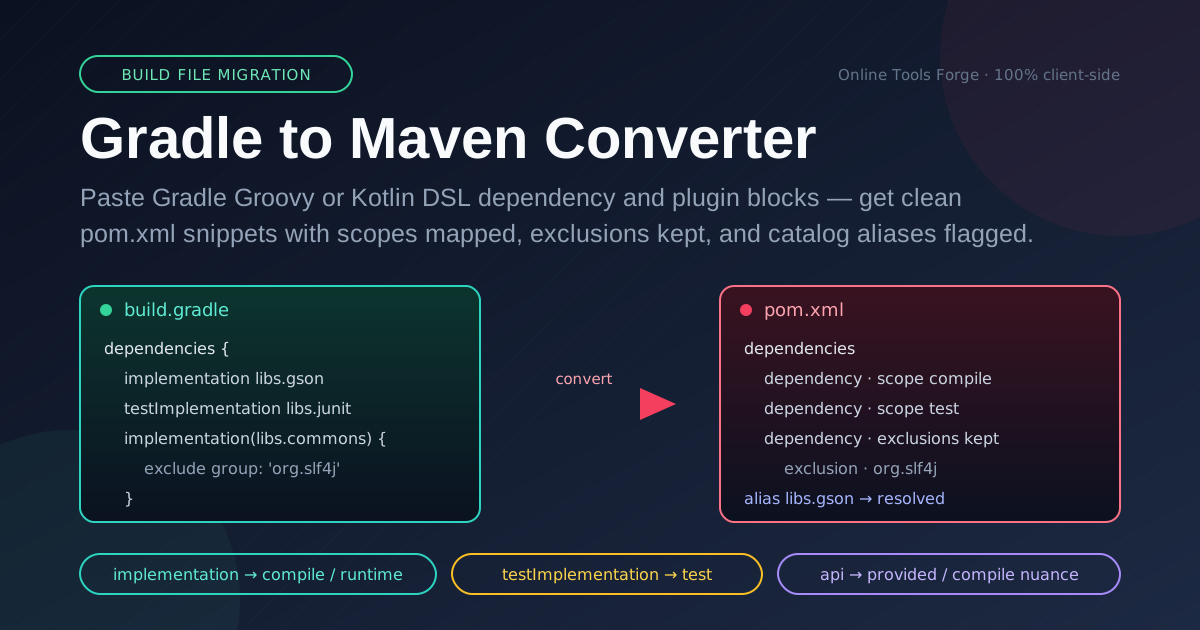
Convert Gradle Groovy and Kotlin DSL dependencies and plugins into Maven pom.xml snippets in your browser. Maps configurations to scopes, keeps exclusions, and detects version catalog aliases — 100% client-side.
Free Interactive Tool
Gradle to Maven Converter
Convert Gradle Groovy/Kotlin DSL dependencies and plugins into Maven pom.xml snippets in your browser.
Table of Contents
Enterprise software still lives in Maven: corporate monorepos, banking backends, and countless internal parent POMs standardize on pom.xml. New projects gravitate to Gradle, but migration flows both ways — acquisitions get folded into Maven-based release trains, and the governance tooling that scans dependencies often speaks only Maven. The Gradle to Maven Converter exists for exactly these moments: paste your Gradle dependency and plugin blocks and receive ready-to-paste pom.xml snippets in seconds, entirely in your browser.
The tedious part of such a migration is the dependency blocks, not the build script skeleton. Hand-converting them is where mistakes hide: a Groovy implementation line is not a compile dependency by accident, Kotlin DSL accessors like libs.jackson mean nothing to Maven until resolved, and every dropped exclude block is a transitive leak you will rediscover in a later audit. The converter handles all three: it maps configurations to Maven scopes, preserves exclusions as XML blocks, and detects version catalog aliases so nothing sneaks through unresolved.
This guide covers the scope mapping in depth, worked examples in Groovy and Kotlin DSL, and the practices that make a Gradle-to-Maven migration boring — in the best possible way.
Why Use the Gradle to Maven Converter?
- 100% client-side, nothing uploaded. Parsing and generation run entirely in your browser, so internal artifact coordinates and private group IDs never leave your machine — a relief for security reviews and compliance policies.
- Speaks both Groovy and Kotlin DSL. Whether your blocks read implementation 'group:artifact:version' or implementation(libs.acme.core), the same input box accepts both dialects — even mixed in one paste.
- Scope mapping, not string swapping. The tool translates each Gradle configuration to the right Maven scope: implementation to compile (or runtime when that fits better), testImplementation to test, compileOnly to provided, and so on.
- Exclusions survive the trip. Gradle exclude group:, module: clauses become <exclusions> XML with matching groupId and artifactId, so your Gradle dependency hygiene carries over instead of silently regressing.
- Version catalog awareness. libs.* aliases are detected: resolved to concrete coordinates when the mapping is unambiguous, clearly flagged when they are not. Nothing is ever emitted as a literal libs.something string.
- Free, instant, and frictionless. No signup, no quotas, no install. Open a browser tab next to your editor, paste a block, copy the snippet, and keep moving.
Key Features
| Feature | What it does |
|---|---|
| Groovy DSL parsing | Reads string-notation and map-notation dependency declarations with versions |
| Kotlin DSL parsing | Understands accessor calls, including libs.* version catalog references |
| Configuration-to-scope map | Translates implementation, api, testImplementation, compileOnly, and more |
| Exclusion preservation | Emits nested <exclusions> blocks that mirror the Gradle exclude clauses |
| Version catalog detection | Spots libs.* aliases and resolves or flags each one instead of passing them through |
| Plugin block handling | Converts Gradle plugin declarations into Maven build plugin snippets |
| Snippet emission | Produces clean, copy-ready pom.xml fragments you can paste directly into your POM |
The output is deliberately conservative: anything ambiguous is flagged rather than guessed, because a wrong scope is worse than a visible TODO. And because everything is processed locally, blocks referencing internal artifacts and unreleased versions are safe to paste.
How to Use
- Locate the dependency blocks. Open your build.gradle or build.gradle.kts and copy the dependencies { } block — plus the plugins { } block if relevant; only the declarations are needed.
- Paste into the converter. Drop the block into the input panel on the Gradle to Maven Converter page — Groovy and Kotlin DSL lines can be mixed in one paste.
- Review the scope mappings. Each dependency appears as a pom.xml snippet with its scope; check it matches intent — the one step deserving real thought, covered below.
- Resolve flagged aliases. Any libs.* alias the tool cannot resolve confidently is marked; fill in the concrete coordinates from gradle/libs.versions.toml before pasting into a real POM.
- Copy into pom.xml and build. Paste the snippets inside the <dependencies> element of your target POM, then run mvn clean verify to confirm the converted module resolves and compiles.
Configurations Become Scopes
The heart of the conversion is the configuration-to-scope mapping. Gradle configurations describe how a dependency is used; Maven scopes describe which classpaths it lands on and whether it propagates transitively. The tool applies these defaults:
| Gradle configuration | Maven scope | Notes |
|---|---|---|
| implementation | compile | Needed to compile the module and at runtime. When the jar is only needed at runtime, prefer runtime |
| api | compile | Exposed to consumers transitively, matching Maven compile — with a provided nuance below |
| testImplementation | test | Compile and run classpaths for tests only |
| compileOnly | provided | Present at compile time, expected at runtime from elsewhere |
| runtimeOnly | runtime | Needed only when the application runs — JDBC drivers are the classic case |
| kapt / annotationProcessor | provided (flagged) | Processors are build-time tools, not runtime dependencies; see the caveat below |
The api row carries the most nuance. In Gradle it means "compile against this and my consumers inherit it," which maps naturally to Maven compile — but servlet APIs, Lombok-style compile-only tooling, and containers that inject their own implementations belong in provided. The converter picks the structurally correct scope; you confirm the intent.
The kapt and annotationProcessor rows are flagged on purpose: processors belong in annotationProcessorPaths of Maven's compiler plugin, not the dependency list, so treat the emitted provided scope as a placeholder.
Exclusions are preserved, not dropped. Dependency hygiene is meaningless if it evaporates during conversion, so every exclude clause becomes a matching XML block:
dependencies {
    implementation 'com.google.code.gson:gson:2.10.1'
    implementation('org.apache.commons:commons-lang3:3.14.0') {
        exclude group: 'commons-logging', module: 'commons-logging'
    }
    testImplementation 'org.junit.jupiter:junit-jupiter:5.10.2'
}
The converter emits:
<dependency>
    <groupId>com.google.code.gson</groupId>
    <artifactId>gson</artifactId>
    <version>2.10.1</version>
</dependency>
<dependency>
    <groupId>org.apache.commons</groupId>
    <artifactId>commons-lang3</artifactId>
    <version>3.14.0</version>
    <exclusions>
        <exclusion>
            <groupId>commons-logging</groupId>
            <artifactId>commons-logging</artifactId>
        </exclusion>
    </exclusions>
</dependency>
<dependency>
    <groupId>org.junit.jupiter</groupId>
    <artifactId>junit-jupiter</artifactId>
    <version>5.10.2</version>
    <scope>test</scope>
</dependency>
Version catalog aliases are detected. Pasting raw Kotlin DSL accessors into Maven would produce garbage, so the converter recognizes libs.* references, resolves them where it can, and flags the rest:
dependencies {
    implementation(libs.jackson.databind)
    testImplementation(libs.mockito.core)
}
Output for aliases it recognizes:
<dependency>
    <groupId>com.fasterxml.jackson.core</groupId>
    <artifactId>jackson-databind</artifactId>
    <!-- version managed in gradle/libs.versions.toml — pin it here -->
</dependency>
<dependency>
    <groupId>org.mockito</groupId>
    <artifactId>mockito-core</artifactId>
    <scope>test</scope>
</dependency>
Still eyeball every emitted coordinate against your libs.versions.toml — but you will never ship a literal libs.jackson.databind string into a POM and discover it only when the build fails.
Practical Use Cases
Enterprise Standardization on Maven
Large organizations often mandate a single build tool: one dependency-management strategy, one repository layout, one CI template. When a team joins with a Gradle-based module, the fastest path to compliance is converting the dependency block first and adapting the rest second. The converter turns the most tedious part of onboarding into minutes, and internal coordinates never leave the developer's machine.
Auditing Dependency Trees
Security and architecture reviews often need a Maven-shaped view of a project — many scanners, SBOM generators, and license-compliance tools consume pom.xml far more reliably than Gradle scripts. Converting the dependency blocks yields a normalized snippet set for analysis tooling, with exclusions intact so the audit reflects what the build actually ships.
Migrating Legacy Modules One at a Time
Real migrations are rarely big-bang. A six-module legacy application moves module by module, each block converted, reviewed, and built before the next starts. The tool fits this cadence: stateless, instant, and repeatable, so forty conversions across a quarter cost the same per block as one.
Generating BOM-Friendly Poms
If your destination POM imports a BOM and omits explicit versions, the output is a clean starting point: each dependency arrives with its Gradle-declared version in one predictable place, ready to strip in favor of dependencyManagement instead of hand-typing coordinates.
Best Practices
- Review every scope mapping against intent. implementation maps to compile by default, the safe superset. If a dependency is genuinely runtime-only, downgrade it to runtime — an overly broad compile scope misleads future readers.
- Keep exclusions explicit. If Gradle excluded commons-logging, keep it in the converted pom even if Maven conflict mediation might mask it. Explicit hygiene survives tool changes; luck does not.
- Resolve catalog aliases before converting at scale. Spend five minutes with gradle/libs.versions.toml mapping your common aliases and every later conversion is cleaner. Flagged aliases are a feature; resolved aliases are faster.
- Build immediately after each conversion. Paste the snippets, run mvn clean verify, and let the compiler catch scope mistakes while the Gradle original is still open for comparison.
- Convert in small batches. One module or one dependencies block at a time keeps reviews focused and makes regressions trivially attributable.
- Handle annotation processors deliberately. Move flagged kapt and annotationProcessor entries into maven-compiler-plugin's annotationProcessorPaths rather than leaving a provided placeholder in the dependency list.
Ready to migrate a build file the painless way? Open the Gradle to Maven Converter, paste your first dependency block, and turn ten minutes of error-prone transcription into a ten-second review — no account, no upload, no install.
Related Tools You Might Like:
- YAML Formatter — format and validate YAML config files, including the gradle/libs.versions.toml cousin of your dependency lists
- JSON Formatter — pretty-print and validate JSON payloads, lockfiles, and tool configuration
- XML Formatter — beautify and validate the pom.xml files you just generated
Happy migrating — and may every Gradle configuration land in exactly the Maven scope it deserves. — Online Tools Forge Team
Frequently Asked Questions
Q: Is the Gradle to Maven Converter free, and does it upload my build files anywhere?
A: It is completely free with no signup, and nothing is uploaded: all parsing happens locally in your browser, so internal coordinates and private group IDs never leave your machine.
Q: Can I paste Groovy DSL and Kotlin DSL blocks into the same input?
A: Yes. The parser accepts both dialects and mixed input — many projects migrate to Kotlin DSL incrementally and carry both styles for a while.
Q: Why does implementation map to the compile scope instead of something narrower?
A: implementation dependencies sit on both the compile and runtime classpaths of the module itself, so Maven compile is the structurally correct translation. If it is genuinely runtime-only, switch the snippet to runtime during review.
Q: What happens to libs.* version catalog aliases the tool cannot resolve?
A: They are flagged rather than guessed. Open gradle/libs.versions.toml, find the concrete groupId, artifactId, and version, and fill them in before the snippet reaches a real POM.
Q: How should I handle kapt and annotationProcessor entries in the converted pom?
A: Treat the flagged provided placeholder as a reminder: processors belong in annotationProcessorPaths of Maven's compiler plugin, not the dependencies list.