Heading Structure Checker: Validate Your HTML Outline for Accessibility and SEO
Paste any HTML and instantly see the full H1-H6 outline with skipped levels, duplicate H1, and empty headings flagged. Free, private, and 100% client-side.
Free Interactive Tool
Heading Structure Checker
Analyze HTML heading hierarchy, skipped levels, duplicate H1, and empty headings
Table of Contents
Heading tags from H1 to H6 are the table of contents of every page: they announce the main topic, divide it into sections, and nest subtopics underneath. When the sequence is clean, people and search engines skim your document's skeleton in seconds. The free Heading Structure Checker turns that manual review into a one-paste job.
The stakes are higher than most developers assume. Screen reader users navigate pages primarily by the heading outline — they pull up the heading list and jump straight to the section they need. A skipped level such as H2 followed by H4 breaks that map, and two H1s leave users guessing which is the real title — quietly degrading the navigation assistive technology depends on.
This guide explains what a healthy heading hierarchy looks like, why the four classic mistakes matter, and how to audit any page in under a minute.
Why Use Heading Structure Checker?
- Real assistive-technology impact: Screen reader users build a mental map of your page from its headings. A clean H1-H6 outline is among the cheapest, highest-impact accessibility improvements you can ship.
- Search engines read the outline too: Crawlers use heading levels to understand topical structure; a single descriptive H1 with nested sections reinforces what the page is about.
- Catches the four classic mistakes: Skipped levels, duplicate H1, empty headings, and missing H1 are flagged automatically with severity levels and exact line positions.
- Zero setup and zero risk: Everything runs in your browser, so you can safely paste production pages, drafts, or confidential templates.
- Copyable audit output: Export a plain-text report with one click and drop it into a pull request, ticket, or accessibility review.
Key Features
| Feature | What It Does |
|---|---|
| H1-H6 outline tree | Renders every heading as a nested visual tree mirroring document structure |
| Skipped level detection | Flags jumps such as H2 to H4 that break logical nesting |
| Duplicate H1 detection | Marks every H1 after the first as an error with line and column |
| Empty heading detection | Finds headings with no text, a common CMS template artifact |
| Severity badges | Classifies each finding as error, warning, or pass |
| Copyable report | Exports a plain-text summary of all headings and issues |
Each issue reports the line and column where the heading appears, and a built-in sample shows flagged output before you paste your own code. Because the checker is 100% client-side, unreleased or confidential pages stay private.
How to Use
- Open the Heading Structure Checker in your browser.
- Paste your HTML source — view-source output, a template file, or a CMS code view all work.
- Review the outline tree and confirm it matches the structure you intended.
- Inspect each flagged issue: the severity badge, message, and line position tell you exactly what to fix.
- Correct the HTML, paste it again, and confirm the report shows a clean pass.
What a Good Outline Looks Like
A healthy outline follows three rules, each with a common failure mode.
One H1 per page. The H1 is the document title — one subject per page means one H1. Multiple H1s usually happen when a component template hard-codes its own H1. Screen readers announce both as top-level titles, and search engines may split ranking signals between them.
No skipped levels. Heading levels should descend by one at a time. An H2 section that opens with an H4 skips H3, and assistive technology cannot know whether content was lost or levels were mislabeled — it just reports a gap. Descending is strict; ascending is flexible — returning from an H4 to an H2 is correct.
Headings are an outline, not a styling tool. The most common antipattern is picking a heading level for its default font size — grabbing an H4 because it looks right, or wrapping a sidebar label in an H2 to make it bold. Heading tags carry structural meaning, not visual meaning. If text is not genuinely a section title, style a paragraph or span with CSS instead.
Empty headings sneak in from templates. Many CMS themes render heading wrappers even when the field is empty — an H3 with no text inside. Visually invisible, but a screen reader announces it and the outline gains a phantom node.
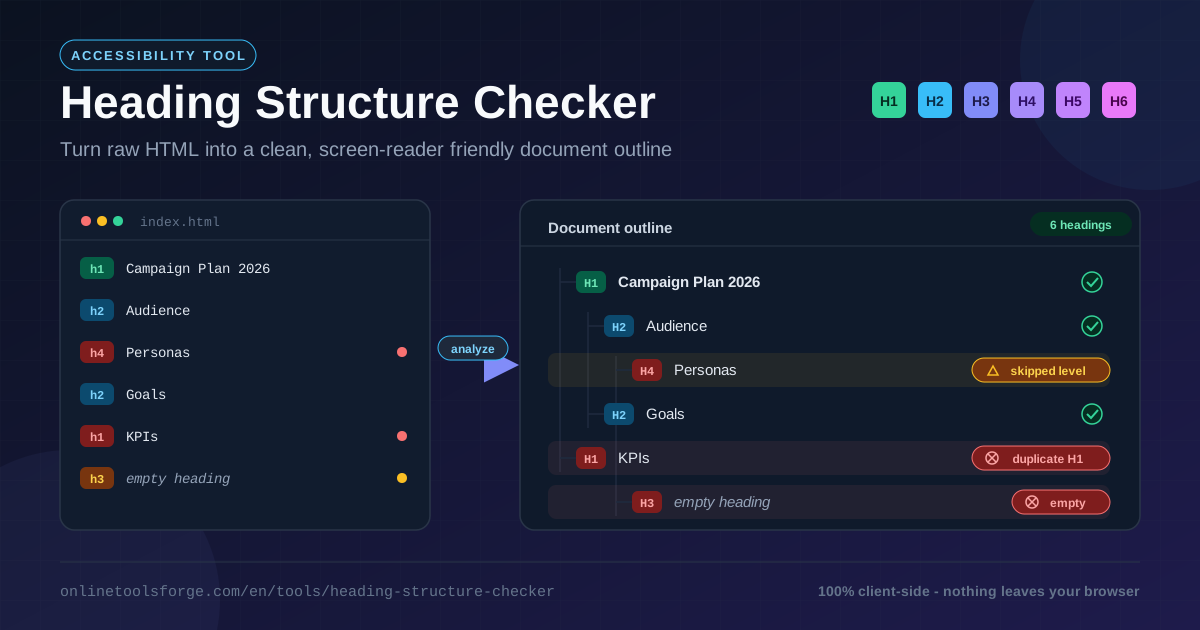
The Heading Structure Checker reports exactly these four problems:
- Skipped level (warning): H2 followed by H4. Screen readers cannot tell whether content was forgotten, parent-child relationships become ambiguous, and crawlers lose the subtopic structure.
- Duplicate H1 (error): Two competing document titles. Users hear two page titles and crawlers see diluted or contradictory topic signals.
- Empty heading (error): A heading with no text. Screen readers announce it as nothing and the outline gains a blank node — pure noise.
- Missing H1 (warning): No top-level title, so the outline has no root. Users hear unframed fragments and the page loses its clearest relevance signal.
Compare a broken outline with a healthy one:
Broken                          Good
H1  Campaign Plan 2026          H1  Campaign Plan 2026
  H2  Audience                    H2  Audience
    H4  Personas   (skipped)        H3  Personas
  H2  Goals                       H2  Goals
    H1  KPIs     (duplicate)        H3  KPIs
    H3  (empty)                 H2  Timeline
The right-hand version descends one level at a time, keeps a single H1, and leaves no empty nodes — the outline both users and crawlers want.
Practical Use Cases
WCAG and Accessibility Audits
Heading hierarchy is explicitly covered by the Web Content Accessibility Guidelines and is one of the fastest audit checks. Paste each key template — homepage, article, product page — and log the findings. Severity badges separate genuine errors from minor warnings so you fix what blocks navigation first.
CMS Template Reviews
Themes and page-builder blocks are where heading regressions hide. A card that hard-codes an H3, a hero that adds its own H1, or a sidebar widget wrapped in an H2 repeats on every page using them. Paste the rendered HTML of each template once, fix the component, and the whole site inherits the correction.
Blog Post Quality Assurance
Before publishing, paste your draft's HTML and read the outline as a table of contents. If the heading list alone does not summarize the article, readers and crawlers will struggle too. This check catches level jumps introduced by pasting from Google Docs or Word.
Migrating and Modernizing Old Pages
Legacy pages accumulate a decade of editor habits: H1s used for logos, empty wrappers, font-size-driven levels. When migrating to a new design system, run each page through the checker before and after. The before snapshot documents the debt; the after snapshot proves the new template ships a clean outline.
Best Practices
- Style with CSS, not heading levels. Pick the level that reflects structure, then restyle it.
- Keep exactly one H1. Reserve it for the page title, and make sure components never inject their own.
- Check dynamic pages too. Client-rendered apps can produce different heading trees per route or state — test the real rendered HTML, not just the source.
- Write descriptive headings. The outline should read like a summary of the page.
- Descend one level at a time; returning upward is fine. H2 to H4 is a break; H4 back to H2 is a normal sibling transition.
- Re-check after content updates. CMS edits can quietly reintroduce empty or duplicated headings — include the checker in release review.
Try It Now
A clean heading outline is one of the highest-leverage accessibility wins available, and verifying takes one paste. Open the free Heading Structure Checker, drop in your HTML, and confirm that every visitor and crawler can navigate your page as intended.
Related Tools You Might Like:
- Accessible Name Calculator — compute the accessible name of any element for screen reader announcements
- Markdown to HTML Converter — generate clean HTML, including heading tags, from Markdown
- HTML Tag Remover — strip markup down to plain text when you need content without structure
Happy auditing!
Frequently Asked Questions
Q: Why does heading order matter for screen reader users?
A: Most screen reader users navigate by pulling up the heading list and jumping between sections. Skipped levels, duplicate H1s, and empty headings corrupt that map, making pages slower and harder to scan.
Q: Can I use more than one H1 on a page?
A: HTML technically permits it, but it creates two competing document titles. Screen readers announce both at the top level, so the safe convention is exactly one H1 per page.
Q: Is my HTML uploaded anywhere when I use the checker?
A: No. All parsing and analysis runs entirely in your browser, so nothing is transmitted to a server. You can safely paste unreleased, internal, or confidential pages.
Q: What is the difference between a skipped level and returning to a higher level?
A: Skipping means descending by more than one, such as H2 followed by H4, leaving a hole in the outline. Returning upward, such as an H4 followed by an H2, is a normal sibling transition.
Q: Does fixing heading structure really affect SEO?
A: Headings help search engines understand page topics and hierarchy. A single descriptive H1 with nested sections gives crawlers clearer structure, supporting better snippets and topical relevance.