i18n Coverage Checker: Compare Locale Files and Find Missing Keys
Compare two locale JSON files like en.json vs th.json to find missing keys, extra keys, and empty translations with per-namespace coverage stats. Free in your browser.
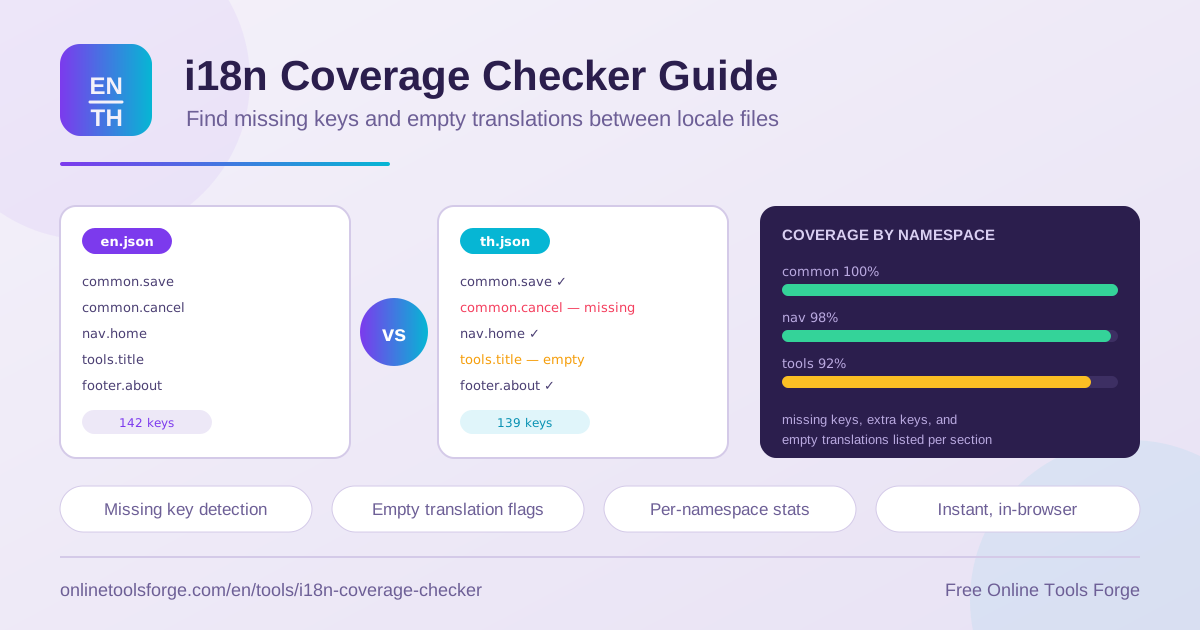
Table of Contents
If your application ships in more than one language, you maintain parallel locale files: en.json for English, th.json for Thai, fr.json for French, and so on. Keeping those files in sync is one of the least glamorous but most error-prone parts of internationalization work. A single forgotten key can leave your production UI rendering fallback text, an empty string, or a literal key name like checkout.button.pay.
The i18n Coverage Checker eliminates this class of bug with a fast, focused workflow. Paste two locale JSON files and it instantly reports keys missing in each direction, extra keys, empty translations, and per-namespace coverage percentages with color-coded status. Everything runs in your browser: the tool is completely free, requires no signup, and nothing is uploaded, so proprietary and pre-release strings stay on your machine.
This guide explains how the tool works, what translation coverage really means, and how to fold the i18n coverage checker into your release routine.
Why Use the i18n Coverage Checker?
- Catch missing translation keys before users do. A key present in en.json but absent from th.json renders as fallback text or a raw key name for Thai users. The checker lists gaps in both directions.
- Detect empty translations. A key can exist in both files yet hold an empty string. These silent gaps are common in real projects, and the checker flags them explicitly.
- Spot extra and dead keys. Keys that exist in one file but not the other often mark renamed or removed UI strings. The report surfaces them in a single pass.
- Get per-namespace coverage. Instead of one opaque number, you see coverage for common, checkout, settings, and every other namespace, with color-coded success and warning status.
- Handle flat and nested structures. Real locale files use nested objects, and the comparison handles both consistently, so settings.profile.email matches wherever it lives.
- Work privately with zero setup. All parsing and comparison happen locally in the browser. No accounts, no uploads, no waiting.
Key Features
The checker packs a complete comparison engine into a compact feature set:
| Feature | What it does |
|---|---|
| Two-file paste input | Paste en.json and th.json directly — no uploads, no account. |
| Flat and nested comparison | Deep keys like settings.profile.email are matched correctly across structures. |
| Bidirectional missing-key report | Separate lists for keys missing in A and keys missing in B. |
| Extra key detection | Surfaces keys present in one file but absent from the other. |
| Empty translation detection | Flags keys whose value is an empty string despite existing. |
| Per-namespace coverage stats | Computes a coverage percentage for each top-level namespace. |
| Color-coded status | 100% shows success; lower coverage is flagged as a warning. |
| Instant in-browser results | Comparison runs locally the moment you paste, with no server round trip. |
A few details worth calling out:
- Missing, extra, and empty lists are computed in both directions, so asymmetric drift between locales is easy to see.
- Coverage is reported per namespace, turning a vague "our Thai file is incomplete" into "billing is at 72%."
How to Compare Locale Files
- Open the tool. Navigate to the i18n coverage checker — there is nothing to install and no account needed.
- Paste file A. Copy your reference locale, usually en.json, into the first panel. Any valid JSON object works, flat or nested.
- Paste file B. Add the locale you want to audit, such as th.json, into the second panel.
- Review the report. Scan the missing-in-B list first, then missing-in-A, extra keys, and empty translations.
- Fix and re-verify. Update your files, paste them again, and confirm every namespace reaches 100%.
What Coverage Means in Localization
Localization teams rely on parallel locale files: every user-facing string gets a stable key, and each language maps those keys to translated text.
en.json → { "checkout": { "pay": "Pay now" } }
th.json → { "checkout": { "pay": "ชำระเงิน", "cancel": "ยกเลิก" } }
checkout.pay    → translated in both files
checkout.cancel → extra in th.json, missing in en.json
Three defect categories matter. Missing keys exist in the reference locale but not in the target, so the target UI falls back to raw text or breaks. Extra keys exist only in the target, usually marking strings renamed or removed upstream. Empty translations are the worst middle ground: the key and structure look right, but the value is an empty string, so the defect stays invisible until a user reaches that screen.
Namespaces act as modules. Teams typically organize locale files by top-level namespace — common, auth, checkout, settings — mirroring application modules. That is why per-namespace coverage beats a single global number: it tells you which feature area is behind, not merely that something is missing.
The math is straightforward. For each namespace, coverage equals the number of keys with non-empty translations in the target, divided by the total keys in that namespace of the reference locale, times one hundred. If en.json defines 50 checkout keys and th.json provides 45 non-empty values, checkout scores 90%. Counting empty values as failures is deliberate: a present-but-empty key breaks the UI just as surely as an absent one.
Coverage also works as a release gate: many teams require 100% on user-facing namespaces before a merge ships, using the color-coded status as a pass or fail signal.
Practical Use Cases
Pre-Release Translation Audits
Before cutting a release, paste en.json and each target locale into the checker. Any namespace below 100% becomes a blocker for languages you promise to support. Teams often run the comparison once per locale to build a coverage matrix, then attach the warnings to the release ticket so translators know exactly which keys remain.
Onboarding a New Locale
The fastest way to start a new language is to duplicate the reference file with empty values and hand it to translators. As translated batches come back, paste them against en.json and watch each namespace climb toward 100%. The per-namespace view shows which feature areas are still unfinished without manually diffing hundreds of keys.
Cleaning Up Dead Keys
Applications evolve, and locale files collect cruft: leftovers from removed screens, renamed buttons, and refactored components. Extra keys in the comparison report are your dead-key candidates. Verify each against the codebase, remove confirmed orphans from every locale file at once, and re-run the comparison to confirm both sides match.
Reviewing Translator Submissions
When a translator returns a batch of strings, paste the updated file against the reference locale before merging. The report confirms every expected key is present and non-empty, and flags accidental deletions or additions. Translation review becomes a verifiable audit instead of a spot check, catching copy-paste mistakes before they surface in production.
Best Practices
- Treat one locale as the source of truth. Anchor all comparisons and coverage math to a single reference file, usually en.json.
- Gate releases on 100% coverage for user-facing namespaces. A warning at release time is far cheaper than a post-launch hotfix.
- Fix both directions. Missing-in-A entries are as important as missing-in-B, and extra keys should be pruned from every locale simultaneously.
- Check after every feature merge, not only at release. Drift compounds quickly when several teams add strings independently.
- Apply key renames everywhere in the same commit so comparisons stay meaningful across locales.
- Audit empty strings separately from missing keys. They fail differently — one breaks lookup, the other renders blank space — but both should block a release.
Ready to find the gaps in your locale files before your users do? Open the i18n coverage checker, paste your en.json and th.json, and get a full missing-key, extra-key, and empty-translation report with per-namespace coverage in seconds — free, private, and entirely in your browser.
Related Tools You Might Like:
- YAML Diff — compare YAML configuration files with the same rigor you apply to JSON locale files.
- Unicode Escape Converter — escape and unescape Unicode sequences when working with non-Latin scripts.
- Unicode Lookup — identify Unicode characters and code points that appear in your translations.
Happy localizing!
Frequently Asked Questions
Q: Does the i18n coverage checker upload my locale files to a server?
A: No. All parsing, comparison, and coverage calculation run entirely in your browser. Your locale files never leave your machine, which makes the tool safe for proprietary or unreleased strings.
Q: Can it compare nested JSON locale files?
A: Yes. The checker supports flat and nested key structures. Nested objects are flattened into dotted key paths, so settings.profile.email in a nested file compares correctly against the same key in any layout.
Q: What is the difference between missing, extra, and empty keys?
A: Missing keys exist in the reference file but not in the target, so the target UI has nothing to render. Extra keys exist only in the target and usually indicate dead or renamed strings. Empty keys exist in both files but hold an empty string, producing blank output at runtime.
Q: How is the coverage percentage calculated?
A: For each namespace, coverage is the number of keys with non-empty translations in the target locale, divided by the total keys in that namespace of the reference locale, multiplied by 100. A namespace at 100% shows success status; anything lower is flagged as a warning.