iCal RRULE Generator: Build RFC 5545 Recurrence Strings Without the Guesswork
Free online RRULE generator for iCal events. Build RFC 5545 recurrence strings with daily, weekly, monthly, and yearly patterns, BYDAY and BYMONTHDAY rules, COUNT or UNTIL endings, and a human-readable schedule preview. 100% client-side.
Free Interactive Tool
iCal RRULE Generator - Create Recurring Event Rules Online
Free online RRULE generator for RFC 5545 recurring events. Build daily, weekly, monthly, and yearly recurrence rules with INTERVAL, BYDAY, UNTIL, and COUNT options, preview the schedule in plain language, and copy or download it as an .ics file.
Table of Contents
Behind every repeating event you have ever accepted sits one compact line of text. RRULE strings run every calendar app on earth — and they read like encrypted text. A rule such as RRULE:FREQ=MONTHLY;INTERVAL=2;BYDAY=2TU;COUNT=12 means "the second Tuesday of every other month, twelve times," yet almost nobody can write one from memory. The governing standard, RFC 5545, is precise but written for parsers, not for people.
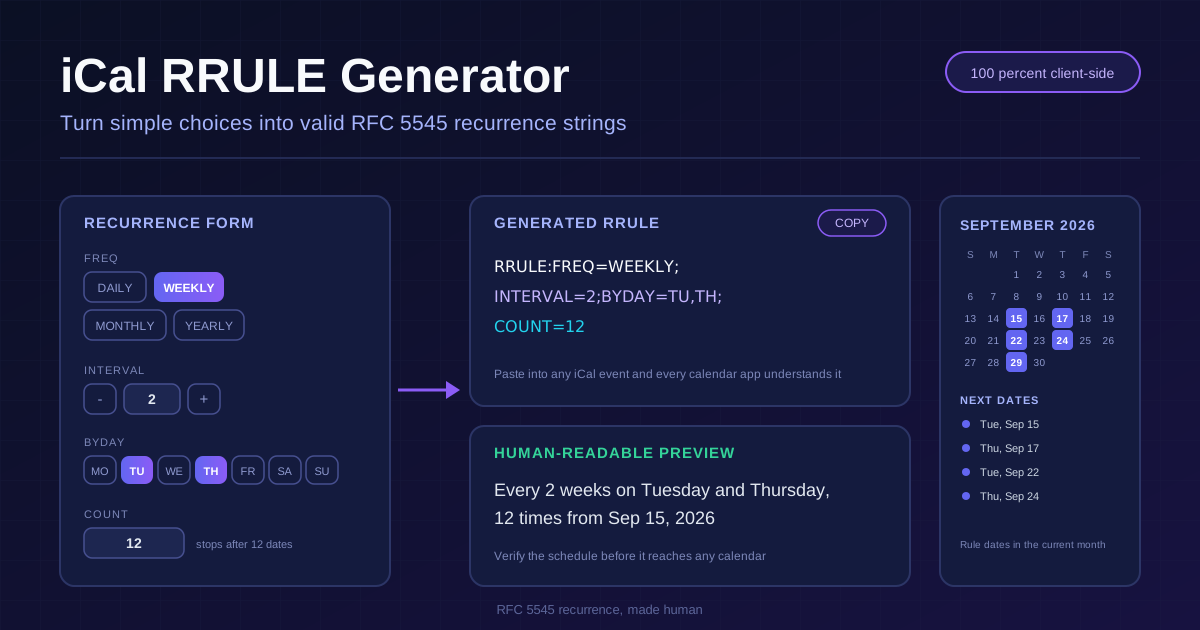
The free iCal RRULE generator flips that workflow around. Choose a frequency — daily, weekly, monthly, or yearly — set an interval, tap the days that apply, and decide whether the series ends after a count or on a date. The tool assembles a valid RFC 5545 RRULE string and, just as importantly, translates it into plain English with a live schedule preview before you paste it anywhere.
Everything runs 100% client-side in your browser. No account, no uploads, and the string plus preview update the moment you change an option — equally good for one-off rules and production schedules.
Why Use iCal RRULE Generator?
- Standards-correct output: every string follows RFC 5545, so Google Calendar, Outlook, Apple Calendar, and scheduling libraries interpret it identically.
- Plain-English feedback: the preview restates the rule as a sentence — "Every 2 weeks on Tuesday and Thursday, 12 times" — so you confirm it before shipping.
- All four frequencies, full control: DAILY, WEEKLY, MONTHLY, and YEARLY patterns combined with INTERVAL, BYDAY, BYMONTHDAY, COUNT, and UNTIL.
- Tricky cases made easy: ordinal weekdays like the second Tuesday and negative month days like the last day of the month are one click, not a spec lookup.
- Private by design: generation is entirely client-side, so confidential schedules never leave your machine.
- Copy-paste ready: one click copies the finished RRULE for .ics files, calendar APIs, or documentation.
Key Features
| Feature | What It Does |
|---|---|
| Pattern builder | Assembles FREQ, INTERVAL, BYDAY, BYMONTHDAY, COUNT, and UNTIL into one valid RRULE |
| Four frequencies | Covers DAILY, WEEKLY, MONTHLY, and YEARLY recurrence from a single form |
| Ordinal BYDAY support | Selects nth weekdays, such as 2TU for the second Tuesday or -1FR for the last Friday |
| BYMONTHDAY with negatives | Targets fixed month days, including -1 for the last day of any month |
| Human-readable preview | Translates the rule into a sentence you can verify at a glance |
| 100% client-side | All generation happens locally; nothing is uploaded or stored |
- Live two-way confidence: the string and the sentence update together, so what you configured and what the rule says never drift apart.
- Spec-strict output: drops cleanly into .ics files, import flows, and code using recurrence libraries such as rrule.js or python-dateutil.
How to Use
- Pick a frequency. DAILY, WEEKLY, MONTHLY, or YEARLY sets the FREQ part and reshapes the form to show only relevant options.
- Set the interval. INTERVAL 1 means every period, 2 means every other: weekly with 2 is the classic biweekly, monthly with 3 fires once a quarter.
- Add day constraints. Tap the BYDAY chips for weekdays, or set BYMONTHDAY to pin fixed dates, with numeric prefixes for "second Tuesday" rules.
- Choose an ending. Leave it open-ended, set COUNT to stop after a number of occurrences, or set UNTIL to end on a fixed date.
- Read the preview, then copy. Verify the sentence and highlighted dates, adjust anything off, and copy the RRULE into your calendar, app, or code.
RRULE Parts in Plain Words
- FREQ — the heartbeat. The only mandatory part: DAILY repeats by days, WEEKLY by weeks, MONTHLY by months, YEARLY by years. Everything else refines the rhythm.
- INTERVAL — every N. Defaults to 1. FREQ=WEEKLY;INTERVAL=2 means every second week; FREQ=MONTHLY;INTERVAL=6 is a twice-a-year schedule.
- BYDAY — weekdays, with optional ordinals. Codes are MO, TU, WE, TH, FR, SA, SU. In monthly and yearly rules a numeric prefix selects an occurrence: 2TU is the second Tuesday, -1FR the last Friday. In weekly rules the prefix is meaningless.
- BYMONTHDAY — fixed calendar days. Values 1 through 31 pin exact dates; negatives count from the month's end: -1 is the last day, -2 the second-to-last — the reliable way to say "final day of the month" across different month lengths.
- COUNT vs UNTIL — mutually exclusive endings. COUNT stops after a number of occurrences; UNTIL stops at a moment in time, written in UTC like 20261231T235959Z. Include one or the other, never both.
- Real-world recipes. Biweekly payday: FREQ=WEEKLY;INTERVAL=2;BYDAY=FR. Last Friday of the month: FREQ=MONTHLY;BYDAY=-1FR. Weekdays only: FREQ=WEEKLY;BYDAY=MO,TU,WE,TH,FR.
A small annotated rule shows how the parts chain together:
RRULE:FREQ=MONTHLY;INTERVAL=2;BYDAY=2TU;COUNT=12
      |            |            |          |
      |            |            |          stops after 12 occurrences
      |            |            the 2nd Tuesday of each month
      |            every 2nd month
      repeat on a monthly rhythm
Two gotchas deserve attention. First, the monthly 31st: FREQ=MONTHLY;BYMONTHDAY=31 silently produces nothing in months with fewer than 31 days. If you mean "last day of the month," write BYMONTHDAY=-1 and the rule adapts to every length. Second, DST drift: an RRULE describes local wall-clock times, while the timezone lives in DTSTART, not the rule. A 9:00 meeting stays at 9:00 through daylight saving changes — usually what you want — but systems storing times in UTC without a proper timezone can show occurrences an hour off for part of the year. Keep DTSTART timezone-aware, and remember UNTIL must be UTC.
Practical Use Cases
Subscription billing schedules
Billing rarely hits the same date every month: annual renewals, quarterly plans, and same-weekday billing use ordinal BYDAY rules. Generating the exact RRULE — and previewing the next several charges — prevents off-by-one cycles that annoy customers and pollute revenue reports.
Meeting recurrences that survive timezones
A rule built here, paired with a timezone-aware DTSTART, keeps the Tuesday sync on Tuesday in every calendar across daylight saving changes, while COUNT or UNTIL retires the series when the project ends.
Report automation
Weekly digests, month-end exports, and quarterly snapshots all need machine-readable schedules. Generate one RRULE, paste it into your scheduler or .ics feed, and let the human-readable preview double as the documentation.
IoT timers and maintenance windows
Water the garden every third day, reboot the backup server on the first Sunday, run diagnostics every weekday at noon. An RRULE captures these patterns in a portable string, and the date preview catches mistakes before pumps fire at 3 AM.
Best Practices
- Prefer COUNT for trials and fixed-length series. A 14-day trial is simply FREQ=DAILY;COUNT=14 — the series ends on its own.
- Use UNTIL for fixed calendar end dates. When a contract expires on a specific date regardless of occurrence count, UNTIL says it directly.
- Always read the preview before shipping. The sentence and highlighted dates turn silent syntax slips into obvious mistakes.
- Anchor DTSTART on a real occurrence. Expansion depends on the start date; anchoring a Monday rule on a Saturday produces surprising first occurrences.
- Use BYMONTHDAY=-1 for end-of-month logic. It sidesteps the 31st problem and reads unambiguously in code review.
- Never combine COUNT and UNTIL. Strict parsers reject rules that carry both.
Generate Your Next RRULE in Seconds
The recurrence syntax rewards people who memorize it and punishes everyone else. Skip the memorization: open the iCal RRULE generator, click through the pattern in your head, and copy a validated RFC 5545 string with a plain-English preview — free, private, fully client-side.
Related Tools You Might Like:
- Calendar Link Generator — create add-to-calendar links for single events that work across Google, Outlook, and Apple.
- Date Range Splitter — break a long schedule into weeks, months, or custom chunks for planning and billing.
- Business Days Calculator — count working days between dates, skipping weekends and holidays.
Happy scheduling!
Frequently Asked Questions
Q: What exactly is an RRULE?
A: The recurrence property defined by RFC 5545, the iCalendar standard. One string tells a calendar how to expand a single event into a repeating series — frequency, interval, day constraints, and ending — in a compact, language-independent format every major calendar supports. As plain text, it also stores cleanly in configs and databases.
Q: What is the difference between COUNT and UNTIL?
A: COUNT ends the series after a fixed number of occurrences; UNTIL ends it at a fixed moment in UTC time. Use COUNT when the length matters, like a 12-session course; UNTIL when a date matters, like access expiring December 31. A valid rule contains at most one.
Q: Why does my monthly rule on the 31st skip some months?
A: Months without a 31st cannot host the occurrence and are skipped. For "last day of every month," use BYMONTHDAY=-1, which resolves to the 30th, 31st, 28th, or 29th as appropriate.