Printable Calendar Generator: Create Print-Ready Calendars as PDF or PNG
Learn how the Printable Calendar Generator builds custom monthly and yearly calendars you can export as PDF or PNG, with week start control, ISO week numbers, and event marks.
Free Interactive Tool
Printable Calendar Generator
Create printable monthly calendars as PDF or PNG with custom week start, ISO week numbers, and notes lines, all client-side
Table of Contents
Paper calendars still rule fridges, workshops, and planning walls — and generic templates never match your week start or language. The free Printable Calendar Generator fixes that by building the grid to your specification: your first day of the week, your paper size, your event marks, and your language.
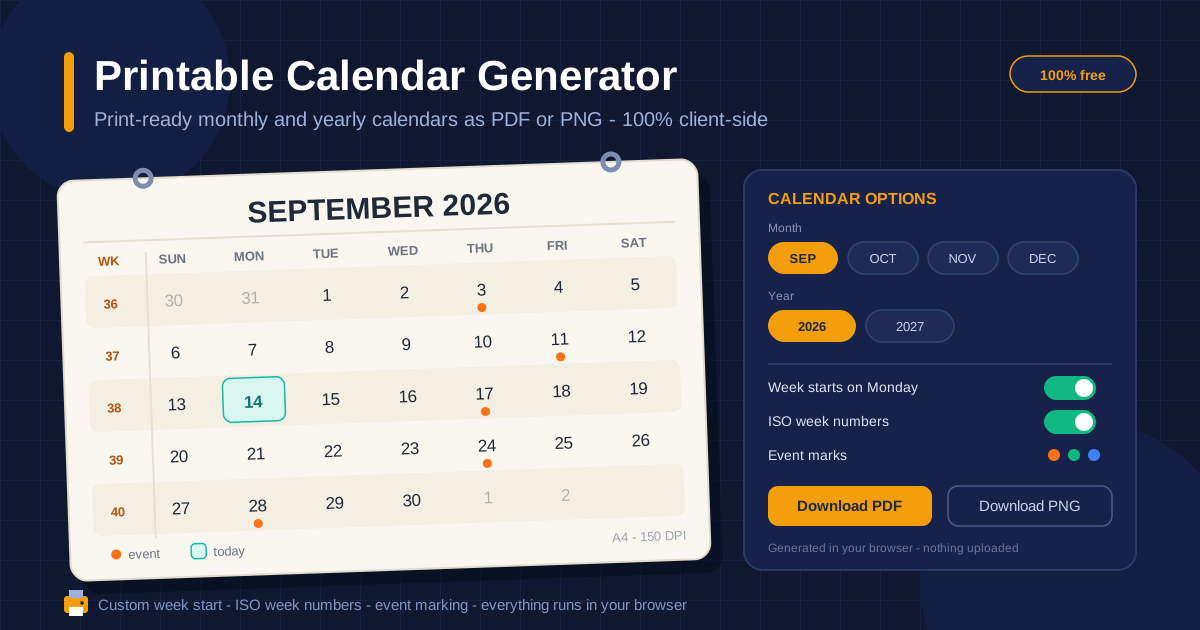
Everything runs client-side in your browser. Choose a month or the full year, pick A4 or US Letter paper, set Sunday or Monday as the week start, toggle ISO week numbers, and dot the dates that matter. Then export a PDF sized exactly for the printer or a PNG ready to paste into a slide, document, or chat.
Why Use Printable Calendar Generator?
- No template hunting. Ad-heavy "free printable calendar" sites lock you into one fixed layout; here the grid regenerates from your settings in seconds.
- Your week start, your rules. Switch between Sunday-first and Monday-first and the weekends land where your household or office expects them.
- Bilingual output. Render months and weekdays in English or Thai, with the Buddhist Era year for Thai labels — a proper Thai wall calendar, not a translated template.
- Print-perfect sizing. PDF exports match A4 or US Letter dimensions precisely, so sheets print true to size at 100 percent scale.
- Event marking built in. Color-dot key dates before printing, or keep the grid clean and annotate by hand.
- Private by design. Nothing is uploaded; all generation and export happens on your device.
Key Features
| Feature | What it does |
|---|---|
| Monthly and yearly views | Print one focused month or all twelve on a single master sheet |
| PDF or PNG export | Crisp PDF for the printer, PNG image for slides, chats, and docs |
| Custom week start | Sunday-first or Monday-first grids, with weekends shaded |
| ISO week numbers | Optional left-hand column showing the ISO-8601 week number per row |
| Event marking | Dotted dates for meetings, birthdays, deadlines, and holidays |
| A4 and US Letter | Portrait or landscape, matched to home and office printer trays |
Two details are worth calling out:
- The yearly view puts the whole year on one sheet — the fastest way to spot quarter boundaries and long breaks.
- The ISO week column numbers entire rows, so every date in a row shares one week number.
How to Use
- Pick the period. Choose the monthly or yearly view, then set the month and year.
- Configure the grid. Select your week start day, toggle ISO week numbers, and choose English or Thai labels.
- Mark events. Dot the launches, exams, birthdays, or maintenance windows that matter.
- Choose paper and orientation. Pick A4 or US Letter, portrait or landscape, to match your printer tray and wall space.
- Export and print. Download the PDF and print at actual size, or grab the PNG for decks and documents.
Week Start, Week Numbers, and Event Marks
These three settings decide how readable a printed calendar is.
Sunday versus Monday. Week-start convention is deeply regional. The United States, Canada, and Japan traditionally begin the week on Sunday, putting the weekend at the right edge of the grid. Most of Europe, the United Kingdom, Australia, and ISO-aligned offices across Asia start on Monday, matching ISO 8601. Neither is wrong, but a calendar that fights your mental model gets ignored. Since the generator rebuilds the grid from this one setting, you can print Sunday-first for the kitchen and Monday-first for the office from the same page.
ISO week numbers. ISO 8601 defines weeks as Monday-through-Sunday and makes week 1 the week containing the first Thursday of January, so no week ever straddles two years. The numbering is second nature in European business culture: manufacturing schedules, school terms, and sprint plans are quoted as "week 37" rather than a date range. If you coordinate with European suppliers or run Scrum-style sprints, switch the column on; otherwise leave it off.
Event marks. Pre-printed dots lock in fixed commitments — a board meeting, a school break, a delivery date — and create a shared visual language: one color for deadlines, another for personal events.
PDF versus PNG. Export as PDF when the destination is paper: the file matches your chosen paper size exactly and stays crisp at any printer resolution. Export as PNG when the destination is digital: the image drops straight into a slide, a chat thread, or a newsletter layout.
Thai context. Switching the language to Thai renders month and weekday names in Thai and displays the year in the Buddhist Era — 2569 instead of 2026 — matching how Thai wall calendars are actually printed. The result looks shop-bought, not translated.
Month versus year view. Use the monthly view when a period needs detail: event dots, large cells, room for handwriting. Use the yearly view as the master map — term dates, quarter boundaries, and big deadlines at a glance — then print monthly sheets for the day to day.
Practical Use Cases
Family planners on the fridge
One sheet carries every school event, sports practice, and payday. Sunday start suits households that plan around weekends, and pre-marked dots let kids count down to birthdays and trips themselves.
Workshop and studio boards
Garages, woodshops, and studios run on visible schedules. Print a landscape sheet with ISO week numbers so deadlines quoted by week match the wall, laminate it, and write on it with a whiteboard marker.
School terms and study plans
Teachers print a term calendar with exam and holiday dots; students map assignment deadlines month by month. The yearly view makes term boundaries and parent-teacher weeks obvious at a glance.
Content and editorial calendars
Dot the publish dates for a blog or social channel, print the month, and pin it beside the desk. Paper exposes gaps in a publishing schedule that a scrolling app tends to hide.
Best Practices
- Print at actual size. Choose "Actual size" or 100 percent scale so the sheet matches the paper exactly; fit-to-page shrinks the grid and your writing space.
- Mark holidays after printing. Pre-print known dates, then hand-mark regional holidays once confirmed.
- Keep a master yearly view on the wall and monthly sheets on the desk — together they prevent double-booking.
- Print the next month before the current one ends — ten seconds prevents the blank-wall week.
- Standardize one week start per wall to avoid weekend-column arguments.
- Pair paper with digital. Let the printed sheet be the shared source of truth while big dates live in phone calendars.
Get Printing
A calendar you can see beats an app you have to open. Head to the Printable Calendar Generator, set your week start, toggle the ISO week column if your team plans in weeks, and have a fresh sheet on the wall in under a minute. The first print is the hardest part of getting organized.
Related Tools You Might Like:
- Graph Paper Generator — print custom grids and planner paper that pair well with calendar margins.
- Business Days Calculator — count working days between dates before you commit to deadlines on the wall.
- Date Range Splitter — break long projects into month-sized chunks that map neatly onto printed sheets.
Happy printing!
Frequently Asked Questions
Q: What is the difference between the PDF and PNG exports? A: PDF is sized to your selected paper (A4 or US Letter) and is best for printing at actual size. PNG is a high-resolution image for pasting into slides, documents, or chat messages.
Q: Which week start should I choose? A: Pick the convention your audience already uses. Sunday start is common in North America and Japan, while Monday start matches ISO 8601 and is standard across most of Europe and many offices in Asia.
Q: How do ISO week numbers work? A: ISO 8601 numbers weeks Monday-through-Sunday, and week 1 is the week containing the first Thursday of January. When the toggle is on, that number appears in a left-hand column for each row.
Q: Is the tool free, and does it send my data anywhere? A: It is free, with no account or watermark, and everything runs client-side — nothing is uploaded to a server.