Complete Guide to JSON Repair Tool: Fix Malformed JSON in Your Browser
Repair malformed JSON in your browser. Fix trailing commas, single quotes, comments, unquoted keys, and Python literals automatically, with a named change preview for every fix applied.
Free Interactive Tool
JSON Repair Tool
Fix malformed JSON instantly — trailing commas, single quotes, comments, unquoted keys, and Python literals — with a clear change preview.
Table of Contents
Few things stall a workflow faster than a parser error on data you were sure was fine. Much of the JSON crossing a developer's desk is not strictly valid: LLM outputs emit trailing commas, teammates hand-edit config files late at night, and log scraping stitches fragments together with regexes. All of it is almost right — and strict parsers reject it.
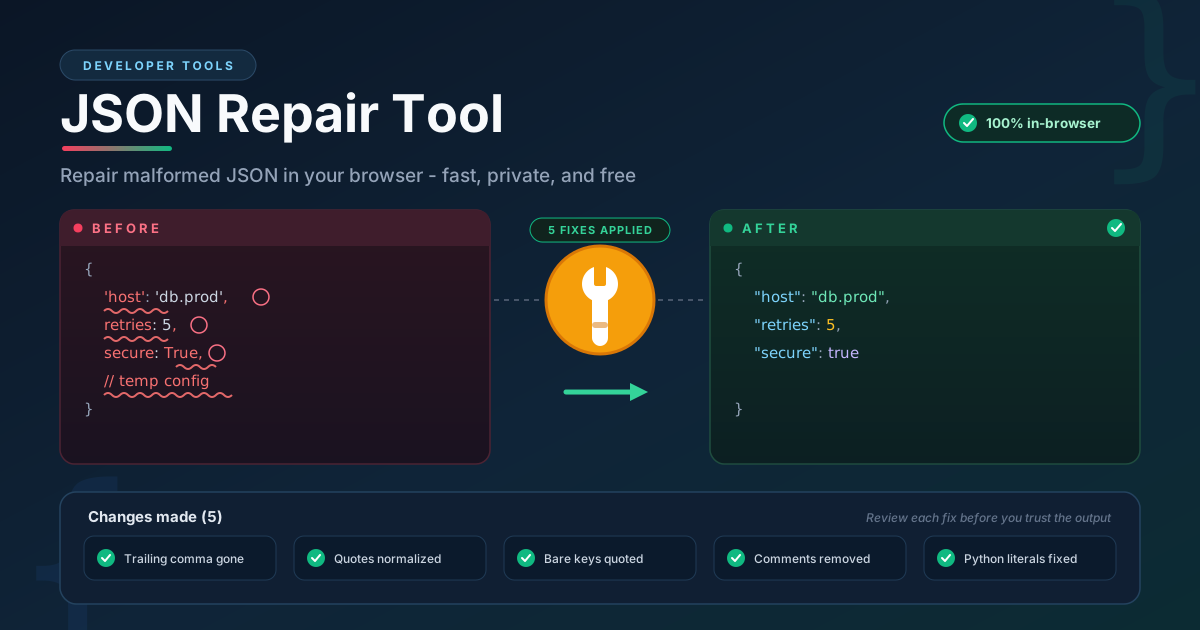
The JSON Repair Tool fixes the most common malformations automatically: it removes trailing commas, converts single quotes to double quotes, quotes bare keys, strips comments, and converts Python literals such as True, False, and None into their JSON equivalents. Crucially, nothing happens silently — every fix is tagged with a named change category and listed in a change preview, so you see exactly what was touched before you trust the output. This guide shows how each repair works.
Why Use the JSON Repair Tool?
For a three-line snippet, fix it by hand. For real payloads, where the same errors repeat dozens of times, automate:
- Named, auditable fixes. Every repair is listed by category in the change preview — no silent, black-box rewriting.
- The errors you actually make. The five categories cover the vast majority of broken JSON in the wild.
- 100% in-browser. Parsing and repair run client-side, so sensitive payloads never leave your machine.
- Speed at scale. Dozens of errors disappear in a single fast pass.
- Safer than eval hacks. Evaluating near-JSON as JavaScript runs arbitrary code and silently coerces values.
- Zero setup. No account, no installation, no limits.
Key Features
Its features map directly to the repair categories:
| Feature | Description |
|---|---|
| Automatic repair | Fixes common malformations in one pass as soon as you paste. |
| Named change categories | Each fix is tagged: trailing comma, quotes, unquoted key, comment, Python literal. |
| Change preview | A running list of every applied fix — nothing changes silently. |
| Python literal conversion | True, False, and None become true, false, and null. |
| Quote normalization | Single-quoted strings and bare keys become valid double-quoted JSON. |
| 100% client-side | No uploads, no storage, and one-click copy for the next step. |
Two notes:
- The change preview doubles as a teaching aid — after a few sessions you know which mistakes your tools make most often.
- Repair is deterministic: the same input always yields the same output — important when repairs sit inside a pipeline.
How to Use the JSON Repair Tool
Step 1: Open the tool
Navigate to the JSON Repair Tool. It loads instantly in any modern browser — nothing to install, nothing to sign in to.
Step 2: Paste the broken JSON
Paste the malformed text into the input pane — from an LLM response, a hand-edited settings file, a log line, or a rejected script output.
Step 3: Review the change preview
Each fix appears with its named category. Read the list before moving on — if one surprises you, such as a needed comment removed, adjust the source first.
Step 4: Copy the repaired output
Use the copy button to take strict, parser-ready JSON into your editor, API client, or pipeline.
Step 5: Validate downstream
Repair makes text parse, not correct. Run schema or contract checks so structural mistakes surface immediately.
The Five Common JSON Crimes
Strict JSON has a small grammar, and the same violations appear again and again. Each subsection shows one crime, with broken and fixed snippets.
Crime 1: Trailing Commas
The most common violation: JavaScript, Python, and habit all allow a comma after the last element; JSON does not. The repair removes it in objects and arrays alike.
Broken:
{ "name": "deploy-job", "retries": 3, }
Fixed:
{ "name": "deploy-job", "retries": 3 }
Crime 2: Single Quotes
Config formats and JavaScript accept single-quoted strings; JSON requires double quotes. The delimiters are converted without touching the content between them.
Broken:
{ 'region': 'eu-west-1' }
Fixed:
{ "region": "eu-west-1" }
Crime 3: Comments
JSON has no comment syntax, yet JSON-with-comments refuses to die in hand-edited files. Comments are stripped, the structure untouched, and the dropped text is flagged in the preview.
Broken:
{ "timeout": 30 } // tuned after the incident
Fixed:
{ "timeout": 30 }
Crime 4: Unquoted Keys
JavaScript objects allow bare keys; JSON requires every key to be a double-quoted string. Each bare key is quoted in place, leaving values intact.
Broken:
{ env: "production" }
Fixed:
{ "env": "production" }
Crime 5: Python Literals
Python prints booleans and null capitalized; JSON wants lowercase. This breaks countless scripts that stringify a dict and call the result JSON. Mapping True, False, and None to true, false, and null is the only correct translation.
Broken:
{ "debug": True, "cache": None }
Fixed:
{ "debug": true, "cache": null }
Strict Parsers Do Not Forgive
Python's built-in json module and JavaScript's JSON.parse are strict: any violation above aborts the pipeline. Lenient alternatives carry costs — JSON5-style parsers must be installed in every runtime, and their output remains invalid JSON elsewhere. The more dangerous shortcut is eval, which executes input as code and silently coerces values. Repairing to strict JSON first keeps every downstream consumer standard and safe.
Practical Use Cases
Cleaning LLM and Agent Outputs
Asked for structured output, a model may add a trailing comma, wrap keys in single quotes, or emit None. A repair pass between the model and JSON.parse turns intermittent crashes into reliable parsing, and the preview shows when the model drifted.
Salvaging Hand-Edited Config Files
Hand-maintained configs accumulate comments and relaxed quoting that work until a strict parser sees them. The tool names every non-standard construct and gives you a valid baseline to diff before committing the cleanup.
Extracting JSON from Logs
Scraped log fragments carry formatter comments and Python literals from stack traces. Repair normalizes them for analysis tools without a bespoke cleaning script per source.
Best Practices
- Review the change preview before trusting the output. Ten seconds of reading the fix list confirms the repairs matched your expectations.
- Prefer fixing at the source. If the same trailing comma appears in every build, change the template or prompt that produces it.
- Validate schema after repair. Valid JSON is not necessarily correct JSON — run your schema or contract checks right after.
- Treat dropped comments as information loss. When the preview reports comment removal, move needed annotations to documentation.
- Repair first, then format. Mixing the two steps makes failures harder to attribute.
- Watch for repeated fixes. A pipeline that needs the same repair daily is pointing at an upstream bug.
Repair Your JSON Now
Broken JSON should be a hiccup, not a roadblock. The JSON Repair Tool turns the five most common malformations into a reviewed, one-click fix — entirely in your browser, with a change preview that keeps you in control of every edit.
Try it now: JSON Repair Tool
Related Tools You Might Like:
- JSON Formatter — Beautify and validate the repaired JSON with proper indentation.
- jq Playground — Query and transform the cleaned data with jq expressions.
- JSON Schema Visualizer — Turn a schema into a diagram to confirm your repaired structure matches the contract.
Happy repairing!
Frequently Asked Questions
Q: Is my data uploaded anywhere when I use the JSON Repair Tool?
A: No. Parsing and repair run entirely in your browser — pasted text never leaves your machine, making the tool safe for API responses, secrets, and customer data.
Q: What kinds of problems can the tool fix automatically?
A: Five named categories: trailing commas, single quotes, comments, unquoted keys, and Python literals such as True, False, and None. Each applied fix appears in the change preview under its category name.
Q: Why not just use eval or a lenient parser on near-JSON?
A: eval executes untrusted input as code and silently coerces values — a serious security risk. Lenient parsers tie every consumer to a non-standard dialect. Strict JSON keeps your data portable everywhere.