JSON to JSDoc Converter: Turn JSON Samples into Typed JavaScript
Generate JSDoc @typedef blocks from any JSON sample with the free online JSON to JSDoc Converter — nested @property tags, nullable flags, array element types and mixed arrays, 100% client-side.
Free Interactive Tool
JSON to JSDoc Converter
Generate JSDoc @typedef blocks from JSON samples with nested @property tags, nullable field flags, and array element types — free, 100% in your browser.
Table of Contents
JavaScript projects without TypeScript still deserve types. When your codebase is plain JS — a legacy Express service, an internal dashboard, a build script that grew into a product — you still juggle API payloads whose shape lives only in someone's head. The free JSON to JSDoc Converter closes that gap: paste a JSON sample and get a ready-to-commit block of JSDoc @typedef declarations describing exactly what your data looks like.
The converter inspects every field and emits the matching annotations: primitives map to their types, fields that appear as null get flagged as nullable, arrays are typed by their elements, and nested objects become their own typedefs. Mixed-type arrays come back as union types, so the documentation reflects reality instead of an optimistic guess. Everything runs 100% client-side, so payloads with real customer data never leave your browser.
In this guide we cover why JSDoc typing is worth adopting, walk through the tool's features, and finish with use cases and best practices.
Why Use the JSON to JSDoc Converter?
- Types without a compiler. JSDoc gives you the vocabulary of types — field shapes, nullability, array contents — with no build step, config, or dependency.
- Real editor superpowers for plain JS. VS Code and similar editors read @typedef blocks for autocomplete, hover hints, and type-checking.
- Faithful to your actual data. Types derived from a real payload reflect what the API returns — including the nullable fields everyone forgets.
- Nested structures handled automatically. Each nested object becomes its own named typedef referenced by a @property tag, not a monolithic blob.
- Arrays get honest element types. Every array gets a concrete element type; genuinely mixed arrays become explicit unions.
- Private and instant. Parsing runs entirely in your browser — no uploads, no accounts, no limits.
Key Features
| Feature | What It Does |
|---|---|
| @typedef generation | Wraps each object in a documented block ready to paste into any file |
| Nested @property tags | Child objects become separate typedefs, linked from the parent |
| Nullable field flags | Fields that are null in the sample are typed as nullable |
| Array element types | Arrays are typed by their contents; mixed arrays become unions |
| Copy to clipboard | One click copies the generated block into your codebase |
| 100% client-side | Parsing runs in your browser; payloads never leave your machine |
- The nested output reads like a hand-written schema: one named typedef per object shape, cross-referenced rather than inlined.
- The nullable handling matters because null is where most API documentation lies — nullable fields stay nullable.
How to Use the JSON to JSDoc Converter
- Open the tool at JSON to JSDoc Converter — a simple input area with a generate action.
- Paste a representative JSON sample. A single object is ideal; full API responses and arrays of objects work too.
- Review the generated typedefs. Rename generic names to domain terms and confirm the nullable flags and array types match the API.
- Copy the block and paste it above the function or module that consumes the data.
- Let your editor work. Reference the types with @type tags or enable type-checking, and autocomplete plus warnings start working on plain JavaScript.
JSDoc Types from Real Payloads
JSDoc's type system revolves around two annotations. @typedef declares a named type, and each @property tag describes one field — its name, its type, and an optional description. Editors that understand JSDoc treat these blocks like interface definitions in a typed language.
The mapping from JSON is direct. Strings, numbers, and booleans become string, number, and boolean. A field whose value is null is emitted as nullable — for example {?string} — signaling it can legitimately hold no value. Arrays are typed by their elements: a list of strings becomes string[] (equivalently Array<string>), and a mixed array produces a union such as (string|number)[]. Nested objects become their own @typedef, referenced by name from the parent.
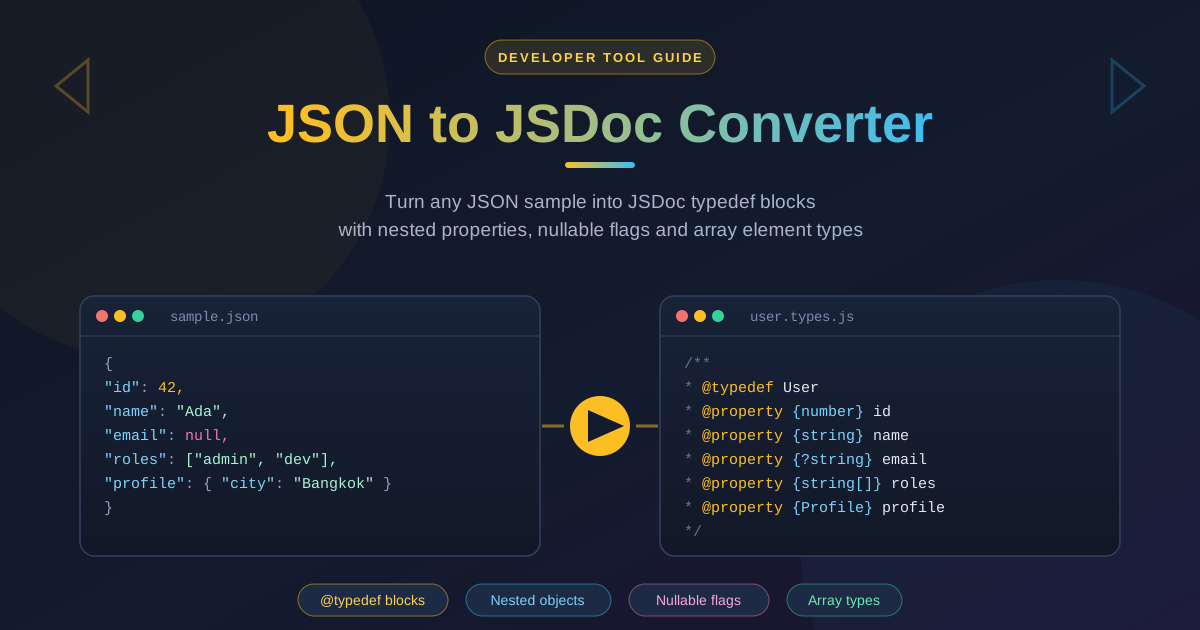
A sample payload next to what the converter produces:
{
  "id": 42,
  "name": "Ada",
  "email": null,
  "active": true,
  "roles": ["admin", "dev"],
  "referenceCodes": ["A-1", 7],
  "profile": { "city": "Bangkok", "postalCode": null }
}
/**
 * @typedef User
 * @property {number} id
 * @property {string} name
 * @property {?string} email - nullable
 * @property {boolean} active
 * @property {string[]} roles
 * @property {(string|number)[]} referenceCodes - mixed array
 * @property {Profile} profile
 */

/**
 * @typedef Profile
 * @property {string} city
 * @property {?string} postalCode - nullable
 */
The payoff arrives the moment you open the file in an editor. Adding // @ts-check at the top of a file — or enabling checkJs in VS Code — turns the blocks into live type contracts: autocomplete on every property, warnings on possibly-null reads, and errors on wrong assignments. Your plain-JS project gains most of TypeScript's safety with none of the migration.
Practical Use Cases
Documenting API Responses in Plain-JS Codebases
Call an endpoint, copy the response body, paste it into the converter, and commit the typedefs next to the client code. Sixty seconds of work gives every teammate hover-time documentation of the response shape.
Legacy App Modernization
Old JavaScript applications are where type information pays off most, and where retrofitting TypeScript is hardest. Generated JSDoc lets you annotate the highest-risk data boundaries first — API clients, config objects, message queues — without touching the build.
Contract Notes for Teammates
When two teams share an API, the typedef block doubles as a lightweight contract. Paste it into a pull request and reviewers immediately see which fields exist, which are nullable, and what array elements look like.
Preparing a TypeScript Migration
If a full migration is on the roadmap, generated JSDoc is the perfect scaffold. The typedef names and shapes translate almost mechanically into interface declarations, and the annotated code is already partially type-aware today.
Best Practices for Generated Typedefs
- Feed the tool a sample that represents real payloads. Use a genuine response with the messy cases, not a toy object.
- Mark nullable honestly. If a field is sometimes null, let the nullable flag stand so consumers handle the missing case.
- Regenerate when the API changes. Types describing last year's payload inspire false confidence — re-run the converter whenever an endpoint evolves.
- Rename generated typedefs to your domain language. RootObject is technically correct and completely unhelpful; a meaningful name makes the code self-documenting.
- Keep typedefs near the code that uses them. A block in an unrelated utils file gets ignored; one above the parsing function gets maintained.
- Prefer TypeScript when the codebase is ready. JSDoc typing is a bridge, not a destination — the generated types have already done the analysis.
Start Generating Types from Your JSON Today
You should not need a build pipeline or a migration plan to get type documentation for the data your code depends on. The JSON to JSDoc Converter turns any JSON sample into well-formed @typedef blocks in seconds — nested properties, nullable flags, array element types, mixed-array unions — entirely in your browser.
Grab a payload from your next API call, paste it into the converter, and give your plain-JavaScript project the types it has been missing.
Related Tools You Might Like:
- OpenAPI to TypeScript Converter — generate types from an entire OpenAPI specification instead of one sample
- JSON Formatter — pretty-print and validate raw JSON before converting it into typedefs
- JSON to Go Struct — turn the same JSON samples into typed Go struct definitions
Happy typing!
Frequently Asked Questions
Q: Is the JSON to JSDoc Converter free to use? A: Yes — completely free, with no account required and no usage limits.
Q: Is my JSON uploaded to a server? A: No. Parsing and type generation happen entirely in your browser, so payloads with real customer data never leave your machine.
Q: How are arrays with mixed value types handled? A: The generator produces a union type such as (string|number)[], reflecting the actual variety of values rather than hiding it.
Q: Can editors really type-check plain JavaScript from JSDoc comments? A: Yes. Editors built on the TypeScript language service, such as VS Code, read @typedef blocks and — with checkJs or a // @ts-check comment — provide autocomplete and type errors in ordinary .js files.