JSON to Python Converter: Generate Dataclasses and Pydantic Models Instantly
Turn any JSON sample into Python dataclasses or Pydantic models with nested classes, Optional fields, field aliases, and snake_case naming — free and 100% client-side.
Free Interactive Tool
JSON to Python Converter
Generate Python dataclasses or Pydantic models from JSON samples with nested types, Optional fields, and snake_case naming.
Table of Contents
If you build Python services that consume HTTP APIs, you know the routine: a sample JSON response arrives, and the next thirty minutes go to hand-writing a matching class — picking types, spotting nullables, renaming camelCase keys to snake_case. Every missed nullable is a TypeError waiting for production.
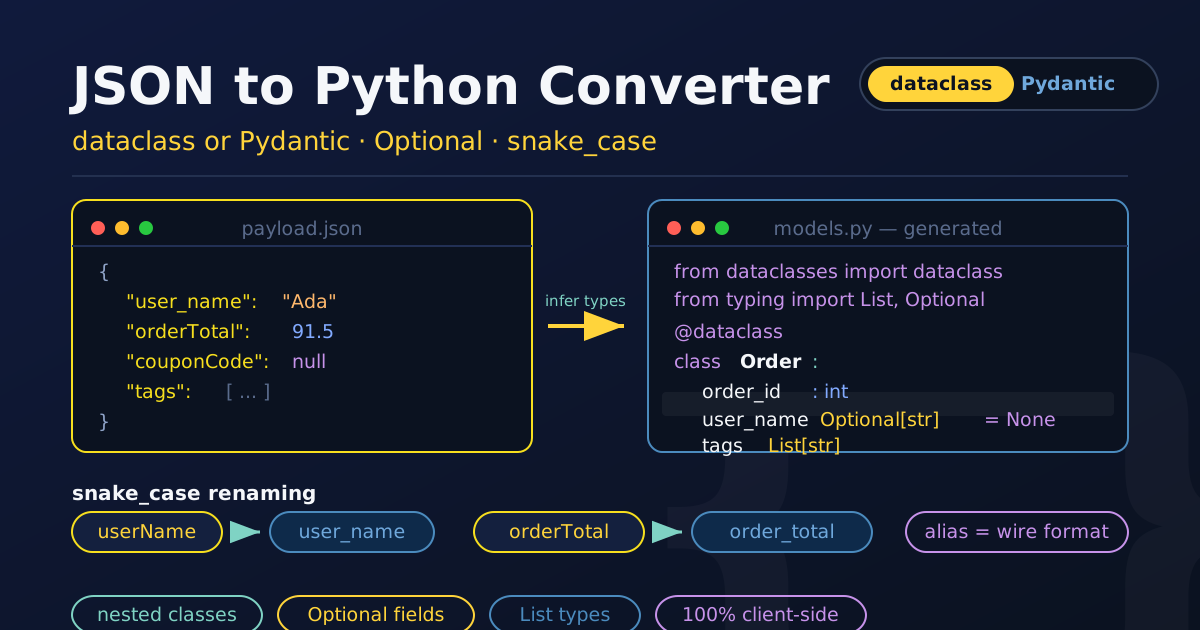
The JSON to Python Converter turns that chore into a paste-and-copy step. Paste any JSON sample and get clean Python classes in two flavors — dataclasses or Pydantic models — with nested JSON becoming nested classes, nullable values becoming Optional[...] fields with None defaults, and camelCase keys renamed to PEP 8 snake_case, aliases included so the wire format still parses. Everything runs in your browser: your payloads never leave your machine.
This guide covers how the converter works, dataclasses versus Pydantic, and the workflows where it saves the most time.
Why Use the JSON to Python Converter?
- Two output styles, one input. Toggle between standard-library dataclasses and Pydantic BaseModel — zero dependencies or runtime validation.
- Nested JSON becomes nested classes. A nested customer object becomes its own Customer class, emitted before the class that references it.
- Optional[...] where it belongs. Flip the optional-fields switch and fields become Optional[T] = None, matching payloads where keys are absent or null.
- snake_case renaming with aliases. orderTotal becomes order_total for PEP 8, and the Pydantic output keeps Field(alias="orderTotal") so deserialization works.
- 100% client-side and free. Conversion happens entirely in your browser — no sign-up, no upload, no server round-trip.
Key Features
| Feature | What it does |
|---|---|
| Output style toggle | Chooses between @dataclass and Pydantic BaseModel output |
| Nested class generation | JSON objects become named classes, emitted in dependency order |
| Optional fields | Optional[T] with None defaults for absent or nullable values |
| snake_case renaming | camelCase and other key styles become PEP 8 field names |
| List inference | Arrays become List[T] based on their first element |
| Automatic imports | dataclasses, pydantic, and typing imports assembled for you |
The import block is complete: typing imports appear only when the code uses them, and the Pydantic flavor adds a # pip install pydantic reminder so the snippet runs after one install. Non-object roots work too: paste an array or primitive and the tool appends a commented Root = ... alias for the inferred type.
How to Use
- Paste your JSON into the input panel — object, array, or even a bare primitive.
- Pick the output style: dataclass for standard-library-only code, Pydantic for validation.
- Toggle the options: snake_case field names, and Optional[...] fields with None defaults.
- Copy the generated classes — imports, decorators, and class ordering included.
- Drop them into your project and run pip install pydantic if you chose that style.
Dataclass vs Pydantic
Both styles produce the same class shapes, but they behave differently at runtime — choosing per layer keeps the model from fighting you.
When plain dataclasses suffice. Dataclasses have been in the standard library since Python 3.7, cost nothing, and instantiate fast. For trusted data — an internal file, a dict your code built, a test fixture — they give typed, self-documenting attributes with zero dependencies.
When Pydantic earns its keep. At system boundaries — parsing API responses, loading config, accepting webhooks — the data is untrusted. There, Pydantic justifies its dependency: it coerces types on the way in, raises a ValidationError naming the exact field path, and integrates natively with FastAPI. Models at these edges mean malformed payloads fail loudly instead of poisoning your domain objects.
Optional[...] semantics and None defaults. Optional[str] means the value is a string or None — it does not by itself make a field omittable. In both styles, a field without a default is still required, which is why the tool pairs the annotation with = None. A null sample infers Any — a signal to tighten the type later.
snake_case renaming with aliases. In Pydantic output, Field(alias="orderTotal") lets your code read order_total while the model parses the camelCase key from the wire. Dataclasses have no native alias support — one more reason Pydantic fits external payloads best.
List[...] and nested models. Arrays map to List[T] from their first element, and nested objects become full classes. Here is a sample payload:
{
  "order_id": 1042,
  "orderTotal": 91.5,
  "couponCode": null,
  "customer": {
    "userName": "ada",
    "email": "[email protected]"
  },
  "tags": ["priority", "gift"]
}
The dataclass output (optional fields on):
from dataclasses import dataclass
from typing import Any, List, Optional

@dataclass
class Customer:
    user_name: Optional[str] = None
    email: Optional[str] = None

@dataclass
class Order:
    order_id: Optional[int] = None
    order_total: Optional[float] = None
    coupon_code: Optional[Any] = None
    customer: Optional[Customer] = None
    tags: Optional[List[str]] = None
The Pydantic output (optional fields on):
from pydantic import BaseModel, Field
from typing import Any, List, Optional

# pip install pydantic

class Customer(BaseModel):
    user_name: Optional[str] = Field(default=None, alias="userName")
    email: Optional[str] = None

class Order(BaseModel):
    order_id: Optional[int] = None
    order_total: Optional[float] = Field(default=None, alias="orderTotal")
    coupon_code: Optional[Any] = Field(default=None, alias="couponCode")
    customer: Optional[Customer] = None
    tags: Optional[List[str]] = None
Same shapes — but only Pydantic carries aliases, and only it rejects a string where order_total expects a number.
Practical Use Cases
API Clients
Wrapping a third-party REST API with a 40-field sample response? Paste the sample into the JSON to Python Converter, pick Pydantic, and you have an alias-aware model in seconds. When new fields ship, paste and regenerate.
ETL Scripts
Extract-and-load jobs live or die by explicit schemas. Generate dataclasses for the records moving between systems and every stage gets IDE autocomplete and mypy-friendly annotations, failing fast on unexpected shapes.
Test Fixtures
Capture one real response per endpoint, generate the model once, and build fixtures against it. Tests then break immediately when the schema changes — not three assertions deep.
Config Loading
Paste a sanitized config sample, generate Pydantic models, and startup validation refuses to boot with a missing or mistyped setting — naming the exact field.
Best Practices
- Validate against a real payload. Generate from an actual API response so nullable fields and odd key styles are captured, then tighten from there.
- Keep aliases for the wire format. Let Field(alias=...) own the translation instead of renaming API keys by hand.
- Regenerate when the API changes. A free regeneration after a version bump beats eyeballing a payload diff.
- Replace Any with concrete types. Once you know what the field holds, change Optional[Any] to Optional[str] or a nested model.
- Pydantic at boundaries, dataclasses inside. Validate untrusted input at the edge, then pass plain dataclasses through core logic.
- Keep generated models in their own module. Treating them as regenerable artifacts keeps types honest and diffs reviewable.
Turn JSON into Python Classes Today
Stop transcribing API responses field by field. The JSON to Python Converter turns any JSON sample into dataclasses or Pydantic models in under a second — nested classes, Optional[...] fields, aliases, and imports all handled, entirely in your browser. Paste your first payload and copy the result into your codebase.
Related Tools You Might Like:
- JSON Formatter — pretty-print and validate payloads before generating models
- JSON to Go Struct Converter — the same paste-and-generate workflow for Go services
- OpenAPI to TypeScript Converter — typed TypeScript clients straight from API specs
Happy modeling!
Frequently Asked Questions
Q: Is my JSON uploaded to a server?
A: No. Parsing and generation happen entirely in your browser with JavaScript — nothing is transmitted, stored, or logged, and the tool works offline once loaded.
Q: When should I choose dataclass output over Pydantic?
A: Dataclasses for trusted internal data where zero dependencies matter — ETL records, domain objects, fixtures. Pydantic at boundaries such as API clients and config loading, where validation, type coercion, and ValidationError messages earn their keep.
Q: How are null and missing fields handled?
A: A null infers Any, and with the optional-fields switch on, fields become Optional[T] with a None default so keys can be omitted. Optional[T] alone does not make a field optional — the None default is what does.
Q: What happens to camelCase JSON keys?
A: They are renamed to PEP 8 snake_case, and the Pydantic output keeps the original key as a field alias, so the model deserializes the real payload while your code uses the Pythonic name.