LocalBusiness Schema Generator: Build Local SEO JSON-LD With NAP Consistency Checks
The LocalBusiness Schema Generator turns your business details into valid LocalBusiness JSON-LD structured data, with NAP consistency warnings, opening hours, geo coordinates and price range included.
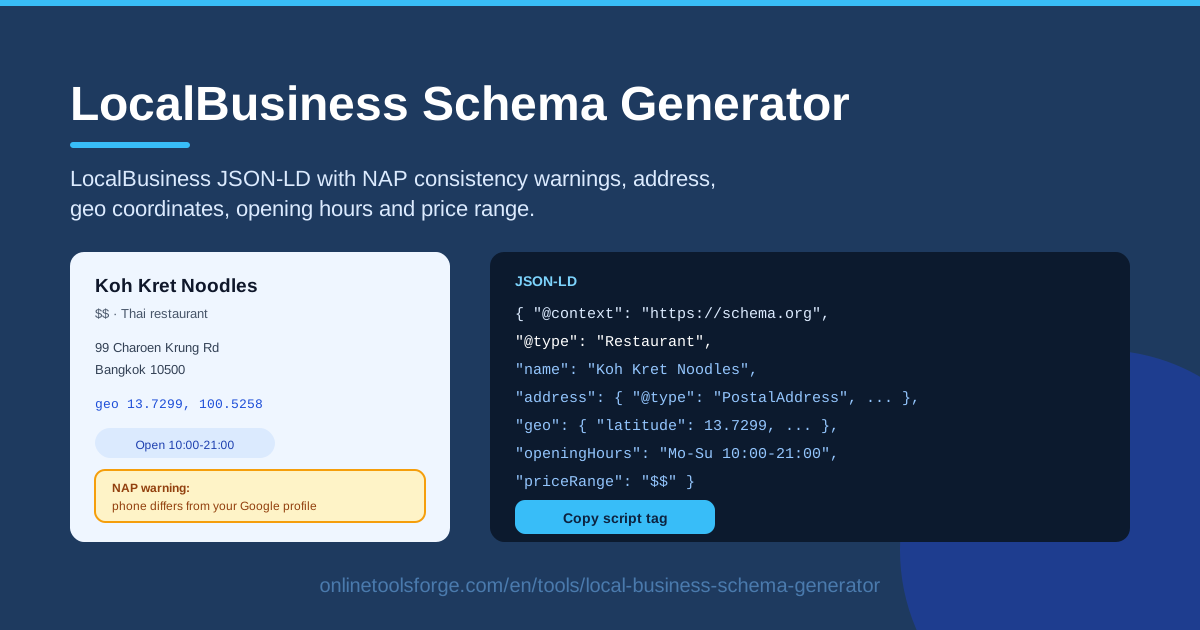
Table of Contents
When someone searches for "bakery near me" or "dentist in Chicago," Google decides in milliseconds which businesses deserve the top spots. One of the clearest signals you can give it is structured data: machine-readable LocalBusiness markup that states who you are, where you are, and when you are open. The LocalBusiness Schema Generator builds that markup for you in seconds, straight from a simple form.
Writing JSON-LD by hand is easy to get wrong. A mistyped property, a missing comma, or a phone number that does not match your Google Business Profile can quietly cost you visibility. This generator handles the syntax for you and goes one step further: it watches your Name, Address, and Phone details as you type, and raises NAP consistency warnings the moment something looks off.
The output is a clean, copy-paste-ready script tag. Drop it into your homepage, contact page, or location pages, and search engines get an unambiguous description of your business. Everything runs in your browser, so your business details never leave your device.
Why Use LocalBusiness Schema Generator?
- Compete in local search. LocalBusiness schema tells Google explicitly that your page represents a physical business — the foundation for local pack placement and map results.
- Catch NAP inconsistencies early. Built-in warnings flag Name, Address, and Phone mismatches before the markup ever reaches your site.
- No coding required. The form translates your inputs into valid JSON-LD; you never touch schema.org syntax directly.
- Richer search presentation. Details like opening hours and price range can surface directly in search results and knowledge panels.
- Fast for multi-location sites. Generate one markup block per branch in minutes instead of hand-editing templates for every location.
- Free and private. The tool runs entirely client-side — no sign-up, and nothing about your business is uploaded anywhere.
Key Features
| Feature | What it does |
|---|---|
| Form-driven generation | Fill in your business details once and receive valid LocalBusiness JSON-LD. |
| NAP consistency warnings | Flags mismatches in Name, Address, and Phone entries as you fill the form. |
| Address and geo fields | Captures the full PostalAddress plus latitude and longitude coordinates. |
| Opening hours builder | Defines day-by-day hours in the exact format schema.org expects. |
| Price range input | Adds your price range so budget-aware searchers know what to expect. |
| Copy-paste script output | Produces a complete script tag ready to paste into any HTML page. |
- NAP warnings are the differentiator. Most generators only build markup; this one also checks that your core identity fields agree with each other — the single most common failure point in local SEO.
- Geo coordinates anchor you to the map. Exact latitude and longitude values improve accuracy for map-based results and "near me" queries.
- Works with any platform. The standard script tag drops into WordPress, Shopify, custom HTML, or static site generators alike.
How to Use LocalBusiness Schema Generator
- Enter your business details. Open the tool and fill in the business name, address fields, and phone number, using the exact values you want Google to see.
- Fix any NAP warnings. If the tool flags a mismatch — a truncated street suffix, a differently formatted phone number — correct it before moving on. Consistency here is the whole point.
- Set opening hours and geo coordinates. Add your day-by-day hours and, if you know them, the latitude and longitude of your entrance.
- Generate the JSON-LD. Click generate and the tool assembles the complete LocalBusiness object, correctly formatted and escaped.
- Paste the script tag into your site. Copy the output into the head or body of your homepage or location page, save, and publish.
That is the entire workflow — most users go from an empty form to live markup in under five minutes.
NAP and Local Search Trust
NAP stands for Name, Address, Phone — the three facts that identify a real-world business. Google builds local rankings by cross-referencing these facts across your website, your Google Business Profile, and the directories and citation sites that mention you. If the same business appears with three different phone numbers, Google cannot be confident they refer to one place, and trust in your listing erodes. NAP consistency is less a single ranking factor than the foundation that lets every other local signal count.
The schema.org LocalBusiness type lets you state these facts explicitly: name, address (a PostalAddress with streetAddress, addressLocality, addressRegion, postalCode, and addressCountry), telephone, and url. Beyond the basics, geo holds latitude and longitude so machines know exactly where you are, openingHoursSpecification expresses your schedule day by day, and priceRange communicates affordability in a compact symbol form.
Opening hours follow a strict pattern — day ranges and time ranges such as "Mo-Fr 09:00-17:00", with multiple ranges permitted per entry. A malformed string is a classic silent failure: the markup validates, but Google ignores the hours entirely. The generator builds that string for you, which is exactly the kind of detail worth automating.
One more refinement: specialize your @type where possible. LocalBusiness is valid, but Restaurant, Store, Dentist, and dozens of other subtypes carry extra meaning and can unlock type-specific features. Finally, remember that schema complements your Google Business Profile rather than replacing it — GBP is a profile you claim, while schema is a claim you publish on your own site. When both agree, trust is maximized.
Practical Use Cases
Restaurant websites
LocalBusiness markup — or better, a Restaurant type — puts your address, hours, and price range in front of hungry searchers directly in the results. Generate once, paste into the homepage, and let the markup reinforce what the menu page already says.
Clinic and salon pages
Dentists, physiotherapists, barbershops, and salons live on "near me" searches. Accurate address and geo fields place the practice on the map, while correct opening hours prevent clients from arriving to a locked door — and the negative reviews that follow.
Multi-branch franchises
Every branch deserves its own markup block on its own location page, carrying that branch's exact NAP, hours, and coordinates — plus a local phone number rather than a shared call center line. The generator turns a dozen consistent blocks into a five-minute task.
Service-area businesses
Plumbers, mobile groomers, and contractors serve customers without a storefront. Publish your office address and phone accurately, and let your page content describe the areas you cover. Consistent NAP still connects your listings even when customers never visit your address.
Best Practices
- Match markup to visible content. Every fact in your schema should appear on the page — structured data describes the page, it does not extend it.
- Keep NAP identical everywhere. Same spelling, same abbreviations, same phone format across your site, Google Business Profile, and directories.
- Use the most specific @type possible. Prefer Bakery or DentalClinic over generic LocalBusiness whenever the schema.org vocabulary fits.
- Source geo coordinates carefully. Pin the entrance, not the middle of the block.
- Regenerate after business changes. New hours, a rebrand, or a relocation all mean fresh markup.
- Validate after deploying. Recheck the live page with a rich results test, not just the generator output.
Ready to make your local signals agree? Run your details through the LocalBusiness Schema Generator, fix the warnings, paste the script tag, and give Google every reason to trust your listing.
Related Tools You Might Like:
Happy ranking!
Frequently Asked Questions
Q: Does LocalBusiness schema directly improve my Google rankings? A: It is a supporting signal, not a magic bullet. Structured data helps Google understand and correctly attribute your business facts, which strengthens local relevance and enables richer presentation — but rankings still depend on relevance, distance, prominence, and overall site quality.
Q: Where should I paste the generated script tag? A: In the head or body of the page that represents the business — usually the homepage or a dedicated location page. One block per page is enough; do not repeat identical markup across every page of a multi-location site.
Q: What exactly counts as a NAP inconsistency? A: Any difference in Name, Address, or Phone between listings — "St." versus "Street," a missing suite number, or different phone number formats. Pick one canonical format and use it everywhere, which is precisely what the tool's warnings help you enforce.
Q: Can I use this tool for a business without a physical storefront? A: Yes. Use your office address, keep it consistent across the web, and describe your service areas in your page content. The markup stays valid, and NAP consistency still helps Google connect your listings.