Markdown Chunker: Split Long Markdown Into Token-Budget Chunks for RAG
Split long Markdown documents into token-budget chunks for RAG pipelines and LLM context windows. Markdown-aware splitting that never breaks code blocks or tables, with heading-breadcrumb context, overlap control, and JSONL export — all offline.
Free Interactive Tool
Markdown Chunker for LLMs
Split long Markdown documents into token-budget chunks for RAG pipelines and LLM context windows, keeping headings, code blocks, and tables intact — all offline in your browser.
Table of Contents
Retrieval quality lives or dies at chunk boundaries. A chunk that cuts a table in half poisons retrieval: the embedding describes half a table, the index stores an ambiguous fragment, and the model receives a broken grid. The same happens to code blocks split mid-fence — every failure starts as a line-count split in an ingestion script.
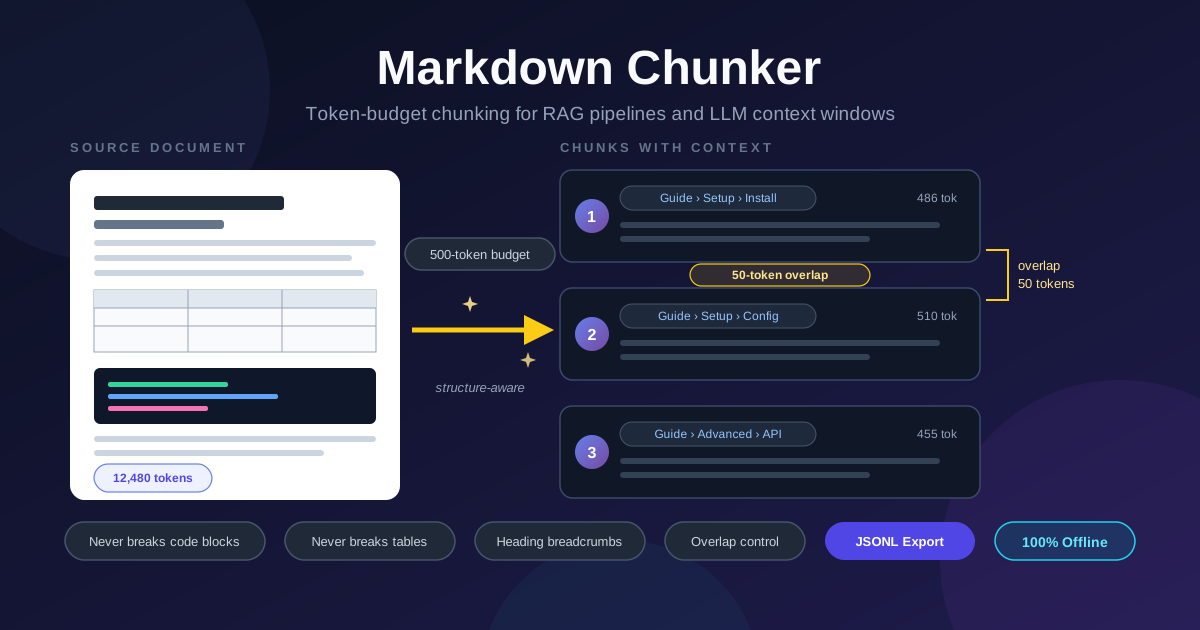
Markdown Chunker fixes this at the source. It splits long Markdown documents into token-budget chunks with a parser that understands the format: code fences stay whole, tables keep every row, and each chunk carries its heading breadcrumb. You control the token budget and the overlap, then export everything as JSONL for your embedding pipeline. Everything runs in your browser, fully offline — nothing is uploaded, which matters when you are chunking internal wikis or proprietary docs.
Why Use Markdown Chunker?
- Naive splits destroy retrieval quality. A character-count splitter slices fenced blocks in half and amputates table rows — and every downstream embedding inherits that damage.
- Chunks arrive with their own context. Each chunk is stamped with the heading path that produced it, so a retrieved fragment still knows its section.
- Token budgets match model reality. Models are measured in tokens, not characters, so no chunk silently exceeds your model's limit.
- Overlap keeps continuity across boundaries. Adjacent chunks share a configurable tail, so an answer spanning a boundary can be assembled from two chunks.
- JSONL export drops straight into pipelines. One record per chunk with index, token count, breadcrumb, and text — the shape most ingestion scripts expect.
- Fully offline and private. Splitting happens client-side in your browser, so proprietary documentation never touches a server.
Key Features
| Feature | What it does |
|---|---|
| Token-budget splitting | Packs blocks into chunks up to your budget, measured in tokens |
| Markdown-aware boundaries | Never breaks code fences or tables; blocks move whole from chunk to chunk |
| Heading breadcrumbs | Every chunk records its section path, such as Guide / Setup / Configuration |
| Overlap control | Carries configurable trailing content into the next chunk |
| JSONL export | One JSON record per chunk with index, tokens, heading, and text |
| 100% offline | All parsing and splitting run locally in your browser |
Two details worth noting. The token estimator lets you pick the approximation that matches your stack, so the budget you set is the budget your pipeline sees. And the live statistics — chunk count, total tokens, largest chunk — update as you type, so you can spot an odd-sized chunk before it reaches your index.
How to Use
- Open Markdown Chunker in your browser.
- Paste your Markdown document into the editor, or load the sample first.
- Set the token budget per chunk — 500 is a sensible default for embedding models; larger budgets suit long-context LLMs.
- Set the overlap — around 50 tokens preserves continuity without bloating your index.
- Review the chunk cards — each shows its breadcrumb and token count — then click Export JSONL.
Chunking That Respects Structure
The core problem with naive splitting is that Markdown is not flat text. A fenced code block opens with a marker line and closes many lines later; a table is a grid whose meaning dies when its rows are separated. A character counter cuts through both because it does not know what the lines mean. Markdown Chunker works on blocks, not lines: it tracks fence state so everything between an opening and closing marker travels together, and treats a table as one indivisible unit. When the next block would push a chunk past the budget, the chunk closes at the last safe boundary and the block starts the next chunk — whole.
The second ingredient is context. A short excerpt of a manual:
api-guide.md — 3,120 tokens total

chunk 0   breadcrumb: API Guide / Getting Started            412 tokens
chunk 1   breadcrumb: API Guide / Getting Started / Auth     498 tokens
chunk 2   breadcrumb: API Guide / Endpoints / Users          486 tokens
Each chunk knows its section path. When a user asks "how do I authenticate?", the retriever matches on content, and the breadcrumb tells the generator the passage came from the Authentication section — the difference between an answer that cites the right procedure and one that guesses.
Overlap solves continuity at the boundary itself. Suppose an argument runs across a chunk edge: the claim ends chunk 1, its justification starts chunk 2. With a 50-token overlap, the tail of chunk 1 repeats at the head of chunk 2, so a retrieval that finds one side still carries the connective tissue.
Token budgets deserve a deliberate choice. Embedding models cap input well below LLM context windows — a chunk that exceeds the embedder's limit gets truncated silently, corrupting its vector. Retrieval usually favors smaller, focused chunks: 300 to 500 tokens is the sweet spot for RAG, while 1,000-plus token chunks suit context packing.
Finally, the JSONL export turns the chunker into a pipeline component — one record per chunk, one file per document:
{
  "index": 1,
  "tokens": 498,
  "heading": "API Guide / Getting Started / Auth",
  "text": "To authenticate, create an API key in the console and pass it as a bearer token..."
}
Practical Use Cases
RAG Ingestion Pipelines
This is the tool's home turf. Before documents reach your vector store, run them through Markdown Chunker and export JSONL; your script embeds the text and stores the breadcrumb as metadata. Clean boundaries mean your retriever stops returning table fragments and half-fenced code.
LLM Context Preparation
When you need to pack a long document into a limited context window, the token budget does the rationing. Set it to what your window can spare, and you get back chunks that fill it exactly, each structurally complete and labeled with its source.
Documentation Search Indexing
Chunks become index documents with the breadcrumb as a title or category facet, so a hit on "retry policy" surfaces as "Admin Guide / Reliability / Retry Policy" instead of an anonymous fragment that reviewers cannot trace.
Long-Content Analysis
Handing a 40,000-token whitepaper to a model in one pass invites skimming and dropped details. Split it into budgeted chunks and it becomes a reviewable work queue: summarize chunk by chunk and compare breadcrumbs to confirm full coverage.
Best Practices
- Keep chunks semantically complete. Trust the structural boundaries — a slightly smaller chunk that ends at a real boundary beats a fuller one that ends mid-table.
- Tune overlap to content density. Long-sentence prose rewards 50 to 100 tokens of overlap; terse reference docs need little or none.
- Match the token estimator to your stack. Align it with how your pipeline counts tokens so budgets agree end to end.
- Export JSONL and spot-check before indexing. Scan a few records to confirm breadcrumbs and token counts look sane — thirty seconds here saves a re-embedding run.
- Review the largest chunk in the stats. An outlier usually signals a giant block or a pathological table; fix the source document.
- Re-chunk when the source changes. Chunk indices are only as stable as their documents, so rebuild rather than patching old chunks.
Feed Your Pipeline Chunks Worth Retrieving
Bad chunks are invisible until your RAG application answers from half a table — and then the fix means re-embedding everything. Start from clean boundaries: open Markdown Chunker, set a token budget and a little overlap, and export JSONL your pipeline can trust — free, private, and entirely in your browser.
Related Tools You Might Like:
- JSONL Validator — Validate and pretty-print JSONL exports line by line before ingestion.
- Markdown Link Checker — Scan Markdown documents for broken links before you chunk and publish them.
- Text Case Converter — Normalize heading and title casing across documents before splitting them.
Happy chunking!
Frequently Asked Questions
Q: Does my document get uploaded anywhere?
A: No. Parsing, splitting, and export all happen client-side in your browser tab, fully offline, so proprietary docs never leave your machine.
Q: What token budget should I use per chunk?
A: For RAG with common embedding models, 300 to 500 tokens is a reliable range. For packing LLM context windows, set the budget to what the window can spare. Live statistics show your largest chunk so nothing exceeds your embedder's limit.
Q: How much overlap should I configure?
A: Start with around 50 tokens. Increase it for dense prose, decrease it toward zero for self-contained reference material. Overlap duplicates content in your index, so very large overlaps inflate storage.
Q: What exactly is in the JSONL export?
A: One JSON record per chunk containing its index, token count, heading breadcrumb, and full text — read a line, embed the text field, and store the rest as metadata.