Markdown Mind Map: Visualize Any Outline as an Interactive Tree
Convert Markdown headings and lists into a collapsible mind map online for free. Click branches to expand or collapse and export the map as SVG — fully in your browser.
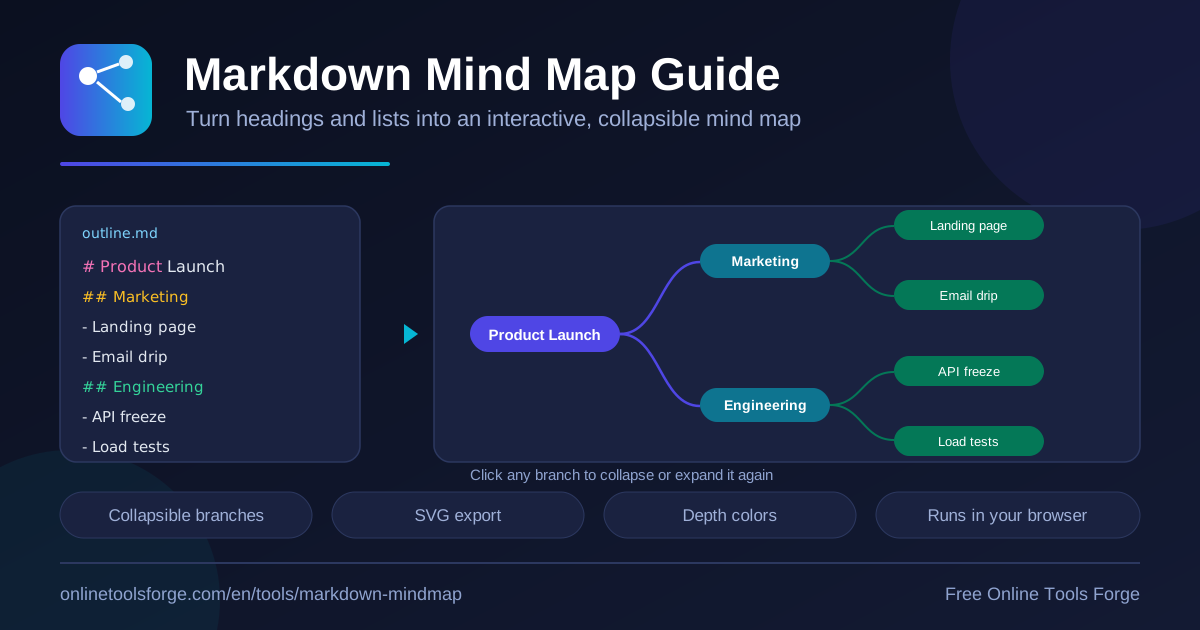
Table of Contents
Every well-organized Markdown document already contains the skeleton of a mind map. Headings are the major branches, subheadings are the smaller limbs, and bullet lists grow into clusters of leaves. The free Markdown Mind Map tool reveals that hidden structure, converting headings and lists into an interactive, collapsible tree you can explore directly in your browser.
There is nothing to install and nothing to sign up for. Paste your outline, watch the map appear, click any branch to expand or collapse it, and export the finished diagram as SVG. Because everything runs client-side, your notes never leave your machine.
If you like the idea behind markmap but do not want to install an editor plugin or write any code, this mind map generator is the fastest route from plain text to a shareable visual. This guide explains how the conversion works, walks through a step-by-step workflow, and shows where the approach fits into real projects.
Why Use the Markdown Mind Map Tool?
- Instant structure discovery. Long documents hide their shape inside a wall of text. Rendering an outline as a tree makes the hierarchy visible at a glance, so gaps, duplicates, and unbalanced sections stand out in seconds.
- True interactivity. This is not a static image. Click any branch to collapse or expand it, letting you zoom from the big picture down to fine detail without ever losing your place.
- Completely private. The tool runs 100% in your browser: no uploads, no accounts, no server-side storage. That makes it safe for confidential plans, client work, and internal notes.
- Color-coded depth. Each of the six nesting levels receives its own color, so hierarchy stays readable even in a large, densely branched map.
- Portable SVG output. The export stays crisp everywhere — wikis, slide decks, documentation sites, and printed handouts — because vector graphics scale without blurring.
- Free forever. No paywall, watermark, or usage cap. It is markmap-style visualization delivered as a simple web page anyone can open.
Key Features
| Feature | What it does |
|---|---|
| Markdown parser | Reads headings from # through ###### plus bullet lists, building a tree automatically |
| Interactive canvas | Click any branch to expand or collapse it; the layout adjusts as you explore |
| Depth coloring | Assigns one of six colors by nesting level for instant visual hierarchy |
| Automatic layout | Positions every node for you — no dragging, snapping, or aligning required |
| SVG export | Downloads the finished map as a scalable vector graphic |
| Sample outline | Ships with a "Product Launch" example so you can try the tool in one click |
A few details deserve emphasis. Indented bullets become genuine sub-branches rather than flat entries, so nested lists translate faithfully into the tree. The layout recalculates automatically whenever branches collapse, keeping the canvas tidy during a presentation. And because the export is SVG, the same file works as a chat thumbnail and as a poster-sized printout.
How to Create a Mind Map from Markdown
- Open the tool. Visit Markdown Mind Map; it loads instantly with a sample "Product Launch" outline already rendered, so you can see a finished map before typing a word.
- Paste your Markdown. Replace the sample with your own content. Any outline built from headings (# to ######) and bullet lists works — no special syntax or front matter needed.
- Review the tree. The map regenerates as you edit. Scan the color-coded branches to confirm the hierarchy matches what you intended.
- Collapse and expand. Click branches to fold away sections you do not need to show, or to focus a walkthrough on a single area of the map.
- Export as SVG. When the map looks right, download it and drop the file into your documentation, wiki, or slide deck.
The whole cycle takes under a minute for a typical outline, and you can re-export a fresh map whenever the source document changes.
How the Markdown-to-Tree Conversion Works
Understanding the conversion helps you write outlines that map well. The tool parses your text line by line and builds the hierarchy with three simple rules.
First, heading levels become tree depth: a # heading becomes the root, ## headings nest beneath it, ### headings beneath those, and so on down to ######. Second, list items become children: every bullet attaches to the nearest heading above it, and indentation creates deeper nesting, so a bullet under another bullet becomes its sub-node. Third, inline formatting is stripped into labels: bold, italic, and link markers are removed so each node displays clean, readable text instead of raw syntax.
Depth also drives the color scheme. The tool assigns one of six colors according to nesting level, so headings, subsections, and leaf bullets each carry a distinct hue. Consider this small outline:
# Product Launch

## Marketing

- Social campaign
- Email series
The # heading becomes the root, "Marketing" becomes a colored second-level branch, and the two bullets hang beneath it as leaves. The same logic scales smoothly from a five-line scratch note to a hundred-line planning document, which is why this approach works so well for visualizing document structure of any size.
Practical Use Cases
Structuring Meeting Notes
Raw meeting notes tend to arrive as a flat stream of remarks. Turn agenda items into ## headings and individual discussion points into bullets, then render the map. Collapsed branches show only the outcomes per topic — perfect for a follow-up email where colleagues see decisions without wading through every comment made.
Study and Revision Maps
Students and lifelong learners can convert textbook summaries or lecture outlines into revision maps. Headings become topics, bullets become facts, and the color-coded depth lets you rehearse at different resolutions: the whole chapter one day, individual details the next. Export each SVG and build a personal gallery of subject maps.
Project Planning Outlines
Break a project into phases as headings, with deliverables, owners, and milestones as nested bullets. The resulting tree doubles as a visual project brief: collapse everything except the current phase for a clean status snapshot, and regenerate it whenever the plan shifts. When the plan also needs a task tracker, the Markdown Table Generator complements the map nicely.
Brainstorming Sessions
Ideas arrive fast and unstructured — exactly what Markdown tolerates. Capture every thought as a bullet without worrying about order, then group them under headings once patterns emerge. The mind map makes clusters and orphans obvious at a glance, and like the Markdown to HTML Converter, the entire workflow stays inside the browser.
Best Practices
- Keep node labels short. Aim for a few words per bullet; long sentences bloat nodes and hide the detail you care about.
- Match depth to meaning. Reserve deeper levels for genuinely subordinate ideas instead of splitting a single thought across levels.
- One topic per branch. If a section title needs an "and" in it, it is probably two branches.
- Step heading levels down gradually. Jumping from # straight to #### creates confusing gaps in the tree; move one level at a time.
- Collapse before exporting. Fold the branches your audience does not need so the exported SVG communicates one clear message.
- Re-generate often. Treat the map as a living view of the document and refresh it whenever the outline changes.
Try It Now
Your next outline is already a mind map waiting to be unfolded. Open the free Markdown Mind Map tool, paste a document, and watch its structure appear — no signup, no upload, no cost. Export the result as SVG and put it where your team will actually see it.
Related Tools You Might Like:
Happy mapping!
Frequently Asked Questions
Q: Is my Markdown uploaded to a server?
A: No. The tool runs entirely in your browser, so your text never leaves your device. It is safe to use with confidential or internal outlines.
Q: Which Markdown syntax is supported?
A: Headings from # through ###### and bullet lists, including nested bullets. Each syntax level becomes a matching depth in the tree.
Q: Can I export the finished mind map?
A: Yes. The export button downloads the map as an SVG file, a vector format that stays sharp in wikis, slide decks, and print at any size.
Q: How is this different from markmap?
A: It follows the same idea of turning Markdown into an interactive tree, but requires no installation, editor plugin, or coding — just open the page and paste your outline.
Q: Is the tool really free?
A: Yes. There is no signup, no watermark, and no usage limit, because all processing happens locally in your own browser.