OpenAPI to cURL Converter: Turn Any Spec into a Ready-to-Run Request
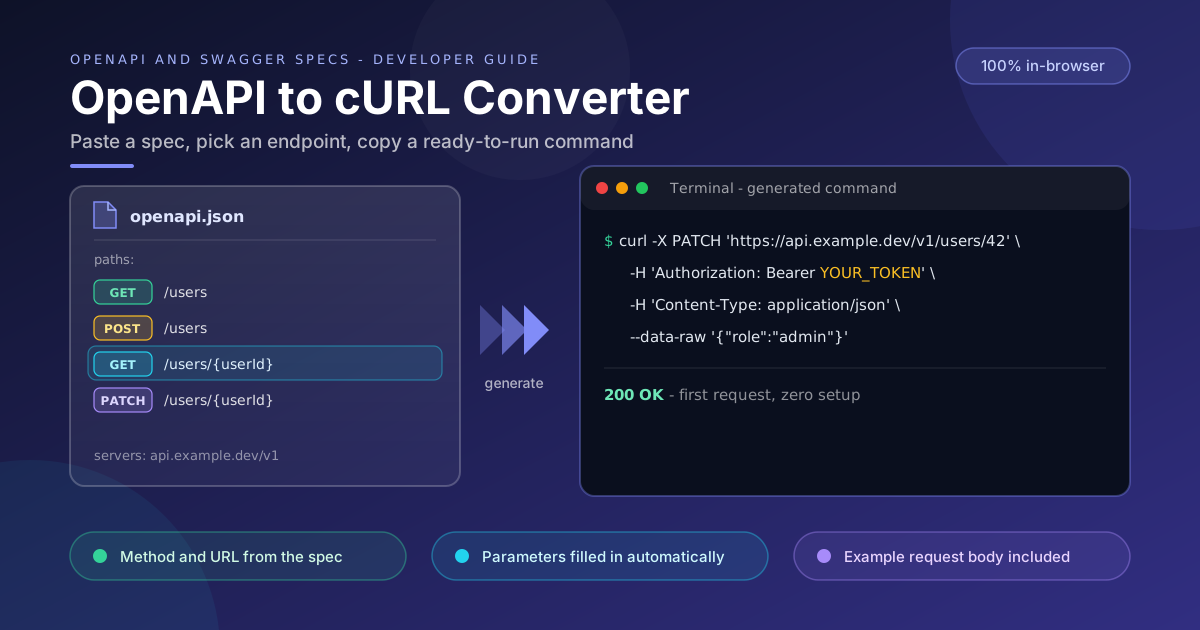
Generate copy-paste cURL commands from OpenAPI or Swagger JSON specifications entirely in your browser. See how methods, servers, parameters and example bodies become one working request.
Free Interactive Tool
OpenAPI to cURL Converter
Generate copy-paste cURL request examples from OpenAPI and Swagger specifications.
Table of Contents
Every integration project starts the same way. Someone hands you an OpenAPI or Swagger JSON file, and the first real question is never what the API does in the abstract — it is "how do I call this endpoint without reading 40 pages of spec". You need a working HTTP request: the right method, URL, headers, and a plausible body, ideally in the next five minutes. The OpenAPI to cURL Converter answers that instantly — paste your specification, click an endpoint, and copy a complete cURL command that runs as-is in any terminal.
cURL remains the universal language of API work. It is preinstalled on macOS, Linux, and modern Windows; it appears in tickets, runbooks, and incident channels; and it maps one-to-one onto whatever HTTP client your production code uses. A generated cURL command is the most portable artifact a specification can produce.
The converter runs 100% in your browser. Your spec — which often describes internal hosts, staging infrastructure, and proprietary schemas — is never uploaded. Parsing and command generation happen locally in JavaScript, so it is safe even for confidential APIs behind NDAs.
Why Use the OpenAPI to cURL Converter?
- Skip the manual translation. Resolving a base URL, listing parameters, and hand-writing --data-raw JSON is slow and error-prone. The tool performs the mapping mechanically.
- Works with OpenAPI and Swagger. Both Swagger 2.0 and OpenAPI 3.x documents are accepted — plenty of enterprise specifications still use the older format.
- Private by design. The spec never leaves the tab. No account, no upload, no telemetry — a hard requirement for internal APIs and anything under an NDA.
- Example bodies included. When the specification defines request body examples, they are quoted into the command, so your first request is realistic rather than an empty shell.
- Built for sharing. A cURL one-liner pastes cleanly into tickets, READMEs, and chat messages, and anyone can replay it with zero setup.
- Free, instant, unlimited. No signup, no rate limits, no installation — open a tab and get an answer in one paste.
Key Features
| Feature | What it does |
|---|---|
| Endpoint picker | Lists every method and path so you click instead of scrolling raw JSON |
| Server-aware URLs | Joins the servers entry with the operation path into one URL |
| Header generation | Emits the Content-Type, Accept, and security headers each operation declares |
| Parameter substitution | Fills path parameters and appends query parameters with example values |
| Request body examples | Pulls sample payloads from the spec into the command |
| Copy-to-clipboard | Copies the full multi-line command with continuations intact |
Two details deserve a call-out: the command is emitted with single quotes around URLs and bodies, so common shells interpret it predictably, and generation is deterministic — the same endpoint in the same spec always produces the same command, easy to review in diffs.
How to Use
- Load your specification. Open the OpenAPI to cURL Converter and paste the JSON of your OpenAPI or Swagger document. It parses locally and lists every operation.
- Pick an endpoint. Browse the method-and-path list and click the operation you care about.
- Review the generated command. Check the method, the URL built from the declared server, the headers, and the example body — and confirm the target environment is the one you intended.
- Replace the placeholders. Anything the spec cannot know — an auth token above all — appears as an explicit placeholder such as YOUR_TOKEN.
- Copy and run. Paste into a terminal, CI job, or test file. If the response looks wrong, adjust the inputs and re-run.
From Spec Path to Working Request
The pieces the converter assembles
A cURL request needs four ingredients, and every one already exists in the specification — the converter's job is pure assembly. The method comes from the operation key (get, post, patch) under each path. The URL comes from joining a servers entry with the path template. Parameters are resolved from the operation's parameters array, and the body comes from requestBody, ideally from an example someone bothered to write:
{
  "servers": [{ "url": "https://api.acme.dev/v2" }],
  "paths": {
    "/invoices/{invoiceId}": {
      "patch": {
        "parameters": [
          { "name": "invoiceId", "in": "path", "required": true, "example": "INV-2041" },
          { "name": "notify", "in": "query", "example": true }
        ],
        "requestBody": {
          "content": {
            "application/json": {
              "example": { "status": "paid", "paidAt": "2026-09-13" }
            }
          }
        }
      }
    }
  }
}
The converter walks that structure and emits:
curl -X PATCH 'https://api.acme.dev/v2/invoices/INV-2041?notify=true' \
  -H 'Content-Type: application/json' \
  -H 'Authorization: Bearer YOUR_TOKEN' \
  --data-raw '{"status":"paid","paidAt":"2026-09-13"}'
Path parameters versus query parameters
The two parameter styles behave differently. invoiceId is declared in: path, so its example value replaces the template segment inside the URL. notify is declared in: query, so it is appended after a question mark as a key-value pair. Confusing the two is where typos creep in — a path parameter pasted into the query string silently targets the wrong resource.
Auth headers stay as placeholders
If the operation declares a security scheme — bearer token, API key header, basic auth — the converter emits the header with an obvious placeholder instead of inventing credentials. The command is therefore safe to paste into a ticket because it cannot leak a secret.
Why spec examples make the command immediately useful
A command with an empty body technically runs but tells you almost nothing — a validation error proves the request was malformed, not that the endpoint works. When the spec carries realistic examples, the very first invocation exercises the happy path and returns a meaningful response: the difference between "the endpoint exists" and "the endpoint works for my case," in one round trip.
Practical Use Cases
Smoke-testing a new deployment
After a deploy, generate commands for the critical endpoints, run them against the new environment, and confirm each returns the expected status before declaring the release healthy — a smoke test that takes a minute and leaves an auditable trail.
Seeding integration tests
Integration suites need concrete requests as their starting point. Generate the command, drop it into your test harness as the request template, and parameterize the parts that vary per case — the tests stay aligned with the contract because they inherit the spec's parameter names and types.
Onboarding frontend developers to backend endpoints
The fastest way to teach someone a new endpoint is a command they can run, not a page of schema tables. Generate one command per endpoint, paste them into the onboarding doc, and let new teammates explore real responses on staging immediately.
Support and incident runbooks
When production misbehaves, runbooks need reproduction steps that work under pressure. Ready-made commands — health checks, status probes, read-only lookups — let an on-call engineer verify behavior without reconstructing request syntax from memory.
Best Practices
- Replace auth placeholders before a command goes anywhere. Substitute a scoped, short-lived credential at run time, and never paste a real token into tickets, screenshots, or shared documents.
- Keep spec examples current. The generated request is only as realistic as the examples in your specification — if the body has drifted from what the endpoint accepts, fix the spec, not just the command.
- Test against staging first. Point generated commands at staging until you are confident about side effects, especially for anything that writes.
- Regenerate after spec changes. Resist hand-editing a previously generated command when the API evolves; re-paste the updated spec so it stays contract-accurate.
- Treat commands as starting points. Add pagination, error handling, and timeouts when promoting one into a script or test — the generator gives you a correct request, not a complete program.
- Verify quoted bodies survive your shell. If you route the command through another layer such as Make or CI templating, re-check that the body still reaches the wire intact.
Start Converting Specs into Commands Today
A specification is a contract, but a cURL command is a conversation — and most API work happens in conversations. Next time someone drops a spec on you, skip the reading marathon: paste it into the free OpenAPI to cURL Converter, click the endpoint you need, and send a real request in seconds.
Related Tools You Might Like:
- OpenAPI to TypeScript Converter — turn the same specification into typed interfaces for your client-side code
- HAR to cURL Converter — replay a request captured in browser DevTools as a clean cURL command
- JSON Formatter — pretty-print and validate the spec itself and the response bodies you get back
May your first request always return 200.
Frequently Asked Questions
Q: Does the converter upload my OpenAPI file anywhere? A: No. Parsing and command generation run entirely in your browser with local JavaScript, so the specification never leaves your machine.
Q: Which specification versions are supported? A: Both Swagger 2.0 and OpenAPI 3.x documents. The tool normalizes the differences internally, so you do not have to.
Q: What appears in place of credentials? A: An explicit placeholder such as YOUR_TOKEN wherever the operation declares a security scheme. You substitute a real credential at run time, keeping the generated command safe to share.
Q: Can I use the generated command in CI or scripts? A: Yes. Replace placeholders with values from your secret store or environment variables, confirm the server URL matches the environment, and it works in any shell-based pipeline.
Q: What if my spec has no request body examples? A: The command still includes the correct method, URL, and headers. The body will be minimal, so fill in representative values from the schema before running it.