Passport Photo Maker: Create Compliant ID Photos at Home for Every Official Standard
Rejected ID photos are almost always a geometry problem. Passport Photo Maker fixes head size, eye line, and print DPI at home for free - no upload, no photo booth fees.
Free Interactive Tool
Passport Photo Maker
Crop photos to official passport, visa, and ID card photo sizes with exact print DPI, face guides, and a live preview - all in your browser.
Table of Contents
Few things derail an application faster than a rejected photograph. You prepare everything, and then a clerk points at the photo: the head is too small, the eye line sits too high, or the print is too soft. The picture itself was usually fine. The free Passport Photo Maker exists because these failures are almost never about image quality - they are about geometry.
ID photo rejections are almost always a geometry problem. Head size relative to the frame, the position of the eye line, and the pixel density of the final print are the three measurements authorities actually check, and all three can be fixed at home in minutes, for free.
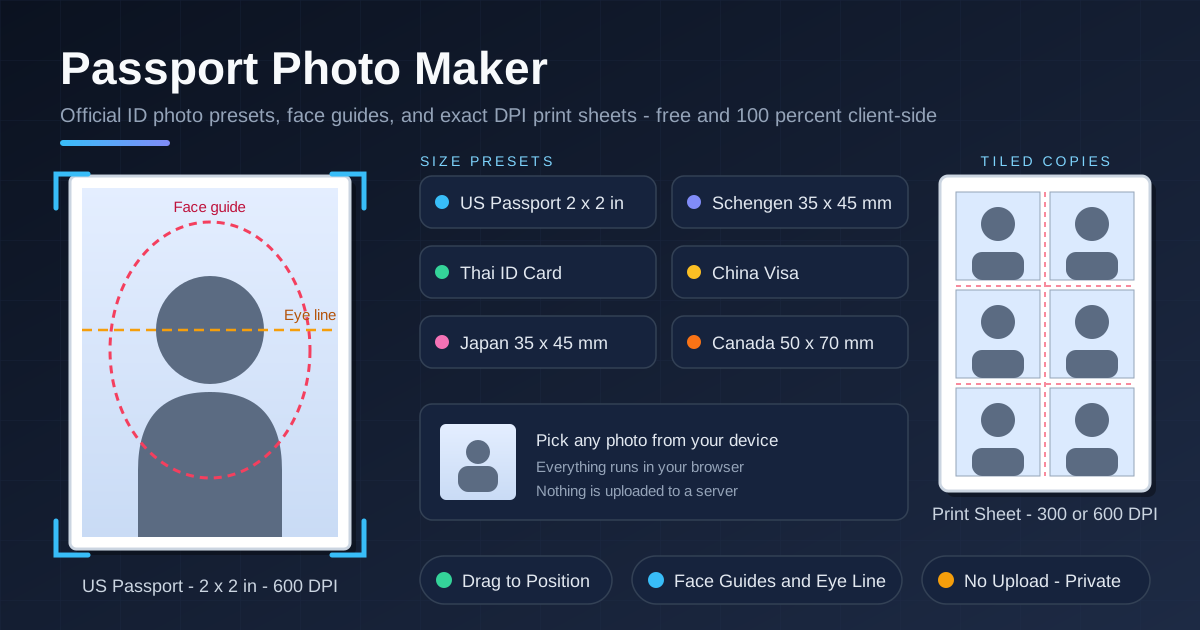
Passport Photo Maker runs entirely in your browser. Pick an official preset, load a photo from your device, drag the image until your face matches the built-in face guides, and export a print-ready sheet at exact 300 or 600 DPI. Nothing is uploaded to any server, so your face never leaves your computer.
Why Use Passport Photo Maker?
- Official presets for every common standard. US passport 2x2 in, Schengen 35x45 mm, Thai ID, China visa, Japan certificate photo, and Canada 50x70 mm are built in.
- Face photos stay private. The tool is 100 percent client-side with no upload, so biometric images never leave your device.
- Exact 300 and 600 DPI output. Exports are calculated in physical units, so a printed photo truly measures 35x45 mm or 2x2 in.
- Free versus photo booth prices. Booths and studios charge per sheet; this costs nothing and allows unlimited retries.
- Drag-to-position with face guides. You see exactly where your head sits relative to the guide oval and eye line, then nudge the photo until everything aligns.
- Tiled print sheets. Multiple copies land on one sheet, so a single 4x6 inch print covers applications that ask for two identical photos.
Key Features
| Feature | What It Does |
|---|---|
| Official size presets | Loads the exact frame size and head proportion rules for each standard |
| 300 and 600 DPI export | Produces print-ready output at true physical dimensions |
| Face position guides | Overlays a face guide oval and eye line for visual verification |
| Drag-to-position cropping | Move and scale the photo until the head sits correctly |
| Tiled print sheet | Repeats the finished photo on one page for easy cutting |
| Client-side processing | All cropping and DPI math happens in the browser; no account |
Two details matter most in practice. The presets encode not just the outer frame but the internal head-height ratio that reviewers actually measure, and the DPI-aware export keeps dimensions identical to the official spec.
How to Use
- Pick a country preset. Open Passport Photo Maker and select US passport 2x2 in, Schengen 35x45 mm, Thai ID, China visa, Japan certificate photo, or Canada.
- Choose a photo locally. Load a picture from your device; it is read from disk and never sent anywhere. A plain background and front-facing shot work best.
- Drag to align the face. Move and scale the image until your head fills the face guide oval, with chin and crown touching the marked zones.
- Check the eye line. Confirm your eyes sit on the dashed guide line - this eliminates one of the most common rejection reasons.
- Export the print sheet at 300 or 600 DPI. Download the tiled sheet, print it at actual size, and cut out the copies.
Millimeters, Inches, and the Face Grid
Every official photo specification answers three questions: how large is the frame, how large is the head inside it, and where do the eyes sit. Countries answer differently, which is why one crop cannot serve every application.
- US passport - 2x2 in (51x51 mm). Head height is 1 to 1-3/8 inches (25 to 35 mm) from chin to crown, roughly 50 to 69 percent of the frame.
- Schengen visa - 35x45 mm. The face occupies about 70 to 80 percent of the frame, tighter than the US rule despite a similar look.
- Thai ID card. Thai national ID applications follow their own published format - a centered head on a plain background - with proportions distinct from US and Schengen rules.
- Japan certificate photo - 35x45 mm. The same frame as Schengen, used for residence certificates and employment documents, but with its own head proportion conventions.
- Canada - 50x70 mm. Head height is specified in millimeters (31 to 36 mm chin to crown), making eye line placement stricter than it looks.
The eye line matters because biometric matching software locates the eyes first, then scales its comparison model around them. If the eye line drifts too high or too low, automated checks can fail before a human ever reviews the photo. That is why the tool draws a dedicated eye line guide instead of relying on the oval alone.
DPI is the third leg of the geometry. Print sharpness is measured in dots per inch, and 300 DPI means about 11.8 pixels per millimeter. At that density, a 35 mm edge needs roughly 413 pixels, a 45 mm edge about 531, and a 2 inch US passport photo needs 600 pixels per side. Below this, fine features smear and prints look obviously soft; the 600 DPI option doubles the figures for agencies that request higher-resolution originals.
The print sheet solves the last practical problem: getting exact physical dimensions onto paper. The export tiles several copies on a 4x6 inch or A4 sheet; printed at actual size, each copy measures precisely to spec and is ready to cut. It is the photo studio's trick, done at your desk for free.
One caution: the presets match the published specifications for each standard, but requirements do get revised. Always double-check the issuing authority's current photo requirements before you print and submit.
Practical Use Cases
Passport Renewals
Most renewals do not require an appointment just for the photo. Crop a recent picture to the 2x2 in preset, print a tiled sheet, and attach the copies to your paperwork - done in an evening.
Visa Applications
A Schengen application often needs photos for several family members. With the 35x45 mm preset and a tiled print sheet, one 4x6 inch print covers multiple applications, each dimensionally identical.
National ID Cards
Thai ID card applications have their own photo conventions, and a rejected print means another trip to the district office. Cropping to the Thai ID preset and printing at 300 DPI removes the most common reason for a counter rejection.
Student and Employee Badges
Schools and employers frequently request passport-style photos for badges and records. Pick the requested preset, align with the guides, and hand in a clean print sheet - across a whole class, the savings add up quickly.
Best Practices
- Use a plain, light background. White or off-white works; patterns and shadows behind the head are instant red flags.
- Light the face evenly. Face a window or use two soft light sources so neither side falls into shadow.
- Keep a neutral expression. Eyes open, mouth closed - and remove glasses glare if the glasses cannot come off.
- Start from the sharpest original. A phone photo at eye level is fine; avoid screenshots and heavily compressed images that lack pixels for 300 DPI printing.
- Print at actual size, never fit-to-page. Rescaling silently changes physical dimensions and invalidates the geometry you corrected.
- Recheck the official requirements. Confirm background color and recency rules with the issuing authority before submitting.
Start Making Compliant Photos Today
There is no reason to pay for a photo you can crop correctly yourself in five minutes. Open Passport Photo Maker, pick your preset, align your face with the guides, and print a DPI-exact sheet - privately and for free.
Related Tools You Might Like:
- Image Resizer - change image dimensions and aspect ratios with precision.
- Image Compressor - shrink file sizes for upload-limited forms without visible quality loss.
- Photo Collage Maker - combine multiple photos into clean, printable layouts.
Happy cropping!
Frequently Asked Questions
Q: Are my photos uploaded to a server?
A: No. Passport Photo Maker is 100 percent client-side. The photo is loaded into your browser, cropped and exported there, and never transmitted anywhere - there is no upload step at all.
Q: Can I use a photo taken with my phone?
A: Yes. A modern phone camera captures more than enough pixels for 300 DPI printing. Shoot at eye level against a plain background with even lighting, and the crop will come out clean.
Q: Will photos from this tool be accepted for official applications?
A: The presets match the published specifications for each standard, including frame size and head proportions. Requirements occasionally change, so verify the issuing authority's current photo rules before submitting.
Q: What printer settings should I use for the print sheet?
A: Print at actual size (100 percent scale), not fit-to-page, on photo or heavy matte paper. The 300 DPI output meets typical home printer and photo kiosk requirements.