Redirect Map Generator: Turn URL Pairs into Ready-to-Deploy Redirect Configs
Paste old-to-new URL pairs and instantly generate nginx, Apache, Netlify, and Vercel redirect configs — plus JSON and CSV exports, all in your browser.
Free Interactive Tool
Redirect Map Generator
Turn old-to-new URL pairs into nginx, Apache, Netlify, Vercel, JSON, or CSV redirect configs. Free, offline, and copy-paste ready.
Table of Contents
Site migrations are where SEO goes to die. You launch the new version of your site and within a week search traffic falls off a cliff. The culprit is brutally simple: pages that used to live at familiar URLs now return 404 errors, and every inbound link that hits a dead end bleeds authority from your domain.
The fix is a redirect map: a curated list of old-to-new URL pairs telling the server or edge platform exactly where each retired address should go. It is the insurance policy for your migration — visitors on old links are silently routed to their new homes, and search engines transfer ranking signals instead of dropping pages from the index.
That is why we built the Redirect Map Generator. Paste your URL pairs and it instantly produces production-ready redirect configs for nginx, Apache, Netlify, and Vercel, plus JSON and CSV exports. Everything runs 100 percent in your browser — no uploads, no accounts.
Why Use Redirect Map Generator?
- Skip the syntax rabbit holes — nginx rewrite flags, Apache directives, Netlify's _redirects format, and Vercel's JSON schema are all subtly different. Enter one list of pairs and the tool renders each flavor.
- Protect hard-won search rankings — a 301 tells search engines a move is permanent, so the old page's equity flows to the new address instead of evaporating.
- Eliminate transcription errors — hand-writing hundreds of rules invites typos and inverted pairs. Generated output keeps every rule consistent.
- Move platforms without rework — the same map regenerates the correct config for whatever you deploy to next.
- Keep a portable source of truth — the CSV export is platform-agnostic. Commit it to your repository and regenerate any target config in seconds.
- Nothing leaves your machine — redirect maps can contain unreleased URLs. Generation is entirely client-side, so sensitive paths never touch a server.
Key Features
| Feature | What You Get |
|---|---|
| URL pair input | Paste pairs in bulk; each row becomes one redirect rule |
| nginx output | A ready-to-include nginx-redirects.conf |
| Apache output | A drop-in .htaccess with permanent Redirect directives |
| Netlify output | A clean _redirects file in first-match-wins order |
| Vercel output | A valid vercel.json redirects array |
| JSON and CSV exports | Structured exports with per-format filenames |
| In-browser generation | All parsing happens locally — nothing leaves the page |
- Conventional filenames — every export downloads as nginx-redirects.conf, .htaccess, _redirects, or vercel.json.
- Messy-paste tolerant — newline-separated rows, space or comma separators, and blank lines are all normalized.
- JSON seed — a handy starting point when your target is not one of the four built-ins.
How to Use
- Paste your URL pairs. Add each old-to-new mapping as a row, for example /old-pricing mapped to /pricing. Bulk paste from a spreadsheet works.
- Choose your target platform. Pick nginx, Apache, Netlify, or Vercel; the output updates instantly with the correct syntax.
- Download the config. Grab the generated file — nginx-redirects.conf, .htaccess, _redirects, or vercel.json — or copy it to your clipboard.
- Deploy it. Place the file where your platform expects it: the nginx include path, the web root for .htaccess, the publish directory for _redirects, or the repo root for vercel.json.
- Verify with curl. Spot-check old URLs: curl -I https://example.com/old-page should return 301 Moved Permanently with the right location header. Check your top ten old URLs.
One Map, Four Platforms
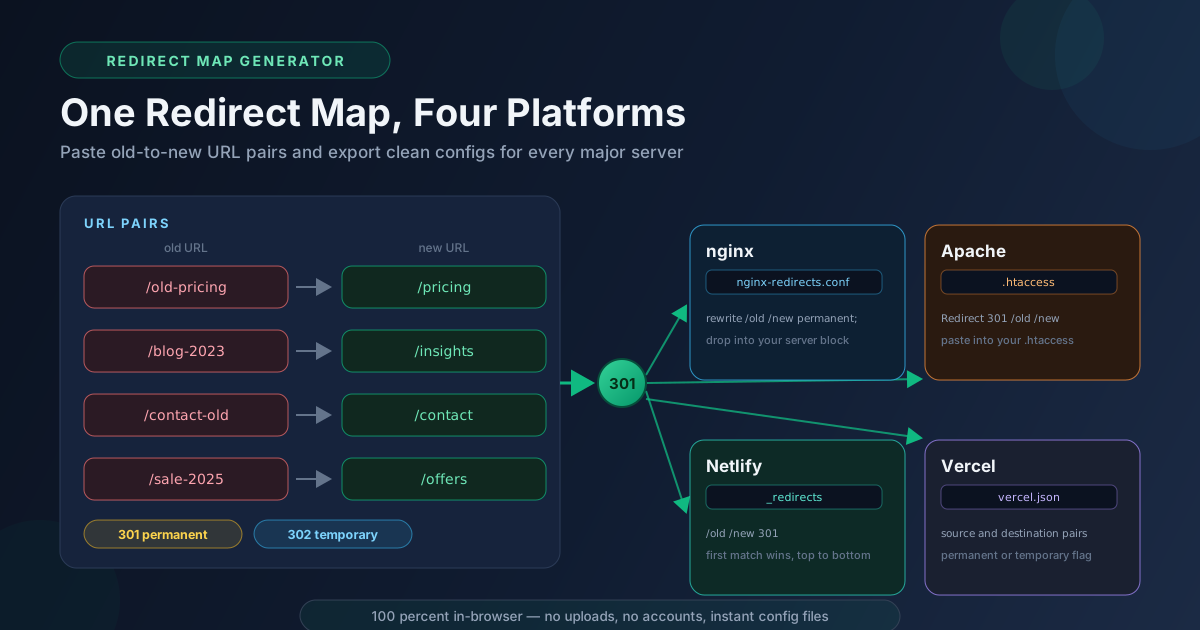
The real asset is the map itself — the plain list of pairs. Everything else is a projection of that list into a platform's syntax. Here is how two sample pairs (/old-pricing to /pricing, /blog-2023 to /insights) look on each target.
nginx uses rewrite directives with the permanent flag, which produces a 301, inside the generated nginx-redirects.conf:
rewrite ^/old-pricing$ /pricing permanent;
rewrite ^/blog-2023$ /insights permanent;
Apache reads .htaccess, where the classic form is the Redirect directive and the word permanent stands in for a 301:
Redirect 301 /old-pricing /pricing
Redirect 301 /blog-2023 /insights
Netlify uses a flat _redirects file where each line is source, destination, and status code. Order matters: Netlify evaluates top to bottom and serves the first match, so the tool preserves your input order. Vercel expects a redirects array in vercel.json with a source, a destination, and a permanent: true flag for 301s.
Two decisions deserve special care. First, 301 versus 302. A 301 tells browsers and search engines the move is permanent and is almost always right for a migration. A 302 signals a temporary hop, but serve 302s for a permanent move and search engines keep the old URL indexed while rankings erode. Second, ordering and first-match-wins behavior. On sequential engines, a specific rule placed after a broader rule never fires — put specific paths first, catch-alls last.
Wildcards are where hand-written maps go wrong. Netlify uses /old/* with a :splat placeholder in the destination, Vercel supports path segments, and nginx uses regular expressions. A splat is perfect when an entire section moved — /blog-2023/* to /insights/:splat keeps every deep link working without enumeration. Let the splat catch the long tail, but never let it sit above a rule it would shadow.
Finally, keep the CSV export as the source of truth. Config files drift as teams edit servers directly; a versioned CSV in your repository is the single place the intended mapping lives.
Practical Use Cases
Re-platforming a Website
Moving from an Apache VPS to Netlify, or from nginx to Vercel, is the textbook scenario. Export the URL inventory from the old sitemap, map each URL to its new home, and generate the destination config.
Slug Cleanups and Restructuring
The site stays put, but /products/best-widget-2024-final needs to become /products/best-widget. Every changed URL needs a 301 — paste the before-and-after slugs, generate, and deploy.
Merging Two Sites
When company B is absorbed into company A's domain, every page on B's site needs a destination on A's. Build the pair list once and keep the CSV as the shared contract between teams.
Campaign URL Retirement
Seasonal microsites accumulate fast. When /summer-sale-2025 is retired, a small map pointing old campaign URLs at evergreen equivalents keeps QR codes and old emails working instead of landing visitors on a 404.
Best Practices
- Prefer 301 for permanent moves. Reserve 302s for genuinely temporary redirects; the status code is a statement of intent to search engines.
- Avoid redirect chains longer than one hop. Point old URLs directly at their final destination — every hop adds latency and dilutes signals.
- Test the top pages with curl -I. Verify the status code and location header on your ten most-linked old URLs after deploying.
- Keep the map in version control. Commit the CSV export so the mapping is reviewable, revertible, and attributable.
- Order specific rules before wildcards. On first-match-wins platforms, a splat above a specific rule silently swallows it.
- Regenerate, never hand-edit. Change the map and regenerate all outputs — one source of truth beats four drifting files.
Ready to protect your rankings before the next migration? Open the Redirect Map Generator, paste your URL pairs, and download deploy-ready configs in under a minute — entirely in your browser.
Related Tools You Might Like:
- Apache to Nginx Converter — translate Apache rewrite rules into nginx syntax.
- .htaccess Generator — build common Apache snippets without memorizing directives.
- Caddyfile Generator — generate config for the Caddy web server.
Happy migrating — and may every old URL find its new home. — Online Tools Forge Team
Frequently Asked Questions
Q: Is my URL data uploaded anywhere?
A: No. Parsing, formatting, and file generation all happen client-side, so your URL pairs never leave your machine.
Q: Which status code should I use for my migration?
A: Use 301 for permanent moves and 302 only for genuinely temporary redirects — search engines use it to decide whether to transfer ranking signals.
Q: Do I need all four config files?
A: No. Download only the format for the platform you deploy to. The others exist so the same map works when your hosting changes later.
Q: Can the map handle wildcard redirects for a whole moved section?
A: Yes — add a splat or path-pattern rule for the directory-wide move, with specific rules kept above it.