SMS Segment Calculator: Master GSM-7 vs UCS-2 Costs Before You Send
Use the SMS Segment Calculator to count SMS segments, detect GSM-7 vs UCS-2 encoding automatically, and estimate messaging costs before you hit send.
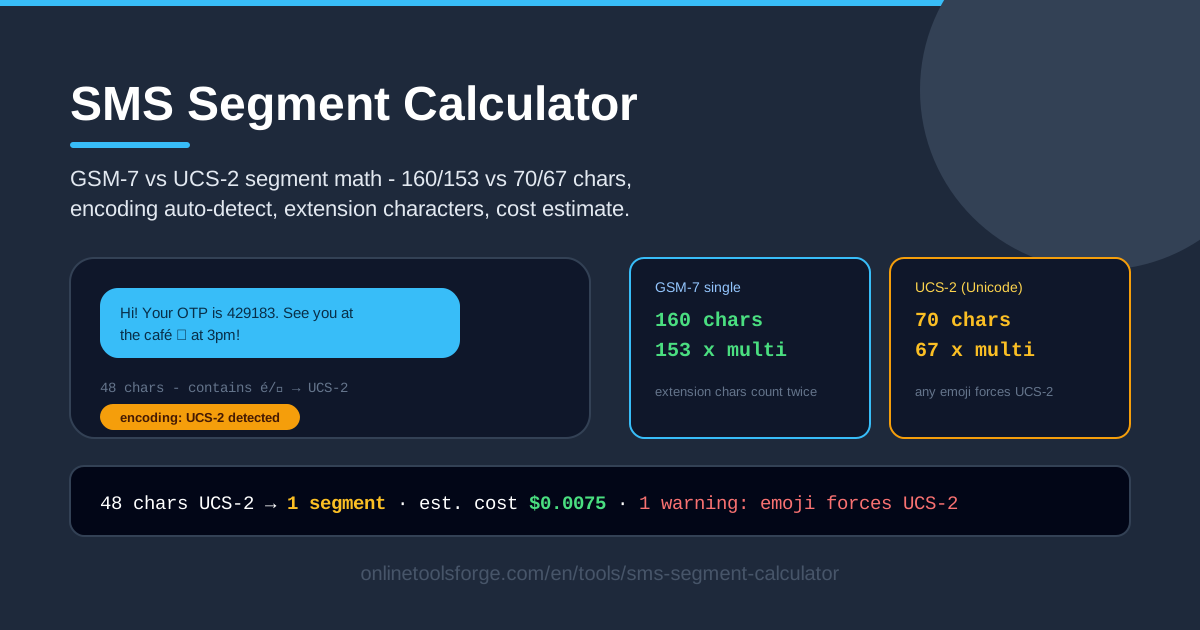
Table of Contents
Every SMS is billed by segments, not by the character count in your head. A message that looks short can quietly cost two or three times what you budgeted, all because of how mobile networks encode text. The free SMS Segment Calculator at Online Tools Forge removes the guesswork: paste your draft and it instantly shows the detected encoding, the exact segment count, and an estimated cost.
The culprit behind most billing surprises is encoding. The classic GSM-7 standard fits 160 characters into a single SMS, while UCS-2 — required for Thai, Arabic, Chinese, and every emoji — fits only 70. Worse, one emoji anywhere in the text flips the entire message to UCS-2, cutting your usable capacity by more than half in an instant.
The calculator runs entirely in your browser. Nothing is uploaded, no account is needed, and results update as you type, which makes it an ideal pre-flight check before any campaign or notification goes out.
Why Use SMS Segment Calculator?
Here is why marketing, fintech, and operations teams keep this tool open in a browser tab:
- Avoid surprise emoji costs. A single pictograph can double the price of every message across thousands of recipients. See the damage before you send, not on the invoice.
- Get the 160/70 split right. The tool applies the official GSM-7 and UCS-2 single-segment limits automatically, so manual miscounts simply disappear.
- Catch hidden extension characters. Symbols like ^ { } [ ] ~ | € count as two characters each under GSM-7 rules, and the calculator flags every one of them.
- Estimate campaign spend in advance. Multiply the segment count by your gateway rate and budget the full send with confidence.
- Protect OTP delivery. One-time passwords should arrive fast and intact; a stray Unicode character that splits the message puts that reliability at risk.
- Keep drafts private. All processing is client-side, so customer names and promo codes never leave your device.
Key Features
Everything the tool does maps directly to a real billing rule:
| Feature | What it does |
|---|---|
| Paste message text | Drop in any draft and see live analysis as you type |
| Auto encoding detection | Identifies GSM-7 vs UCS-2 based on the characters present |
| Segment math | Applies 160/153 (GSM-7) and 70/67 (UCS-2) per-segment limits |
| Extension characters | Counts ^ { } [ ] ~ | € as two characters, per GSM rules |
| Per-character warnings | Highlights non-GSM characters that force UCS-2 encoding |
| Cost estimate per segment | Shows what each extra segment adds to your bill |
Three details worth knowing:
- The 153 and 67 figures are not typos. Multi-part messages reserve space for the reassembly header, so every segment after the first carries fewer characters.
- Warnings are per character, which means you can see exactly which symbol is inflating the count.
- Detection is live: replacing a single character can flip the encoding label for the whole message the moment you type it.
How to Use SMS Segment Calculator
- Paste your message text. Drop a marketing draft, OTP template, or system notification into the input box.
- See the encoding detection. The tool labels the message GSM-7 or UCS-2 immediately; if you expected GSM-7, look for the emoji or accented letter that switched it.
- Read the segment count. Note how many billable segments your text needs and how many characters remain before the next segment kicks in.
- Check the warnings. Review the flagged non-GSM characters and extension symbols that consume double character slots.
- Estimate the cost. Apply your per-segment rate to the segment count to price each recipient, then trim the copy if the number stings.
GSM-7 vs UCS-2 Encoding Rules
GSM-7 is the original SMS alphabet defined by the GSM standard. It packs 128 common characters — basic Latin letters, digits, and everyday punctuation — into 7 bits each, which is why a single segment holds exactly 160 characters (1,120 bits). If your message is plain English, GSM-7 is the cheapest way to send it.
UCS-2 encodes every character in 16 bits so phones can display Thai, Hindi, Chinese, Cyrillic, emoji, and thousands of other scripts. That doubles the storage cost per character and cuts a single segment to just 70 characters. Critically, the encoding is chosen per message, not per character: one emoji at the end of a 160-character sentence forces the entire message into UCS-2, where it suddenly needs three segments instead of one.
Concatenated (multi-part) messages add another wrinkle. To stitch segments back together in the right order, the network inserts a user data header of about seven bytes into each part, so capacity drops from 160 to 153 characters for GSM-7 and from 70 to 67 for UCS-2. Extension characters behave differently again: symbols such as ^ { } [ ] ~ | € and the backslash are not in the core GSM-7 alphabet, so each one must be escaped with a hidden prefix character and consumes two character slots. All of this math happens automatically inside the calculator, which is exactly why checking before you send pays off.
Practical Use Cases
Marketing Copy That Fits One Segment
A promo text of 150 characters at $0.005 per segment costs half a cent per recipient. Add a row of emoji and the same message may jump to three UCS-2 segments — roughly 150% more spend, just for decoration. Paste both versions into the calculator, compare the segment counts, and keep the cheaper one that still converts.
OTP and Verification Messages
A typical one-time password template — "Your code is 482913. Do not share it." — sits comfortably under 160 GSM-7 characters. The calculator confirms the message stays in a single segment, which keeps delivery fast and avoids the small risk of multi-part reassembly delays on older handsets.
International Campaigns with Thai and Unicode Text
Thai, Arabic, and Devanagari scripts always use UCS-2, so plan around 70 characters for the first segment and 67 for each one after. For a Thai promotion, use the tool to test whether your tagline fits one segment or needs two, then price the campaign on real numbers before you sign off.
Comparing Gateway Prices on Equal Terms
Gateways quote per segment. When vendor A charges $0.004 and vendor B charges $0.006, the winner depends entirely on your segment count. Run your actual templates through the calculator first, then multiply each vendor's rate by the same segment count for a true apples-to-apples comparison.
Best Practices
- Strip emojis for GSM-7. If a pictograph adds no value, remove it and keep the full 160-character budget.
- Keep OTPs under 160. A single-segment verification SMS is faster, cheaper, and more reliable than a split one.
- Watch the 153/67 multi-part drop. Never assume 160 characters per segment in long messages; the reassembly header takes its cut from every part.
- Trim before you widen. Cutting a few words often removes an entire segment and saves more than any rate negotiation.
- Test with your gateway. Some providers bill or transliterate differently; send yourself a test and compare it against the calculator's numbers.
- Re-check after every edit. One smart quote pasted from a word processor can flip the entire message to UCS-2.
Ready to stop guessing? Paste your next draft into the SMS Segment Calculator, read the encoding and segment count in under a second, and send every campaign knowing exactly what it will cost. It is free, private, and runs entirely in your browser.
Related Tools You Might Like:
- Character Counter — quick word, character, and paragraph counts for any draft
- Base64 Encoder — encode payloads and debug API integrations in one click
- URL Encoder — make tracking links safe to embed in SMS and emails
Happy texting — and may every message land in one segment!
Frequently Asked Questions
Q: Why does one emoji make my SMS cost more? A: Emoji are not part of the GSM-7 alphabet, so their presence switches the whole message to UCS-2 encoding. Capacity per segment drops from 160 characters to 70, which usually means more billable segments and a higher total cost.
Q: What are extension characters in GSM-7? A: They are symbols such as ^ { } [ ] ~ | € and the backslash that live outside the core 7-bit alphabet. The network escapes each one with a hidden prefix character, so every extension character occupies two character slots in your segment count.
Q: Why do multi-part messages only fit 153 or 67 characters per segment? A: Concatenated SMS reserve about seven bytes in each part for the user data header that tells the phone how to reassemble the pieces. That overhead reduces GSM-7 capacity to 153 characters and UCS-2 capacity to 67.
Q: Does the calculator upload my message anywhere? A: No. All detection and math run client-side in your browser. Your text never leaves your device, which makes the tool safe for drafts containing customer data or unreleased promo codes.