SQL INSERT to JSON Converter: Turn INSERT Statements Into Clean JSON
Convert SQL INSERT statements back into JSON arrays, grouped objects, or CSV rows with type inference and line-numbered issue reporting — free, fast, and entirely client-side.
Free Interactive Tool
SQL INSERT to JSON Converter
Parse SQL INSERT statements back into JSON arrays, grouped objects, or CSV rows — with type inference and multi-statement support, all in your browser.
Table of Contents
SQL dumps are for databases. Everywhere else — test fixtures, API mocks, NoSQL imports, spreadsheets — data wants to live as JSON. Yet one of the most common ways data gets shared is still the humble INSERT statement, pasted into tickets, chats, and scripts. The free SQL INSERT to JSON Converter closes that gap: paste any INSERT INTO statement and get back clean, typed JSON in seconds.
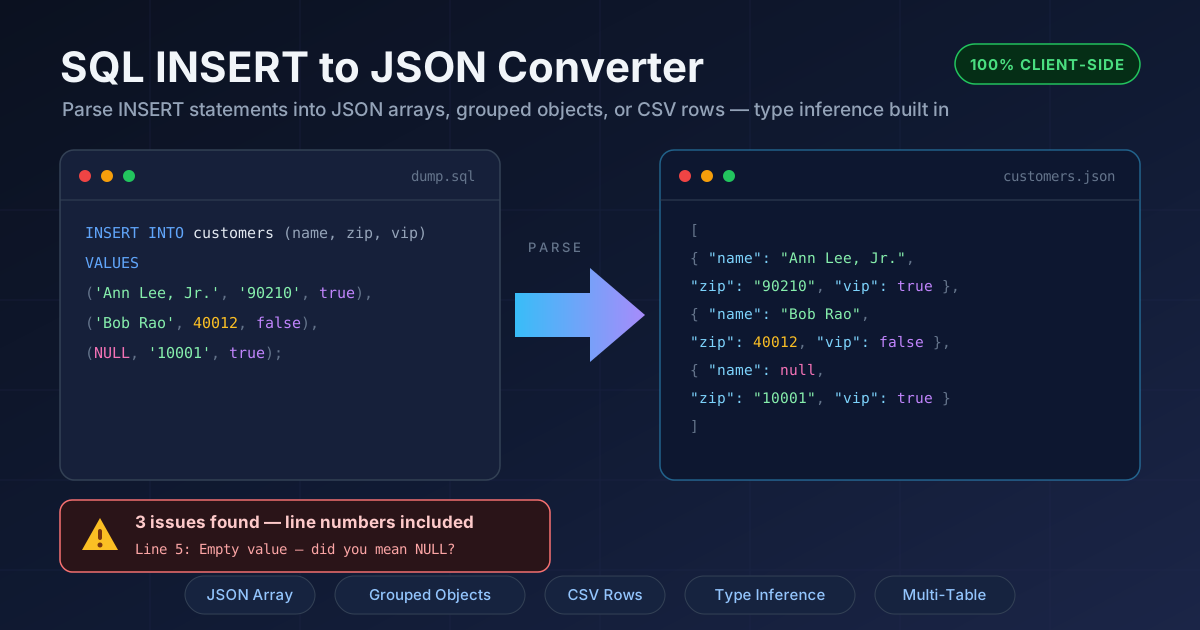
The converter reads the table name, the optional column list, and every row tuple, then rebuilds the data as a JSON array, as objects grouped per table, or as CSV rows. Type inference runs automatically: unquoted numbers become JSON numbers, true and false become booleans, NULL becomes null, and quoted strings stay strings — output ready to drop straight into code, fixtures, or import pipelines.
Best of all, nothing ever leaves your browser — no uploads, no accounts, no servers touching your data.
Why Use SQL INSERT to JSON Converter?
- Reverse the export direction. Most online tools turn JSON into SQL; far fewer do the opposite. When your source of truth is a dump and your destination is code, this converter saves you from hand-transcribing rows.
- Type inference done carefully. Quoted values stay strings, bare numerics become numbers, NULL maps to null, and true or false map to booleans — the JSON reflects what the SQL actually said.
- Multi-statement and multi-table support. Paste an entire dump spanning several tables and receive one organized result per table instead of running the tool once per statement.
- Line-numbered issue reports. Malformed tuples and missing VALUES clauses come back with the exact line of your original input, so fixing a broken dump takes seconds instead of a binary search.
- Three output shapes. A plain JSON array, column-mapped objects grouped per table, or CSV rows for spreadsheet hand-offs — one paste, three destinations.
- Zero risk with sensitive data. Parsing is 100% client-side — nothing is transmitted, logged, or stored — making the tool safe for dumps with customer records or anything confidential.
Key Features
| Feature | What It Does |
|---|---|
| INSERT statement parser | Reads the table name, optional column list, and row tuples from standard INSERT INTO syntax |
| JSON array output | Emits one JSON array where each row becomes an array of values, in statement order |
| Grouped object output | Maps columns to keys and groups the resulting objects per table name |
| CSV output | Produces CSV rows with a header line derived from the column list |
| Type inference | Converts unquoted numbers, true and false, and NULL into native JSON types |
| Multi-table support | Parses many statements in one paste and organizes results per table |
| Issue reporting | Flags malformed tuples, missing VALUES clauses, and empty values with exact line numbers |
| 100% client-side | All parsing runs in the browser; no data ever leaves your machine |
A few details worth noting:
- Accurate line numbers. The parser tracks where each statement starts, so every issue points at the real line of your original dump.
- Safe integers only. Values beyond the JavaScript safe integer range are kept as strings and reported, preventing silent precision loss on big IDs.
How to Use
- Open the tool. Navigate to the SQL INSERT to JSON Converter — it loads instantly with no sign-up.
- Paste your INSERT statements. Drop a full dump, a single statement, or several tables into the input box.
- Choose an output format. Pick JSON array for raw rows, grouped objects for column-mapped records, or CSV for spreadsheets.
- Review the issue panel. If anything could not be parsed, check the reported line numbers, fix those lines, and paste again if needed.
- Copy or download. Grab the result or download it as a JSON or CSV file and move on with your day.
The Messy Reality of SQL Dumps
Real dumps are rarely as tidy as tutorial examples, and three problems break naive converters.
Quoted strings with embedded commas and escaped quotes. Splitting a tuple on commas works until a value like 'Ann Lee, Jr.' shows up — the comma inside the string would split one column into two. Escaped quotes such as '12 Main St, Apt "B"' add a second layer. The converter tokenizes quoted literals first, so names, addresses, and prose survive intact.
NULL versus empty string semantics. In SQL, NULL means "no value" while '' means "an empty value", and the difference is often meaningful. The converter preserves it: NULL becomes JSON null, an empty quoted string becomes "", and bare empty values are flagged as issues, since a dangling comma usually means a mangled row.
Type inference choices. Should 40012 be a number or a string? The converter follows the SQL: unquoted numerics become JSON numbers, and quoted literals such as '90210' stay strings. That rule matters for ZIP codes, phone numbers, and codes with leading zeros, where numeric treatment would corrupt the value; integers beyond the safe range are kept as strings and reported.
Multi-row and multi-table statements. Dumps routinely contain multi-row VALUES lists and back-to-back INSERTs for different tables. The parser captures every tuple and groups output per table, so you always know which rows came from where.
Here is a realistic snippet and what comes out of it:
INSERT INTO customers (name, address, zip, vip, notes)
VALUES
  ('Ann Lee, Jr.', '12 Main St, Apt "B"', '90210', true, NULL),
  ('Bob Rao', '8 Oak Ave', 40012, false, '');
[
  {
    "name": "Ann Lee, Jr.",
    "address": "12 Main St, Apt \"B\"",
    "zip": "90210",
    "vip": true,
    "notes": null
  },
  {
    "name": "Bob Rao",
    "address": "8 Oak Ave",
    "zip": 40012,
    "vip": false,
    "notes": ""
  }
]
Notice the details: the embedded comma did not split the row, escaped quotes round-tripped into valid JSON, the quoted '90210' stayed a string while bare 40012 became a number, NULL became null, and the empty string stayed "" — exactly the fidelity you need when the JSON is about to become test data.
Line-numbered issue reports are the safety net: wrong value counts, unterminated strings, and missing VALUES clauses all come back with exact line numbers, so you fix the dump at the source instead of debugging missing columns downstream.
Practical Use Cases
Building Test Fixtures from Production Dumps
Production INSERT dumps are the richest source of realistic test data. Convert a sanitized dump to JSON and it becomes a fixture file your test runner imports directly — no database, no connection strings, no cleanup between runs.
Migrating Relational Data to Document Stores
Moving from MySQL or PostgreSQL to MongoDB starts with getting the data into a JSON-friendly shape. Grouped-objects output maps columns to keys and preserves types, giving you documents ready for a bulk importer after a quick review.
Spreadsheet Hand-Offs
Analysts live in spreadsheets, not SQL clients. Convert a dump to CSV rows and hand over a file that opens cleanly in Excel or Google Sheets with numbers and booleans already typed.
Data Audits and Reviews
Converting a migration script to JSON turns an opaque wall of SQL into structured records you can search, diff, and attach to a review ticket — with issues flagged at specific lines if the script is malformed.
Best Practices
- Review inferred types before shipping. Spot-check numeric-looking columns like ZIP codes and phone numbers; quoted values stay strings, which is usually what you want.
- Watch NULL semantics. Decide per field whether null or "" suits your destination system before importing.
- Keep column lists explicit. Statements with an explicit column list produce cleanly keyed objects; ones without are harder to map and easier to misalign.
- Validate row counts. Compare output rows against the tuples in your dump — the issue panel catches malformed tuples, but only you know how many were expected.
- Sanitize before converting. Strip or mask personal data before turning dumps into fixtures, especially when the fixture will be committed to a repository.
- Fix issues at the source. Use the reported line numbers to fix the original dump, then re-convert, so your SQL and JSON stay in sync.
Try It Now
The next time a dump file lands in your lap and the other side speaks JSON, skip the manual transcription. Open the SQL INSERT to JSON Converter, paste the statements, pick your output shape, and get typed, structured data in seconds — privately and at zero cost.
Related Tools You Might Like:
- JSON Formatter — pretty-print, validate, and minify the JSON you just generated
- CSV to JSON Converter — go the other way and turn spreadsheet exports into structured JSON
- SQL Formatter — tidy messy SQL dumps before converting for the cleanest parsing results
Happy converting!
Frequently Asked Questions
Q: Is my SQL data uploaded to a server?
A: No. Parsing runs entirely in your browser, and nothing is transmitted, logged, or stored. You can even use the tool offline once the page has loaded.
Q: Which SQL dialects are supported?
A: It targets the standard INSERT INTO ... VALUES syntax shared by MySQL, PostgreSQL, SQLite, and SQL Server dumps, including multi-row and multi-statement input.
Q: What happens if my dump contains syntax errors?
A: Valid rows are still converted, and each problem is reported with its exact line number — a missing VALUES clause, a malformed string literal, or an empty value where NULL was probably intended.
Q: Why did my ZIP code stay a string while another number became a number?
A: Type inference follows the SQL text: quoted literals such as '90210' stay strings, while unquoted 40012 becomes a number. For numeric output, remove the quotes — though for codes with leading zeros, keeping them is usually correct.