Standing Desk Height Calculator: Find Your Perfect Desk Setup in Seconds
Use the Standing Desk Height Calculator to compute your ideal sitting and standing desk heights, elbow height, and monitor placement from your body height in seconds.
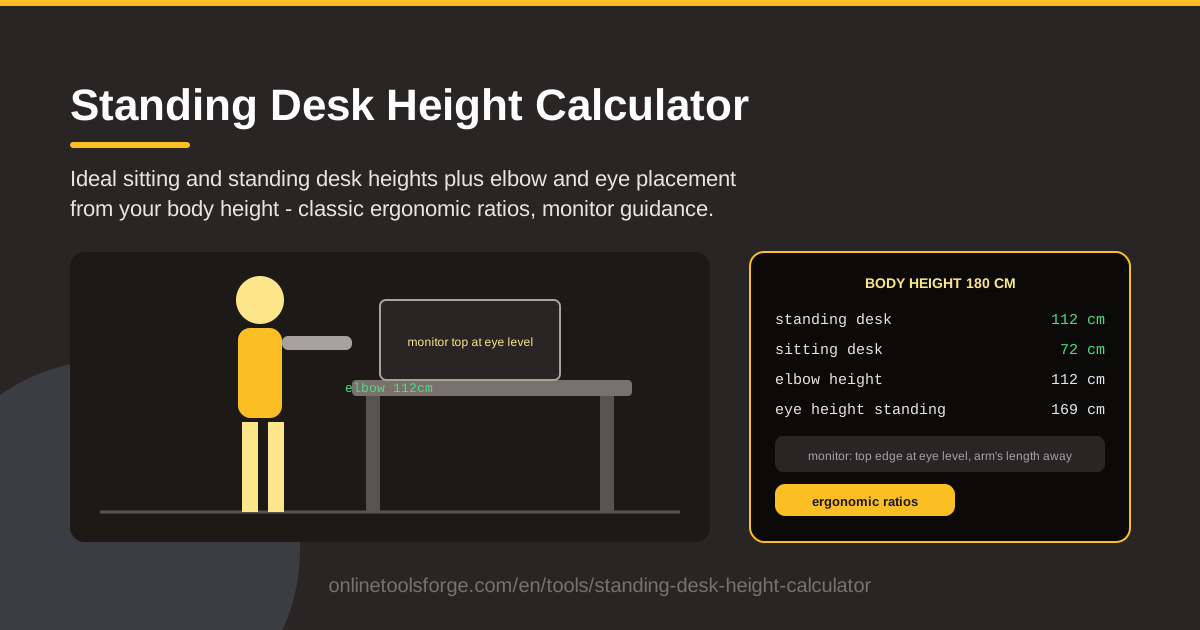
Table of Contents
A sit-stand desk arrives in a flat box, you assemble it, press the up button, and stop wherever it feels roughly right. That is how most people end up spending their workdays at a surface that quietly fights their body. The Standing Desk Height Calculator replaces that guesswork with numbers: enter your body height once, and it computes your ideal sitting desk height, standing desk height, elbow height, and eye placement using classic ergonomic ratios.
Those ratios come from decades of anthropometric research: elbow and eye height track body height closely, so one measurement is enough to place your surface, keyboard, and monitor in a neutral position — shoulders relaxed, wrists straight, neck level.
This guide walks through the tool step by step, explains the ratios behind the numbers, and shows how to apply them to motorized desks, fixed desks, and shared workspaces.
Why Use Standing Desk Height Calculator?
- One input, a complete setup. Type a single number — your height — and get sitting desk height, standing desk height, elbow height, and eye placement back instantly.
- Both postures covered. Sit-stand desks have two correct heights; the calculator gives you both so you can program your memory presets on day one.
- Monitor guidance included. Screen position strains necks as much as desk height, and the tool tells you where the monitor top should sit relative to your eyes.
- Classic ergonomic ratios. The math follows long-established anthropometric proportions that ergonomists actually use, not vague rules of thumb.
- Private and instant. All math runs client-side in your browser, your height never leaves your device, and results appear as you type.
- Free with no sign-up. No account and no download — bookmark it and re-check whenever your chair, shoes, or monitor changes.
Key Features
| Feature | What it does |
|---|---|
| Body height input | A single field drives every downstream calculation. |
| Ideal sitting desk height | The surface height that keeps elbows near 90 degrees in your chair. |
| Standing desk height | The working height that keeps wrists neutral on the keyboard while standing. |
| Elbow height | Your estimated elbow line, the anchor for desk and keyboard placement. |
| Eye placement | Your estimated eye level, so the monitor can be raised or lowered correctly. |
| Monitor placement guidance | Turns eye level into concrete screen height and distance instructions. |
- The ratios relate elbow and eye height to total stature, so results stay proportionally correct for tall and short users alike.
- Everything is computed client-side, which makes results instant and keeps every byte of your data on your device.
- The output reads like a setup checklist you can act on in a couple of minutes.
How to Use Standing Desk Height Calculator
- Measure and enter your height. Stand against a wall without shoes, mark the top of your head, measure down to the floor, and type the number into the calculator.
- Read your sitting desk height. This is where the surface should sit while you are in your chair: upper arms hanging naturally, elbows bent about 90 degrees.
- Read your standing desk height. Save it as a preset on your sit-stand desk. If you use a keyboard tray, remember the number refers to where the keyboard rests.
- Set your elbow and monitor placement. Adjust your chair until your elbows meet the sitting height, then place the monitor with its top edge at or just below eye level, about an arm's length away.
- Alternate positions through the day. With both heights dialed in, switch between sitting and standing every 30 to 60 minutes — the goal is movement, not permanent standing.
The Ratios Behind Comfortable Desks
The elbow-height rule. Ergonomists anchor nearly everything to the elbow. Forearms parallel to the floor with elbows close to your sides keeps wrists neutral and shoulders relaxed. Classic anthropometry puts standing elbow height at roughly 60 to 63 percent of stature, which is why the calculator can estimate it from body height alone.
Sitting versus standing deltas. Seated, the chair absorbs most of the difference: ideal sitting desk height works out to roughly a quarter of your stature, while standing height lands near your elbow line. That 40-centimeter gap is why fixed desks feel wrong in one of the two postures, and why both numbers are reported separately.
Monitor top at eye level, at arm's length. Your gaze should meet the top edge or top third of the screen so your eyes angle slightly downward, with a viewing distance of roughly 50 to 70 centimeters — about one arm's length. Raise the screen with a stand or riser instead of tilting your head down toward it.
Keyboard and mouse on one plane. Both belong at elbow height on the same surface. A mouse perched higher than the keyboard is a classic wrist-extension trap; keep them level and close enough that your elbows stay at your sides.
A cadence, not just positions. Ratios set the positions; movement keeps you healthy. A common starting rhythm is 30 to 60 minutes sitting followed by 15 to 30 minutes standing, tuned to how your legs and lower back feel.
Where the ratios run out. These are population averages, and torso-to-leg proportions vary from person to person. A few centimeters of difference from your measured elbow height is normal, so treat the output as a strong starting point and fine-tune with the practices below.
Practical Use Cases
Programming a New Sit-Stand Desk
You unbox a motorized desk with four memory presets. Run the calculator once, save your sitting height as preset one and your standing height as preset two, and the desk is correctly tuned before you write your first email — no weeks of trial and error.
Fixing a Home Office Setup
Suppose your wrists ache at a dining table that stands 76 centimeters high. The calculator shows your ideal sitting height is 69 centimeters, so you lower your chair, add a footrest, and lift the monitor to eye level — three small changes that remove a daily strain.
Shared Hot Desks with Presets
In offices where desks change hands daily, have each team member run the calculator and write their two heights on a label under the desk. Whoever arrives next simply punches in their own numbers and is comfortable within seconds.
Checking a Fixed Desk with Risers
A fixed desk cannot move, but everything on it can. Compare the calculator's output to your current surface; if the desk is too tall, add a keyboard tray and use monitor risers to bring the screen to eye level while the typing surface drops to your elbows.
Best Practices
- Re-measure with your working shoes on. Thick soles raise your elbows and eyes by one to three centimeters — enough to matter across a full day.
- Move the monitor, not your neck. If you catch yourself leaning in or looking down, raise the screen or pull it closer instead of bending to meet it.
- Start with short standing blocks. Begin at 15 minutes per hour and build up; standing all day creates fatigue of its own.
- Adjust after a week. Live with the numbers for several days, note any aches, then nudge heights or monitor position accordingly.
- Fix the chair first. Seated comfort starts with chair height and foot support; set those before blaming the desk.
- Re-run the calculator after changes. A new monitor arm, keyboard, or chair can shift your ideal numbers.
Ready to stop guessing? Open the Standing Desk Height Calculator, enter your height, and set both desk positions in under five minutes. Your shoulders and wrists will feel the difference by the end of the week.
Related Tools You Might Like:
- Viewing Distance Calculator — find the ideal distance between your eyes and your screen.
- Wall Mount Height Calculator — mount TVs and monitors at the right height the first time.
- BMI Calculator — track a health metric that pairs well with better desk habits.
Happy building!
Frequently Asked Questions
Q: How accurate can the results be from height alone? A: The calculator uses classic ergonomic ratios that correlate elbow and eye height with stature, landing within a few centimeters for most people. Treat the output as an excellent starting point, then fine-tune until elbows sit near 90 degrees and the screen top is at eye level.
Q: My desk is fixed and cannot reach the recommended sitting height. What should I do? A: Change what you can. Raise your chair until your elbows match the keyboard, add a footrest if your feet no longer reach the floor, and lift the monitor with a stand or riser. A keyboard tray can bring the typing surface down without replacing the desk.
Q: Should I measure myself with or without shoes? A: Measure your barefoot height for the calculator, then check the results again while wearing the shoes you actually work in. Thick soles raise your elbows and eyes by one to three centimeters, which is enough to matter at a desk you use all day.
Q: How long should I stand at my standing desk each day? A: Start with 15 to 30 minutes per hour and increase gradually over a couple of weeks. Alternating roughly every 30 to 60 minutes matters more than hitting a standing quota, and light movement beats standing still either way.