Tailwind Class Sorter: Put Every Utility Class in a Canonical Order
Sort any Tailwind class list into a canonical order with variants, arbitrary values, and duplicate handling preserved — free, instant, and 100% client-side.
Free Interactive Tool
Tailwind CSS Class Sorter
Sort Tailwind CSS utility classes into a consistent canonical order. Variants (hover:, md:, dark:), arbitrary values like w-[13px], and duplicates are fully preserved.
Table of Contents
Every Tailwind team eventually collides with the same pull request. One developer writes flex p-4 text-white, another writes text-white flex p-4, a third buries hover:bg-blue-600 mid-string. The styles render identically, but the diff is noisy and review slows until someone asks: "can we agree on a class order?" Class order is the Tailwind code-review argument nobody wants to have twice — the Tailwind Class Sorter makes sure you never have to.
The tool takes any Tailwind class list — from a className attribute, a template file, or your clipboard — and sorts it into a canonical order in the spirit of prettier-plugin-tailwindcss. Variants like hover:, md:, and dark: stay attached to their utilities, arbitrary values such as w-[37px] are preserved exactly, and an optional toggle strips duplicates. Everything runs 100% client-side: no signup, no build step, nothing leaves your machine.
This guide covers why canonical order matters, how variants and arbitrary values are handled, and how to fold the sorter into your workflow.
Why Use Tailwind Class Sorter?
-
It ends the ordering debate for good: With a canonical order, every teammate's class strings converge on the same shape. Reviews point at one deterministic output instead of re-litigating preferences.
-
Variants stay readable: hover:, md:, and dark: classes stay with the utilities they modify and sort into consistent layers. No more hunting for the hover state hiding mid-string.
-
Arbitrary values are preserved exactly: w-[37px] and bg-[#0f172a] are never rewritten or rounded to a scale value. What you paste is what comes back — just ordered.
-
Duplicate handling is built in: Duplicates left behind by conditional class merging cause quiet confusion. The remove-duplicates toggle collapses them and reports the count.
-
Zero setup: No plugin, no config file, no CLI in CI. Paste a class list, copy the result — it fits a two-minute fix as easily as a large refactor.
-
Private by design: Sorting happens entirely in your browser, so class lists from commercial or unreleased projects never leave your machine.
Key Features
| Feature | What it does |
|---|---|
| Canonical ordering engine | Sorts utilities by property family: layout, spacing, typography, visual, then state |
| Variant-aware sorting | Keeps chains like md:hover: intact, layering variants consistently with base first |
| Arbitrary value support | Values like w-[37px] pass through byte-for-byte |
| Duplicate removal | Optional toggle collapses repeats and reports how many were removed |
| Unknown class reporting | Classes matching no known group are kept, flagged, and counted — never dropped |
| Live results | Output updates as you type, with one-click copy and a built-in sample |
| 100% client-side | All sorting happens in your browser — no uploads, no account |
The live-as-you-type output turns sorting into a reflex: paste, glance, copy. And unrecognized classes are never silently dropped — a sorter that discards what it does not know can break your UI, so here they are kept, flagged, and counted in the stats.
How to Use
- Open the Tailwind Class Sorter. It loads instantly with no signup; load the sample class list to see it work first.
- Paste your class list. Copy a className attribute, a class="..." string from a template, or any whitespace-separated utility list.
- Toggle duplicate removal if you want it. Off keeps the class set byte-identical; on collapses repeats.
- Review the sorted output. Check variant layering and whether flagged unrecognized classes are intentional.
- Copy the result back, paste it over the original string, and commit.
Canonical Order and Why It Helps
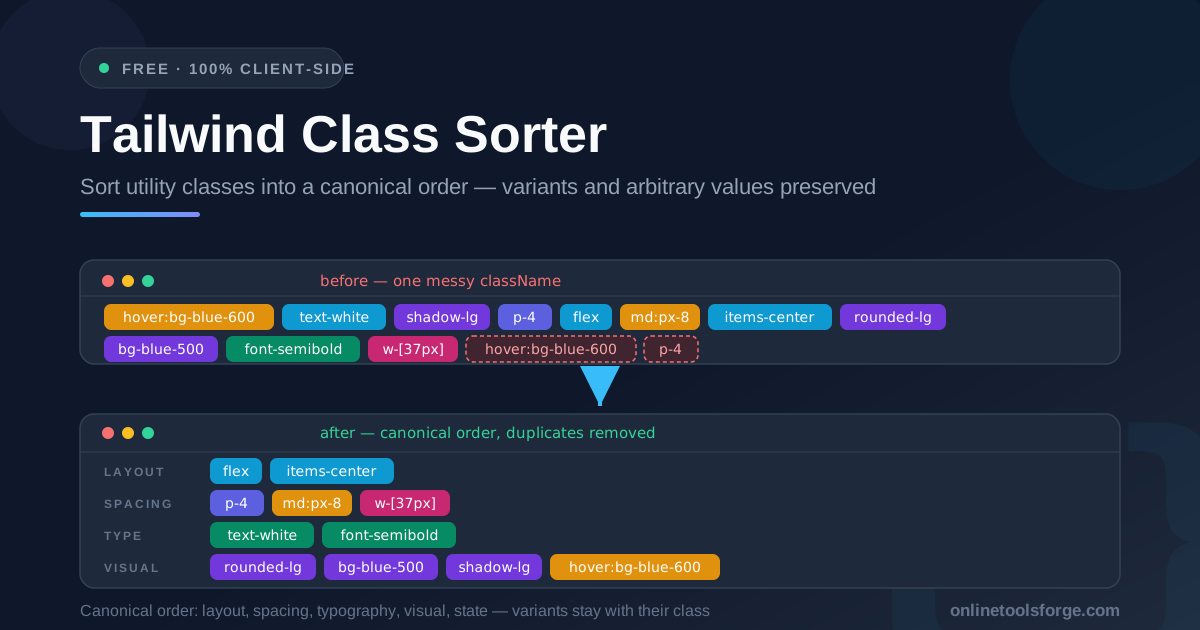
The sorter groups utilities by property family, the way you would design a component from scratch: layout → spacing → typography → visual → state. Layout classes like flex and items-center set the structure; spacing follows (p-4, md:px-8), then typography (text-white, font-semibold), then visual treatment (rounded-lg, bg-blue-500, shadow-lg), and finally state variants like hover:bg-blue-600. Reading a string in that order tells the same story as the component itself.
Variant layers sort inside-out within that structure. Base utilities come before their variant-prefixed siblings, and md:hover:bg-blue-700 lands next to the other md: classes instead of floating wherever it was typed. Fewer variants come first, so p-4 precedes md:px-8 — defaults, then hover, then responsive, then dark mode.
Arbitrary values are the third pillar. Sorters that try to interpret w-[37px] tend to mangle it; this one treats the bracketed expression as an opaque token and emits it exactly as it arrived.
Dedupe plus stable ordering produces the quiet benefit: smaller diffs. When the order is canonical, only the lines whose styling actually changed appear in a diff. Without it, a reorder from memory shuffles every line and buries the meaningful change.
One messy className, before and after:
<!-- before -->
<button
  class="text-white hover:bg-blue-600 p-4 flex items-center md:px-8 rounded-lg shadow-lg bg-blue-500 font-semibold"
>
  <!-- after -->
  <button
    class="flex items-center p-4 md:px-8 text-white font-semibold rounded-lg bg-blue-500 shadow-lg hover:bg-blue-600"
  ></button>
</button>
Same classes, same button — but layout, spacing, typography, and hover state are now findable at a glance.
Practical Use Cases
Code review consistency
The fastest payoff is in pull requests. When class strings go through the sorter before a commit, review comments stop being about order and start being about substance — nobody writes "please keep hover: classes together" for the fifth time.
Migrating scattered components
Older codebases accumulate class strings from different people, generators, and AI assistants. Sorting each component is a fast, low-risk normalization pass: styles are provably unchanged and the diff is purely mechanical.
Template files and starters
Boilerplate, email templates, and starters get copied between projects and edited piecemeal for years. Sorting their classes once turns them into stable reference files with a canonical baseline.
Teaching Tailwind ordering conventions
Onboarding a developer new to Tailwind? A canonical order doubles as a curriculum. Sorting a few real components together shows how utilities map to property families and how variant layers stack — faster than a style guide nobody reads.
Best Practices
- Pick one order and automate it: The specific order matters less than having exactly one. Make the sorter the team's shared tool.
- Sort before you commit, not after: A quick pre-commit sort keeps future diffs clean; keep formatting commits separate from functional changes.
- Keep variants readable: Trust the base → hover: → md: → dark: layering. If you hunt for a variant, extract a component instead.
- Glance at the unrecognized list: Flagged classes are custom utilities or typos — typos in class names are invisible in diffs and silent at runtime.
- Use dedupe deliberately: Off when you need a byte-identical set; on when conditional merging may have left repeats.
- Pair it with adjacent tools: Expand sorted classes with a converter for compiled CSS; check arbitrary numbers with a unit converter.
Sort Your First className Today
The class-order argument is only worth having once — have it by choosing a tool, not writing a manifesto. Open the Tailwind Class Sorter, paste the messiest class string in your codebase, and copy back a canonical, deduplicated, variant-aware result in seconds. Your reviewers will thank you.
Related Tools You Might Like:
- Tailwind to CSS Converter — expand Tailwind utility classes into plain CSS rules
- CSS Custom Properties Generator — generate CSS variable blocks for your design tokens
- CSS Unit Converter — convert between px, rem, em, and other CSS units
Happy sorting!
Frequently Asked Questions
Q: Will sorting my classes change how anything renders?
A: No. Tailwind applies styles by class identity, not position in the attribute, so reordering never changes computed styles. Duplicate removal also has no visual effect.
Q: Are my class lists uploaded to a server?
A: No. The sorter runs entirely in your browser with 100% client-side processing. Class strings from private projects never leave your machine, and no account is required.
Q: What happens to classes the sorter does not recognize?
A: They are preserved. Unrecognized classes go to the end of the output, flagged and counted, so a custom utility or typo is visible rather than silently discarded.
Q: Does it handle stacked variants like md:hover:bg-blue-700?
A: Yes. Variant chains are split, kept in order, and sorted as a unit, so md:hover: lands consistently next to related md: classes.
Q: Can I sort the classes inside a full HTML file?
A: The tool sorts class lists one string at a time rather than parsing whole documents. Copy a className or class attribute in, paste the sorted result back.