Terms of Service Generator: Ship a Legal Page With Your Launch
Generate a Terms of Service page from your company name, service description, and governing law, with optional clauses for accounts, payments, user content, and dispute resolution. Free, copy-paste HTML output, 100% client-side.
Free Interactive Tool
Terms of Service Generator
Generate a Terms of Service (Terms of Use) page from your company name, service description, governing law, and optional clauses - copy-ready HTML, fully in-browser.
Table of Contents
Every app, bot, and side project ships with a Terms page — and drafting one from scratch is the part everyone postpones. The code is done and the landing page shines, then the checklist reaches "Terms of Service": the item that blocks app store reviews and payment approvals.
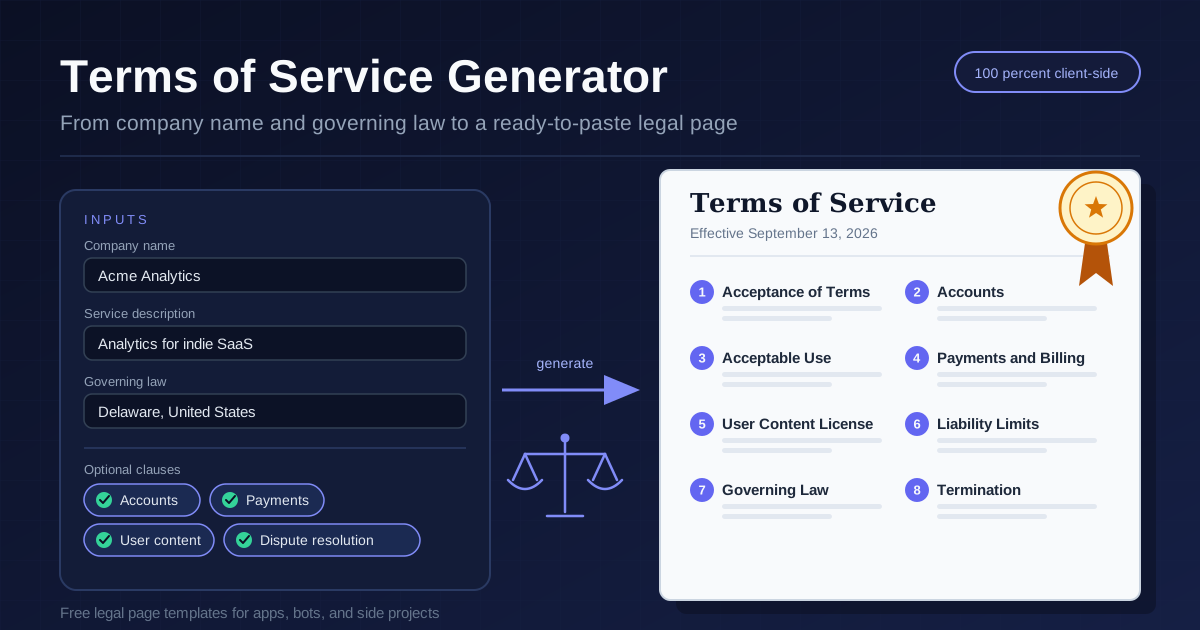
The free Terms of Service Generator removes that blocker. Enter your company name, describe the service, pick a governing law, and toggle the optional clauses that fit your product — accounts, payments, user content, and dispute resolution. It assembles a complete Terms page as clean HTML you can paste into your site, and everything runs 100% client-side, so nothing you type is uploaded.
This guide covers what a solid ToS contains, which clauses fit which product, and where a template ends and a lawyer begins.
Why Use Terms of Service Generator?
- Skip the blank page — A complete document skeleton is generated, so you edit specifics instead of inventing structure.
- Match clauses to your product — Accounts, payments, user content, and dispute resolution are optional toggles; include only what you need.
- Copy-paste HTML output — Plain, portable HTML that drops into any stack, from static sites to CMS pages.
- Unblock launches faster — App stores and payment processors routinely require a Terms URL; this takes minutes, not billable hours.
- Keep inputs private — The generator is 100% client-side: your details never leave your device.
Key Features
The Terms of Service Generator turns a few inputs into a structured legal page.
| Feature | What It Does | Example |
|---|---|---|
| Input fields | Company name, service description, and governing law set the parties, scope, and jurisdiction | Acme Analytics |
| Clause toggles | Accounts, payments, user content, and dispute resolution sections switch on demand | Payments toggle |
| Always-included core | Acceptance, acceptable use, liability limits, and termination ship by default | Standard anatomy |
| Copy-paste HTML | One click copies a ready-to-embed, numbered page | Paste into CMS |
- Sensible defaults — The core sections every ToS needs are always present.
- Portable output — Publish anywhere HTML lives, then restyle with your own CSS.
How to Use the Terms of Service Generator
- Enter your company name — This names the operator throughout, so use the name users will recognize.
- Describe the service — One or two plain sentences about what the product does; they anchor the agreement scope.
- Choose the governing law — Pick the jurisdiction where your business actually operates; it drives how disputes are interpreted.
- Toggle optional clauses — Accounts if users register, payments if you charge, user content if people post, dispute resolution for a defined conflict process.
- Copy the HTML and publish — Paste it as your Terms page, link it from signup and footer, and keep a dated copy.
What a Solid ToS Covers
A Terms of Service is a contract, and contracts follow a familiar anatomy. Knowing what each section does lets you review the output instead of pasting it blind.
The standard section anatomy
Nearly every well-formed ToS follows one sequence. Acceptance opens the document: using the service means agreeing to the terms, which makes the rest enforceable. Accounts covers registration, accurate information, credential security, and abuse suspension. Acceptable use bans scraping, reverse engineering, and harassment. Payments states what is charged, when renewals occur, and how refunds work. The user content license grants just enough rights to host and display user submissions without claiming ownership. Liability limits cap your exposure, excluding indirect damages. Governing law names the jurisdiction, and termination explains how the relationship ends and what happens to data.
Matching clauses to your product type
The optional clauses exist because products differ. A free tool with no login needs almost none: acceptance, acceptable use, liability, governing law, and termination carry the document. Add accounts the moment users register. Add payments when you charge, since app stores expect billing and refund language. User content fits anything social — comments, uploads, profiles. Dispute resolution earns its place once real money moves, giving conflicts an orderly path.
A starting template, not legal advice
Be honest about what a generator produces: a strong starting template, not legal advice. It cannot know your specific risks, regulatory obligations, or industry rules. Before a serious launch — paid products at scale, strict consumer protection markets, sensitive data — have a qualified lawyer review the output. The tool does the first 80%, so a professional pass on the last 20% becomes affordable.
Jurisdiction matters
Governing law is not decoration. It determines which courts hear disputes, which consumer protection rules apply, and which clauses may be unenforceable. Choose where your business genuinely operates; naming a convenient jurisdiction with no real presence can backfire, and courts override unrealistic choices, especially for consumers.
Practical Use Cases
SaaS side projects
Weekend SaaS starts free and charges later. Launch with a minimal ToS, then regenerate with the payments clause the day you add pricing — revisiting the document becomes cheap enough to happen.
Discord and Telegram bots
Bots feel too small for terms, yet they store tokens and live on platforms that expect documented behavior. A one-page ToS covering acceptable use and termination fits naturally in the bot site or repository.
Mobile apps
Both major app stores require a Terms URL before review; payment integrations expect one too. Host the generated HTML at a stable URL and link it from the settings screen.
Community sites
Forums run on user content. The user content clause defines what members grant when they post, and acceptable use gives moderators a written basis for enforcement.
Best Practices
- Have a lawyer review before serious launches — Generated text is a draft; professional review matters once money or sensitive data is involved.
- Keep the effective date visible — Date the document at the top so users and disputes can reference a specific version.
- Update when the product changes — New features, pricing, or markets change the contract; regenerate and republish rather than let it drift.
- Link it where agreement happens — Put the Terms URL in the signup flow, checkout, and footer.
- Pair it with a Privacy Policy — The ToS covers the contract; a privacy policy covers the data. Regulators and stores usually require both.
- Keep every published version — Disputes may require showing which terms were in force on a given date.
Ship Your Terms Page Today
The gap between finished and launch-ready is often just paperwork. The free Terms of Service Generator closes it in minutes: enter your details, pick the governing law, toggle your clauses, and copy the HTML — 100% client-side, nothing uploaded. Generate your Terms page before the next deploy and cross it off the checklist for good.
Related Tools You Might Like:
- SLA Uptime Calculator — Turn uptime promises into downtime budgets for Terms that reference service levels.
- Markdown Preview — Draft and preview supporting pages like FAQs before publishing them.
- HTML Tag Remover — Strip formatting from source text when adapting policy content between pages.
Happy shipping — and may your launches stay unblocked.
Frequently Asked Questions
Q: Is the generated Terms of Service legally binding?
A: It is a template in standard contract form, and click-through acceptance is widely used. Whether a clause holds up depends on your jurisdiction and circumstances, so have a lawyer review before serious commercial launches.
Q: Which optional clause should I enable first?
A: Enable accounts as soon as users can register, and payments the moment you charge money. Add user content when people can post, and dispute resolution once transactions justify a defined conflict process.
Q: What should I write in the service description field?
A: One or two plain sentences on what the product does and who it serves, such as web analytics for indie SaaS teams. It sets the agreement scope, so keep it accurate rather than aspirational.
Q: Does the tool upload anything I type?
A: No. The Terms of Service Generator runs 100% client-side in your browser; nothing you type ever leaves your device.