Tone Generator Guide: Play Sine, Square, Sawtooth, and Triangle Test Tones in Your Browser
Learn how to use the free online Tone Generator to create sine, square, sawtooth, and triangle test tones from 20 Hz to 20 kHz, with musical note presets. Runs entirely in your browser with the Web Audio API.
Free Interactive Tool
Audio Tone Generator
Generate sine, square, sawtooth, and triangle test tones at custom frequencies via the Web Audio API.
Table of Contents
Everyone who works with sound eventually needs a clean, precise test tone — to learn whether a speaker truly reproduces bass, check how far your hearing reaches, or produce a perfect A4 for tuning by ear. Getting that tone usually meant installing audio software or trusting a sketchy download.
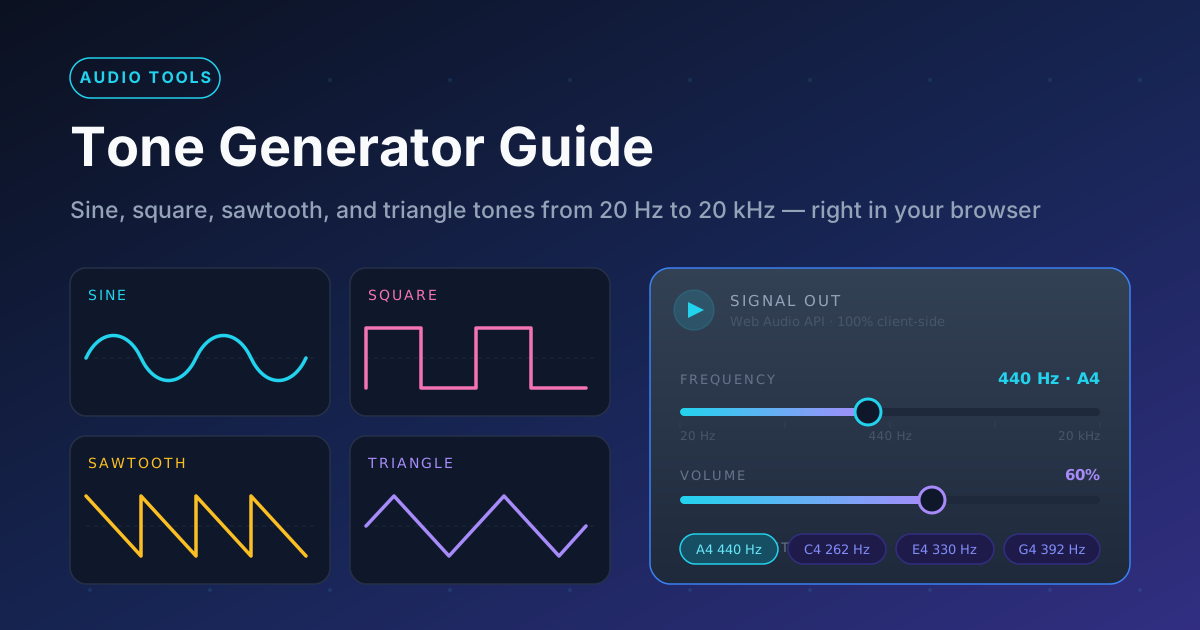
The Tone Generator solves this with a single browser page. Built on the Web Audio API, it synthesizes sine, square, sawtooth, and triangle waves at any frequency from 20 Hz to 20 kHz, with volume control and note presets such as A4 at 440 Hz. Everything is generated on your own device, so it is instant, private, and free. This guide covers safe use, the four waveforms, and real-world projects.
Why Use Tone Generator?
- Test speakers and headphones. A steady tone quickly reveals where a small speaker rolls off, where a driver buzzes, or whether one earcup has quietly died.
- Check your hearing range. Sweep a sine downward from 20 kHz to find where your high-frequency hearing ends.
- Get a tuning reference. The A4 = 440 Hz preset is the international concert-pitch standard, never a few cents sharp or flat.
- Diagnose hum and buzz. A 50 Hz or 60 Hz tone confirms suspected mains hum; higher tones locate room resonances and loose connectors.
- Stay private and instant. The tone is synthesized locally in your browser — no upload, no account, no waiting.
Key Features
| Feature | What It Does |
|---|---|
| Four waveforms | Sine, square, sawtooth, or triangle, each with a distinct harmonic character. |
| Frequency slider | Continuous sweep from 20 Hz to 20 kHz, the full span of human hearing. |
| Volume control | Set a comfortable output level before you press play. |
| Musical note presets | Jump to standard pitches like A4 = 440 Hz without any math. |
| Web Audio API engine | A sample-accurate oscillator running natively in your browser. |
| Fully client-side | All sound is synthesized on your device — no uploads, no tracking. |
- The slider covers the entire audible spectrum — one tool tests sub-bass and tweeters — and pitch accuracy is limited only by your sound hardware.
How to Use
- Lower your system volume first. Square and sawtooth waves sound much harsher than sine, and high frequencies feel loud sooner than expected. Set output around 20 to 30 percent before pressing play.
- Choose a waveform. Sine is the gentle default for most testing; square, sawtooth, and triangle add harmonics that are useful for auditioning gear but harder on your ears.
- Set the frequency. Drag the slider from 20 Hz to 20 kHz or tap a note preset. Sweep slowly — problems usually hide between the obvious numbers.
- Press play and raise the volume only until the tone is clearly audible. If you hear distortion or discomfort, stop and back off immediately.
- Stop when you are done. Note what you heard, then stop the tone instead of leaving it droning on.
Waveforms and Frequencies in Plain Words
Sine is the purest sound there is: exactly one frequency and no harmonics, which is why it sounds like a smooth, flute-like whistle. That purity makes it the standard for hearing tests and frequency response sweeps.
Square and sawtooth are sines with company. A square stacks strong odd-numbered harmonics above the fundamental, for the hollow, buzzy character of chiptune consoles; a sawtooth adds both odd and even harmonics for a bright, aggressive edge. Both are far harsher at equal volume. Triangle sits between: it carries only odd harmonics, but they decay quickly, leaving a soft tone gentler than either sharp wave.
Frequency is how many vibration cycles occur per second, measured in hertz (Hz). Young human hearing runs from roughly 20 Hz at the bass extreme to 20,000 Hz (20 kHz) at the treble extreme. In practice, 20 to 100 Hz is sub-bass you feel more than hear, 100 to 500 Hz adds body and warmth, 500 Hz to 4 kHz carries speech and musical detail, and everything above is sparkle and air.
Note presets map musical pitches onto that range using the equal-tempered scale, anchored at A4 = 440 Hz — the international concert-pitch standard. An octave up doubles the frequency and an octave down halves it, hence A5 at 880 Hz and A3 at 220 Hz.
These pieces enable useful experiments. Sweep a sine across a speaker to map its range and expose rattles, and test channels one at a time to check balance. Nudge the frequency a fraction of a hertz to find a room's resonant frequencies. Compare pitches against a reference to sharpen your ear for intervals. One rule throughout: continuous tones fatigue hearing faster than music, so keep the volume low and sessions short.
Practical Use Cases
Audio gear testing
Before blaming a mix on your monitors, feed them a tone. A slow sweep from 20 Hz upward shows where small speakers stop reproducing bass and where a tweeter goes missing. Playing the tone channel by channel confirms your headphones and amp chain are balanced.
Musician reference tones
Tuning by ear is a skill worth keeping in the age of clip-on tuners. The A4 = 440 Hz preset gives a canonical starting pitch for strings, warm-ups, or a piano's middle register. Paired with the metronome, you have a practice rig that costs nothing.
Informal hearing checks
Sweep a quiet sine down from 20 kHz and note where it appears; most adults lose sensitivity above 15 kHz first. This is not a medical diagnostic — see an audiologist for that — but it is a fascinating way to understand why teenagers hear ringtones you cannot.
Pest and animal frequency experiments
Dogs respond into the tens of kilohertz, and many pest deterrents claim to exploit ultrasonic hearing. With the slider near the top of its range, you can learn which frequencies your cat notices. Keep levels low; animals hear high frequencies far more acutely than you.
Best Practices
- Start quiet, always. Make a low starting volume a reflex, especially with square or sawtooth and at high frequencies.
- Limit exposure. Constant tones give your ears no rest — keep sessions short and take breaks.
- Be careful with headphones and square waves. Strong harmonics fatigue hearing quickly through sealed earcups.
- Use sine for measurements. Shaped waves are for character; sine gives unambiguous data when hunting resonances.
- Write down what you find. Roll-off points, rattles, and hearing thresholds become useful when compared over time.
- Verify hardware before blaming software. Distorted tones usually mean a cable, driver, or bass boost issue.
Try the Tone Generator Now
A precise, private signal generator should be one browser tab away. Open the free Tone Generator, lower your volume, pick a waveform, and sweep from a 20 Hz rumble to the edge of ultrasonic territory — or tap A4 and tune with confidence.
Related Tools You Might Like:
- Guitar Tuner — tune your instrument with precise per-string pitch detection
- Decibel Meter — measure the actual sound pressure level of your tests
- Metronome — lock in your timing while you practice pitch and rhythm
From pure sine waves to buzzy sawtooths — happy testing, and keep those ears safe.
Frequently Asked Questions
Q: What is the difference between the four waveforms? A: A sine contains only its fundamental frequency and sounds smooth and pure. A square adds strong odd harmonics for a hollow, buzzy tone. A sawtooth adds odd and even harmonics for a bright, aggressive sound, and a triangle has mild odd harmonics that make it softer than a square but richer than a sine.
Q: Why does the range go from 20 Hz to 20 kHz? A: That span covers the nominal limits of human hearing. Below 20 Hz you feel vibration more than pitch, and most adults lose some sensitivity near 20 kHz.
Q: Is it safe to listen to loud test tones with headphones? A: Continuous tones are more fatiguing than music at the same level, and square and sawtooth waves add harsh harmonics. Keep the starting volume low and stop if you feel discomfort or ringing.